Selecione o idioma

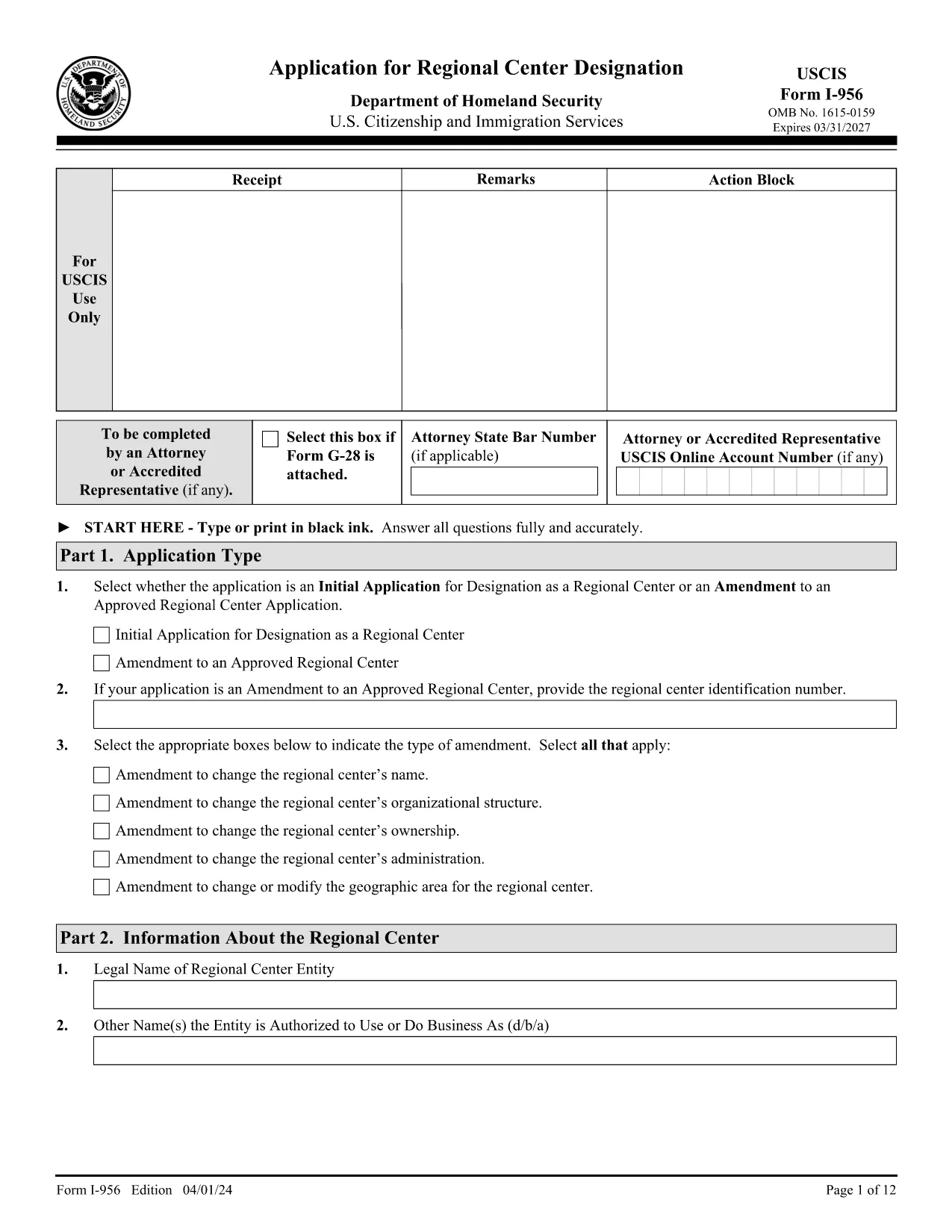
Form I-956 – Application for Regional Center Designation (Fillable PDF)

  1. País EUA
  2. Linguagem Inglês
  3. Departamento Serviços de Cidadania e Imigração dos Estados Unidos
Form I-956 – Application for Regional Center Designation (Fillable PDF)

The USCIS Form I-956 is the official application used to request designation as a Regional Center under the EB‑5 Immigrant Investor Program, or to amend an existing designation. This form must be completed in English, signed, and submitted with the appropriate filing fee.

Formize provides a secure, fillable PDF version of Form I-956 that works directly in your browser—no extra software needed. Simply click the "Fill out this form" button, let the Formize PDF Filler load, and start entering your information.

What Is Form I-956?

Form I-956 collects detailed information about the proposed or existing regional center, including business structure, proposed projects, investment amounts, and the qualifications of key personnel. The form is a core requirement for EB‑5 investors and project sponsors.

How to Complete Form I-956 Online

Using the Formize fillable version, you can:

  • Navigate between sections with a click.
  • Save your progress and return later.
  • Validate required fields in real time.
  • Print a clean, signed PDF for mailing to the USCIS Lockbox.

Common Filing Mistakes to Avoid

  • Wrong edition date: Ensure every page shows the edition date 04/01/24.
  • Missing signatures: Unsigned forms are rejected.
  • Incorrect fee payment method: Use Form G‑1450 for credit‑card payments or the approved ACH form.
  • Inconsistent page numbers: All pages must be from the same edition.

Submission Guidelines & Filing Fee

Mail the completed Form I-956 to the USCIS Regional Center Designation Lockbox (Dallas, TX) with the current filing fee. Payments must be made electronically unless you qualify for an exemption.

Download & Save the Official PDF

For a hard‑copy backup, you can download the official PDF directly from USCIS. The link below is the exact source used by the U.S. government.

Download Official Form I-956 (PDF)

PERGUNTAS FREQUENTES
  • What is the purpose of Form I-956?

    Form I-956 is used to request USCIS designation of a Regional Center under the EB‑5 Immigrant Investor Program, or to amend an existing designation.

  • Can I submit Form I-956 electronically?

    No. Form I-956 must be printed, signed, and mailed to the USCIS Lockbox. The fillable PDF helps you prepare a correct paper submission.

  • Do I need a lawyer to complete Form I-956?

    While not required, many applicants work with an immigration attorney to ensure the business plan and supporting evidence meet USCIS standards.

  • What edition of Form I-956 should I use?

    Use the edition dated 04/01/24. All pages of the form and its instructions must show this date; mixing editions leads to rejection.

  • How much is the filing fee for Form I-956?

    The fee varies; check the USCIS Fee Schedule for the current amount. Payments must be made electronically unless you qualify for an exemption.

  • What common errors cause Form I-956 to be rejected?

    Missing signatures, wrong edition date, inconsistent page numbers, and incorrect fee payment method are the top reasons for rejection.

  • Can I save my progress while filling the form online?

    Yes. The Formize fillable PDF allows you to save the document locally and return later to finish it.

  • Where do I mail the completed Form I-956?

    Send the signed form and fee to the USCIS Regional Center Designation Lockbox: P.O. Box 660168, Dallas, TX 75266‑0168.

COMO

Como preencher Form I-956 gratuitamente, online em 5 etapas fáceis:

  1. 1
    Open the Fillable Form
    Click the "Fill out this form" button on the page. The Formize PDF Filler app will open in a new tab.
  2. 2
    Wait for the Filler to Load
    The app loads the official I-956 PDF and automatically makes every field editable.
  3. 3
    Enter Your Information
    Complete each section, following the on‑screen prompts. Required fields are highlighted.
  4. 4
    Review and Sign
    Use the built‑in review tool to check for missing data, then add your electronic signature.
  5. 5
    Download or Print
    Save the completed PDF to your computer or print it for mailing to the USCIS Lockbox.
Aplicativo Formize PDF Filler
SOBRE

modelo Form I-956

Com o conjunto tradicional de recursos para visualizar e preencher um documento PDF, combinado com os benefícios de um aplicativo da web e layout responsivo, você pode preencher Form I-956 em minutos.

RECURSOS

Preenchimento de PDF

A maneira mais fácil de preencher formulários PDF online

  • Preencha Form I-956 rapidamente
    Procurando uma maneira de preencher rapidamente Form I-956 online? Com nosso preenchedor de formulário PDF online gratuito, você saberá como editar e preencher este documento PDF em menos de um minuto.
  • Editor de PDF online fácil de usar
    Cansado de imprimir arquivos PDF para poder editá-los antes de digitalizá-los novamente e enviá-los de volta? Edite documentos PDF gratuitamente online. Use nosso editor de PDF online para economizar tempo e papel.
  • Ótimas ferramentas, todas as plataformas
    Quer saber como preencher Form I-956 em um Mac, ou talvez como usar um preenchimento de PDF grátis? Nossas ferramentas online de PDF funcionam em todas as plataformas.
  • Armazenamento seguro de arquivos
    Os arquivos "Form I-956" concluídos são armazenados em um banco de dados seguro gerenciado pela hospedagem Amazon Cloud. Você pode excluir seus arquivos do nosso sistema a qualquer momento. Em qualquer caso, esses arquivos são excluídos automaticamente após 24 horas.
  • Converse com {palavra-chave}
    Converse com "Form I-956" no Chatize, que é um assistente gratuito de leitura de PDF. Faça perguntas e obtenha respostas de "Form I-956". Basta clicar no botão Bate-papo com documento acima.

Excluir sessão de preenchimento

Excluir a sessão de preenchimento selecionada? Nesse caso, seu progresso no preenchimento do formulário será perdido.

Excluir sessão de edição

Excluir a sessão de edição selecionada? Neste caso, o seu progresso na criação e edição do formulário será perdido.