
Selecione o idioma

Alabama Motor Vehicle Power of Attorney (Form MVT‑5‑13)

  1. Linguagem Inglês
  2. País EUA
  3. Atividade Registro de Veículo
  4. Estado Alabama
Alabama Motor Vehicle Power of Attorney (Form MVT‑5‑13)

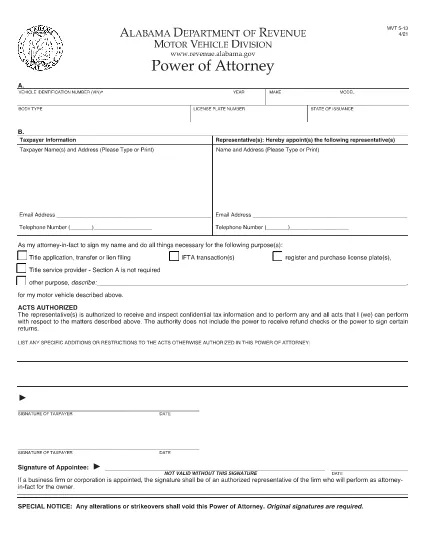
The Alabama Motor Vehicle Power of Attorney (Form MVT‑5‑13) lets a vehicle owner authorize another person—called the appointee or attorney‑in‑fact—to perform specific vehicle‑related tasks such as registration, title transfer, or sale. This form is required whenever the owner cannot be present at the Alabama Department of Revenue or a local licensing office.

What Is Form MVT‑5‑13?

Form MVT‑5‑13 is a short, state‑approved document that grants limited authority to a trusted representative. It is used for:

  • Transferring a vehicle title
  • Registering or renewing a vehicle
  • Submitting a bill of sale
  • Handling lien releases
The form must be signed by both the vehicle owner (taxpayer) and the appointed representative.

How to Fill the MVT‑5‑13 Online

Instead of downloading the PDF and editing it in a separate program, simply click the "Fill out this form" button on this page. The Formize PDF Filler app will load instantly, allowing you to complete every field directly in your browser.

Signing Requirements & Notarization

Alabama law requires:

  • Both the owner and the representative to sign and date the form.
  • A notary public is not mandatory, but a notarized signature adds credibility and is often requested by the licensing office.
If you choose notarization, bring a valid ID and the completed form to a notary.

Common Mistakes to Avoid

  • Leaving sections blank: Every field marked with an asterisk (*) is required.
  • Incorrect VIN: Double‑check the Vehicle Identification Number; a single digit error can delay processing.
  • Mismatched signatures: The signatures on the PDF must match the printed names exactly.
  • Using an expired form: Ensure you are using the latest version (the link below is the current 2021 revision).

Where to Submit the Completed Form

After filling and signing, you can:

  • Bring the printed form to any Alabama Department of Revenue office.
  • Mail it to the appropriate Vehicle Licensing Office.
  • Upload a scanned copy through the online portal if the agency permits electronic submissions.
Having a clean, correctly completed Form MVT‑5‑13 speeds up title transfers and registration renewals.

Download the official PDF version of Form MVT‑5‑13 for reference or offline use.

PERGUNTAS FREQUENTES
  • Who can be appointed as an attorney‑in‑fact on Form MVT‑5‑13?

    Any adult individual you trust – a family member, friend, attorney, or title‑service representative – can be appointed, as long as they are willing to sign the form.

  • Is notarization required for the MVT‑5‑13?

    Alabama law does not require notarization, but many licensing offices prefer or require a notarized signature for added security.

  • Can I use the same Form MVT‑5‑13 for multiple vehicles?

    No. Each vehicle requires its own completed Form MVT‑5‑13 with the specific VIN, make, model, and year.

  • How long is the power of attorney valid?

    The form remains effective until the vehicle transaction is completed, or until you submit a written revocation to the Department of Revenue.

  • What should I do if I make a mistake after signing?

    Correct the error by crossing out the mistake, initialing the change, and having both the owner and representative sign again. For major errors, submit a new Form MVT‑5‑13.

  • Can I submit the form electronically?

    Some county offices accept scanned copies via their online portals. Check with your local licensing office for electronic submission policies.

  • Do I need to provide additional documents with the POA?

    Typically you’ll need the vehicle’s current title, a valid photo ID for both parties, and any applicable fees for the transaction you’re performing.

  • Is there a fee to download the PDF?

    No. The PDF is provided free of charge; you only pay any notary or filing fees required by the Department of Revenue.

COMO

Como preencher MVT-5-13 gratuitamente, online em 5 etapas fáceis:

  1. 1
    Click the Fill Button
    Press the “Fill out this form” button on the page. The Formize PDF Filler app loads instantly in your browser.
  2. 2
    Enter All Required Information
    Complete each field – vehicle details, owner information, and representative details. Required fields are marked with an asterisk (*).
  3. 3
    Review and Sign
    Double‑check the entered data, then use the built‑in signature tool to sign as the owner and as the appointee.
  4. 4
    Download or Email the Completed Form
    When you’re satisfied, click “Save & Download” to get a copy, or choose “Email” to send the filled PDF directly to the licensing office.
  5. 5
    Print and Notarize (if needed)
    Print the saved PDF, bring it to a notary public for notarization if your local office requires it, then submit the final document.
Aplicativo Formize PDF Filler
SOBRE

Formulários de registro de veículos

MVT-5-13 é um dos formulários de registro de veículos que são documentos usados ​​para registrar um veículo motorizado junto à autoridade governamental relevante, normalmente o Departamento de Veículos Motorizados (DMV) ou agência equivalente. Esses formulários são exigidos quando uma pessoa compra um veículo novo ou usado, transfere a propriedade de um veículo ou se muda para uma nova jurisdição com um veículo.

Os formulários específicos de registro de veículos podem variar de acordo com a jurisdição, mas geralmente exigem as seguintes informações:

Informações do veículo: incluem detalhes sobre o veículo, como marca, modelo, ano, número de identificação do veículo (VIN) e leitura do hodômetro.

Informações do proprietário: o formulário exigirá informações sobre o proprietário do veículo, incluindo nome, endereço, informações de contato e número da carteira de motorista.

Prova de Propriedade: Dependendo das circunstâncias, pode ser necessária uma prova de propriedade, como um certificado de título, nota fiscal ou certificado de origem do fabricante (para veículos novos).

Informações sobre seguro: normalmente é necessária prova de cobertura de seguro de veículo válida. Isso pode incluir o fornecimento do número da apólice de seguro, datas de cobertura e detalhes da seguradora.

Pagamento de Taxas: O registro de veículos envolve o pagamento de diversas taxas, como taxas de registro, impostos e possivelmente outros encargos específicos da jurisdição.

Além desses requisitos básicos, algumas jurisdições podem ter formulários ou requisitos de documentação adicionais. Por exemplo, resultados de testes de emissões, inspeções de segurança ou comprovante de residência podem ser necessários em determinadas áreas.

Assim que os formulários de registro do veículo forem preenchidos e enviados, a autoridade governamental emitirá um certificado de registro, placas e adesivos de registro. Esses documentos indicam que o veículo está legalmente registrado e autorizado a circular em vias públicas.

É importante observar que os requisitos de registro de veículos podem variar significativamente de acordo com a jurisdição. Portanto, é recomendável consultar o DMV local ou agência equivalente para obter os formulários e procedimentos específicos aplicáveis ​​à sua localização.

RECURSOS

Preenchimento de PDF

A maneira mais fácil de preencher formulários PDF online

  • Preencha MVT-5-13 rapidamente
    Procurando uma maneira de preencher rapidamente MVT-5-13 online? Com nosso preenchedor de formulário PDF online gratuito, você saberá como editar e preencher este documento PDF em menos de um minuto.
  • Editor de PDF online fácil de usar
    Cansado de imprimir arquivos PDF para poder editá-los antes de digitalizá-los novamente e enviá-los de volta? Edite documentos PDF gratuitamente online. Use nosso editor de PDF online para economizar tempo e papel.
  • Ótimas ferramentas, todas as plataformas
    Quer saber como preencher MVT-5-13 em um Mac, ou talvez como usar um preenchimento de PDF grátis? Nossas ferramentas online de PDF funcionam em todas as plataformas.
  • Armazenamento seguro de arquivos
    Os arquivos "MVT-5-13" concluídos são armazenados em um banco de dados seguro gerenciado pela hospedagem Amazon Cloud. Você pode excluir seus arquivos do nosso sistema a qualquer momento. Em qualquer caso, esses arquivos são excluídos automaticamente após 24 horas.
  • Converse com {palavra-chave}
    Converse com "MVT-5-13" no Chatize, que é um assistente gratuito de leitura de PDF. Faça perguntas e obtenha respostas de "MVT-5-13". Basta clicar no botão Bate-papo com documento acima.

Excluir sessão de preenchimento

Excluir a sessão de preenchimento selecionada? Nesse caso, seu progresso no preenchimento do formulário será perdido.

Excluir sessão de edição

Excluir a sessão de edição selecionada? Neste caso, o seu progresso na criação e edição do formulário será perdido.