
Selecione o idioma

Fillable Form 96-0225 – Tribal Fuel Tax Refund Application

  1. Linguagem Inglês
  2. País EUA
  3. Atividade Registro de Veículo
  4. Estado Arizona
Fillable Form 96-0225 – Tribal Fuel Tax Refund Application

The Form 96-0225 is the official Tribal Government Fuel Refund Application used by eligible tribal members and entities to claim refunds on fuel taxes paid in Arizona. This form must be completed accurately and submitted to the Arizona Department of Transportation (AZDOT) Fuel Tax Refund Compliance Unit.

Our online Fill out this form button launches the Formize PDF Filler app, letting you edit the document directly in your browser—no download, print, or separate PDF editor required.

What Is Form 96-0225?

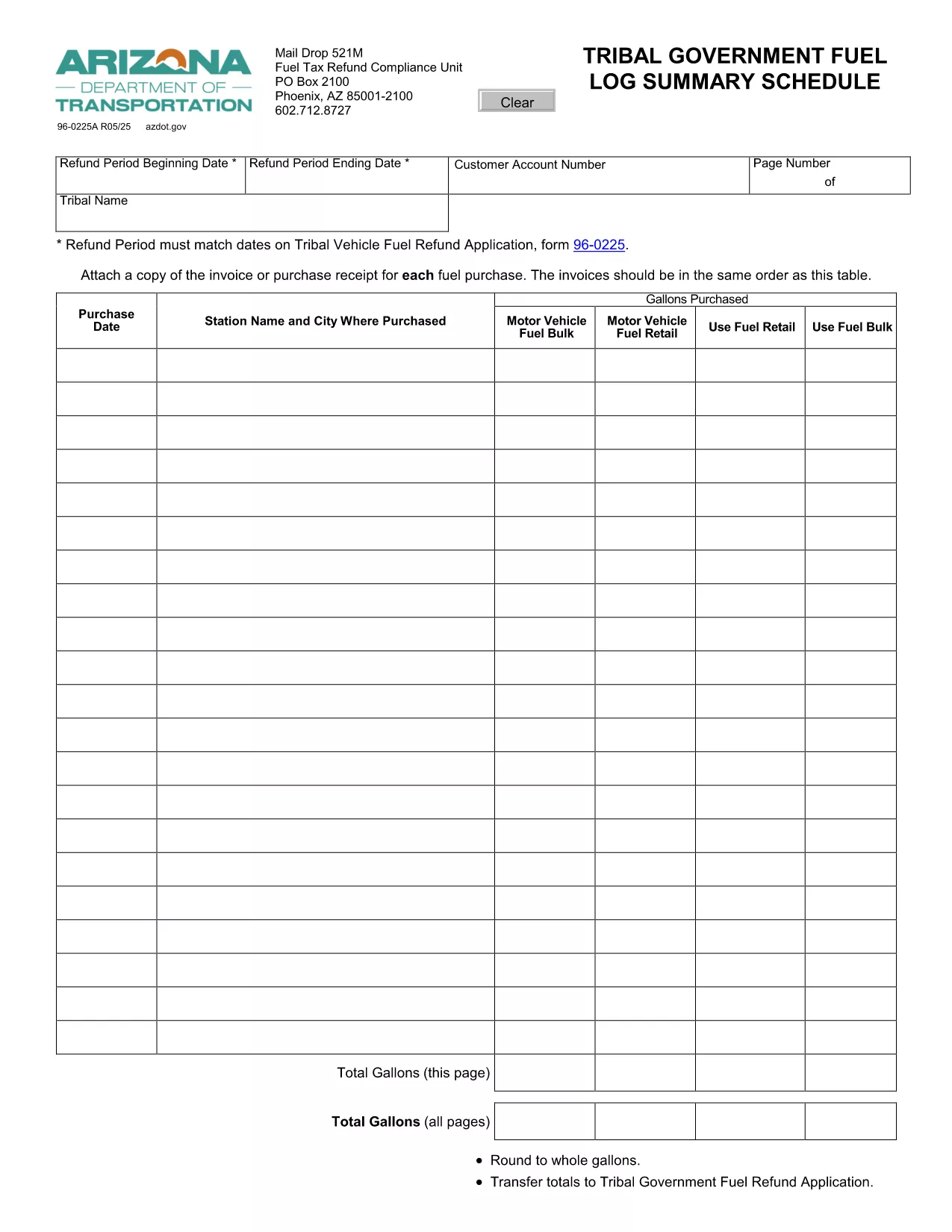
Form 96-0225 captures the details of each fuel purchase, including date, station name, and amount of tax paid. It also requires verification that the refund period matches the dates on the Tribal Vehicle Fuel Refund Application.

Who Must File This Form?

  • Tribal governments, agencies, or individuals who operate fuel‑tax‑exempt vehicles in Arizona.
  • Anyone who has documented fuel purchases that qualify for a tax refund under the Tribal Fuel Tax Exemption program.

How to Complete the Fillable PDF

Follow these simple steps:

  1. Click the Fill out this form button on this page.
  2. Wait for the Formize PDF Filler to load (usually a few seconds).
  3. Enter the required information in each field. The form automatically validates dates and numeric entries.
  4. Attach scanned copies of invoices or receipts for each fuel purchase using the "Attach File" field.
  5. When all sections are complete, click Submit to download the filled PDF or to email it directly to the AZDOT compliance unit.

Common Mistakes to Avoid

  • Entering a refund period that does not align with the dates on the Tribal Vehicle Fuel Refund Application.
  • Skipping the attachment of purchase receipts—each fuel transaction must be supported by a copy of the invoice.
  • Using the wrong fuel‑tax‑exempt vehicle identification number (VIN) or tribal code.
  • Submitting the form without a signature or with an unsigned electronic signature.

Where to Submit the Completed Form

After you have saved the completed PDF, mail it to:

Fuel Tax Refund Compliance Unit
Arizona Department of Transportation
PO Box 2100
Phoenix, AZ 85001‑2100

Alternatively, you can email a scanned copy to fuelrefund@azdot.gov if you prefer electronic submission.

Need more help? Review the FAQs below or contact the AZDOT compliance unit during business hours.

PERGUNTAS FREQUENTES
  • What is the purpose of Form 96-0225?

    It is the official application used by tribal governments and eligible individuals to claim refunds for fuel taxes paid in Arizona.

  • Can I fill out Form 96-0225 on a mobile device?

    Yes. The Formize PDF Filler works on most modern smartphones and tablets as long as you have a stable internet connection.

  • Do I need to attach receipts for every fuel purchase?

    Yes. Each fuel transaction must be supported by a scanned copy of the invoice or receipt, attached in the order shown on the form.

  • What if my refund period dates don’t match the Tribal Vehicle Fuel Refund Application?

    The form will flag the mismatch. Correct the dates to exactly match the dates on the Tribal Vehicle Fuel Refund Application before submitting.

  • How long does it take for the AZDOT to process my refund?

    Processing times vary, but most refunds are issued within 30‑45 days after the completed form and supporting documents are received.

  • Is there a filing fee for Form 96-0225?

    No. The Tribal Fuel Refund Application is free of charge.

COMO

Como preencher Form 96-0225 gratuitamente, online em 4 etapas fáceis:

  1. 1
    Open the Formizer PDF Filler
    Click the “Fill out this form” button on the page. The Formize PDF Filler loads directly in your browser.
  2. 2
    Enter Your Information
    Fill each field with the required data—dates, station names, fuel amounts, and tribal identifiers. The filler validates entries in real time.
  3. 3
    Attach Supporting Receipts
    Use the “Attach File” button to upload scanned copies of each fuel invoice. Ensure the order matches the table in the form.
  4. 4
    Review and Submit
    Check all entries for accuracy, then click “Submit” to download the completed PDF or to email it directly to the AZDOT compliance unit.
Aplicativo Formize PDF Filler
SOBRE

Formulários de registro de veículos

Form 96-0225 é um dos formulários de registro de veículos que são documentos usados ​​para registrar um veículo motorizado junto à autoridade governamental relevante, normalmente o Departamento de Veículos Motorizados (DMV) ou agência equivalente. Esses formulários são exigidos quando uma pessoa compra um veículo novo ou usado, transfere a propriedade de um veículo ou se muda para uma nova jurisdição com um veículo.

Os formulários específicos de registro de veículos podem variar de acordo com a jurisdição, mas geralmente exigem as seguintes informações:

Informações do veículo: incluem detalhes sobre o veículo, como marca, modelo, ano, número de identificação do veículo (VIN) e leitura do hodômetro.

Informações do proprietário: o formulário exigirá informações sobre o proprietário do veículo, incluindo nome, endereço, informações de contato e número da carteira de motorista.

Prova de Propriedade: Dependendo das circunstâncias, pode ser necessária uma prova de propriedade, como um certificado de título, nota fiscal ou certificado de origem do fabricante (para veículos novos).

Informações sobre seguro: normalmente é necessária prova de cobertura de seguro de veículo válida. Isso pode incluir o fornecimento do número da apólice de seguro, datas de cobertura e detalhes da seguradora.

Pagamento de Taxas: O registro de veículos envolve o pagamento de diversas taxas, como taxas de registro, impostos e possivelmente outros encargos específicos da jurisdição.

Além desses requisitos básicos, algumas jurisdições podem ter formulários ou requisitos de documentação adicionais. Por exemplo, resultados de testes de emissões, inspeções de segurança ou comprovante de residência podem ser necessários em determinadas áreas.

Assim que os formulários de registro do veículo forem preenchidos e enviados, a autoridade governamental emitirá um certificado de registro, placas e adesivos de registro. Esses documentos indicam que o veículo está legalmente registrado e autorizado a circular em vias públicas.

É importante observar que os requisitos de registro de veículos podem variar significativamente de acordo com a jurisdição. Portanto, é recomendável consultar o DMV local ou agência equivalente para obter os formulários e procedimentos específicos aplicáveis ​​à sua localização.

RECURSOS

Preenchimento de PDF

A maneira mais fácil de preencher formulários PDF online

  • Preencha Form 96-0225 rapidamente
    Procurando uma maneira de preencher rapidamente Form 96-0225 online? Com nosso preenchedor de formulário PDF online gratuito, você saberá como editar e preencher este documento PDF em menos de um minuto.
  • Editor de PDF online fácil de usar
    Cansado de imprimir arquivos PDF para poder editá-los antes de digitalizá-los novamente e enviá-los de volta? Edite documentos PDF gratuitamente online. Use nosso editor de PDF online para economizar tempo e papel.
  • Ótimas ferramentas, todas as plataformas
    Quer saber como preencher Form 96-0225 em um Mac, ou talvez como usar um preenchimento de PDF grátis? Nossas ferramentas online de PDF funcionam em todas as plataformas.
  • Armazenamento seguro de arquivos
    Os arquivos "Form 96-0225" concluídos são armazenados em um banco de dados seguro gerenciado pela hospedagem Amazon Cloud. Você pode excluir seus arquivos do nosso sistema a qualquer momento. Em qualquer caso, esses arquivos são excluídos automaticamente após 24 horas.
  • Converse com {palavra-chave}
    Converse com "Form 96-0225" no Chatize, que é um assistente gratuito de leitura de PDF. Faça perguntas e obtenha respostas de "Form 96-0225". Basta clicar no botão Bate-papo com documento acima.

Excluir sessão de preenchimento

Excluir a sessão de preenchimento selecionada? Nesse caso, seu progresso no preenchimento do formulário será perdido.

Excluir sessão de edição

Excluir a sessão de edição selecionada? Neste caso, o seu progresso na criação e edição do formulário será perdido.