
Selecione o idioma

Missouri Form 4601 – Fillable PDF for Military Personalized License Plates

  1. Linguagem Inglês
  2. País EUA
  3. Atividade Registro de Veículo
  4. Estado Missouri
Missouri Form 4601 – Fillable PDF for Military Personalized License Plates

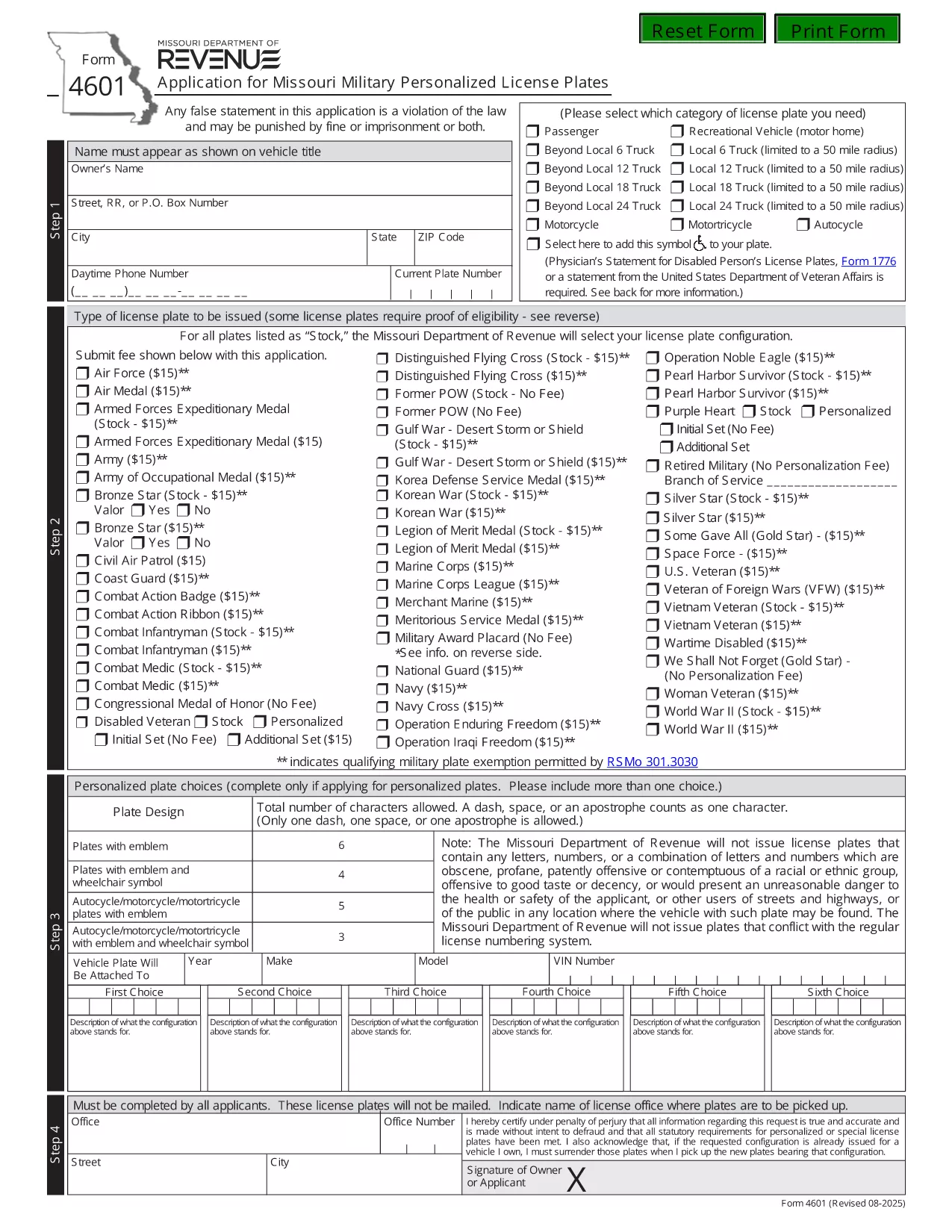
Form 4601 is the official Application for Missouri Military Personalized License Plates issued by the Missouri Department of Revenue. This fillable PDF lets eligible veterans, active‑duty service members, and qualified family members request a custom military‑themed plate for their vehicle.

What Is Form 4601?

Form 4601 collects personal information, vehicle details, and proof of military service. The form is required for any of the following plate designs:

  • U.S. Army, Navy, Air Force, Marine Corps, Coast Guard
  • Veterans of specific campaigns or decorations
  • Active‑duty personnel requesting a temporary plate

How to Complete the Fillable Form 4601 Online

With Formize’s PDF Filler you can fill out the form directly in your browser—no download, print, or third‑party editor needed.

  1. Click the "Fill out this form" button on this page.
  2. Wait a few seconds while the Formize PDF Filler loads the fillable version of Form 4601.
  3. Enter your information in each highlighted field. The filler automatically validates dates, ZIP codes, and required fields.
  4. Upload a scanned copy of your discharge papers or award certificate when prompted.
  5. Review the completed form, then click Submit to download the filled PDF or to email it directly to the Missouri Department of Revenue.

Common Mistakes to Avoid

  • Leaving the "Signature" field blank—use the electronic signature tool provided.
  • Entering an incorrect VIN; double‑check the 17‑character vehicle identification number.
  • Submitting an outdated or non‑honorable discharge document.
  • Choosing a plate configuration longer than six characters (or five with an emblem).

Where to Submit Your Application

After completing the fillable PDF, mail it with the $15 application fee to:

Motor Vehicle Bureau
301 West High Street – Room 370
PO Box 569
Jefferson City, MO 65105‑0569

Or bring the printed form to any Missouri license office. The Department will process the request within 6‑8 weeks.

Download the Official PDF

If you prefer the original, non‑fillable version, you can download it directly from the Missouri Department of Revenue:

Download Form 4601 (PDF)

Using Formize’s fillable version saves time, reduces errors, and keeps a digital copy for your records.

PERGUNTAS FREQUENTES
  • Who is eligible to use Form 4601?

    Veterans with an honorable discharge, active‑duty service members, and surviving spouses of eligible veterans may apply for a military personalized plate.

  • Is there a fee to submit Form 4601?

    Yes, a $15 application fee is required for each military plate request. The fee is paid to the Missouri Department of Revenue when you mail the form.

  • Can I submit Form 4601 electronically?

    The Missouri Department of Revenue currently requires a printed, signed PDF with the fee. However, you can fill it out online using Formize, then print and mail it.

  • How long does it take to receive the plates?

    Processing typically takes 6‑8 weeks after the Department receives your completed form and payment.

  • What proof of service do I need to attach?

    Attach a copy of your DD‑214, discharge certificate, or the official award documentation that qualifies you for the specific military plate.

  • What if my desired plate configuration is unavailable?

    You may submit up to three alternative configurations on the same form. If none are available, you can request a refund of the $15 fee.

  • Do I need to renew the military plate each year?

    Yes. Renewal requires the same $15 fee and a current proof of service if your status has changed.

COMO

Como preencher Form 4601 gratuitamente, online em 3 etapas fáceis:

  1. 1
    Open the Fillable Form
    Click the "Fill out this form" button on the page. The Formize PDF Filler will open the fillable version of Form 4601 in your browser.
  2. 2
    Enter Your Information
    Complete each highlighted field—personal details, vehicle info, and military service proof. Use the upload button for your discharge documents.
  3. 3
    Validate and Submit
    Review the completed form for any errors. Click the Submit button to download the finished PDF or to email it directly to the Missouri Department of Revenue.
Aplicativo Formize PDF Filler
SOBRE

Formulários de registro de veículos

Se você possui ou aluga um veículo motorizado, reboque ou barco, você deve cumprir certas obrigações para manter seu veículo legalmente registrado e seguro.

Form 4601 é um dos formulários de registro de veículos que são documentos usados ​​para registrar um veículo motorizado junto à autoridade estadual ou provincial relevante. Esses formulários são normalmente exigidos quando uma pessoa compra um veículo novo ou usado ou quando se muda para um novo estado ou província com um veículo.

Os requisitos e formulários exatos necessários para o registro do veículo podem variar de acordo com o local, mas geralmente o processo envolve o fornecimento de informações sobre o veículo, o proprietário e quaisquer ônus sobre o veículo.

Depois que os formulários de registro e as taxas forem enviados, a autoridade estadual ou provincial emitirá um certificado de registro ou placa ao proprietário do veículo. Este registro permite que o veículo seja conduzido legalmente em vias públicas e rodovias.

RECURSOS

Preenchimento de PDF

A maneira mais fácil de preencher formulários PDF online

  • Preencha Form 4601 rapidamente
    Procurando uma maneira de preencher rapidamente Form 4601 online? Com nosso preenchedor de formulário PDF online gratuito, você saberá como editar e preencher este documento PDF em menos de um minuto.
  • Editor de PDF online fácil de usar
    Cansado de imprimir arquivos PDF para poder editá-los antes de digitalizá-los novamente e enviá-los de volta? Edite documentos PDF gratuitamente online. Use nosso editor de PDF online para economizar tempo e papel.
  • Ótimas ferramentas, todas as plataformas
    Quer saber como preencher Form 4601 em um Mac, ou talvez como usar um preenchimento de PDF grátis? Nossas ferramentas online de PDF funcionam em todas as plataformas.
  • Armazenamento seguro de arquivos
    Os arquivos "Form 4601" concluídos são armazenados em um banco de dados seguro gerenciado pela hospedagem Amazon Cloud. Você pode excluir seus arquivos do nosso sistema a qualquer momento. Em qualquer caso, esses arquivos são excluídos automaticamente após 24 horas.
  • Converse com {palavra-chave}
    Converse com "Form 4601" no Chatize, que é um assistente gratuito de leitura de PDF. Faça perguntas e obtenha respostas de "Form 4601". Basta clicar no botão Bate-papo com documento acima.

Excluir sessão de preenchimento

Excluir a sessão de preenchimento selecionada? Nesse caso, seu progresso no preenchimento do formulário será perdido.

Excluir sessão de edição

Excluir a sessão de edição selecionada? Neste caso, o seu progresso na criação e edição do formulário será perdido.