
Selecione o idioma

Pennsylvania Form MV-217 – Fillable PDF Online

  1. Linguagem Inglês
  2. País EUA
  3. Atividade Registro de Veículo
  4. Estado Pensilvânia
Pennsylvania Form MV-217 – Fillable PDF Online

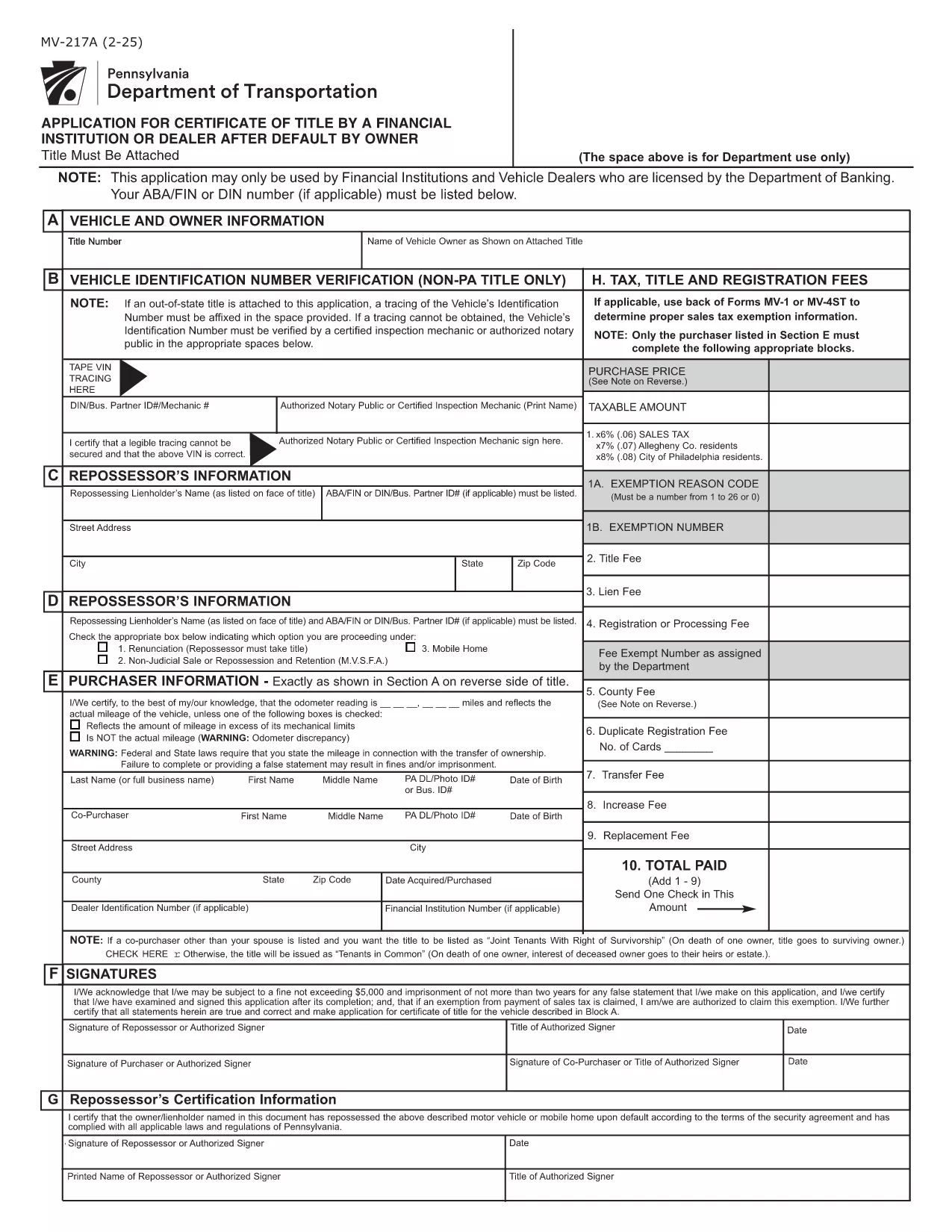
Form MV-217 is the Pennsylvania Department of Transportation (PennDOT) application used to request a Certificate of Title after a vehicle owner defaults. It is required for financial institutions, licensed vehicle dealers, and lienholders when the original title cannot be released.

What is Form MV-217?

This form authorizes PennDOT to issue a new title when the original owner has defaulted on a loan or other financial obligation. The form is only for licensed entities; individuals must follow a different legal process.

How to Fill Out MV-217 Online

Instead of downloading the PDF and editing it manually, simply click the "Fill out this form" button on our page. The Formize PDF Filler will load in your browser, letting you complete every field instantly.

Common Mistakes to Avoid

  • Leaving the “Lienholder” section blank when you are the lienholder.
  • Submitting an unsigned form – the signature field must be completed electronically.
  • Using the wrong form version (MV-217A vs. MV-217). Verify the version required by your institution.

Where to Submit the Completed Form

After you finish, download the completed PDF and mail or deliver it to your local PennDOT office or the financial institution that requested the title. Some lenders also accept electronic submissions via email.

Frequently Asked Questions

For quick answers, see the FAQ section below or scroll down to the step‑by‑step guide.

PERGUNTAS FREQUENTES
  • Who is allowed to submit Form MV-217?

    Only financial institutions, licensed vehicle dealers, and lienholders that are authorized by the Pennsylvania Department of Banking may use this form.

  • Is there a fee to file MV‑217?

    PennDOT may charge a processing fee. Check with your local PennDOT office or lender for the exact amount.

  • Can I use the form if I am an individual owner?

    Individuals must follow the “Judgment and Execution” option (Option 1) instead of MV‑217. This form is not intended for private owners.

  • What happens after I submit the form?

    PennDOT reviews the application, verifies the default, and issues a new Certificate of Title to the lienholder or authorized dealer.

  • Do I need to attach supporting documents?

    Yes. Include a copy of the original title, proof of default (e.g., court order), and any lienholder agreements as required.

  • How long does processing take?

    Processing time varies, but most applications are completed within 10‑15 business days after receipt.

  • Can I edit the form after I’ve saved it?

    Yes. Open the saved PDF in the Formize filler again to make changes before final submission.

COMO

Como preencher MV-217 PDF gratuitamente, online em 5 etapas fáceis:

  1. 1
    Click the Fill‑out Button
    Press the bright "Fill out this form" button on the page. The Formize PDF Filler loads directly in your browser.
  2. 2
    Wait for the Filler to Load
    A few seconds may pass while the app prepares the fillable fields. No download required.
  3. 3
    Complete All Required Fields
    Enter the lienholder information, vehicle details, and default description exactly as they appear on your records.
  4. 4
    Add Your Electronic Signature
    Use the signature field to sign electronically. This satisfies PennDOT’s requirement for a signed application.
  5. 5
    Save or Submit the Form
    When finished, click "Save PDF" to download a copy for your records, or follow your lender’s instructions to submit the file.
Aplicativo Formize PDF Filler
SOBRE

Formulários de registro de veículos

Se você possui ou aluga um veículo motorizado, reboque ou barco, você deve cumprir certas obrigações para manter seu veículo legalmente registrado e seguro.

MV-217 PDF é um dos formulários de registro de veículos que são documentos usados ​​para registrar um veículo motorizado junto à autoridade estadual ou provincial relevante. Esses formulários são normalmente exigidos quando uma pessoa compra um veículo novo ou usado ou quando se muda para um novo estado ou província com um veículo.

Os requisitos e formulários exatos necessários para o registro do veículo podem variar de acordo com o local, mas geralmente o processo envolve o fornecimento de informações sobre o veículo, o proprietário e quaisquer ônus sobre o veículo.

Depois que os formulários de registro e as taxas forem enviados, a autoridade estadual ou provincial emitirá um certificado de registro ou placa ao proprietário do veículo. Este registro permite que o veículo seja conduzido legalmente em vias públicas e rodovias.

RECURSOS

Preenchimento de PDF

A maneira mais fácil de preencher formulários PDF online

  • Preencha MV-217 PDF rapidamente
    Procurando uma maneira de preencher rapidamente MV-217 PDF online? Com nosso preenchedor de formulário PDF online gratuito, você saberá como editar e preencher este documento PDF em menos de um minuto.
  • Editor de PDF online fácil de usar
    Cansado de imprimir arquivos PDF para poder editá-los antes de digitalizá-los novamente e enviá-los de volta? Edite documentos PDF gratuitamente online. Use nosso editor de PDF online para economizar tempo e papel.
  • Ótimas ferramentas, todas as plataformas
    Quer saber como preencher MV-217 PDF em um Mac, ou talvez como usar um preenchimento de PDF grátis? Nossas ferramentas online de PDF funcionam em todas as plataformas.
  • Armazenamento seguro de arquivos
    Os arquivos "MV-217 PDF" concluídos são armazenados em um banco de dados seguro gerenciado pela hospedagem Amazon Cloud. Você pode excluir seus arquivos do nosso sistema a qualquer momento. Em qualquer caso, esses arquivos são excluídos automaticamente após 24 horas.
  • Converse com {palavra-chave}
    Converse com "MV-217 PDF" no Chatize, que é um assistente gratuito de leitura de PDF. Faça perguntas e obtenha respostas de "MV-217 PDF". Basta clicar no botão Bate-papo com documento acima.

Excluir sessão de preenchimento

Excluir a sessão de preenchimento selecionada? Nesse caso, seu progresso no preenchimento do formulário será perdido.

Excluir sessão de edição

Excluir a sessão de edição selecionada? Neste caso, o seu progresso na criação e edição do formulário será perdido.