
Selecteaza limba

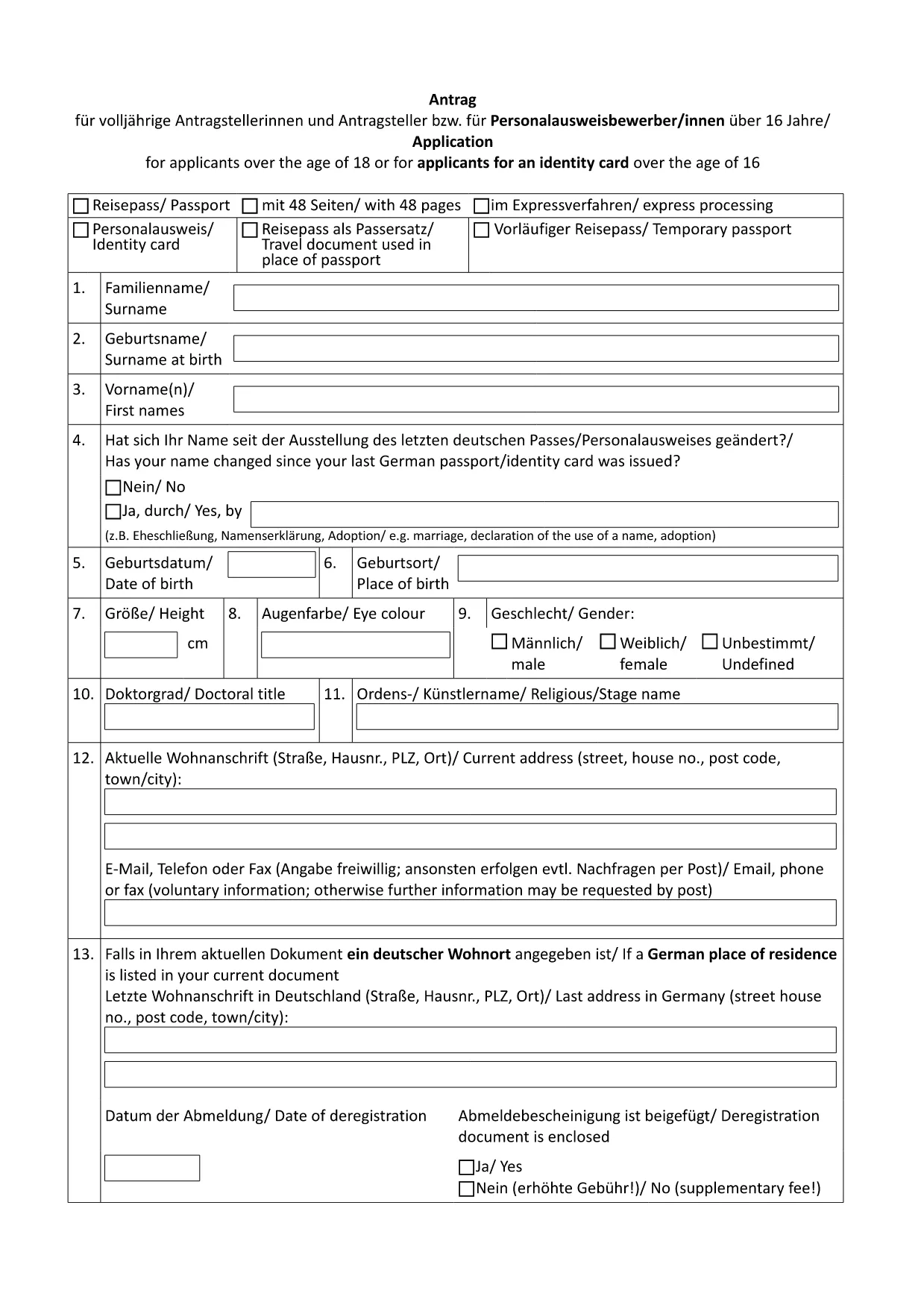
German Passport Application Form (Fillable PDF)

  1. Țară Germania
  2. Limba Engleză
  3. Departament Federal Foreign Office
  4. Activitate Passports
German Passport Application Form (Fillable PDF)

Applying for a German passport can feel overwhelming, especially when you need to gather the right paperwork and fill out a lengthy application. With Formize’s fillable PDF solution, you can complete the official German passport application form directly in your browser, avoid transcription errors, and save a printable copy for your embassy appointment.

Why Use a Fillable PDF for Your German Passport?

  • Accuracy: Fields are validated in real time, reducing the risk of missing or incorrect information.
  • Speed: No more printing, writing, and re‑typing. Fill, save, and download instantly.
  • Secure storage: Your data stays within the Formize app until you choose to export it.
  • Eco‑friendly: Reduce paper waste by printing only the final, completed form.

How to Complete the German Passport Application Online

Follow these simple steps (see the How‑To section below for a detailed guide):

  1. Click the "Fill out this form" button on this page.
  2. Wait for the Formize PDF Filler to load.
  3. Enter your personal data, passport details, and supporting information.
  4. Review the form for completeness and correctness.
  5. Save the PDF and print a hard copy for your appointment.

Required Documents and Common Mistakes

Before you start, gather the following original documents:

  • Completed application form (the PDF you will fill out).
  • Two recent biometric passport photos.
  • Birth certificate or proof of German citizenship.
  • Current passport or ID card.
  • Proof of residence (e.g., utility bill, driver’s license).
  • Marriage or divorce certificates if applicable.

Common pitfalls to avoid:

  • Leaving any mandatory field blank.
  • Using photos that are not biometric or are cropped incorrectly.
  • Submitting outdated or non‑original documents.
  • Forgetting a name declaration when your current surname differs from the one in your previous passport.

Download & Print the Official Form

The PDF linked below is the exact form used by German embassies and consulates worldwide. Click the button, fill it online, then print a single copy for your scheduled appointment.

Download German Passport Application Form (PDF)

FAQ – German Passport Application

Find quick answers to the most common questions below. If you need further assistance, contact your local German mission.

FAQ
  • Do I need to print the form after filling it online?

    Yes. German embassies require a printed, signed copy of the completed application together with original supporting documents.

  • Can I submit the application by mail?

    No. Since November 2007, all German passport applications must be submitted in person at an embassy, consulate, or honorary consul.

  • What biometric photo specifications are required?

    Two identical, recent biometric photos (35 mm × 45 mm), with a plain background and no glasses. The Formize filler does not embed photos; attach them separately.

  • How long does processing take?

    Typical processing time is six to eight weeks. If a name declaration is needed, it may take longer.

  • Is the form available in English?

    The official form is in German. However, you can fill it out using Formize and refer to the English guidance on this page.

  • What if I make a mistake after saving the PDF?

    Open the saved PDF again in the Formize filler, correct the error, and re‑save. Do not hand‑write changes on the printed form.

  • Do I need to bring my old passport?

    Yes. Bring the data page of your current or most recent passport, even if it is expired.

  • Are there fees for the application?

    Passport fees vary by age and type. Check the fee schedule on the website of the German mission where you will apply.

CUM SĂ

Cum să completați German passport application gratuit, online, în 5 pași simpli:

  1. 1
    Click the Fill‑out Button
    On this page, click the "Fill out this form" button to launch the Formize PDF Filler.
  2. 2
    Wait for the Formizer to Load
    The online filler will open in a new tab. Allow a few seconds for all fields to become interactive.
  3. 3
    Enter Your Information
    Complete each section – personal data, passport details, and supporting information – using the keyboard or drop‑down menus.
  4. 4
    Validate and Save
    Use the built‑in validation to check for missing fields, then click "Save" to download the completed PDF to your device.
  5. 5
    Print for Your Appointment
    Print a single copy of the filled form and bring it, along with the required documents, to your embassy or consulate appointment.
Aplicația Formize PDF Filler
DESPRE

șablon German passport application

Cu setul tradițional de caracteristici pentru vizualizarea și completarea unui document PDF, combinat cu beneficiile unei aplicații web și a unui aspect receptiv, puteți completa German passport application în câteva minute.

CARACTERISTICI

Filler PDF

Cel mai simplu mod de a completa German passport application online

  • Completați rapid German passport application
    Căutați o modalitate de a completa rapid German passport application online? Cu ajutorul nostru online gratuit de completare a formularelor PDF, veți ști cum să editați și să completați acest document pdf în mai puțin de un minut.
  • Editor PDF online ușor de utilizat
    Sătul de tipărirea fișierelor PDF pentru a le putea edita, înainte de a le rescana și a le trimite înapoi? Editați documente PDF gratuit online. Utilizați editorul nostru online de pdf pentru a economisi timp și hârtie.
  • Instrumente grozave, toate platformele
    Vă întrebați cum să completați German passport application pe un Mac sau poate cum să utilizați un fișier PDF gratuit? Instrumentele noastre PDF online funcționează pe toate platformele.
  • Stocare securizată a fișierelor
    Fișierele „German passport application” finalizate sunt stocate într-o bază de date securizată gestionată de Amazon Cloud hosting. Puteți șterge oricând fișierele din sistemul nostru. În orice caz, aceste fișiere sunt șterse automat după 24 de ore.
  • Chat cu German passport application
    Conversați cu „German passport application” pe Chatize, care este un asistent de citire PDF gratuit. Puneți întrebări și obțineți răspunsuri de la „German passport application”. Doar faceți clic pe butonul Conversați cu documentul de mai sus.

Ștergeți sesiunea de umplere

Ștergeți sesiunea de umplere selectată? În acest caz, progresul dumneavoastră în completarea formularului se va pierde.

Ștergeți sesiunea de editare

Ștergeți sesiunea de editare selectată? În acest caz, progresul dvs. în crearea și editarea formularului se va pierde.