
Selecteaza limba

Fillable Form 10AC – Order for Provisional Registration

  1. Limba Engleză
  2. Țară India
  3. Activitate Impozite
Completează acest formular
Fillable Form 10AC – Order for Provisional Registration

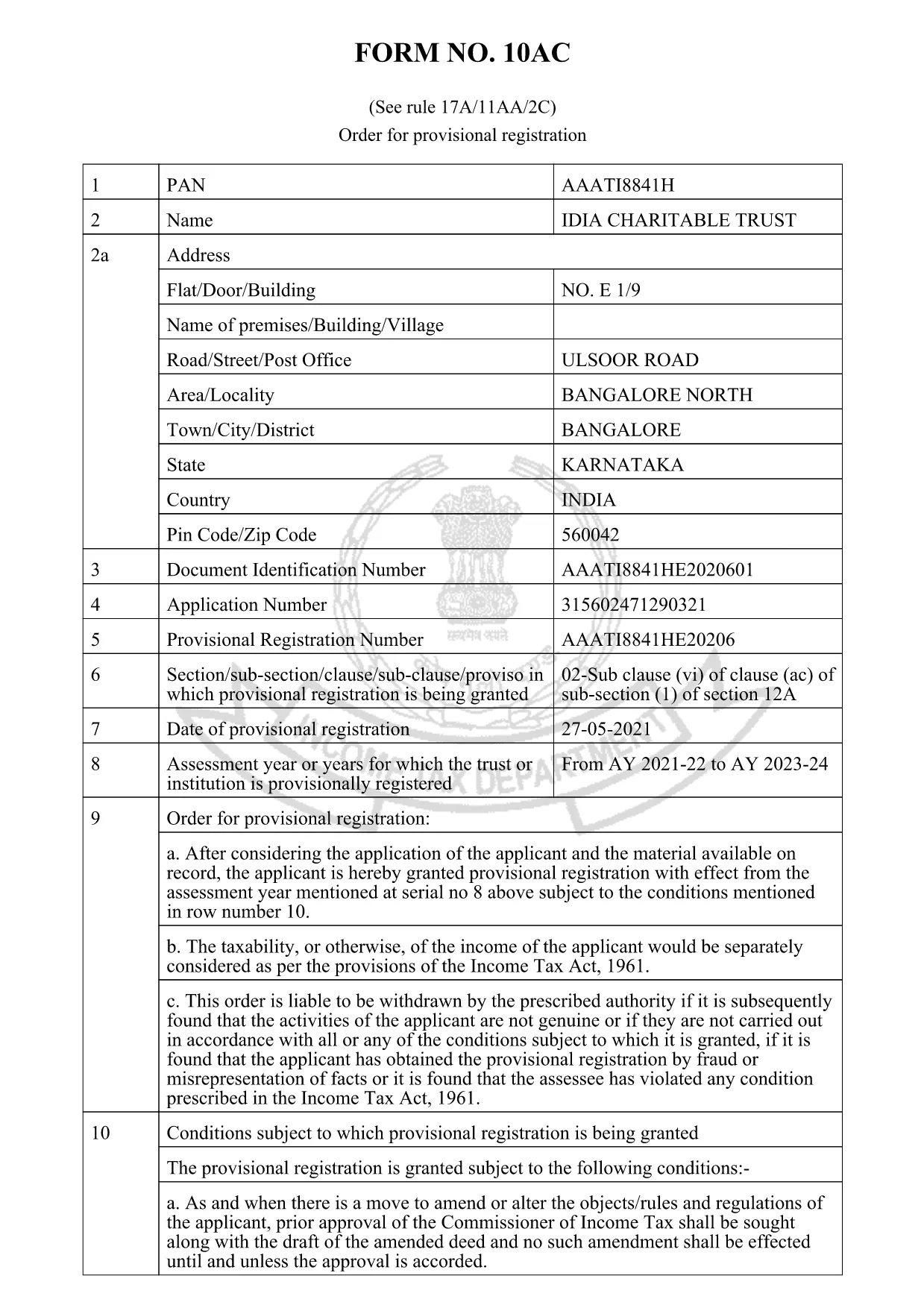
Form 10AC is the official “Order for Provisional Registration” used under Rule 17A/11AA/2C of the Income Tax Act, 1961. Trusts, charitable institutions, and religious societies file this form to obtain a temporary registration that allows them to operate while the final approval is processed.

What is Form 10AC?

The form records the applicant’s details, the purpose of the trust, and the provisional registration period. It also specifies conditions for asset disposal, dissolution, and compliance with Sections 13(3) and 115TD‑115TF of the Act.

Key Sections of Form 10AC

  • Applicant Information: Name, address, PAN, and registration number of the trust.
  • Objects of the Trust: Detailed description of charitable or religious activities.
  • Provisional Period: Start and end dates of the temporary registration.
  • Asset & Surplus Clauses: How surplus assets are to be transferred if the trust is dissolved.
  • Declaration: Signature of the authorized signatory and the jurisdiction officer.

How to Fill Form 10AC Online with Formize

Instead of downloading the PDF and opening a separate editor, simply click the “Fill out this form” button on this page. The Formize PDF Filler app will load automatically, letting you type directly into the fields, add dates, and sign electronically.

Common Mistakes to Avoid

  • Leaving any mandatory field blank – the system will highlight missing entries.
  • Using an incorrect PAN or registration number – verify numbers before submitting.
  • Not attaching the required supporting documents – upload them in the “Attachments” section.
  • Mistyping dates – the filler enforces the DD/MM/YYYY format.

Download & Save Your Completed Form

After completing the form, click Save to download a filled PDF copy. Keep a backup for your records and submit the original to the Income Tax Department as instructed.

Need a printable version? The link below provides the official PDF that powers the online filler.

FAQ
  • What is the purpose of Form 10AC?

    Form 10AC grants a provisional registration to trusts and charitable institutions, allowing them to operate while the final registration is being processed.

  • Can I fill Form 10AC on a mobile device?

    Yes. The Formize PDF Filler works on all modern browsers, including mobile Safari and Chrome.

  • Do I need a digital signature to submit the form?

    A digital signature is optional for the online filler, but the printed copy must be signed by an authorized signatory before submission.

  • How long is the provisional registration valid?

    The provisional period is usually six months from the date of issuance, but it can be extended by the jurisdiction officer.

  • What happens to surplus assets if the trust is dissolved?

    Surplus assets must be transferred to another organization with similar objectives, as stipulated in Section 13(3) of the Income Tax Act.

  • Is there a fee to download Form 10AC?

    No. The PDF is free to download and fill online using the Formize platform.

  • Can I edit the form after I have saved it?

    Yes. Open the saved PDF again with Formize’s filler to make any needed corrections before final submission.

CUM SĂ

Cum să completați form 10ac gratuit, online, în 5 pași simpli:

  1. 1
    Open the Fillable Form
    Click the “Fill out this form” button on the page. The Formize PDF Filler loads instantly in your browser.
  2. 2
    Enter Your Details
    Type directly into each highlighted field – name, PAN, address, and trust objects. The filler validates entries in real time.
  3. 3
    Attach Supporting Documents
    Use the “Attachments” section to upload required certificates, PAN copies, and any other supporting paperwork.
  4. 4
    Review & Sign
    Check every field for accuracy, then add your electronic signature in the declaration box.
  5. 5
    Save or Submit
    Click “Save” to download the completed PDF for your records, or follow the on‑screen instructions to submit it to the Income Tax Department.
Aplicația Formize PDF Filler
DESPRE

Formulare Departamentul Impozit pe Venit

form 10ac este unul dintre formularele oficiale care sunt utilizate de Departamentul de impozitare pe venit din India pentru a administra și colecta impozite pe venit. Aceste formulare sunt folosite de contribuabili pentru a-și raporta veniturile, deducerile și obligațiile fiscale către autoritățile fiscale.

Iată câteva formulare utilizate în mod obișnuit ale departamentului de impozit pe venit în India:

ITR-1 (Sahaj): acest formular este folosit de persoane fizice care au venituri din salariu, proprietatea unei case și alte surse precum dobândă, pensie sau pensie familială. Se aplică persoanelor cu venituri totale de până la Rs. 50 de lakhs.

ITR-2: acest formular este folosit de persoane fizice și hinduși Familii indivize (HUF) care au venituri din alte surse decât afaceri sau profesie. Se aplică persoanelor fizice care au un venit total care depășește Rs. 50 de lakhs sau având active/venituri străine.

ITR-3: acest formular este folosit de persoane fizice și HUF având venituri din afacere sau profesie. Se aplică persoanelor fizice care au venituri dintr-o firmă de parteneriat și profesioniștilor care exercită o profesie.

ITR-4 (Sugam): acest formular este folosit de persoane fizice, HUF și firme (altele decât LLP) care au optat pentru schema de impozitare prezumtivă în conformitate cu secțiunile 44AD, 44ADA sau 44AE din Legea privind impozitul pe venit.

Formular 16: acest formular este furnizat de angajatori angajaților și conține detalii de salariu, impozit dedus la sursă (TDS) și alte informații conexe. Ajută angajații să depună cu acuratețe declarațiile de impozit pe venit.

Formular 26AS: acesta nu este un formular, ci o declarație fiscală anuală consolidată care oferă un rezumat al informațiilor legate de impozite, cum ar fi TDS, impozitul în avans și impozitul de autoevaluare plătit de contribuabil. Îi ajută pe contribuabili să-și verifice încrucișat obligațiile fiscale în timp ce își depun declarațiile de impozit pe venit.

Acestea sunt doar câteva exemple de formulare ale departamentului de impozit pe venit din India. Formele și cerințele specifice pot varia în funcție de natura venitului, categoria de contribuabil și legile fiscale în vigoare în India. Este important să consultați site-ul web oficial al Departamentului de impozitare pe venit din India (www.incometaxindia.gov.in) sau să căutați sfaturi profesionale pentru a obține informații exacte și actualizate cu privire la formularele specifice de impozit pe venit relevante pentru situația dvs. fiscală din India.

CARACTERISTICI

Filler PDF

Cel mai simplu mod de a completa form 10ac online

  • Completați rapid form 10ac
    Căutați o modalitate de a completa rapid form 10ac online? Cu ajutorul nostru online gratuit de completare a formularelor PDF, veți ști cum să editați și să completați acest document pdf în mai puțin de un minut.
  • Editor PDF online ușor de utilizat
    Sătul de tipărirea fișierelor PDF pentru a le putea edita, înainte de a le rescana și a le trimite înapoi? Editați documente PDF gratuit online. Utilizați editorul nostru online de pdf pentru a economisi timp și hârtie.
  • Instrumente grozave, toate platformele
    Vă întrebați cum să completați form 10ac pe un Mac sau poate cum să utilizați un fișier PDF gratuit? Instrumentele noastre PDF online funcționează pe toate platformele.
  • Stocare securizată a fișierelor
    Fișierele „form 10ac” finalizate sunt stocate într-o bază de date securizată gestionată de Amazon Cloud hosting. Puteți șterge oricând fișierele din sistemul nostru. În orice caz, aceste fișiere sunt șterse automat după 24 de ore.
  • Chat cu form 10ac
    Conversați cu „form 10ac” pe Chatize, care este un asistent de citire PDF gratuit. Puneți întrebări și obțineți răspunsuri de la „form 10ac”. Doar faceți clic pe butonul Conversați cu documentul de mai sus.

Ștergeți sesiunea de umplere

Ștergeți sesiunea de umplere selectată? În acest caz, progresul dumneavoastră în completarea formularului se va pierde.

Ștergeți sesiunea de editare

Ștergeți sesiunea de editare selectată? În acest caz, progresul dvs. în crearea și editarea formularului se va pierde.