
Selecteaza limba

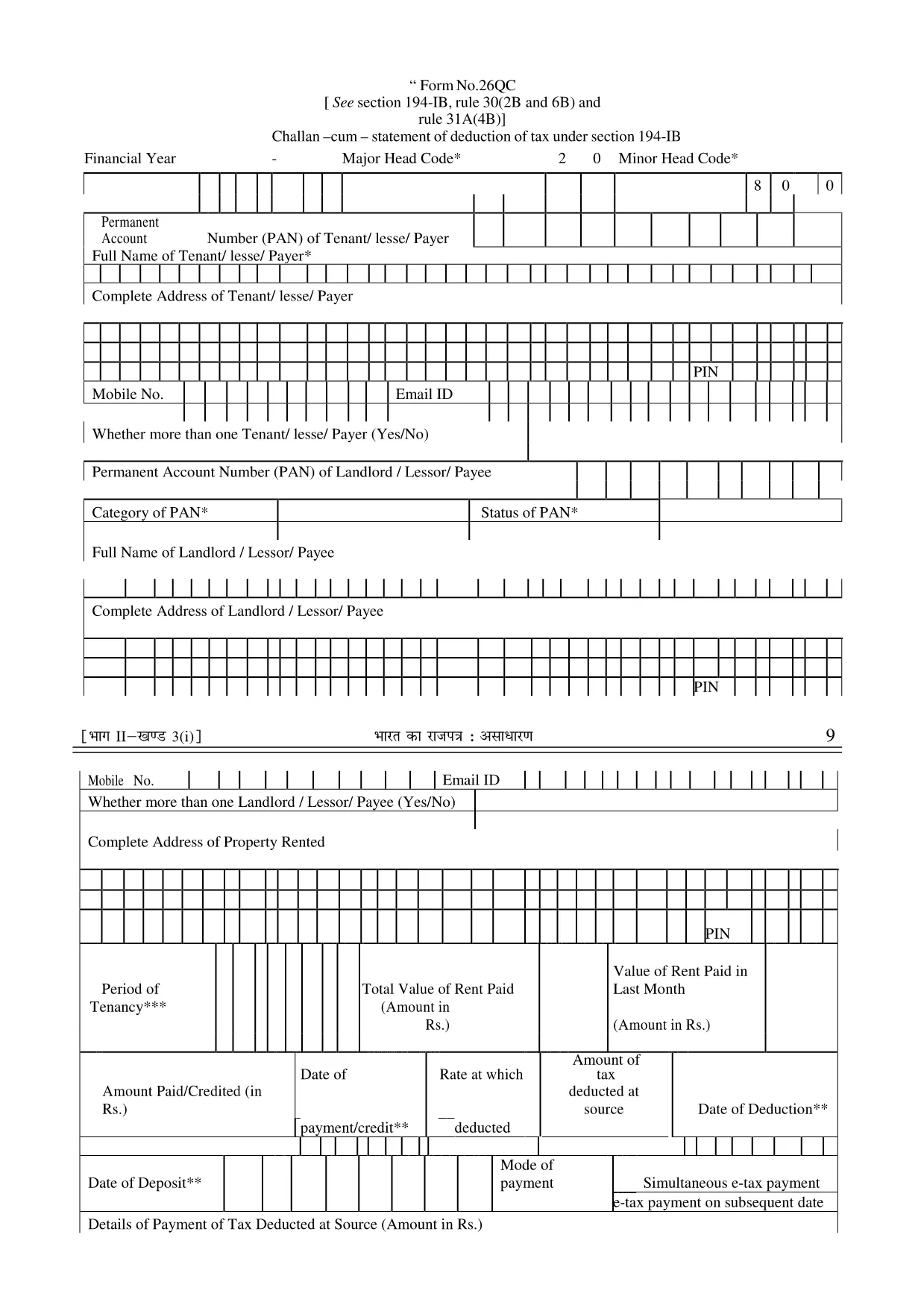
Form 26QC – Fillable PDF for TDS Section 194‑IB

  1. Limba Engleză
  2. Țară India
  3. Activitate Impozite
Form 26QC – Fillable PDF for TDS Section 194‑IB

Form 26QC is the official challan‑cum‑statement used to report tax deducted at source (TDS) under Section 194‑IB of the Indian Income Tax Act. It is required when you deduct tax on payments made to non‑resident individuals or foreign companies for services rendered in India.

What is Form 26QC?

This form consolidates details of the deductor, deductee, and the TDS amount. It must be filed electronically through the TDS portal and is a prerequisite for generating the TDS certificate (Form 16A).

How to Fill Form 26QC Online

Instead of downloading and editing the PDF manually, simply click the "Fill out this form" button on this page. The Formize PDF Filler app will load in your browser, allowing you to complete every field directly online.

Common Mistakes to Avoid

  • Entering the wrong PAN of the deductee – always double‑check the 10‑digit number.
  • Missing the deductor’s TAN – the form will be rejected without it.
  • Incorrect financial year format – use the FY as "2024‑25".
  • Leaving the "Nature of Payment" blank – select the correct category from the drop‑down.

Download & Save the Fillable PDF

If you prefer an offline copy, you can download the original fillable PDF from the link below. The file is fully editable and compatible with any PDF reader.

Where to Submit the Completed Form

After filling the form, submit it through the TDS Reconciliation Portal. Keep a copy of the acknowledgment for your records.

FAQ
  • Who needs to file Form 26QC?

    Any deductor who withholds tax on payments to non‑resident individuals or foreign entities under Section 194‑IB must file Form 26QC.

  • What is the deadline for filing Form 26QC?

    Form 26QC must be filed by the 15th day of the month following the month in which the TDS was deducted.

  • Can I print the filled form after using Formize?

    Yes. Once you have completed the form online, you can download a printable PDF version.

  • Do I need a digital signature on Form 26QC?

    A digital signature is not mandatory for Form 26QC, but the form must be submitted through the authorized TDS portal.

  • Is there a fee to use the Formize PDF Filler?

    No. Formize provides a free, secure online filler for this form.

  • What should I do if I make a mistake after submission?

    You can file a corrected Form 26QC within the same financial year, referencing the original acknowledgment number.

  • Is Form 26QC the same as Form 26QB?

    No. Form 26QB is for TDS on securities transactions, while Form 26QC is specific to Section 194‑IB deductions.

  • Can I use the same form for multiple deductees?

    Each deductor‑deductee transaction requires a separate entry within the same Form 26QC file.

CUM SĂ

Cum să completați Form 26QC gratuit, online, în 5 pași simpli:

  1. 1
    Click the Fill Button
    Press the "Fill out this form" button on the page. The Formize PDF Filler will open in a new tab.
  2. 2
    Wait for the Filler to Load
    Give the app a few seconds to initialize. All form fields will become editable.
  3. 3
    Enter All Required Details
    Complete each section – deductor information, deductee PAN, payment details, and TDS amount.
  4. 4
    Validate and Review
    Use the built‑in validation to check for missing or incorrect entries, then review the completed form.
  5. 5
    Save or Submit
    Download the filled PDF for your records or directly upload it to the TDS portal as required.
Aplicația Formize PDF Filler
DESPRE

Formulare fiscale

Form 26QC este unul dintre formularele fiscale care sunt documente utilizate pentru a raporta informații legate de taxe către autoritatea fiscală relevantă. Există diferite tipuri de formulare fiscale, inclusiv formulare fiscale federale, de stat și locale, care pot varia în funcție de circumstanțele și locația contribuabilului.

CARACTERISTICI

Filler PDF

Cel mai simplu mod de a completa Form 26QC online

  • Completați rapid Form 26QC
    Căutați o modalitate de a completa rapid Form 26QC online? Cu ajutorul nostru online gratuit de completare a formularelor PDF, veți ști cum să editați și să completați acest document pdf în mai puțin de un minut.
  • Editor PDF online ușor de utilizat
    Sătul de tipărirea fișierelor PDF pentru a le putea edita, înainte de a le rescana și a le trimite înapoi? Editați documente PDF gratuit online. Utilizați editorul nostru online de pdf pentru a economisi timp și hârtie.
  • Instrumente grozave, toate platformele
    Vă întrebați cum să completați Form 26QC pe un Mac sau poate cum să utilizați un fișier PDF gratuit? Instrumentele noastre PDF online funcționează pe toate platformele.
  • Stocare securizată a fișierelor
    Fișierele „Form 26QC” finalizate sunt stocate într-o bază de date securizată gestionată de Amazon Cloud hosting. Puteți șterge oricând fișierele din sistemul nostru. În orice caz, aceste fișiere sunt șterse automat după 24 de ore.
  • Chat cu Form 26QC
    Conversați cu „Form 26QC” pe Chatize, care este un asistent de citire PDF gratuit. Puneți întrebări și obțineți răspunsuri de la „Form 26QC”. Doar faceți clic pe butonul Conversați cu documentul de mai sus.

Ștergeți sesiunea de umplere

Ștergeți sesiunea de umplere selectată? În acest caz, progresul dumneavoastră în completarea formularului se va pierde.

Ștergeți sesiunea de editare

Ștergeți sesiunea de editare selectată? În acest caz, progresul dvs. în crearea și editarea formularului se va pierde.