
Selecteaza limba

Form 1040 Schedule 1 – Fillable PDF

  1. Țară STATELE UNITE ALE AMERICII
  2. Limba Engleză
  3. Activitate Impozite
  4. Departament Serviciul de Venituri Interne
Form 1040 Schedule 1 – Fillable PDF

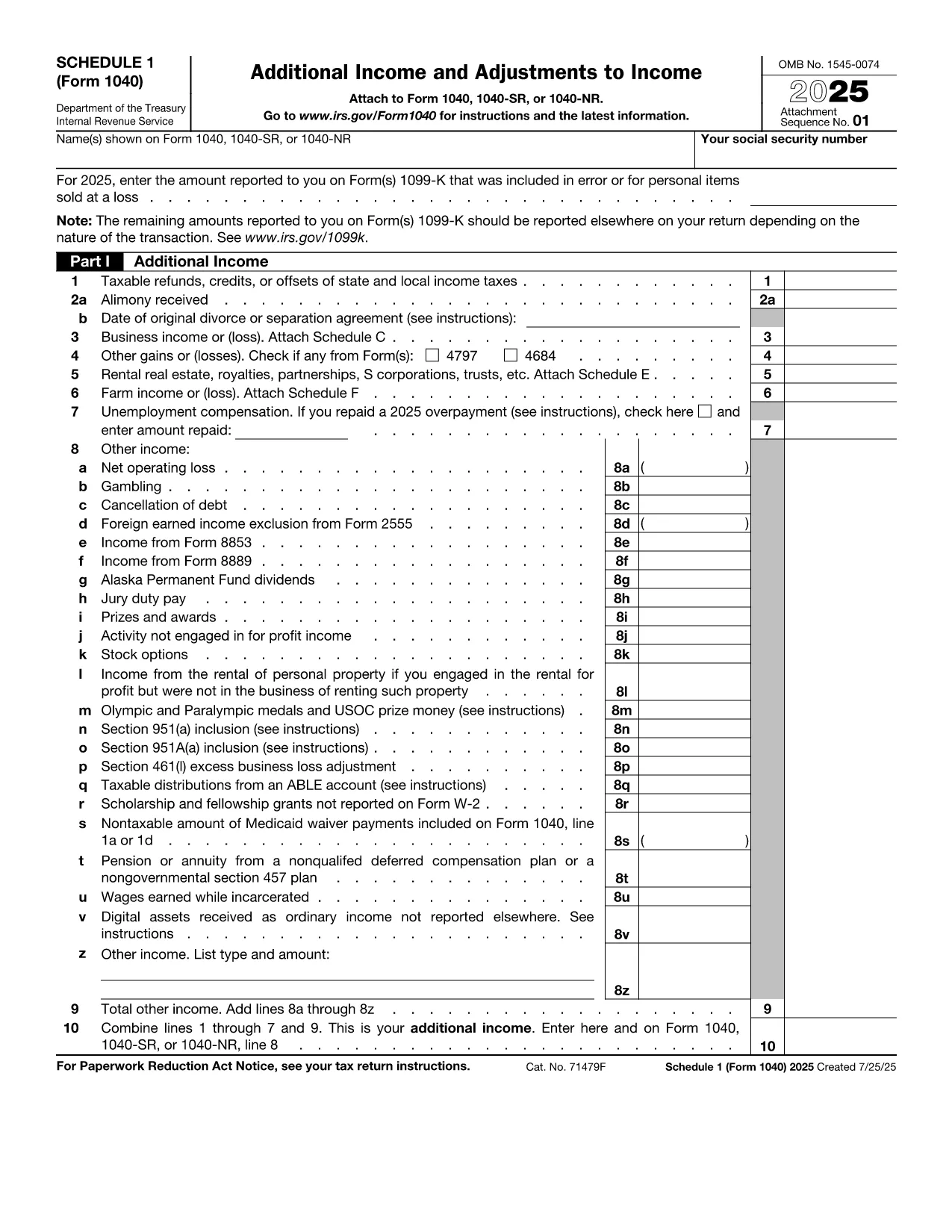
The IRS Form 1040 Schedule 1 is an essential supplement to the main U.S. Individual Income Tax Return (Form 1040). It captures additional income, adjustments to income, and certain credits that don’t fit on the primary form. With Formize’s fillable PDF, you can complete Schedule 1 directly in your browser—no extra software required.

What Is Form 1040 Schedule 1?

Schedule 1 (Form 1040) reports:

  • Business income or loss (self‑employment)
  • Rental real estate, royalties, partnerships, S corporations, trusts
  • Unemployment compensation, alimony received, and other income
  • Adjustments such as educator expenses, student loan interest, and IRA contributions

Filling this schedule accurately can lower your taxable income and increase your refund.

How to Complete the Fillable PDF on Formize

Follow the simple steps below to finish Schedule 1 online:

  1. Click the "Fill out this form" button on this page.
  2. Wait a few seconds while the Formize PDF Filler app loads the fillable version of Schedule 1.
  3. Enter your information in each field. The interface highlights required fields and validates numbers in real time.
  4. When you’re done, press Save & Download to get a completed PDF you can print or attach to your electronic filing.

Common Mistakes to Avoid

Even with a fillable form, errors can happen. Keep an eye out for these frequent pitfalls:

  • Leaving required fields blank – the Formize validator will flag them before you download.
  • Mismatching line numbers between Schedule 1 and the main Form 1040.
  • Using the wrong tax year version – always verify the year on the PDF header.
  • Forgetting signatures – the signature line must be signed by hand after printing.

Where to Submit Your Completed Form

After downloading the filled PDF, you can:

  • Attach it to your electronic filing through approved tax software.
  • Print, sign, and mail it with the rest of your Form 1040 package.

Make sure to keep a copy for your records.

Instrucțiuni

FAQ
  • Who must file Form 1040 Schedule 1?

    Anyone who has additional income, adjustments, or credits not reported on the main Form 1040 must attach Schedule 1. This includes self‑employment income, unemployment compensation, and certain deductions.

  • Can I file Schedule 1 electronically?

    Yes. Most tax software accepts the filled PDF as part of an electronic submission. Ensure you sign the final Form 1040 by hand after printing, if required.

  • What is the deadline for filing Schedule 1?

    Schedule 1 follows the same deadline as Form 1040 – typically April 15 of the year following the tax year, with extensions available until October 15.

  • Do I need a PDF reader to use the fillable form?

    No. The Formize filler runs entirely in your browser, so you don’t need Adobe Acrobat or any other PDF reader to complete the form.

  • Is the fillable PDF free to use?

    Yes. Formize provides the fillable version of Schedule 1 at no cost. You only pay if you choose premium services, which are optional.

  • What should I do if I make a mistake after downloading?

    You can reopen the saved PDF in any PDF editor, correct the fields, and re‑download. For major errors, it’s often easier to start a new fillable session.

CUM SĂ

Cum să completați Form 1040 Schedule 1 gratuit, online, în 4 pași simpli:

  1. 1
    Click the Fill‑out Button
    Press the "Fill out this form" button on the page to launch the Formize PDF Filler.
  2. 2
    Wait for the Filler to Load
    A short loading screen appears while the fillable Schedule 1 PDF is prepared in the browser.
  3. 3
    Enter Your Information
    Complete each highlighted field. Required fields are marked with an asterisk and validated instantly.
  4. 4
    Save and Download
    When all data is entered, click "Save & Download" to obtain a completed PDF ready for printing or electronic filing.
Aplicația Formize PDF Filler
DESPRE

Formulare fiscale

Form 1040 Schedule 1 este unul dintre formularele fiscale care sunt documente utilizate pentru a raporta informații legate de taxe către autoritatea fiscală relevantă. Există diferite tipuri de formulare fiscale, inclusiv formulare fiscale federale, de stat și locale, care pot varia în funcție de circumstanțele și locația contribuabilului.

CARACTERISTICI

Filler PDF

Cel mai simplu mod de a completa Form 1040 Schedule 1 online

  • Completați rapid Form 1040 Schedule 1
    Căutați o modalitate de a completa rapid Form 1040 Schedule 1 online? Cu ajutorul nostru online gratuit de completare a formularelor PDF, veți ști cum să editați și să completați acest document pdf în mai puțin de un minut.
  • Editor PDF online ușor de utilizat
    Sătul de tipărirea fișierelor PDF pentru a le putea edita, înainte de a le rescana și a le trimite înapoi? Editați documente PDF gratuit online. Utilizați editorul nostru online de pdf pentru a economisi timp și hârtie.
  • Instrumente grozave, toate platformele
    Vă întrebați cum să completați Form 1040 Schedule 1 pe un Mac sau poate cum să utilizați un fișier PDF gratuit? Instrumentele noastre PDF online funcționează pe toate platformele.
  • Stocare securizată a fișierelor
    Fișierele „Form 1040 Schedule 1” finalizate sunt stocate într-o bază de date securizată gestionată de Amazon Cloud hosting. Puteți șterge oricând fișierele din sistemul nostru. În orice caz, aceste fișiere sunt șterse automat după 24 de ore.
  • Chat cu Form 1040 Schedule 1
    Conversați cu „Form 1040 Schedule 1” pe Chatize, care este un asistent de citire PDF gratuit. Puneți întrebări și obțineți răspunsuri de la „Form 1040 Schedule 1”. Doar faceți clic pe butonul Conversați cu documentul de mai sus.

Ștergeți sesiunea de umplere

Ștergeți sesiunea de umplere selectată? În acest caz, progresul dumneavoastră în completarea formularului se va pierde.

Ștergeți sesiunea de editare

Ștergeți sesiunea de editare selectată? În acest caz, progresul dvs. în crearea și editarea formularului se va pierde.