
Selecteaza limba

IRS Form 13909 – Tax‑Exempt Organization Complaint (Fillable PDF)

  1. Țară STATELE UNITE ALE AMERICII
  2. Limba Engleză
  3. Activitate Impozite
  4. Departament Serviciul de Venituri Interne
IRS Form 13909 – Tax‑Exempt Organization Complaint (Fillable PDF)

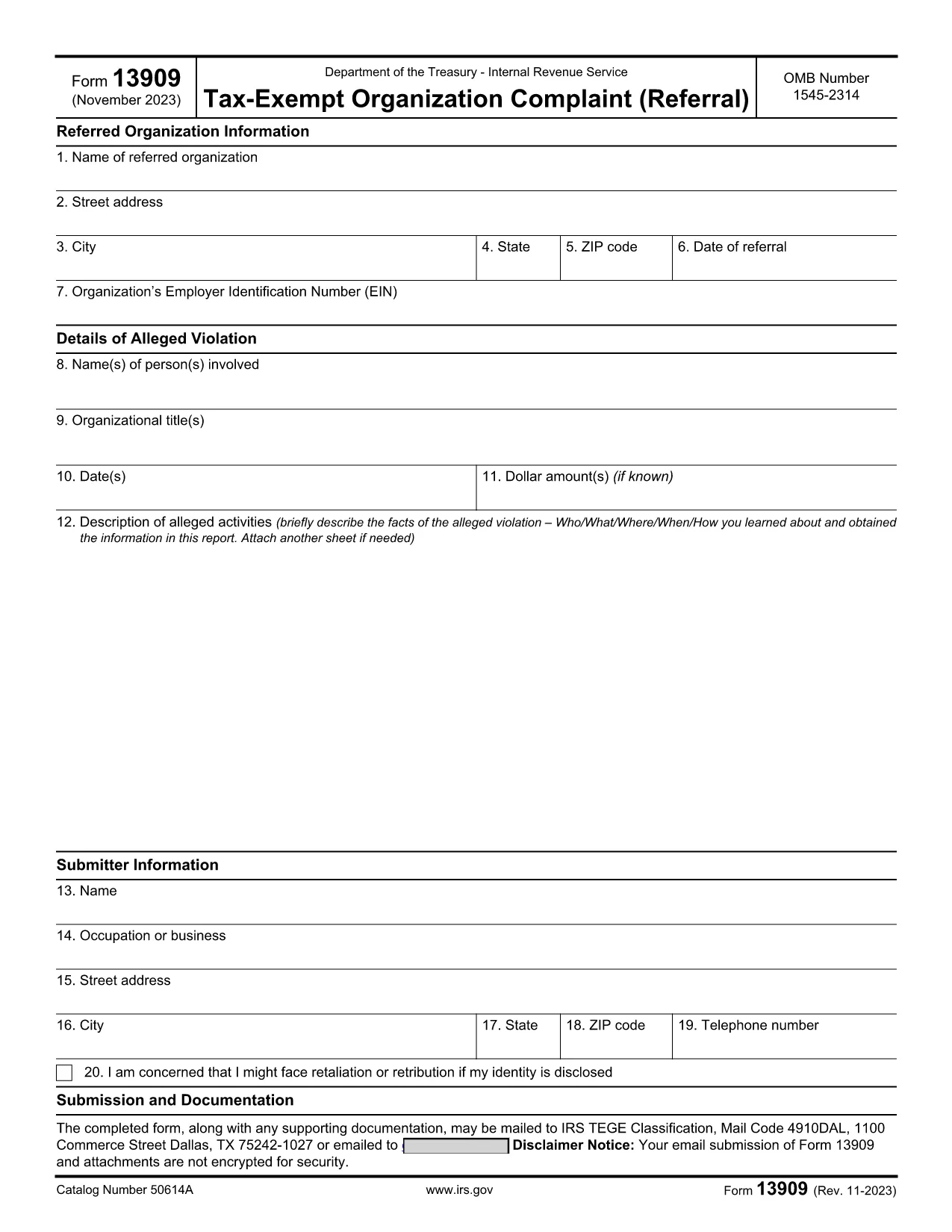
IRS Form 13909 is the official Tax‑Exempt Organization Complaint (Referral) used to report alleged violations of federal tax law by nonprofit charities, churches, or other tax‑exempt entities. The form is completely fillable PDF, allowing you to provide detailed information about the organization, the alleged misconduct, and your own contact details (or remain anonymous).

What Is IRS Form 13909?

This voluntary form collects three main sections:

  • Referred Organization Information – name, address, EIN, and date of referral.
  • Details of Alleged Violation – persons involved, dates, dollar amounts, and a narrative description.
  • Submitter Information – your name, address, and optional whistleblower details.

Submitting accurate information helps the Internal Revenue Service investigate potential abuse of tax‑exempt status.

How to Fill Out the Form Online with Formize

Instead of downloading the PDF and opening it in a separate editor, simply click the "Fill out this form" button on this page. The Formize PDF Filler app will load in your browser, providing a smooth, mobile‑friendly experience.

  1. Click the Fill Out Button – the Formize app opens instantly.
  2. Enter the required data in each field. The app validates dates and EIN formats for you.
  3. Attach supporting documents (PDF, JPG, PNG) if you have evidence.
  4. Review the completed form using the preview feature.
  5. Submit or download – you can email the filled form directly to the IRS or download a copy for your records.

Common Mistakes to Avoid

  • Leaving required fields blank – the IRS may reject the complaint.
  • Providing an incorrect EIN – double‑check the nine‑digit number.
  • Submitting vague descriptions – be as specific as possible about dates, amounts, and actions.
  • Forgetting to sign the form – electronic signatures are accepted in the Formize app.

Where to Submit the Completed Form

After you finish, you can:

  • Email the PDF to exempt@irs.gov.
  • Mail a printed copy to the address listed in the form instructions.
  • Use the online submission link provided by the Formize app (if available).

Keep a copy of the completed form and any supporting documentation for your records.

FAQ
  • Can I submit IRS Form 13909 anonymously?

    Yes. If you are concerned about retaliation, you may write “Anonymous” in the submitter name field. However, providing contact information can help the IRS follow up if needed.

  • Do I need to attach evidence when filing Form 13909?

    Attaching supporting documents (receipts, emails, contracts) strengthens your complaint but is not mandatory. Include anything that clearly illustrates the alleged violation.

  • Is there a filing fee for Form 13909?

    No. Filing a Tax‑Exempt Organization Complaint is completely free.

  • How long does the IRS take to respond?

    The IRS will send an acknowledgment within 30 days. An investigation timeline varies depending on the complexity of the case.

  • Can I claim a whistleblower reward for this form?

    Potential rewards are handled on a separate form (IRS Form 211). If you believe you qualify, you can file Form 211 after submitting Form 13909.

  • What if I make a mistake on the form?

    You can correct errors by reopening the fillable PDF in Formize, fixing the fields, and resubmitting. Do not send multiple versions unless instructed.

  • Is the Formize filler compatible with mobile devices?

    Yes. The Formize PDF Filler is responsive and works on smartphones, tablets, and desktop browsers.

  • Where can I find the official PDF version of Form 13909?

    The official IRS version is available at https://www.irs.gov/pub/irs-pdf/f13909.pdf.

CUM SĂ

Cum să completați IRS Form 13909 gratuit, online, în 5 pași simpli:

  1. 1
    Open the Formize PDF Filler
    Click the “Fill out this form” button on the page. The Formize app loads directly in your browser, no download needed.
  2. 2
    Enter Organization Details
    Fill in the name, address, EIN, and date of referral for the tax‑exempt organization you are reporting.
  3. 3
    Describe the Alleged Violation
    Provide names, dates, dollar amounts, and a clear narrative of the misconduct. Attach any supporting documents.
  4. 4
    Add Your Information (Optional)
    Enter your contact details or write “Anonymous” if you prefer not to be identified.
  5. 5
    Review, Sign, and Submit
    Use the preview feature, add an electronic signature, then either email the completed PDF to the IRS or download it for mailing.
Aplicația Formize PDF Filler
DESPRE

Formulare fiscale

IRS Form 13909 este unul dintre formularele fiscale care sunt documente utilizate pentru a raporta informații legate de taxe către autoritatea fiscală relevantă. Există diferite tipuri de formulare fiscale, inclusiv formulare fiscale federale, de stat și locale, care pot varia în funcție de circumstanțele și locația contribuabilului.

CARACTERISTICI

Filler PDF

Cel mai simplu mod de a completa IRS Form 13909 online

  • Completați rapid IRS Form 13909
    Căutați o modalitate de a completa rapid IRS Form 13909 online? Cu ajutorul nostru online gratuit de completare a formularelor PDF, veți ști cum să editați și să completați acest document pdf în mai puțin de un minut.
  • Editor PDF online ușor de utilizat
    Sătul de tipărirea fișierelor PDF pentru a le putea edita, înainte de a le rescana și a le trimite înapoi? Editați documente PDF gratuit online. Utilizați editorul nostru online de pdf pentru a economisi timp și hârtie.
  • Instrumente grozave, toate platformele
    Vă întrebați cum să completați IRS Form 13909 pe un Mac sau poate cum să utilizați un fișier PDF gratuit? Instrumentele noastre PDF online funcționează pe toate platformele.
  • Stocare securizată a fișierelor
    Fișierele „IRS Form 13909” finalizate sunt stocate într-o bază de date securizată gestionată de Amazon Cloud hosting. Puteți șterge oricând fișierele din sistemul nostru. În orice caz, aceste fișiere sunt șterse automat după 24 de ore.
  • Chat cu IRS Form 13909
    Conversați cu „IRS Form 13909” pe Chatize, care este un asistent de citire PDF gratuit. Puneți întrebări și obțineți răspunsuri de la „IRS Form 13909”. Doar faceți clic pe butonul Conversați cu documentul de mai sus.

Ștergeți sesiunea de umplere

Ștergeți sesiunea de umplere selectată? În acest caz, progresul dumneavoastră în completarea formularului se va pierde.

Ștergeți sesiunea de editare

Ștergeți sesiunea de editare selectată? În acest caz, progresul dvs. în crearea și editarea formularului se va pierde.