
Selecteaza limba

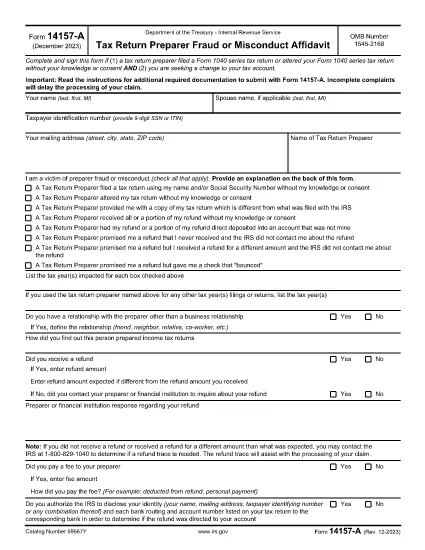
IRS Form 14157‑A (SP) – Fillable PDF

  1. Țară STATELE UNITE ALE AMERICII
  2. Limba Spaniolă
  3. Activitate Impozite
  4. Departament Serviciul de Venituri Interne
IRS Form 14157‑A (SP) – Fillable PDF

Form 14157‑A (SP) is the IRS’s official affidavit used to report fraud, misconduct, or other serious issues involving a tax return preparer. The “(SP)” designation indicates the Spanish‑language version of the form, but the same filing requirements apply to all taxpayers.

What Is Form 14157‑A (SP)?

This form must be submitted together with Form 14157 and any supporting documentation referenced in the instructions. It provides the IRS with detailed information about the alleged misconduct, allowing the agency to investigate and take corrective action.

How to Complete the Fillable PDF on Formize

Instead of downloading the PDF and opening it in a separate editor, you can fill it out directly on our site:

  1. Click the **"Fill out this form"** button below.
  2. Wait a few seconds while the Formize PDF Filler app loads.
  3. Enter all required information in the highlighted fields.
  4. Upload or draw your electronic signature in the signature field.
  5. Review the completed form for accuracy, then click **Submit** to download the signed PDF.

Common Mistakes to Avoid

  • Leaving fields blank: Every required field must be completed; otherwise the IRS will reject the form.
  • Incorrect SSN or EIN: Double‑check numbers to prevent processing delays.
  • Missing signature: The form must be signed under penalty of perjury. Use the built‑in e‑signature tool.
  • Failing to attach supporting documents: Include copies of any notices, letters, or evidence referenced in the affidavit.

Where to Send Your Completed Form

After you download the signed PDF, mail it to the address listed in the official Form 14157‑A instructions. The address varies by state, so be sure to consult the latest IRS guidance before sending.

Key Keywords for Quick Reference

Use these terms when searching for help or additional resources:

  • IRS Form 14157‑A
  • tax preparer fraud affidavit
  • fill‑able 14157‑A PDF
  • Spanish form 14157‑A
  • IRS fraud reporting form
  • electronic signature IRS form

Ready to start? Click the button below to open the fillable version instantly.

FAQ
  • Do I need to file Form 14157‑A if I’m not sure the preparer committed fraud?

    Only file the form when you have concrete evidence or a strong belief that a preparer engaged in fraud, misconduct, or willful non‑compliance. Unsubstantiated claims may delay investigations.

  • Can I submit the form electronically?

    The IRS currently requires a printed, signed copy mailed to the appropriate address. However, you can use the fillable PDF to ensure accuracy before printing.

  • What supporting documents should I attach?

    Attach any IRS notices, correspondence, receipts, or other evidence that supports your claim. Clearly label each attachment.

  • Is the Spanish version (SP) any different from the English version?

    The content and required information are identical; only the language of the instructions and field labels changes.

  • How long does the IRS take to respond?

    Response times vary. The IRS typically acknowledges receipt within 30 days, but investigations can take several months depending on complexity.

  • What penalties exist for filing a false affidavit?

    Providing false information under penalty of perjury can result in criminal charges, fines, and possible imprisonment.

  • Do I need a tax professional to help me fill out Form 14157‑A?

    While not required, a tax professional can help ensure accuracy, especially if the case involves complex issues.

CUM SĂ

Cum să completați IRS Form 14157-A gratuit, online, în 5 pași simpli:

  1. 1
    Open the Fillable Form
    Click the "Fill out this form" button on the page. The Formize PDF Filler will open in a new window.
  2. 2
    Load the Form
    Wait a few seconds while the fillable PDF loads completely.
  3. 3
    Enter Your Information
    Complete each highlighted field with accurate data, including SSN, tax year, and details of the alleged misconduct.
  4. 4
    Add an Electronic Signature
    Use the built‑in e‑signature tool to sign under penalty of perjury.
  5. 5
    Download and Submit
    Review the form, then click "Submit" to download the signed PDF. Mail it to the IRS address shown in the official instructions.
Aplicația Formize PDF Filler
DESPRE

Formulare fiscale

IRS Form 14157-A este unul dintre formularele fiscale care sunt documente utilizate pentru a raporta informații legate de taxe către autoritatea fiscală relevantă. Există diferite tipuri de formulare fiscale, inclusiv formulare fiscale federale, de stat și locale, care pot varia în funcție de circumstanțele și locația contribuabilului.

CARACTERISTICI

Filler PDF

Cel mai simplu mod de a completa IRS Form 14157-A online

  • Completați rapid IRS Form 14157-A
    Căutați o modalitate de a completa rapid IRS Form 14157-A online? Cu ajutorul nostru online gratuit de completare a formularelor PDF, veți ști cum să editați și să completați acest document pdf în mai puțin de un minut.
  • Editor PDF online ușor de utilizat
    Sătul de tipărirea fișierelor PDF pentru a le putea edita, înainte de a le rescana și a le trimite înapoi? Editați documente PDF gratuit online. Utilizați editorul nostru online de pdf pentru a economisi timp și hârtie.
  • Instrumente grozave, toate platformele
    Vă întrebați cum să completați IRS Form 14157-A pe un Mac sau poate cum să utilizați un fișier PDF gratuit? Instrumentele noastre PDF online funcționează pe toate platformele.
  • Stocare securizată a fișierelor
    Fișierele „IRS Form 14157-A” finalizate sunt stocate într-o bază de date securizată gestionată de Amazon Cloud hosting. Puteți șterge oricând fișierele din sistemul nostru. În orice caz, aceste fișiere sunt șterse automat după 24 de ore.
  • Chat cu IRS Form 14157-A
    Conversați cu „IRS Form 14157-A” pe Chatize, care este un asistent de citire PDF gratuit. Puneți întrebări și obțineți răspunsuri de la „IRS Form 14157-A”. Doar faceți clic pe butonul Conversați cu documentul de mai sus.

Ștergeți sesiunea de umplere

Ștergeți sesiunea de umplere selectată? În acest caz, progresul dumneavoastră în completarea formularului se va pierde.

Ștergeți sesiunea de editare

Ștergeți sesiunea de editare selectată? În acest caz, progresul dvs. în crearea și editarea formularului se va pierde.