
Selecteaza limba

IRS Form 3911 – Fillable PDF for Lost Refund Trace

  1. Țară STATELE UNITE ALE AMERICII
  2. Limba Engleză
  3. Activitate Impozite
  4. Departament Serviciul de Venituri Interne
IRS Form 3911 – Fillable PDF for Lost Refund Trace

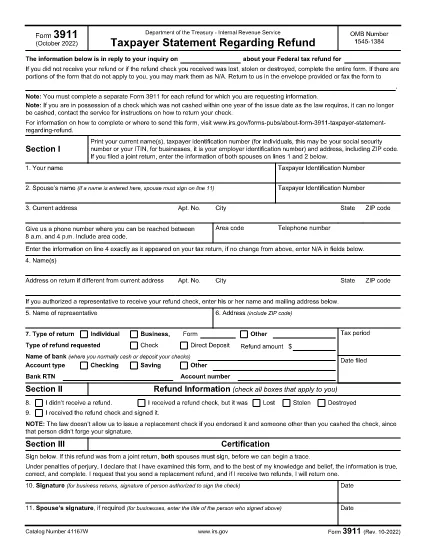
IRS Form 3911, titled “Taxpayer Statement Regarding Refund,” is the official document you use when a tax refund check is lost, stolen or never received. The form lets the IRS trace the payment and issue a replacement.

What Is IRS Form 3911?

This one‑page form collects your personal information, details about the original tax return, and the refund amount. It is required for each missing refund.

How to Fill Out Form 3911 Online

Instead of downloading a static PDF, click the “Fill out this form” button on this page. The Formize PDF Filler loads the fillable version instantly. Follow these steps:

  1. Enter your name, Social Security Number (or EIN/ITIN), and mailing address.
  2. Provide the tax year, type of return (1040, 1040‑SR, etc.), and the exact refund amount.
  3. Indicate whether the original refund was a check or direct deposit.
  4. If a representative will receive the check, fill in their details.
  5. Sign and date the form in Section III.

Common Mistakes to Avoid

  • Leaving any required field blank – the IRS will reject the submission.
  • Using an outdated address – make sure the address matches the one on your most recent return.
  • Submitting one form for multiple missing refunds – file a separate Form 3911 for each refund.
  • Signing only the taxpayer’s line when filing jointly – both spouses must sign.

Where to Send the Completed Form

After you save the completed PDF, mail it to the address listed in the form’s instructions for your state. If you have a pre‑addressed IRS envelope, use it; otherwise, send it to the IRS Processing Center for “Taxpayer Statement Regarding Refund.”

FAQs About Form 3911

Quick answers to the most common questions are listed below.

FAQ
  • When should I file IRS Form 3911?

    File Form 3911 as soon as you know a refund check was lost, stolen, never received, or returned by the post office. The IRS cannot trace a refund without this form.

  • Do I need to file a separate Form 3911 for each missing refund?

    Yes. Each missing check requires its own Form 3911, even if the refunds are from different tax years.

  • Can I file Form 3911 electronically?

    Form 3911 must be printed, signed, and mailed to the IRS. The fillable PDF makes completing it easier, but electronic submission is not accepted.

  • What if my address changed after I filed my return?

    Enter the new address in Section I and also write the address as it appears on your original tax return in Line 4. This helps the IRS locate the refund.

  • How long does the IRS take to process a refund trace?

    Processing typically takes 30–45 days after the IRS receives your completed Form 3911, but times can vary based on workload and the complexity of the case.

  • Do I need to include supporting documents?

    Usually a copy of your most recent tax return and a photo ID are helpful but not required unless the IRS requests them.

  • What if the original check was cashed fraudulently?

    Indicate that situation in Section II and provide any relevant details. The IRS will investigate and may issue a replacement refund.

CUM SĂ

Cum să completați IRS Form 3911 gratuit, online, în 4 pași simpli:

  1. 1
    Open the Fillable Form
    Click the "Fill out this form" button on this page. The Formize PDF Filler app will load the fillable version of IRS Form 3911 directly in your browser.
  2. 2
    Enter Your Personal Information
    Type your name, Social Security Number (or EIN/ITIN), mailing address, and phone number in Section I.
  3. 3
    Provide Refund Details
    In Section II, select the tax year, indicate the type of return, enter the refund amount, and specify whether the original refund was a check or direct deposit.
  4. 4
    Sign and Submit
    Complete Section III with your signature (and spouse’s signature if filing jointly), save the PDF, and mail it to the address shown in the form’s instructions.
Aplicația Formize PDF Filler
DESPRE

Formulare fiscale

IRS Form 3911 este unul dintre formularele fiscale care sunt documente utilizate pentru a raporta informații legate de taxe către autoritatea fiscală relevantă. Există diferite tipuri de formulare fiscale, inclusiv formulare fiscale federale, de stat și locale, care pot varia în funcție de circumstanțele și locația contribuabilului.

CARACTERISTICI

Filler PDF

Cel mai simplu mod de a completa IRS Form 3911 online

  • Completați rapid IRS Form 3911
    Căutați o modalitate de a completa rapid IRS Form 3911 online? Cu ajutorul nostru online gratuit de completare a formularelor PDF, veți ști cum să editați și să completați acest document pdf în mai puțin de un minut.
  • Editor PDF online ușor de utilizat
    Sătul de tipărirea fișierelor PDF pentru a le putea edita, înainte de a le rescana și a le trimite înapoi? Editați documente PDF gratuit online. Utilizați editorul nostru online de pdf pentru a economisi timp și hârtie.
  • Instrumente grozave, toate platformele
    Vă întrebați cum să completați IRS Form 3911 pe un Mac sau poate cum să utilizați un fișier PDF gratuit? Instrumentele noastre PDF online funcționează pe toate platformele.
  • Stocare securizată a fișierelor
    Fișierele „IRS Form 3911” finalizate sunt stocate într-o bază de date securizată gestionată de Amazon Cloud hosting. Puteți șterge oricând fișierele din sistemul nostru. În orice caz, aceste fișiere sunt șterse automat după 24 de ore.
  • Chat cu IRS Form 3911
    Conversați cu „IRS Form 3911” pe Chatize, care este un asistent de citire PDF gratuit. Puneți întrebări și obțineți răspunsuri de la „IRS Form 3911”. Doar faceți clic pe butonul Conversați cu documentul de mai sus.

Ștergeți sesiunea de umplere

Ștergeți sesiunea de umplere selectată? În acest caz, progresul dumneavoastră în completarea formularului se va pierde.

Ștergeți sesiunea de editare

Ștergeți sesiunea de editare selectată? În acest caz, progresul dvs. în crearea și editarea formularului se va pierde.