
Selecteaza limba

Form 6729-D – Fillable PDF for VITA/TCE Site Review

  1. Țară STATELE UNITE ALE AMERICII
  2. Limba Engleză
  3. Activitate Impozite
  4. Departament Serviciul de Venituri Interne
Form 6729-D – Fillable PDF for VITA/TCE Site Review

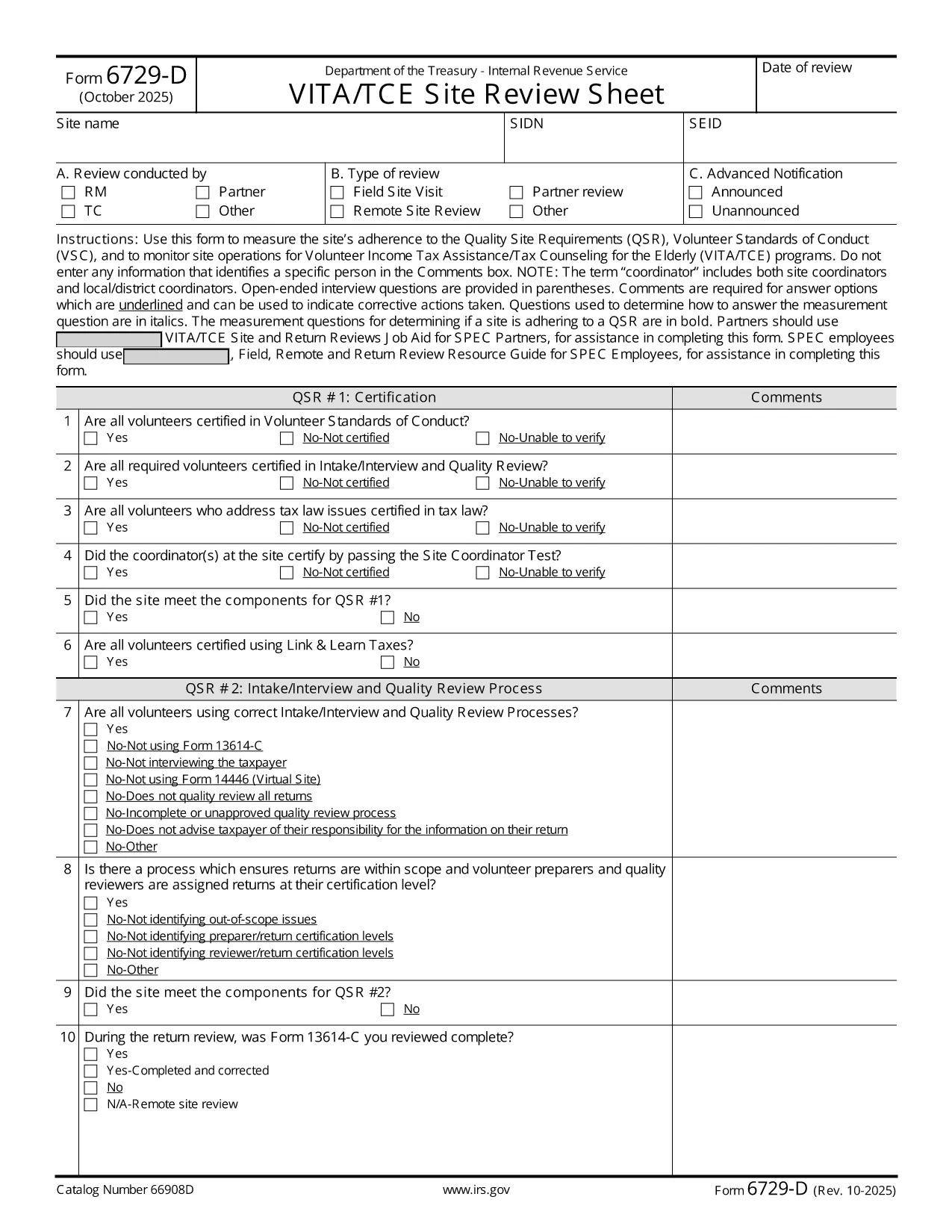
The IRS Form 6729-D (Site Review Sheet) is used by Volunteer Income Tax Assistance (VITA) and Tax Counseling for the Elderly (TCE) programs to evaluate a site’s compliance with the Quality Site Requirements (QSR) and Volunteer Standards of Conduct (VSC). This fillable PDF version lets you complete the form instantly in your browser—no extra PDF editor required.

What Is Form 6729-D?

Form 6729-D records the results of a site review, covering:

  • Adherence to Quality Site Requirements (QSR)
  • Volunteer Standards of Conduct (VSC)
  • Operational observations for VITA/TCE sites
  • Comments from the site coordinator (without personal identifiers)

The form is mandatory for any VITA/TCE location that receives IRS funding or oversight.

How to Complete the Form Online

Instead of downloading the PDF and opening a separate editor, simply click the "Fill out this form" button on this page. Our Formize PDF Filler app will load the document directly in your browser. Follow these steps:

  1. Click the blue Fill out this form button.
  2. Wait a few seconds while the Formize PDF Filler loads.
  3. Enter the required information in each field. Required fields are marked with an asterisk (*).
  4. Use the Comments box for observations—avoid entering names or personal data.
  5. When finished, click Save & Download to get a completed copy, or click Submit if your organization has integrated a secure upload.

Common Mistakes to Avoid

  • Including personal identifiers in the Comments section – the IRS prohibits names, SSNs, or any data that could identify a specific volunteer or client.
  • Leaving required fields blank – an asterisk (*) indicates a mandatory entry; the form will not save until these are completed.
  • Using an outdated version – always verify the revision date (current revision is Rev. 10‑2025).
  • Incorrect date format – use MM/DD/YYYY as shown in the example field.

Where to Submit the Completed Form

After saving the filled PDF, email it to your regional VITA/TCE coordinator or upload it through your organization’s secure portal. Keep a copy for your records in case the IRS requests follow‑up documentation.

Need more guidance? Review the IRS instructions linked below or contact your local VITA/TCE supervisor.

FAQ
  • Do I need Adobe Acrobat to fill Form 6729-D?

    No. The Formize PDF Filler works in any modern browser, so you can complete the form without installing additional software.

  • Can I edit the form after I download it?

    Yes, you can reopen the saved PDF in the Formize filler or any compatible PDF editor, but it’s easier to make changes before downloading.

  • What revision of Form 6729-D is this?

    The PDF linked is the latest revision, Rev. 10‑2025, as published by the IRS.

  • Is it okay to type a volunteer’s name in the Comments box?

    No. The IRS explicitly forbids entering any personal identifiers, including names, in the Comments section.

  • Where should I send the completed form?

    Email the saved PDF to your regional VITA/TCE coordinator or upload it via your organization’s secure portal, following your local procedures.

  • What if I make a mistake after submitting?

    Contact your coordinator immediately. You can submit a corrected version of the form with a brief note explaining the change.

  • Is there a paper version of Form 6729-D?

    Yes, the IRS provides a printable PDF, but the fillable version saves time and reduces errors.

  • Do I need to sign the form electronically?

    If your organization requires an electronic signature, use the signature field provided in the filler. Otherwise, a printed signature after printing is acceptable.

CUM SĂ

Cum să completați Form 6729-D gratuit, online, în 3 pași simpli:

  1. 1
    Open the Fillable Form
    Click the blue “Fill out this form” button on the page. The Formize PDF Filler loads the Form 6729-D directly in your browser.
  2. 2
    Enter Required Information
    Complete each field marked with an asterisk (*). Use the Comments box for observations, but do not include personal identifiers.
  3. 3
    Save or Submit
    When all fields are filled, click “Save & Download” to keep a copy, or click “Submit” if your organization provides a secure upload option.
Aplicația Formize PDF Filler
DESPRE

Formulare fiscale

Form 6729-D este unul dintre formularele fiscale care sunt documente utilizate pentru a raporta informații legate de taxe către autoritatea fiscală relevantă. Există diferite tipuri de formulare fiscale, inclusiv formulare fiscale federale, de stat și locale, care pot varia în funcție de circumstanțele și locația contribuabilului.

CARACTERISTICI

Filler PDF

Cel mai simplu mod de a completa Form 6729-D online

  • Completați rapid Form 6729-D
    Căutați o modalitate de a completa rapid Form 6729-D online? Cu ajutorul nostru online gratuit de completare a formularelor PDF, veți ști cum să editați și să completați acest document pdf în mai puțin de un minut.
  • Editor PDF online ușor de utilizat
    Sătul de tipărirea fișierelor PDF pentru a le putea edita, înainte de a le rescana și a le trimite înapoi? Editați documente PDF gratuit online. Utilizați editorul nostru online de pdf pentru a economisi timp și hârtie.
  • Instrumente grozave, toate platformele
    Vă întrebați cum să completați Form 6729-D pe un Mac sau poate cum să utilizați un fișier PDF gratuit? Instrumentele noastre PDF online funcționează pe toate platformele.
  • Stocare securizată a fișierelor
    Fișierele „Form 6729-D” finalizate sunt stocate într-o bază de date securizată gestionată de Amazon Cloud hosting. Puteți șterge oricând fișierele din sistemul nostru. În orice caz, aceste fișiere sunt șterse automat după 24 de ore.
  • Chat cu Form 6729-D
    Conversați cu „Form 6729-D” pe Chatize, care este un asistent de citire PDF gratuit. Puneți întrebări și obțineți răspunsuri de la „Form 6729-D”. Doar faceți clic pe butonul Conversați cu documentul de mai sus.

Ștergeți sesiunea de umplere

Ștergeți sesiunea de umplere selectată? În acest caz, progresul dumneavoastră în completarea formularului se va pierde.

Ștergeți sesiunea de editare

Ștergeți sesiunea de editare selectată? În acest caz, progresul dvs. în crearea și editarea formularului se va pierde.