
Selecteaza limba

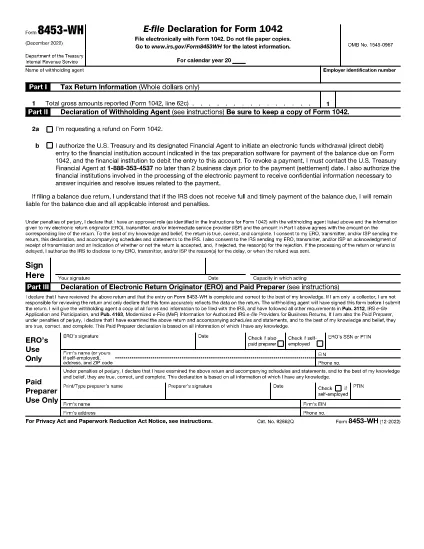
Form 8453‑WH – Fillable PDF for Withholding Agent Signature

  1. Țară STATELE UNITE ALE AMERICII
  2. Limba Engleză
  3. Activitate Impozite
  4. Departament Serviciul de Venituri Interne
Form 8453‑WH – Fillable PDF for Withholding Agent Signature

Form 8453‑WH is the “Authorization for Withholding Agent to Sign a 1042 Return” used when a withholding agent files a Form 1042 electronically. The form authenticates the return, authorizes the electronic return originator (ERO), and records the taxpayer’s signature.

What Is Form 8453‑WH?

This IRS form is required when a withholding agent files a TIP (Tax Information Return) through an ERO and prefers to sign the return with a personal identification number (PIN) rather than a handwritten signature. It replaces the paper signature on the 1042 return and ensures compliance with e‑file rules.

How to Complete the Fillable PDF

Our online Formize PDF Filler lets you fill out Form 8453‑WH without downloading a separate editor. Follow the simple steps below.

Common Mistakes & Tips

  • Do not leave the PIN field blank – a valid PIN is required for e‑signature.
  • Verify that the taxpayer’s name and EIN match the information on Form 1042.
  • Double‑check the date format (MM/DD/YYYY) before submitting.
  • Save a copy of the completed PDF for your records.

Where to Submit the Completed Form

After you finish the form in the Formize filler, download the signed PDF and upload it to your ERO portal or attach it to the electronic 1042 filing as instructed by the IRS.

FAQ
  • Who must file Form 8453‑WH?

    Any withholding agent who files a Form 1042 TIP return electronically and needs to provide an authorized signature using a PIN must submit Form 8453‑WH.

  • Can I sign Form 8453‑WH with a handwritten signature?

    When filing electronically, the IRS requires a PIN‑based e‑signature. A handwritten signature is only accepted on paper filings.

  • Is there a fee to download the fillable PDF?

    No. The fillable PDF for Form 8453‑WH is free to download and complete using Formize.

  • What if I make a mistake after saving?

    Open the saved PDF again in the Formize filler, correct the error, and re‑save. Keep the latest version for submission.

  • Do I need to print the form after filling it online?

    Printing is optional. Most EROs accept the electronic PDF directly. Print only if your specific filing process requires a hard copy.

  • How long is the PIN valid for the e‑signature?

    The PIN is valid for the specific tax year’s filing. It cannot be reused for another year’s return.

  • Where can I find more information about Form 8453‑WH?

    Visit the official IRS page linked below or consult the IRS Publication 1635 for detailed e‑file instructions.

CUM SĂ

Cum să completați Form 8453‑WH gratuit, online, în 5 pași simpli:

  1. 1
    Step 1 – Click “Fill out this form”
    On the page, press the bright “Fill out this form” button. The Formize PDF Filler app will open in a new tab.
  2. 2
    Step 2 – Wait for the filler to load
    The filler loads the fillable version of Form 8453‑WH automatically. A loading bar confirms when the document is ready.
  3. 3
    Step 3 – Complete each field
    Enter the taxpayer’s name, EIN, PIN, and any required dates. All fields are interactive; simply type or select from the calendar.
  4. 4
    Step 4 – Review and save
    Use the “Preview” button to double‑check your entries. When satisfied, click “Save PDF” to download the signed form.
  5. 5
    Step 5 – Submit to your ERO
    Upload the saved PDF to your electronic return originator’s portal or attach it to the e‑file submission as instructed by the IRS.
Aplicația Formize PDF Filler
DESPRE

Formulare fiscale

Form 8453‑WH este unul dintre formularele fiscale care sunt documente utilizate pentru a raporta informații legate de taxe către autoritatea fiscală relevantă. Există diferite tipuri de formulare fiscale, inclusiv formulare fiscale federale, de stat și locale, care pot varia în funcție de circumstanțele și locația contribuabilului.

CARACTERISTICI

Filler PDF

Cel mai simplu mod de a completa Form 8453‑WH online

  • Completați rapid Form 8453‑WH
    Căutați o modalitate de a completa rapid Form 8453‑WH online? Cu ajutorul nostru online gratuit de completare a formularelor PDF, veți ști cum să editați și să completați acest document pdf în mai puțin de un minut.
  • Editor PDF online ușor de utilizat
    Sătul de tipărirea fișierelor PDF pentru a le putea edita, înainte de a le rescana și a le trimite înapoi? Editați documente PDF gratuit online. Utilizați editorul nostru online de pdf pentru a economisi timp și hârtie.
  • Instrumente grozave, toate platformele
    Vă întrebați cum să completați Form 8453‑WH pe un Mac sau poate cum să utilizați un fișier PDF gratuit? Instrumentele noastre PDF online funcționează pe toate platformele.
  • Stocare securizată a fișierelor
    Fișierele „Form 8453‑WH” finalizate sunt stocate într-o bază de date securizată gestionată de Amazon Cloud hosting. Puteți șterge oricând fișierele din sistemul nostru. În orice caz, aceste fișiere sunt șterse automat după 24 de ore.
  • Chat cu Form 8453‑WH
    Conversați cu „Form 8453‑WH” pe Chatize, care este un asistent de citire PDF gratuit. Puneți întrebări și obțineți răspunsuri de la „Form 8453‑WH”. Doar faceți clic pe butonul Conversați cu documentul de mai sus.

Ștergeți sesiunea de umplere

Ștergeți sesiunea de umplere selectată? În acest caz, progresul dumneavoastră în completarea formularului se va pierde.

Ștergeți sesiunea de editare

Ștergeți sesiunea de editare selectată? În acest caz, progresul dvs. în crearea și editarea formularului se va pierde.