
Selecteaza limba

Download & Fill IRS Form 8892 (Gift Tax Extension)

  1. Țară STATELE UNITE ALE AMERICII
  2. Limba Engleză
  3. Activitate Impozite
  4. Departament Serviciul de Venituri Interne
Download & Fill IRS Form 8892 (Gift Tax Extension)

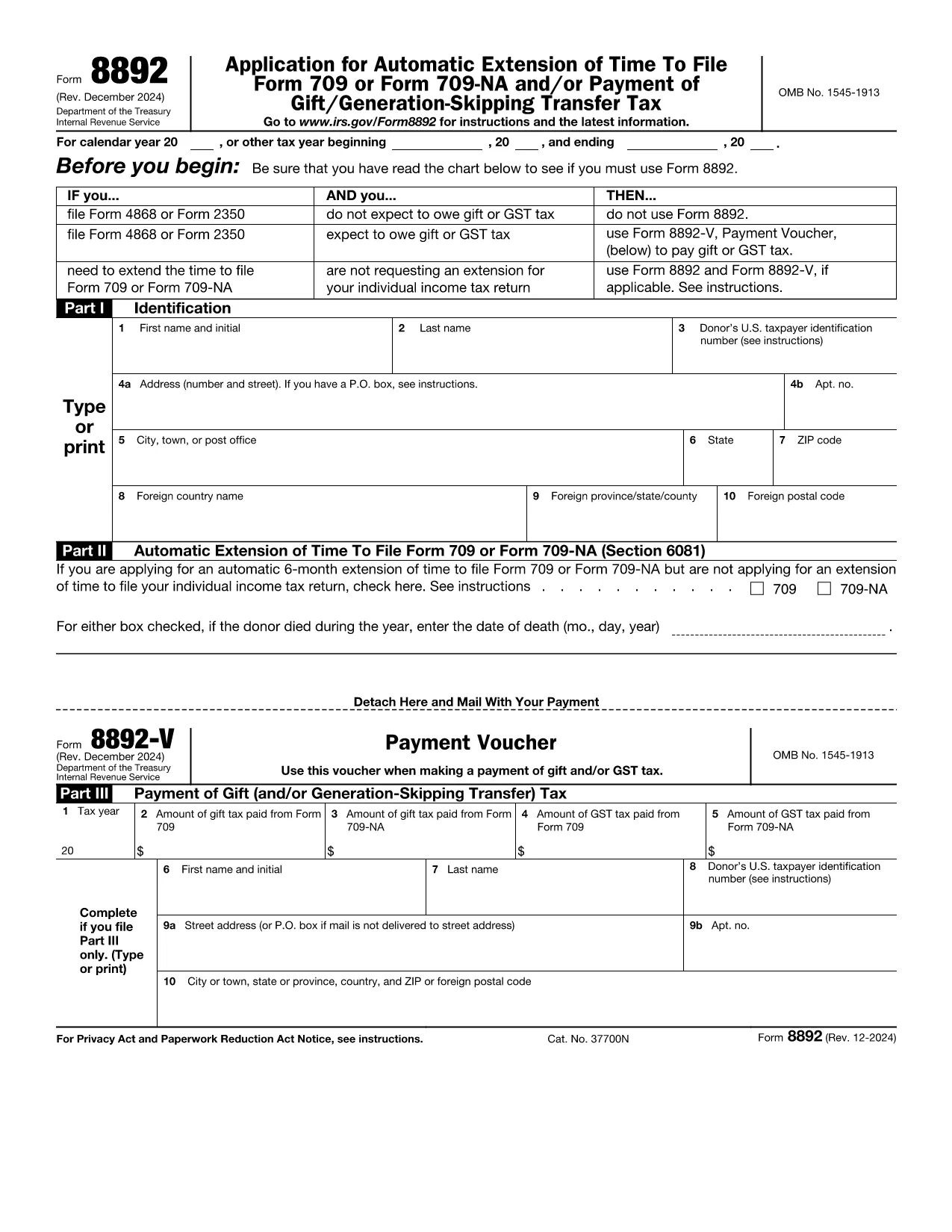
If you made a taxable gift that exceeds the annual exclusion, you may need to file IRS Form 709. When you need more time to file that return, Form 8892 lets you request an automatic six‑month extension.

When to Use Form 8892

Use Form 8892 only if you are filing an individual gift‑tax return (Form 709) and you are not already filing a general income‑tax extension (Form 4868 or Form 2350). The form is also required when you expect to owe gift or generation‑skipping transfer (GST) tax and need to make a payment with your extension request.

How to Complete Each Part of Form 8892

Part I – Identification
Enter your name, Social Security number, and mailing address exactly as they appear on your income‑tax return.

Part II – Automatic Extension (Section 6081)
Check the box to request a six‑month extension for Form 709. If the donor died during the tax year, provide the date of death in the format MM/DD/YYYY.

Part III – Payment of Gift (and/or GST) Tax
If you are making a payment with your extension, fill in the amount owed and attach Form 8892‑V (payment voucher). If no payment is required, you may leave this section blank.

Common Mistakes to Avoid

  • Leaving Part II unchecked – without this box checked the IRS will not grant an extension.
  • Using the wrong tax year on the form – double‑check the calendar year or fiscal year you are extending.
  • Failing to attach Form 8892‑V when a payment is due.
  • Submitting the form after the original due date – the request must be mailed or e‑filed by the original filing deadline.

How to Submit Your Extension Request

After completing the form, you can:

  • Print, sign, and mail it to the address listed in the instructions.
  • Upload the completed PDF to the IRS e‑file system if you have an authorized e‑file provider.
  • Use Formize’s online PDF filler – simply click the "Fill out this form" button below, wait for the Formize PDF Filler app to load, and submit directly from your browser.

Fill out this form

FAQs About Form 8892

Find quick answers to the most common questions below (full list also appears in the FAQ section).

FAQ
  • Do I need Form 8892 if I already filed Form 4868?

    No. If you are already requesting an automatic extension for your individual income‑tax return (Form 4868) and you do not expect to owe gift tax, you do not need to file Form 8892.

  • Can I file Form 8892 electronically?

    Yes. You can complete the fillable PDF in the Formize app and then upload the signed PDF to an IRS‑approved e‑file provider.

  • How long is the extension granted by Form 8892?

    The IRS grants an automatic six‑month extension. If the original due date is April 15, the new deadline is October 15 (or the next business day if the 15th falls on a weekend or holiday).

  • What is Form 8892‑V?

    Form 8892‑V is the payment voucher you must attach when you are making a payment of gift tax or GST tax with your extension request.

  • What happens if I miss the original filing deadline?

    If you file Form 8892 after the original due date, the extension request is not valid and you may be subject to late‑filing penalties and interest on any unpaid tax.

  • Do joint filers need separate Form 8892s?

    Yes. Form 8892 cannot be filed jointly. Each individual taxpayer who needs an extension must submit a separate Form 8892.

CUM SĂ

Cum să completați IRS Form 8892 gratuit, online, în 5 pași simpli:

  1. 1
    Open the Fillable Form
    Click the "Fill out this form" button on this page. The Formize PDF Filler app will load in your browser.
  2. 2
    Enter Your Information
    Complete Part I with your name, SSN, and mailing address. The fields are editable directly in the browser.
  3. 3
    Request the Extension
    In Part II, check the box for an automatic six‑month extension and, if applicable, enter the donor’s date of death.
  4. 4
    Add Payment (if needed)
    If you owe gift or GST tax, fill out Part III and attach Form 8892‑V. The filler lets you type the amount and print a payment voucher.
  5. 5
    Save, Sign, and Submit
    When all fields are filled, click "Save" to download the completed PDF, sign it, and either mail it to the IRS or upload it through an authorized e‑file provider.
Aplicația Formize PDF Filler
DESPRE

Formulare fiscale

IRS Form 8892 este unul dintre formularele fiscale care sunt documente utilizate pentru a raporta informații legate de taxe către autoritatea fiscală relevantă. Există diferite tipuri de formulare fiscale, inclusiv formulare fiscale federale, de stat și locale, care pot varia în funcție de circumstanțele și locația contribuabilului.

CARACTERISTICI

Filler PDF

Cel mai simplu mod de a completa IRS Form 8892 online

  • Completați rapid IRS Form 8892
    Căutați o modalitate de a completa rapid IRS Form 8892 online? Cu ajutorul nostru online gratuit de completare a formularelor PDF, veți ști cum să editați și să completați acest document pdf în mai puțin de un minut.
  • Editor PDF online ușor de utilizat
    Sătul de tipărirea fișierelor PDF pentru a le putea edita, înainte de a le rescana și a le trimite înapoi? Editați documente PDF gratuit online. Utilizați editorul nostru online de pdf pentru a economisi timp și hârtie.
  • Instrumente grozave, toate platformele
    Vă întrebați cum să completați IRS Form 8892 pe un Mac sau poate cum să utilizați un fișier PDF gratuit? Instrumentele noastre PDF online funcționează pe toate platformele.
  • Stocare securizată a fișierelor
    Fișierele „IRS Form 8892” finalizate sunt stocate într-o bază de date securizată gestionată de Amazon Cloud hosting. Puteți șterge oricând fișierele din sistemul nostru. În orice caz, aceste fișiere sunt șterse automat după 24 de ore.
  • Chat cu IRS Form 8892
    Conversați cu „IRS Form 8892” pe Chatize, care este un asistent de citire PDF gratuit. Puneți întrebări și obțineți răspunsuri de la „IRS Form 8892”. Doar faceți clic pe butonul Conversați cu documentul de mai sus.

Ștergeți sesiunea de umplere

Ștergeți sesiunea de umplere selectată? În acest caz, progresul dumneavoastră în completarea formularului se va pierde.

Ștergeți sesiunea de editare

Ștergeți sesiunea de editare selectată? În acest caz, progresul dvs. în crearea și editarea formularului se va pierde.