
Selecteaza limba

Download Fillable IRS Form 8932 – Differential Wage Payment Credit

  1. Țară STATELE UNITE ALE AMERICII
  2. Limba Engleză
  3. Activitate Impozite
  4. Departament Serviciul de Venituri Interne
Download Fillable IRS Form 8932 – Differential Wage Payment Credit

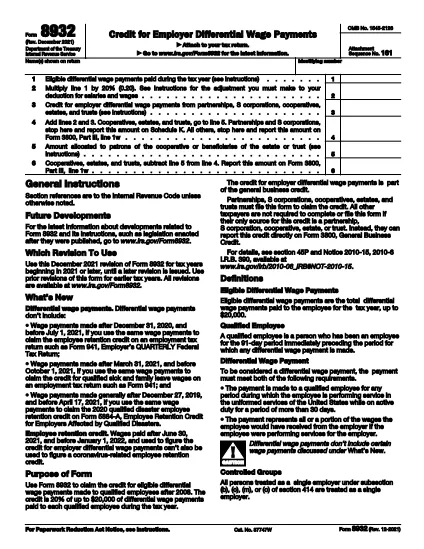
Form 8932 is the official IRS form used to claim the differential wage payment credit for qualifying employees who serve in the uniformed services. Business owners can now download a fillable PDF and complete it directly in your browser with Formize’s PDF Filler – no extra software required.

What Is IRS Form 8932?

The credit allows employers to claim 20% of up to $20,000 in differential wages paid to each qualified employee during the tax year. It was created to ease the financial burden on families when an employee is deployed for more than 30 days.

How to Fill Out Form 8932 Online

Follow the simple steps below to complete the form in minutes. The fillable PDF automatically validates numbers and formats, helping you avoid calculation errors.

Common Mistakes to Avoid

  • Entering wage payments that were already used for other credits (e.g., Employee Retention Credit).
  • Exceeding the $20,000 limit per employee.
  • Forgetting to reduce related research or orphan‑drug credits.
  • Submitting the form without the required employer identification number.

Where to Submit the Completed Form

Attach the finished Form 8932 to your corporate income‑tax return (Form 1120, 1120‑S, or 1065) and file it with the IRS. Keep a copy for your records.

Ready to start? Click the button below to open the fillable version instantly.

FAQ
  • Who can claim the differential wage payment credit?

    Any employer who paid eligible differential wages to qualified employees who served on active duty for more than 30 days.

  • What is the maximum credit per employee?

    The credit is 20% of up to $20,000 in differential wages, so the maximum credit per employee is $4,000.

  • Can I use the same wage payments for other credits?

    No. Wage amounts used for Form 8932 must not be claimed for the Employee Retention Credit, Qualified Sick Leave Credit, or Disaster Employee Retention Credit.

  • Do I need a PDF editor to fill out Form 8932?

    No. The fillable PDF works directly in the Formize PDF Filler app—just click the button and start typing.

  • Where do I submit the completed Form 8932?

    Attach it to your business income‑tax return (Form 1120, 1120‑S, or 1065) when filing with the IRS.

  • Is there a deadline to claim the credit?

    The credit must be claimed on the tax return for the year in which the differential wages were paid.

CUM SĂ

Cum să completați IRS Form 8932 gratuit, online, în 4 pași simpli:

  1. 1
    Open the Fillable Form
    Click the "Fill out this form" button on the page. The Formize PDF Filler app will load the fillable IRS Form 8932 directly in your browser.
  2. 2
    Enter Your Information
    Type the employer name, EIN, and wage payment amounts into the highlighted fields. The app validates entries in real‑time.
  3. 3
    Review & Save
    Check all numbers, then click "Save" to download a completed PDF copy for your records.
  4. 4
    Attach to Your Tax Return
    Print or electronically attach the saved Form 8932 to your corporate tax return and file with the IRS.
Aplicația Formize PDF Filler
DESPRE

Formulare fiscale federale

IRS Form 8932 este unul dintre formularele fiscale federale care sunt documente utilizate pentru a raporta și a depune impozitele federale pe venit la Serviciul Fiscal intern (IRS) din Statele Unite. Aceste formulare sunt folosite de persoane fizice, companii și organizații pentru a-și raporta veniturile, deducerile și alte informații relevante necesare pentru calcularea obligației fiscale federale.

Cel mai frecvent utilizat formular fiscal federal este Formularul 1040, care este folosit de contribuabilii individuali pentru a-și raporta impozitul pe venitul personal. Alte formulare utilizate frecvent includ Formularul 1065 pentru parteneriate, Formularul 1120 pentru corporații și Formularul 990 pentru organizațiile scutite de taxe.

Formularele de impozite federale solicită de obicei contribuabililor să raporteze diverse surse de venit, cum ar fi salariile, salariile și bacșișurile, precum și veniturile din investiții, proprietăți de închiriere și alte surse. Formularele permit, de asemenea, contribuabililor să solicite deduceri și credite pentru diverse cheltuieli, cum ar fi contribuții caritabile, dobânzi ipotecare și cheltuieli de asistență medicală.

Este important să depuneți formularele fiscale federale cu acuratețe și la timp, deoarece nerespectarea acestui lucru poate duce la penalități și taxe de dobânzi de la IRS.

CARACTERISTICI

Filler PDF

Cel mai simplu mod de a completa IRS Form 8932 online

  • Completați rapid IRS Form 8932
    Căutați o modalitate de a completa rapid IRS Form 8932 online? Cu ajutorul nostru online gratuit de completare a formularelor PDF, veți ști cum să editați și să completați acest document pdf în mai puțin de un minut.
  • Editor PDF online ușor de utilizat
    Sătul de tipărirea fișierelor PDF pentru a le putea edita, înainte de a le rescana și a le trimite înapoi? Editați documente PDF gratuit online. Utilizați editorul nostru online de pdf pentru a economisi timp și hârtie.
  • Instrumente grozave, toate platformele
    Vă întrebați cum să completați IRS Form 8932 pe un Mac sau poate cum să utilizați un fișier PDF gratuit? Instrumentele noastre PDF online funcționează pe toate platformele.
  • Stocare securizată a fișierelor
    Fișierele „IRS Form 8932” finalizate sunt stocate într-o bază de date securizată gestionată de Amazon Cloud hosting. Puteți șterge oricând fișierele din sistemul nostru. În orice caz, aceste fișiere sunt șterse automat după 24 de ore.
  • Chat cu IRS Form 8932
    Conversați cu „IRS Form 8932” pe Chatize, care este un asistent de citire PDF gratuit. Puneți întrebări și obțineți răspunsuri de la „IRS Form 8932”. Doar faceți clic pe butonul Conversați cu documentul de mai sus.

Ștergeți sesiunea de umplere

Ștergeți sesiunea de umplere selectată? În acest caz, progresul dumneavoastră în completarea formularului se va pierde.

Ștergeți sesiunea de editare

Ștergeți sesiunea de editare selectată? În acest caz, progresul dvs. în crearea și editarea formularului se va pierde.