
Selecteaza limba

IRS Form 8948 – Preparer Explanation for Not Filing Electronically (Fillable PDF)

  1. Țară STATELE UNITE ALE AMERICII
  2. Limba Engleză
  3. Activitate Impozite
  4. Departament Serviciul de Venituri Interne
IRS Form 8948 – Preparer Explanation for Not Filing Electronically (Fillable PDF)

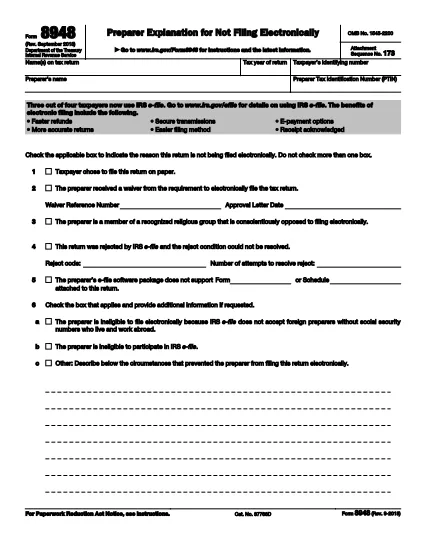
Form 8948, officially titled Preparer Explanation for Not Filing Electronically, is a one‑page IRS form that tax preparers must attach to a paper‑filed return when the electronic filing requirement cannot be met. The form provides a brief, standardized explanation for the paper‑filing exception.

What Is Form 8948?

The form captures basic taxpayer information, the preparer’s PTIN, and the specific reason why the return is being filed on paper instead of through the IRS e‑file system. It is required for most paid preparers who are otherwise obligated to e‑file.

When and Why Is Form 8948 Required?

  • The preparer received an approved e‑file hardship waiver.
  • The taxpayer elected to file a paper return.
  • The preparer’s software does not support a required schedule or form.
  • The preparer faced repeated, unresolvable e‑file rejections.
  • Religious or other qualifying exemptions prevent electronic filing.

If none of these exceptions apply, the preparer must file the return electronically.

How to Complete Form 8948 Online

With Formize you can fill out Form 8948 directly in your browser—no PDF editor needed. Follow these simple steps:

  1. Click the "Fill out this form" button on this page.
  2. The Formize PDF Filler app loads instantly.
  3. Select each highlighted field and type the required data (taxpayer name, SSN/TIN, tax year, preparer PTIN, and the applicable reason).
  4. Use the drop‑down menus to choose the correct exemption code.
  5. Review the completed form, add an electronic signature if required, and click Submit or Download for your records.

Common Mistakes to Avoid

  • Leaving the reason box unchecked: The IRS will reject the return.
  • Using the taxpayer’s choice box incorrectly: Form 8948 is not a "taxpayer choice" statement.
  • Missing the preparer’s PTIN: Every paid preparer must include a valid PTIN.
  • Incorrect tax year: Verify the year matches the return you are filing.

Download & Print Options

If you prefer a hard‑copy version, you can download the official PDF below. The file is the same document used by the IRS and is fully fillable when opened in a PDF editor.

Download IRS Form 8948 (PDF)

FAQ
  • Who must file Form 8948?

    Any paid tax preparer who is required to e‑file but cannot do so for an approved reason must attach Form 8948 to the paper return.

  • Can I use Form 8948 for a personal return I file myself?

    No. Form 8948 is only for paid preparers. Individual taxpayers who choose to file on paper do not need this form.

  • What is the difference between the "taxpayer chose paper" box and the "hardship waiver" box?

    The taxpayer‑chosen box indicates the client elected a paper return, which is not a valid reason under IRS rules. The hardship waiver box is used when the preparer has an approved waiver from the IRS.

  • Do I need to mail Form 8948 separately?

    No. Form 8948 must be attached to the front of the paper return before mailing it to the IRS.

  • Is an electronic signature accepted on Form 8948?

    Yes. The IRS allows an electronic signature when the form is completed using a certified e‑signature solution like Formize.

  • Where can I find the official PDF for Form 8948?

    The official, up‑to‑date PDF is available from the IRS at https://www.irs.gov/pub/irs-pdf/f8948.pdf.

  • What should I do if I select the wrong reason on Form 8948?

    Correct the mistake before attaching the form. An incorrect reason can cause the entire return to be rejected by the IRS.

CUM SĂ

Cum să completați Form 8948 gratuit, online, în 4 pași simpli:

  1. 1
    Open the Fillable Form
    Click the "Fill out this form" button on the page to launch the Formize PDF Filler.
  2. 2
    Enter Your Information
    Select each highlighted field and type the required data – taxpayer name, SSN/TIN, tax year, preparer PTIN, and the reason for paper filing.
  3. 3
    Review and Sign
    Check all entries for accuracy, add an electronic signature if needed, and confirm the selected exemption code.
  4. 4
    Save or Submit
    Click "Download" to save a copy for your records or "Submit" to attach the form to your paper return.
Aplicația Formize PDF Filler
DESPRE

Formulare fiscale

Form 8948 este unul dintre formularele fiscale care sunt documente utilizate pentru a raporta autorității fiscale relevante informații despre veniturile, deducerile și obligațiile fiscale ale unei persoane sau întreprinderi. Aceste formulare sunt necesare pentru a respecta legile fiscale și pentru a îndeplini obligațiile fiscale. Formele fiscale variază în funcție de țară și de cerințele fiscale specifice în vigoare. Iată câteva tipuri comune de formulare fiscale:

Formulare de impozitare individuale: aceste formulare sunt folosite de contribuabilii individuali pentru a-și raporta venitul personal și pentru a solicita deduceri, credite și scutiri. Exemplele includ formularul 1040 în Statele Unite sau formularul de autoevaluare a impozitului în Regatul Unit.

Formulare de impozitare pentru afaceri: formularele de impozit pentru afaceri sunt folosite de companii, parteneriate sau persoane care desfășoară activități independente pentru a-și raporta veniturile, cheltuielile și alte informații legate de impozite. Exemplele includ formularul Schedule C (Profit sau Pierdere din afaceri) în Statele Unite sau formularul CT600 (Company Tax Return) în Regatul Unit.

Formulare de impozit pe salariu: aceste formulare sunt folosite de angajatori pentru a raporta salariile, salariile și impozitele reținute din salariile angajaților lor. Exemplele includ formularul W-2 în Statele Unite sau formularul P60 în Regatul Unit.

Formulare de taxă pe vânzări: formularele de taxă pe vânzări sunt folosite de companii pentru a raporta și a remite impozitul pe vânzări colectat pentru bunuri sau servicii taxabile. Formularele specifice de taxe pe vânzări variază în funcție de jurisdicție.

Formulare privind taxa pe valoarea adăugată (TVA): formularele cu TVA sunt utilizate în țările care impun o taxă pe valoarea adăugată pentru a raporta și a remite TVA-ul colectat la vânzări și pentru a solicita credite de TVA pentru achiziții. Exemplele includ formularele de decontare TVA utilizate în multe țări.

Formulare de impozit estimat: formularele de impozit estimat sunt utilizate pentru a raporta și a plăti impozite estimate pe venitul care nu este supus reținerii la sursă, cum ar fi venitul din activități independente sau venitul din investiții.

Acestea sunt doar câteva exemple din numeroasele forme fiscale care pot exista. Formularele specifice necesare depind de legile și reglementările fiscale din țara sau jurisdicția dvs. Este important să consultați instrucțiunile autorității fiscale sau să solicitați sfaturi profesionale pentru a determina ce formulare sunt aplicabile situației dvs.

CARACTERISTICI

Filler PDF

Cel mai simplu mod de a completa Form 8948 online

  • Completați rapid Form 8948
    Căutați o modalitate de a completa rapid Form 8948 online? Cu ajutorul nostru online gratuit de completare a formularelor PDF, veți ști cum să editați și să completați acest document pdf în mai puțin de un minut.
  • Editor PDF online ușor de utilizat
    Sătul de tipărirea fișierelor PDF pentru a le putea edita, înainte de a le rescana și a le trimite înapoi? Editați documente PDF gratuit online. Utilizați editorul nostru online de pdf pentru a economisi timp și hârtie.
  • Instrumente grozave, toate platformele
    Vă întrebați cum să completați Form 8948 pe un Mac sau poate cum să utilizați un fișier PDF gratuit? Instrumentele noastre PDF online funcționează pe toate platformele.
  • Stocare securizată a fișierelor
    Fișierele „Form 8948” finalizate sunt stocate într-o bază de date securizată gestionată de Amazon Cloud hosting. Puteți șterge oricând fișierele din sistemul nostru. În orice caz, aceste fișiere sunt șterse automat după 24 de ore.
  • Chat cu Form 8948
    Conversați cu „Form 8948” pe Chatize, care este un asistent de citire PDF gratuit. Puneți întrebări și obțineți răspunsuri de la „Form 8948”. Doar faceți clic pe butonul Conversați cu documentul de mai sus.

Ștergeți sesiunea de umplere

Ștergeți sesiunea de umplere selectată? În acest caz, progresul dumneavoastră în completarea formularului se va pierde.

Ștergeți sesiunea de editare

Ștergeți sesiunea de editare selectată? În acest caz, progresul dvs. în crearea și editarea formularului se va pierde.