
Selecteaza limba

Fillable IRS Form 941‑SS (Quarterly Federal Tax Return)

  1. Țară STATELE UNITE ALE AMERICII
  2. Limba Engleză
  3. Activitate Impozite
  4. Departament Serviciul de Venituri Interne
Fillable IRS Form 941‑SS (Quarterly Federal Tax Return)

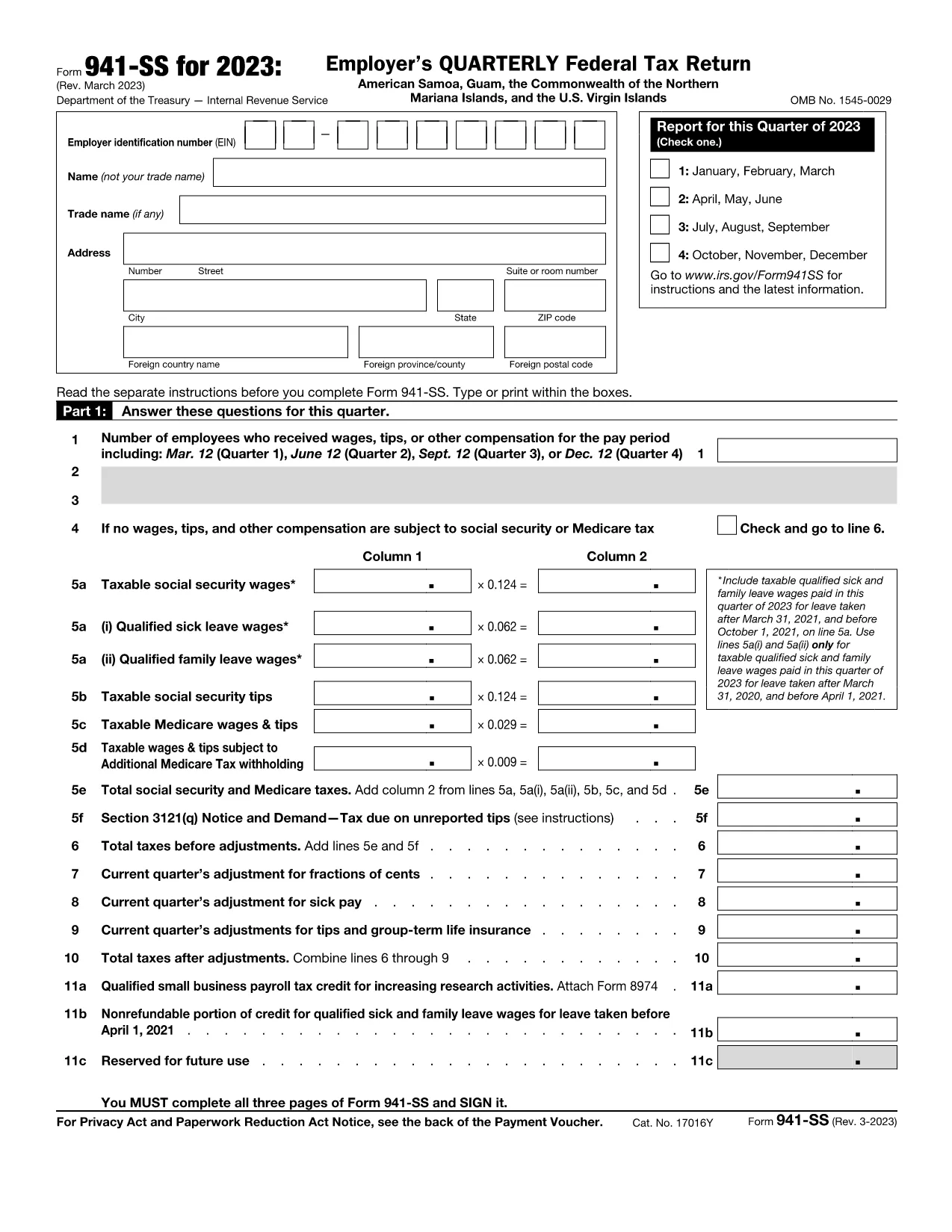
Form 941‑SS is the Employer’s Quarterly Federal Tax Return used by businesses operating in U.S. territories (American Samoa, Guam, the Northern Mariana Islands, and the U.S. Virgin Islands). This fillable PDF lets you enter payroll data quickly, save a digital copy, and print or e‑file without the hassle of paper forms.

What Is Form 941‑SS and Who Needs It?

Employers who pay wages to employees in the territories must file Form 941‑SS each quarter. The form reports income tax, Social Security tax, and Medicare tax withheld from employee wages, as well as the employer’s share of those taxes.

Key Sections and Required Information

The form is divided into clear sections:

  • Employer Information – EIN, name, address, and filing quarter.
  • Wage & Tax Data – Total wages, tips, other compensation, and taxes withheld.
  • Adjustments – Corrections for prior quarters, tax credits, and overpayments.
  • Tax Liability – Calculations for Social Security, Medicare, and additional taxes.
  • Signature – Authorized officer’s signature and date.

How to Complete the Fillable PDF with Formize

Instead of downloading the PDF and opening a separate editor, simply click the “Fill out this form” button on this page. The Formize PDF Filler app loads instantly, providing an intuitive, web‑based interface.

Common Mistakes to Avoid

  • Leaving the EIN blank or entering an incorrect number.
  • Mis‑reporting the quarter (e.g., using Q1 dates for a Q2 filing).
  • Failing to include adjustments from prior quarters.
  • Submitting without a signature or date.

Where to Submit Your Completed Form

After filling out and saving the form, you can:

  • Print and mail it to the IRS processing center listed in the instructions for your territory.
  • Upload the PDF through the IRS e‑file system if you have an approved electronic filing method.

Always keep a copy for your records and verify the filing deadline (the last day of the month following the quarter).

Instrucțiuni

  • Formularul 941-SS Instrucţiuni - Instructiuni pentru formularul 941-SS, CARTERLY Angajatorului Revenire fiscală federală a Statelor Unite ale Americii, Guam, Comunitatea Insulelor Mariane de Nord, și Insulele Virgine SUA
FAQ
  • Who must file Form 941‑SS?

    All employers who have employees in U.S. territories and are subject to federal employment taxes must file Form 941‑SS each quarter.

  • What is the filing deadline for Form 941‑SS?

    The form is due by the last day of the month following the end of the quarter (e.g., April 30 for Q1).

  • Can I file Form 941‑SS electronically?

    Yes, if you have an approved e‑file provider. You can also submit a printed copy to the IRS address for your territory.

  • What if I have no employees for a quarter?

    You can file a “zero” return, indicating no wages or taxes were paid, to avoid penalties.

  • How do I correct an error on a previously filed Form 941‑SS?

    File Form 941‑SSX (adjusted return) for the quarter with the mistake, or amend the original filing following IRS instructions.

  • Is there a penalty for late filing?

    Yes. The IRS may assess a penalty of 5% of the unpaid tax per month, up to 25%, plus interest on the outstanding amount.

  • Do I need to attach supporting documents?

    Generally, you do not attach supporting schedules with the PDF, but keep them on file in case the IRS requests them.

  • Can I use the same form for all U.S. territories?

    Form 941‑SS is specifically designed for all U.S. territories; the same PDF applies to American Samoa, Guam, NMI, and the U.S. Virgin Islands.

CUM SĂ

Cum să completați Form 941-SS gratuit, online, în 4 pași simpli:

  1. 1
    Click the Fillable Form Button
    On this page, click the bright “Fill out this form” button. The Formize PDF Filler app will open in a new tab.
  2. 2
    Enter Your Payroll Data
    Use your keyboard to type directly into each field. The form automatically saves your progress as you go.
  3. 3
    Review and Sign
    Check all entries for accuracy, then add your electronic signature using the built‑in signature tool.
  4. 4
    Save, Print or Submit
    When finished, click “Save PDF” to download a copy, or choose “Print” to mail a hard copy. You can also export the file for electronic filing.
Aplicația Formize PDF Filler
DESPRE

Formulare fiscale

Form 941-SS este unul dintre formularele fiscale care sunt documente utilizate pentru a raporta informații legate de taxe către autoritatea fiscală relevantă. Există diferite tipuri de formulare fiscale, inclusiv formulare fiscale federale, de stat și locale, care pot varia în funcție de circumstanțele și locația contribuabilului.

CARACTERISTICI

Filler PDF

Cel mai simplu mod de a completa Form 941-SS online

  • Completați rapid Form 941-SS
    Căutați o modalitate de a completa rapid Form 941-SS online? Cu ajutorul nostru online gratuit de completare a formularelor PDF, veți ști cum să editați și să completați acest document pdf în mai puțin de un minut.
  • Editor PDF online ușor de utilizat
    Sătul de tipărirea fișierelor PDF pentru a le putea edita, înainte de a le rescana și a le trimite înapoi? Editați documente PDF gratuit online. Utilizați editorul nostru online de pdf pentru a economisi timp și hârtie.
  • Instrumente grozave, toate platformele
    Vă întrebați cum să completați Form 941-SS pe un Mac sau poate cum să utilizați un fișier PDF gratuit? Instrumentele noastre PDF online funcționează pe toate platformele.
  • Stocare securizată a fișierelor
    Fișierele „Form 941-SS” finalizate sunt stocate într-o bază de date securizată gestionată de Amazon Cloud hosting. Puteți șterge oricând fișierele din sistemul nostru. În orice caz, aceste fișiere sunt șterse automat după 24 de ore.
  • Chat cu Form 941-SS
    Conversați cu „Form 941-SS” pe Chatize, care este un asistent de citire PDF gratuit. Puneți întrebări și obțineți răspunsuri de la „Form 941-SS”. Doar faceți clic pe butonul Conversați cu documentul de mai sus.

Ștergeți sesiunea de umplere

Ștergeți sesiunea de umplere selectată? În acest caz, progresul dumneavoastră în completarea formularului se va pierde.

Ștergeți sesiunea de editare

Ștergeți sesiunea de editare selectată? În acest caz, progresul dvs. în crearea și editarea formularului se va pierde.