
Selecteaza limba

Revival Application Form (Fillable PDF)

  1. Limba Engleză
  2. Țară Malaysia
  3. Activitate Insurance Forms
  4. Departament Insurance
Revival Application Form (Fillable PDF)

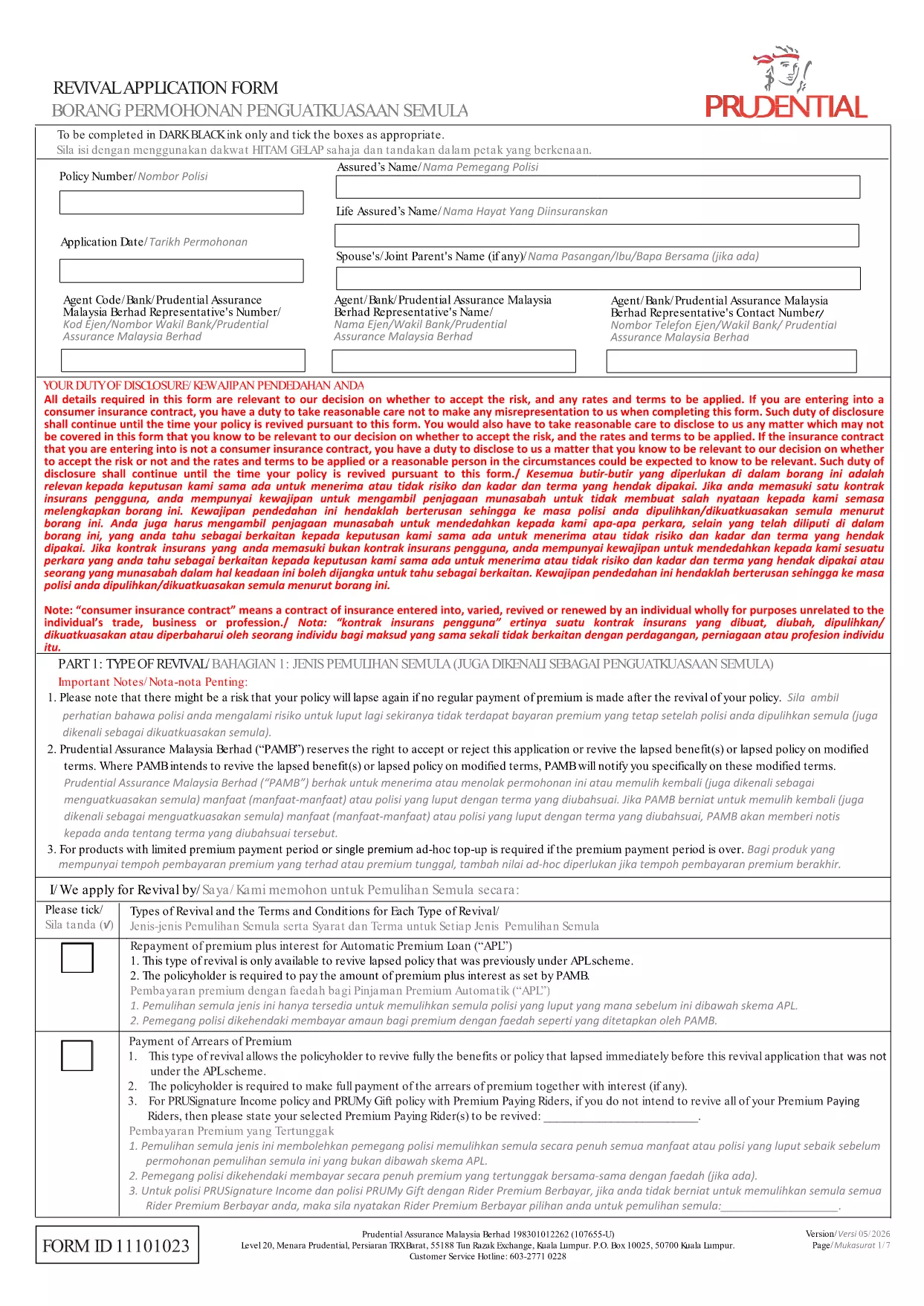
If your insurance policy has lapsed, the Revival Application Form is the official document you need to request reinstatement. This fillable PDF lets you submit all required details quickly, without printing or scanning.

Our Formize PDF Filler loads the form directly in your browser, so you can type, check boxes, and sign electronically. The process is secure, fast, and compliant with the insurer’s guidelines.

What Is a Revival Application Form?

The revival (or reinstatement) application is used by policyholders who missed premium payments and want to restore coverage. It captures personal information, policy details, the amount of overdue premiums, and any supporting documents required by the insurer.

How to Complete the Form Online

Simply click the Fill out this form button below. The Formize PDF Filler app will launch, load the PDF, and let you edit each field. When you’re done, you can download the completed file or submit it directly to the insurer.

Common Mistakes to Avoid

  • Leaving required fields blank – the form will not be accepted.
  • Entering incorrect policy numbers – double‑check your policy documents.
  • Forgetting to calculate interest on overdue premiums – the insurer provides the rate.
  • Skipping the signature field – an unsigned form is rejected.

Download the Fillable PDF

Ready to start? Click the button below to open the fillable PDF in Formize. No extra software is needed.

FAQ
  • What is the purpose of a revival application form?

    It requests the reinstatement of a lapsed insurance policy by providing the insurer with necessary details and payment information.

  • Do I need to print the PDF to fill it out?

    No. With Formize you can complete the fillable PDF entirely online and save a digital copy.

  • Can I save my progress and finish later?

    Yes. The Formize filler lets you download a partially completed PDF and resume editing at any time.

  • What happens if I make a mistake?

    You can edit any field before saving or submitting. Just click the field, correct the entry, and re‑save.

  • Is the online filler secure?

    Formize uses SSL encryption, ensuring your personal and financial data are protected while you fill out the form.

  • Do I need to pay any fee to use the filler?

    No. The Formize PDF filler is free for all users accessing this revival application form.

  • How long does it take for the insurer to process the revived policy?

    Processing time varies by insurer, but most review submitted revival forms within 7‑10 business days.

CUM SĂ

Cum să completați revival application form gratuit, online, în 4 pași simpli:

  1. 1
    Click the Fill‑out Button
    Press the "Fill out this form" button on the page to launch the Formize PDF Filler.
  2. 2
    Wait for the Filler to Load
    The Formize app loads the PDF in your browser. This may take a few seconds depending on your connection.
  3. 3
    Enter Your Information
    Fill each field with accurate data – policy number, personal details, overdue premiums, and any required signatures.
  4. 4
    Save or Submit
    When finished, download the completed PDF or use the built‑in submit option to send it directly to your insurer.
Aplicația Formize PDF Filler
DESPRE

șablon revival application form

Cu setul tradițional de caracteristici pentru vizualizarea și completarea unui document PDF, combinat cu beneficiile unei aplicații web și a unui aspect receptiv, puteți completa revival application form în câteva minute.

CARACTERISTICI

Filler PDF

Cel mai simplu mod de a completa revival application form online

  • Completați rapid revival application form
    Căutați o modalitate de a completa rapid revival application form online? Cu ajutorul nostru online gratuit de completare a formularelor PDF, veți ști cum să editați și să completați acest document pdf în mai puțin de un minut.
  • Editor PDF online ușor de utilizat
    Sătul de tipărirea fișierelor PDF pentru a le putea edita, înainte de a le rescana și a le trimite înapoi? Editați documente PDF gratuit online. Utilizați editorul nostru online de pdf pentru a economisi timp și hârtie.
  • Instrumente grozave, toate platformele
    Vă întrebați cum să completați revival application form pe un Mac sau poate cum să utilizați un fișier PDF gratuit? Instrumentele noastre PDF online funcționează pe toate platformele.
  • Stocare securizată a fișierelor
    Fișierele „revival application form” finalizate sunt stocate într-o bază de date securizată gestionată de Amazon Cloud hosting. Puteți șterge oricând fișierele din sistemul nostru. În orice caz, aceste fișiere sunt șterse automat după 24 de ore.
  • Chat cu revival application form
    Conversați cu „revival application form” pe Chatize, care este un asistent de citire PDF gratuit. Puneți întrebări și obțineți răspunsuri de la „revival application form”. Doar faceți clic pe butonul Conversați cu documentul de mai sus.

Ștergeți sesiunea de umplere

Ștergeți sesiunea de umplere selectată? În acest caz, progresul dumneavoastră în completarea formularului se va pierde.

Ștergeți sesiunea de editare

Ștergeți sesiunea de editare selectată? În acest caz, progresul dvs. în crearea și editarea formularului se va pierde.