
Selecteaza limba

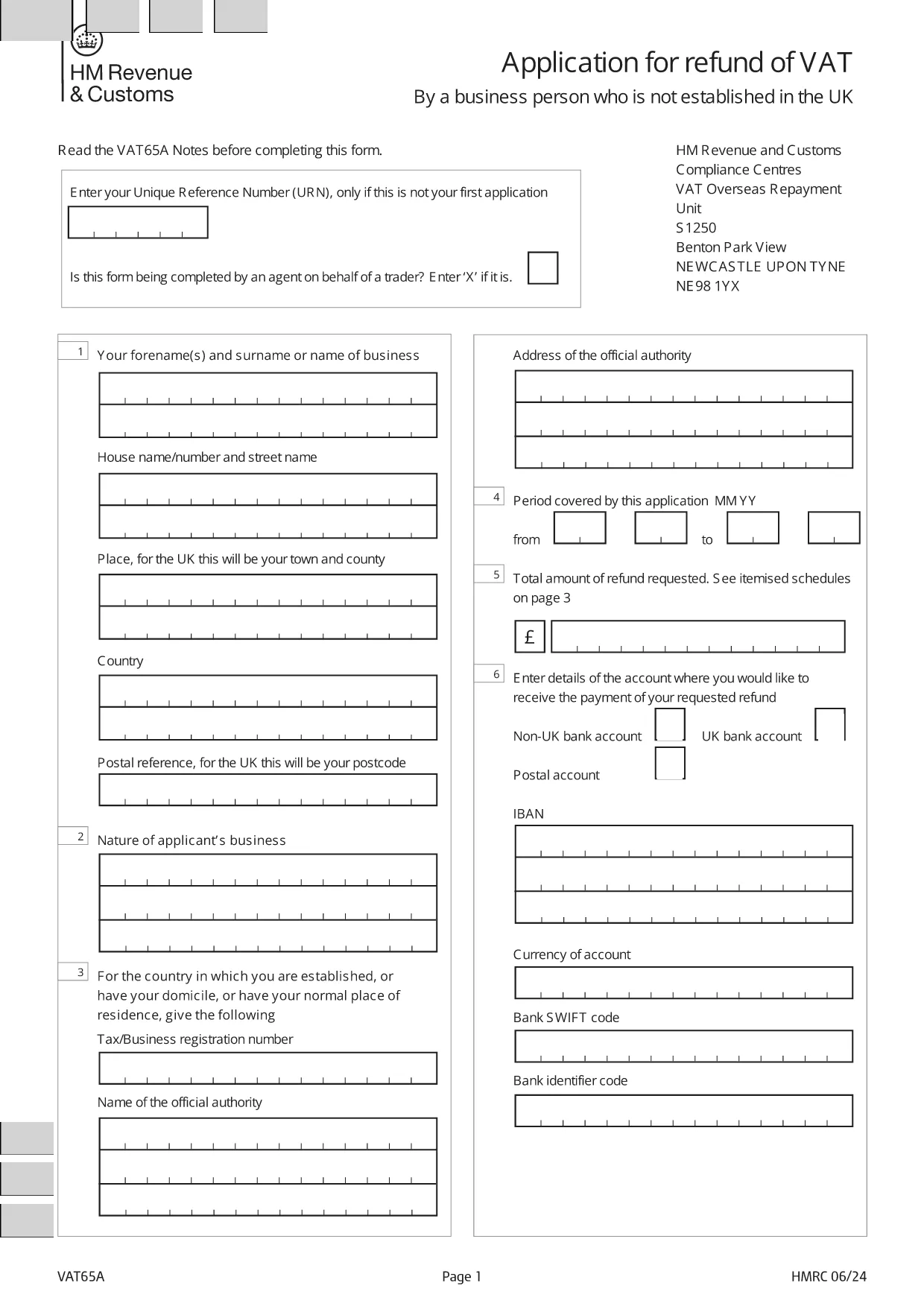
Application Form for Registration of Vendors under the Tourist VAT Refund Scheme

  1. Limba Engleză
  2. Țară United Kingdom
  3. Departament HM Revenue & Customs
  4. Activitate Impozite
Application Form for Registration of Vendors under the Tourist VAT Refund Scheme

Welcome to Formize's dedicated page for the application form for registration of vendors under the Tourist VAT Refund Scheme. This form allows eligible businesses to claim refunds on VAT paid by overseas visitors when they leave the United Kingdom. Below you will find everything you need to know – from why you should register, to step‑by‑step instructions and answers to the most frequently asked questions.

Why Register Your Business for the Tourist VAT Refund?

Registering under the Tourist VAT Refund Scheme helps you:

  • Attract more international customers by offering VAT‑free shopping.
  • Improve cash flow with timely refunds on eligible sales.
  • Comply with HM Revenue & Customs (HMRC) requirements and avoid penalties.

How to Complete the VAT65A Vendor Registration Form

The form you need is the official HMRC VAT65A PDF. Instead of downloading and editing it manually, simply click the "Fill out this form" button on this page. The Formize PDF Filler will load instantly, letting you type directly into the fields, save, and export a completed PDF.

Common Mistakes & Tips for a Successful Submission

Avoid these pitfalls to speed up approval:

  • Missing URN: Enter your Unique Reference Number only if this isn’t your first application.
  • Agent indication: If an agent completes the form on your behalf, mark the appropriate box with an “X”.
  • Incorrect business details: Double‑check your company name, VAT registration number, and address.
  • Unsupported file format: Use the Formize online filler; do not convert the PDF to Word.

Once you have filled out the form, download the completed PDF and submit it to HMRC as instructed in the guidance notes.

FAQ
  • Who can use the Tourist VAT Refund Vendor Registration form?

    Any UK‑registered business that sells goods to non‑UK residents and wishes to reclaim VAT on those sales can apply.

  • Do I need a Unique Reference Number (URN) for my first application?

    No. The URN is only required for subsequent applications. Leave the field blank on your first submission.

  • Can an agent complete the form on my behalf?

    Yes. Mark the agent box with an “X” and provide the agent’s details in the designated section.

  • Is there a fee to use the Formize PDF Filler?

    No. Formize provides the filler for free; you only need internet access and a modern browser.

  • What happens after I submit the completed VAT65A form?

    HMRC will review your application, may request additional information, and then issue a VAT refund if you meet all criteria.

  • How long does the refund process take?

    Typical processing time is 4‑6 weeks, but it can vary depending on the volume of applications.

  • Can I edit the form after downloading it?

    Yes, you can reopen the saved PDF in the Formize filler to make changes before final submission.

  • What supporting documents should I attach?

    Include copies of sales invoices, proof of export (e.g., customs declarations), and your VAT registration certificate.

CUM SĂ

Cum să completați tourist VAT refund form gratuit, online, în 5 pași simpli:

  1. 1
    Open the Formize filler
    Click the "Fill out this form" button on the page. The Formize PDF Filler loads in your browser.
  2. 2
    Enter your details
    Type directly into each field: business name, VAT number, Unique Reference Number (if applicable), and agent information.
  3. 3
    Review and validate
    Check all entries for accuracy. The filler highlights required fields and common errors.
  4. 4
    Download the completed form
    When satisfied, click "Download PDF" to save the filled form to your computer.
  5. 5
    Submit to HMRC
    Follow HMRC's submission instructions – usually by post or secure upload – and keep a copy for your records.
Aplicația Formize PDF Filler
DESPRE

Formulare fiscale

tourist VAT refund form este unul dintre formularele fiscale care sunt documente utilizate pentru a raporta informații legate de taxe către autoritatea fiscală relevantă. Există diferite tipuri de formulare fiscale, inclusiv formulare fiscale federale, de stat și locale, care pot varia în funcție de circumstanțele și locația contribuabilului.

CARACTERISTICI

Filler PDF

Cel mai simplu mod de a completa tourist VAT refund form online

  • Completați rapid tourist VAT refund form
    Căutați o modalitate de a completa rapid tourist VAT refund form online? Cu ajutorul nostru online gratuit de completare a formularelor PDF, veți ști cum să editați și să completați acest document pdf în mai puțin de un minut.
  • Editor PDF online ușor de utilizat
    Sătul de tipărirea fișierelor PDF pentru a le putea edita, înainte de a le rescana și a le trimite înapoi? Editați documente PDF gratuit online. Utilizați editorul nostru online de pdf pentru a economisi timp și hârtie.
  • Instrumente grozave, toate platformele
    Vă întrebați cum să completați tourist VAT refund form pe un Mac sau poate cum să utilizați un fișier PDF gratuit? Instrumentele noastre PDF online funcționează pe toate platformele.
  • Stocare securizată a fișierelor
    Fișierele „tourist VAT refund form” finalizate sunt stocate într-o bază de date securizată gestionată de Amazon Cloud hosting. Puteți șterge oricând fișierele din sistemul nostru. În orice caz, aceste fișiere sunt șterse automat după 24 de ore.
  • Chat cu tourist VAT refund form
    Conversați cu „tourist VAT refund form” pe Chatize, care este un asistent de citire PDF gratuit. Puneți întrebări și obțineți răspunsuri de la „tourist VAT refund form”. Doar faceți clic pe butonul Conversați cu documentul de mai sus.

Ștergeți sesiunea de umplere

Ștergeți sesiunea de umplere selectată? În acest caz, progresul dumneavoastră în completarea formularului se va pierde.

Ștergeți sesiunea de editare

Ștergeți sesiunea de editare selectată? În acest caz, progresul dvs. în crearea și editarea formularului se va pierde.