Selecteaza limba

Form 10BBE – Fillable BE‑10 Survey PDF

  1. Țară STATELE UNITE ALE AMERICII
  2. Limba Engleză
  3. Departament Bureau of Economic Analysis
  4. Activitate International Investment Surveys
Form 10BBE – Fillable BE‑10 Survey PDF

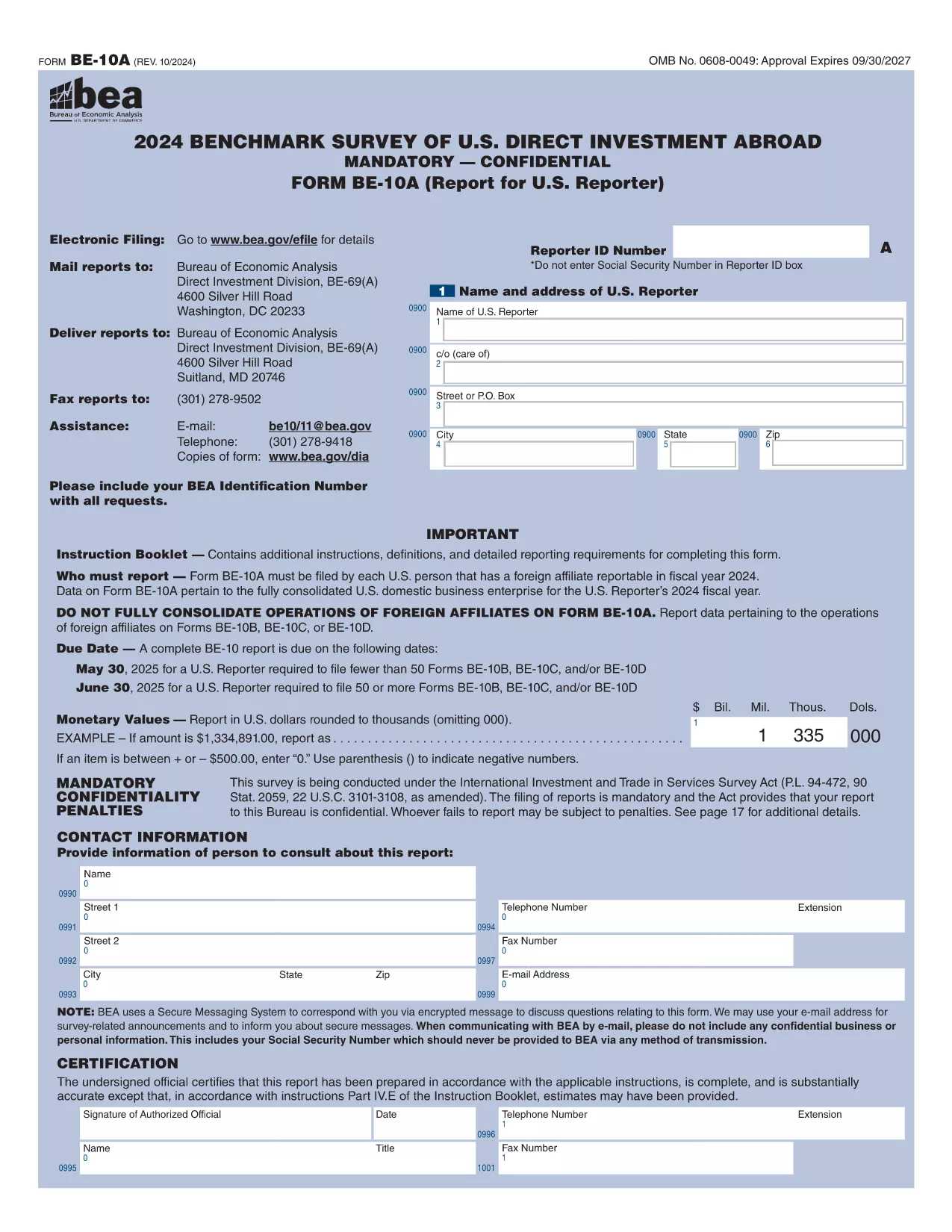
The Form 10BBE is part of the BE‑10 benchmark survey administered by the U.S. Bureau of Economic Analysis (BEA). It collects detailed financial and operating data for majority‑owned foreign affiliates that meet specific asset, sales, or net‑income thresholds.

Using Formize’s online PDF filler, you can complete the form directly in your browser—no Adobe Acrobat Pro or other PDF editor required. Simply click the “Fill out this form” button, wait for the Formize PDF Filler to load, and start entering your information.

Below you’ll find everything you need to know about the form, step‑by‑step instructions, and answers to the most common questions.

What is Form 10BBE?

Form 10BBE (often referenced as BE‑10B) gathers data on foreign affiliates whose assets, sales, or net income exceed $80 million. The information helps the BEA compile the U.S. Direct Investment Abroad statistics used by policymakers, researchers, and businesses.

How to Complete the Fillable Form 10BBE

Follow the simple process below to fill out the form quickly and accurately using Formize.

Common Mistakes to Avoid

  • Leaving required fields blank – the filler will highlight missing entries.
  • Entering figures in the wrong units (e.g., thousands vs. millions).
  • Using outdated fiscal year dates – verify the reporting year before you start.

Download & Fill the Form Instantly

Click the button below to open the fillable PDF in Formize’s secure online editor. All changes are saved automatically, and you can export the completed form as a PDF ready for e‑filing.

FAQ About Form 10BBE

Find quick answers to the most frequently asked questions further down the page.

FAQ
  • Who must file Form 10BBE?

    All U.S. multinational enterprises with majority‑owned foreign affiliates whose assets, sales, or net income exceed $80 million must file Form 10BBE as part of the BE‑10 benchmark survey.

  • Can I file Form 10BBE electronically?

    Yes. After completing the fillable PDF with Formize, you can upload the saved file to the BEA e‑file system for electronic submission.

  • What fiscal year does Form 10BBE cover?

    The form reports data for the most recent fiscal year ending in the calendar year specified in the survey notice (typically the year before the filing deadline).

  • Is the information I provide confidential?

    Federal law protects the confidentiality of all data submitted to the BEA. Your information is used only for statistical purposes and is not disclosed publicly.

  • What if I make a mistake after submitting?

    You can file an amendment using the BEA’s “Form 10BBE Amendment” process. Contact the BEA survey office for the correct procedure.

  • Do I need Adobe Acrobat Pro to edit the form?

    No. Formize’s online PDF filler works in any modern browser, and you only need the free Adobe Acrobat Reader to view the final PDF.

  • What is the deadline for filing Form 10BBE?

    For reporters filing 50 or more BE‑10 forms, the deadline is June 30 2025. For fewer than 50, the deadline is May 30 2025.

  • Where can I find the instructions for Form 10BBE?

    The detailed instruction booklet is available on the BEA website alongside the fillable PDF. It explains each line item and provides examples.

CUM SĂ

Cum să completați Form 10BBE gratuit, online, în 5 pași simpli:

  1. 1
    Click the Fill‑out Button
    Press the “Fill out this form” button on the page. The Formize PDF Filler will open in a new tab.
  2. 2
    Wait for the Formizer to Load
    A short loading screen appears while the fillable PDF is prepared. This ensures all fields are interactive.
  3. 3
    Enter Your Data
    Complete each required field. The filler validates entries in real time and highlights any missing information.
  4. 4
    Review and Save
    Use the built‑in preview to double‑check your answers, then click “Save” to store the completed form on your device.
  5. 5
    Submit or Download
    When you’re satisfied, download the final PDF for e‑filing or submit it directly through the BEA e‑file portal.
Aplicația Formize PDF Filler
DESPRE

șablon Form 10BBE

Cu setul tradițional de caracteristici pentru vizualizarea și completarea unui document PDF, combinat cu beneficiile unei aplicații web și a unui aspect receptiv, puteți completa Form 10BBE în câteva minute.

CARACTERISTICI

Filler PDF

Cel mai simplu mod de a completa Form 10BBE online

  • Completați rapid Form 10BBE
    Căutați o modalitate de a completa rapid Form 10BBE online? Cu ajutorul nostru online gratuit de completare a formularelor PDF, veți ști cum să editați și să completați acest document pdf în mai puțin de un minut.
  • Editor PDF online ușor de utilizat
    Sătul de tipărirea fișierelor PDF pentru a le putea edita, înainte de a le rescana și a le trimite înapoi? Editați documente PDF gratuit online. Utilizați editorul nostru online de pdf pentru a economisi timp și hârtie.
  • Instrumente grozave, toate platformele
    Vă întrebați cum să completați Form 10BBE pe un Mac sau poate cum să utilizați un fișier PDF gratuit? Instrumentele noastre PDF online funcționează pe toate platformele.
  • Stocare securizată a fișierelor
    Fișierele „Form 10BBE” finalizate sunt stocate într-o bază de date securizată gestionată de Amazon Cloud hosting. Puteți șterge oricând fișierele din sistemul nostru. În orice caz, aceste fișiere sunt șterse automat după 24 de ore.
  • Chat cu Form 10BBE
    Conversați cu „Form 10BBE” pe Chatize, care este un asistent de citire PDF gratuit. Puneți întrebări și obțineți răspunsuri de la „Form 10BBE”. Doar faceți clic pe butonul Conversați cu documentul de mai sus.

Ștergeți sesiunea de umplere

Ștergeți sesiunea de umplere selectată? În acest caz, progresul dumneavoastră în completarea formularului se va pierde.

Ștergeți sesiunea de editare

Ștergeți sesiunea de editare selectată? În acest caz, progresul dvs. în crearea și editarea formularului se va pierde.