
Selecteaza limba

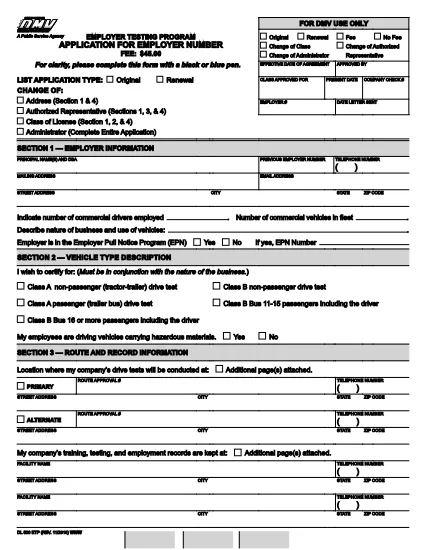
DL 520 – Employer Testing Program Application (California DMV)

  1. Limba Engleză
  2. Țară STATELE UNITE ALE AMERICII
  3. Activitate Inmatricularea autoturismului
  4. Departament California DMV
DL 520 – Employer Testing Program Application (California DMV)

The DL 520 is the California Department of Motor Vehicles (DMV) application used by employers to obtain an employer number for the Employer Testing Program (ETP). This program allows qualified organizations to issue Certificates of Driving Skill (DL 170 ETP) to employees who operate motor vehicles in safety‑sensitive positions.

What is the DL 520 Form?

The DL 520 form collects essential information about your business, the types of testing you will conduct, and your compliance with California Vehicle Code sections related to employer‑run testing programs. Once approved, you receive an employer number that authorizes you to manage driver‑skill testing under the ETP.

Who Must Complete the DL 520?

  • Employers in California who need to test employees for driving‑skill certification (e.g., transportation, construction, utilities).
  • Companies that wish to issue DL 170 ETP certificates to qualified drivers.
  • Any organization that conducts mandatory drug, alcohol, or skills testing required by state law.

How to Fill Out the DL 520 Online with Formize

Instead of downloading, printing, and scanning, you can complete the form directly on our site:

  1. Click the “Fill out this form” button on the page.
  2. Wait a few seconds while the Formize PDF Filler app loads the fillable DL 520 PDF.
  3. Enter your employer information, testing procedures, and contact details in the highlighted fields.
  4. Review each section for accuracy; required fields are marked with an asterisk (*).
  5. When finished, click Save & Download to get a completed PDF you can email or print for submission.

The fillable PDF retains the official DMV layout, so the California DMV will accept it without any modifications.

Common Mistakes to Avoid

  • Leaving required fields blank – the DMV will reject the application.
  • Using an outdated version of the form – always use the latest PDF (linked above).
  • Incorrect employer number format – double‑check the 8‑digit number if you already have one.
  • Missing signatures – both the employer representative and the DMV inspector must sign.
  • Submitting a scanned image of a handwritten form – the fillable PDF ensures legibility.

Where to Submit the Completed Form

After saving your completed DL 520 PDF, mail or fax it to the address listed on the form’s last page. You may also deliver a printed copy to your local DMV office. Keep a copy for your records.

Need help? Review the FAQs below or contact your nearest California DMV office.

FAQ
  • Do I need to print the DL 520 after filling it online?

    The California DMV accepts a printable PDF. You can either submit the electronic file by fax or print a hard copy for mailing.

  • How long does it take to get an employer number after submitting DL 520?

    Processing typically takes 7‑10 business days once the DMV receives a complete and correctly signed application.

  • Can I use the DL 520 for multiple locations?

    Yes. The employer number applies to all locations under the same legal entity, but each site must follow the same testing procedures.

  • What if I make a mistake after downloading the completed PDF?

    You must correct the error on a new copy of the form. The DMV does not accept handwritten alterations on a submitted PDF.

  • Is there a filing fee for the DL 520 application?

    There is no fee to submit the DL 520 itself, but the DMV may charge fees for issuing the employer number and subsequent certificates.

  • Do I need a separate DL 520 for each type of test (drug, alcohol, skill)?

    A single DL 520 authorizes all testing types covered under the Employer Testing Program, provided they are described in the application.

CUM SĂ

Cum să completați DL 520 gratuit, online, în 4 pași simpli:

  1. 1
    Open the Fillable Form
    Click the “Fill out this form” button on the page. The Formize PDF Filler will load the DL 520 PDF automatically.
  2. 2
    Enter Your Information
    Type your employer name, address, testing procedures, and other required details into the highlighted fields.
  3. 3
    Review and Save
    Check every section for completeness, then click “Save & Download” to obtain a completed PDF ready for submission.
  4. 4
    Submit to the DMV
    Print the saved PDF (if required) and mail, fax, or deliver it to your local California DMV office as instructed on the form.
Aplicația Formize PDF Filler
DESPRE

Formulare de înmatriculare a vehiculelor

DL 520 este unul dintre formularele de înmatriculare a vehiculelor care sunt documente utilizate pentru a înmatricula un autovehicul la autoritatea guvernamentală relevantă, de obicei Departamentul de Autovehicule (DMV) sau o agenție echivalentă. Aceste formulare sunt necesare atunci când o persoană cumpără un vehicul nou sau folosit, transferă dreptul de proprietate asupra unui vehicul sau se mută într-o nouă jurisdicție cu un vehicul.

Formularele specifice de înmatriculare a vehiculelor pot varia în funcție de jurisdicție, dar, în general, necesită următoarele informații:

Informații despre vehicul: acestea includ detalii despre vehicul, cum ar fi marca, modelul, anul, numărul de identificare a vehiculului (VIN) și citirea contorului de parcurs.

Informații despre proprietar: formularul va solicita informații despre proprietarul vehiculului, inclusiv numele, adresa, informațiile de contact și numărul permisului de conducere al acestuia.

Dovada dreptului de proprietate: în funcție de circumstanțe, poate fi necesară o dovadă a proprietății, cum ar fi un certificat de titlu, nota de vânzare sau certificatul de origine al producătorului (pentru vehicule noi).

Informații privind asigurarea: de obicei, este necesară dovada acoperirii valabile a asigurării vehiculului. Aceasta poate include furnizarea numărului poliței de asigurare, a datelor de acoperire și a detaliilor companiei de asigurări.

Plata taxelor: înmatricularea vehiculului implică plata diferitelor taxe, cum ar fi taxe de înregistrare, taxe și, eventual, alte taxe specifice jurisdicției.

Pe lângă aceste cerințe de bază, unele jurisdicții pot avea cerințe suplimentare de formulare sau documentație. De exemplu, rezultatele testelor de emisii, inspecții de siguranță sau dovada rezidenței ar putea fi necesare în anumite zone.

Odată ce formularele de înmatriculare a vehiculului sunt completate și depuse, autoritatea guvernamentală va emite un certificat de înmatriculare, plăcuțe de înmatriculare și autocolante de înmatriculare. Aceste documente indică faptul că vehiculul este înmatriculat legal și autorizat să circule pe drumurile publice.

Este important de reținut că cerințele de înmatriculare a vehiculelor pot varia semnificativ în funcție de jurisdicție. Prin urmare, se recomandă să consultați DMV local sau agenția echivalentă pentru formularele și procedurile specifice aplicabile locației dvs.

CARACTERISTICI

Filler PDF

Cel mai simplu mod de a completa DL 520 online

  • Completați rapid DL 520
    Căutați o modalitate de a completa rapid DL 520 online? Cu ajutorul nostru online gratuit de completare a formularelor PDF, veți ști cum să editați și să completați acest document pdf în mai puțin de un minut.
  • Editor PDF online ușor de utilizat
    Sătul de tipărirea fișierelor PDF pentru a le putea edita, înainte de a le rescana și a le trimite înapoi? Editați documente PDF gratuit online. Utilizați editorul nostru online de pdf pentru a economisi timp și hârtie.
  • Instrumente grozave, toate platformele
    Vă întrebați cum să completați DL 520 pe un Mac sau poate cum să utilizați un fișier PDF gratuit? Instrumentele noastre PDF online funcționează pe toate platformele.
  • Stocare securizată a fișierelor
    Fișierele „DL 520” finalizate sunt stocate într-o bază de date securizată gestionată de Amazon Cloud hosting. Puteți șterge oricând fișierele din sistemul nostru. În orice caz, aceste fișiere sunt șterse automat după 24 de ore.
  • Chat cu DL 520
    Conversați cu „DL 520” pe Chatize, care este un asistent de citire PDF gratuit. Puneți întrebări și obțineți răspunsuri de la „DL 520”. Doar faceți clic pe butonul Conversați cu documentul de mai sus.

Ștergeți sesiunea de umplere

Ștergeți sesiunea de umplere selectată? În acest caz, progresul dumneavoastră în completarea formularului se va pierde.

Ștergeți sesiunea de editare

Ștergeți sesiunea de editare selectată? În acest caz, progresul dvs. în crearea și editarea formularului se va pierde.