
Selecteaza limba

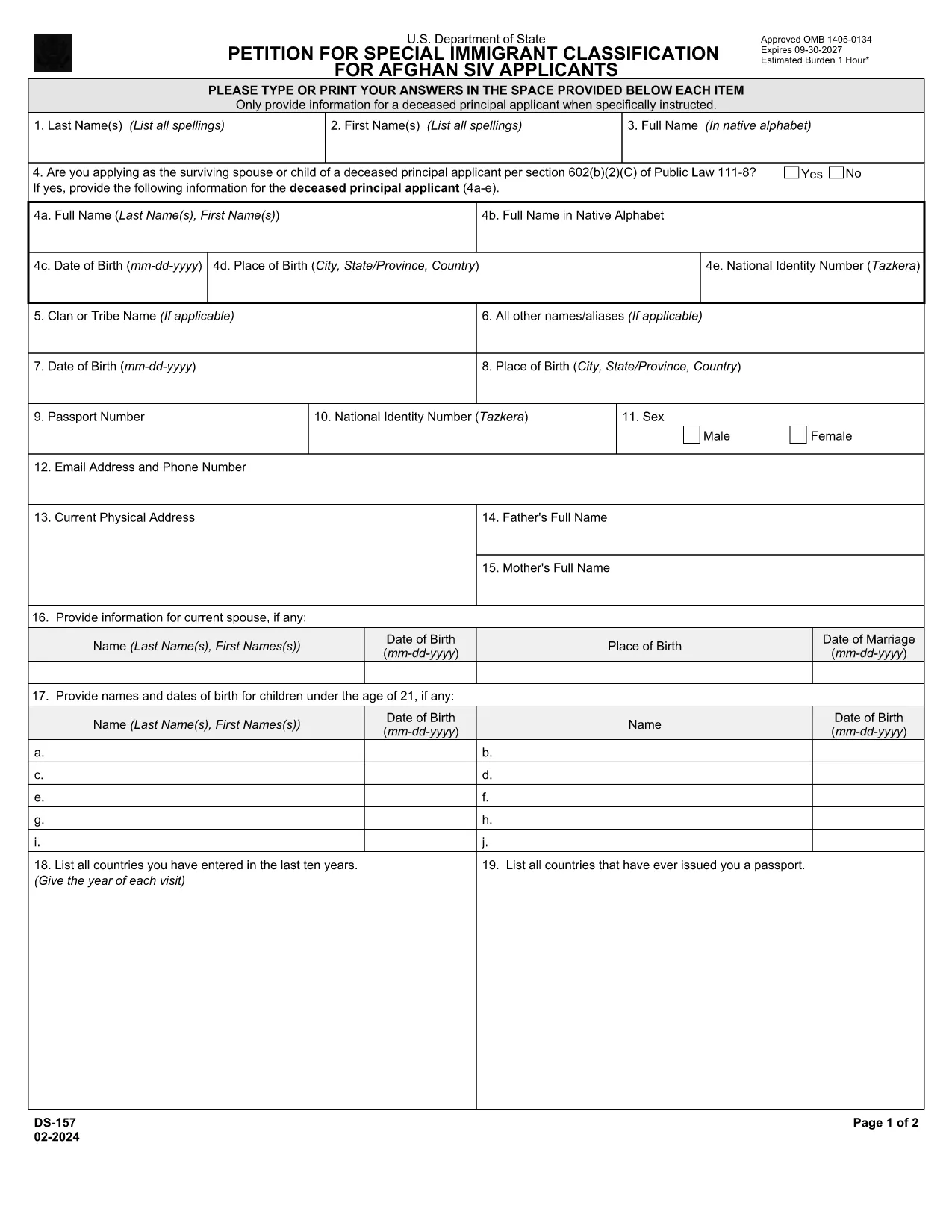
DS-157 Supplemental Nonimmigrant Visa Application – Fillable PDF

  1. Limba Engleză
  2. Țară STATELE UNITE ALE AMERICII
  3. Departament Departamentul de Stat
  4. Activitate Vize
DS-157 Supplemental Nonimmigrant Visa Application – Fillable PDF

The DS-157 (Supplemental Nonimmigrant Visa Application) is required for certain male visa applicants, especially Afghan Special Immigrant Visa (SIV) candidates. It collects detailed personal, employment, and travel information that supports the main DS-160 application.

What is the DS-157 Form?

Issued by the U.S. Department of State, the DS-157 is a supplemental questionnaire that must be submitted with your visa packet. It is a fillable PDF that can be completed electronically, printed, signed, and attached to your visa interview documents.

How to Fill the DS-157 Online with Formize

Formize provides a secure, browser‑based PDF filler so you never need to download, print, or scan the form. Follow these steps:

  • Click the **"Fill out this form"** button on this page.
  • Wait a few seconds while the Formize PDF Filler app loads.
  • Enter your information in the highlighted fields. Use the tab key or click to move between sections.
  • When finished, click **"Save & Download"** to get a copy you can print or email.
  • Sign the form with your finger (touchscreen) or type your signature, then download the completed PDF.

Common Mistakes to Avoid

  • Leaving fields blank – every question must be answered, even if the answer is “None” or “N/A”.
  • Incorrect dates – double‑check birth dates, travel dates, and employment periods.
  • Illegible signatures – use the built‑in e‑signature tool for a clear, legal signature.
  • Mismatched information – ensure details match those on your DS‑160 and supporting documents.

Where to Submit the Completed Form

Print the filled DS-157, sign it in ink if you printed a hard copy, and attach it to your visa interview packet. Submit the package to the U.S. Embassy or Consulate handling your case. Some posts now accept the PDF electronically; verify the specific instructions on your appointment notice.

Download the Official PDF

For reference or offline use, you can download the official, government‑issued PDF directly from the Department of State:

Download DS-157 PDF

Using Formize’s online filler saves you time, reduces errors, and eliminates the need for a scanner.

FAQ
  • Who must complete the DS-157 form?

    All male non‑immigrant visa applicants between ages 16‑45, including Afghan SIV applicants, must submit a DS-157 in addition to the DS‑160.

  • Is the DS-157 form available in languages other than English?

    The official form is only provided in English. If you need translation assistance, you must provide an accurate English version for the U.S. Embassy.

  • Can I submit the DS-157 electronically?

    Some U.S. posts accept an electronic PDF, but most still require a printed, signed copy. Check the instructions on your appointment notice.

  • Do I need a notarized signature on the DS-157?

    No notarization is required. A regular signature (ink or e‑signature) is sufficient as long as it matches the signature on your other visa documents.

  • What happens if I make a mistake on the DS-157?

    Correct the error by crossing out the mistake neatly, writing the correct information, and initialing the change. If the mistake is extensive, download a fresh copy and refill the form.

  • How long is the DS-157 valid?

    The DS-157 is tied to a specific visa application. If your application is withdrawn or denied, you must obtain a new form for any future applications.

CUM SĂ

Cum să completați ds-157 gratuit, online, în 4 pași simpli:

  1. 1
    Open the Formize filler
    Click the "Fill out this form" button on the page. The Formize PDF Filler will open in a new tab.
  2. 2
    Enter your information
    Type directly into each highlighted field. Use the tab key or click to move to the next question.
  3. 3
    Add your signature
    Use the built‑in e‑signature tool to sign with your finger or mouse. The signature is legally binding.
  4. 4
    Save and download
    When all fields are complete, click "Save & Download" to get a copy of the filled PDF. Print it if a hard copy is required.
Aplicația Formize PDF Filler
DESPRE

Formulare de viză

ds-157 este unul dintre formularele de viză care sunt documente care sunt folosite pentru a solicita o viză de intrare într-o țară străină. O viză este un document care permite unui cetățean străin să intre, să rămână și, uneori, să lucreze într-o țară străină pentru o anumită perioadă de timp. Formele și cerințele exacte pentru obținerea unei vize variază în funcție de țară și tipul de viză.

Formularele de viză necesită de obicei informații personale, cum ar fi numele, data nașterii și informații despre pașaport, precum și informații despre scopul și durata călătoriei, destinația prevăzută și dacă solicitantului i s-a refuzat anterior o viză sau a fost deportat dintr-o țară. Formularele pot necesita, de asemenea, documente justificative, cum ar fi pașaport, fotografii și dovada sprijinului financiar.

În Statele Unite, cele mai comune formulare de viză sunt formularele DS-160 și DS-260. Formularul DS-160 este folosit pentru a solicita o viză de nonimigrant, în timp ce formularul DS-260 este folosit pentru a solicita o viză de imigrant. Aceste formulare necesită informații detaliate despre istoricul personal și de călătorie al solicitantului, precum și documente justificative, cum ar fi pașaport, itinerar de călătorie și evidențe financiare.

Alte țări pot avea forme și cerințe diferite de viză, dar procesul de bază implică de obicei completarea unei cereri de viză, furnizarea de documente justificative și participarea la un interviu cu un ofițer consular la o ambasadă sau consulat al SUA. Este important de reținut că procesul de solicitare a vizei poate fi complex și consuma mult timp și se recomandă ca persoanele care solicită o viză să se consulte cu un avocat de imigrare sau alt profesionist calificat pentru a se asigura că toate formularele și cerințele necesare sunt îndeplinite.

CARACTERISTICI

Filler PDF

Cel mai simplu mod de a completa ds-157 online

  • Completați rapid ds-157
    Căutați o modalitate de a completa rapid ds-157 online? Cu ajutorul nostru online gratuit de completare a formularelor PDF, veți ști cum să editați și să completați acest document pdf în mai puțin de un minut.
  • Editor PDF online ușor de utilizat
    Sătul de tipărirea fișierelor PDF pentru a le putea edita, înainte de a le rescana și a le trimite înapoi? Editați documente PDF gratuit online. Utilizați editorul nostru online de pdf pentru a economisi timp și hârtie.
  • Instrumente grozave, toate platformele
    Vă întrebați cum să completați ds-157 pe un Mac sau poate cum să utilizați un fișier PDF gratuit? Instrumentele noastre PDF online funcționează pe toate platformele.
  • Stocare securizată a fișierelor
    Fișierele „ds-157” finalizate sunt stocate într-o bază de date securizată gestionată de Amazon Cloud hosting. Puteți șterge oricând fișierele din sistemul nostru. În orice caz, aceste fișiere sunt șterse automat după 24 de ore.
  • Chat cu ds-157
    Conversați cu „ds-157” pe Chatize, care este un asistent de citire PDF gratuit. Puneți întrebări și obțineți răspunsuri de la „ds-157”. Doar faceți clic pe butonul Conversați cu documentul de mai sus.

Ștergeți sesiunea de umplere

Ștergeți sesiunea de umplere selectată? În acest caz, progresul dumneavoastră în completarea formularului se va pierde.

Ștergeți sesiunea de editare

Ștergeți sesiunea de editare selectată? În acest caz, progresul dvs. în crearea și editarea formularului se va pierde.