
Selecteaza limba

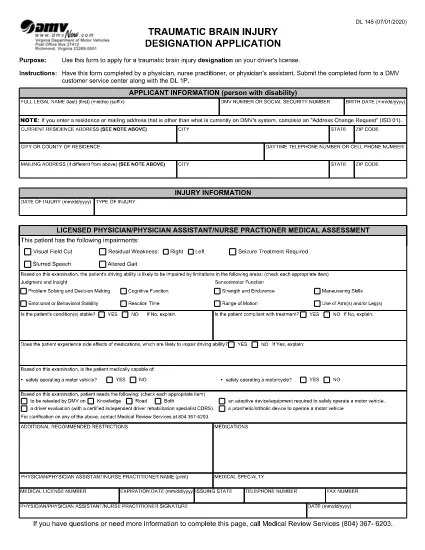
Virginia DL-145 Driver’s License Form – Fillable PDF

  1. Limba Engleză
  2. Țară STATELE UNITE ALE AMERICII
  3. Activitate Permis de conducere
  4. Departament DMV
Virginia DL-145 Driver’s License Form – Fillable PDF

What Is the DL-145 Form?

The DL-145 is the official Virginia Department of Motor Vehicles (DMV) application used to request a driver’s license, learner’s permit, or ID card. It gathers personal information, residency proof, and eligibility details required by state law.

How to Complete the DL-145 Online

Instead of printing, filling out by hand, and scanning, you can complete the DL-145 instantly on our page:

  1. Click the Fill out this form button below.
  2. Wait a few seconds while the Formize PDF Filler app loads the fillable version of the DL-145.
  3. Enter your information in the interactive fields – the form saves your progress automatically.
  4. When you’re done, choose to download a completed PDF or print it directly for submission.

Common Mistakes to Avoid

  • Incorrect address format: Use the exact street address as it appears on your utility bill or lease.
  • Missing signatures: The applicant and any required sponsors must sign the designated fields.
  • Out‑of‑date documents: Ensure all supporting documents (e.g., birth certificate, SSN card) are current and legible.
  • Skipping required checkboxes: The DMV validates each required box; unselected boxes cause delays.

Where to Submit the Completed Form

After you download the filled DL-145, bring it to any Virginia DMV customer service center along with the required supporting documents and payment. Some locations also accept mail‑in submissions; check the Virginia DMV website for specific instructions.

Why Use Formize’s Fillable PDF

Formize provides a secure, browser‑based PDF filler that eliminates the need for third‑party software. Benefits include:

  • Instant loading – no downloads or installations.
  • Auto‑save feature prevents data loss.
  • Fully compliant with Virginia DMV formatting requirements.
  • Free and accessible from any device.
FAQ
  • Is the DL-145 form available for free?

    Yes. The Virginia DMV provides the DL-145 PDF at no cost, and Formize lets you fill it out online for free.

  • Can I save my progress and finish later?

    The Formize filler auto‑saves your data while the browser session is open. For longer breaks, download a partially completed PDF and reopen it later.

  • Do I need special software to use the fillable PDF?

    No. The Formize PDF Filler runs entirely in your web browser—no Adobe Acrobat or other editor required.

  • What documents must I bring with the completed DL-145?

    Typically you need proof of identity, residency, Social Security number, and any applicable fee receipts. Check the Virginia DMV checklist for the exact list.

  • Can I submit the DL-145 electronically?

    The Virginia DMV still requires a printed, signed form for most license types. Some renewals may be completed online, but the DL-145 itself is submitted in person or by mail.

  • What if I make a mistake after downloading?

    You can reopen the downloaded PDF in any standard PDF editor, correct the error, and re‑print. Alternatively, start a new session in Formize and fill the form again.

  • Is my personal information safe when using Formize?

    Formize processes data locally in your browser and does not store any personal information on its servers.

CUM SĂ

Cum să completați DL-145 gratuit, online, în 5 pași simpli:

  1. 1
    Open the Fillable Form
    Click the "Fill out this form" button on the page. The Formize PDF Filler will open the DL-145 in your browser.
  2. 2
    Enter Your Information
    Fill each field with accurate data. The form automatically saves your entries as you type.
  3. 3
    Review & Validate
    Double‑check all entries, especially signatures and checkboxes, to ensure the DMV accepts the form.
  4. 4
    Download or Print
    When finished, click "Download" to save a copy or "Print" to produce a hard copy for submission.
  5. 5
    Submit to the DMV
    Take the printed form and required documents to a Virginia DMV office or follow the mail‑in instructions on the DMV website.
Aplicația Formize PDF Filler
DESPRE

Formulare de solicitare a permisului de conducere

În majoritatea țărilor, este obligatoriu să ai permis de conducere înainte de a porni la drum. Obținerea permisului de conducere este o etapă importantă pentru oricine dorește să conducă o mașină.

DL-145 este unul dintre formularele de solicitare a permisului de conducere care sunt documente utilizate pentru a colecta informații de la persoanele care doresc să solicite un permis de conducere. De obicei, conține câmpuri pentru numele solicitantului, data nașterii, numărul de identificare, informațiile de contact, precum și istoricul și experiența permisului de conducere al acestuia.

CARACTERISTICI

Filler PDF

Cel mai simplu mod de a completa DL-145 online

  • Completați rapid DL-145
    Căutați o modalitate de a completa rapid DL-145 online? Cu ajutorul nostru online gratuit de completare a formularelor PDF, veți ști cum să editați și să completați acest document pdf în mai puțin de un minut.
  • Editor PDF online ușor de utilizat
    Sătul de tipărirea fișierelor PDF pentru a le putea edita, înainte de a le rescana și a le trimite înapoi? Editați documente PDF gratuit online. Utilizați editorul nostru online de pdf pentru a economisi timp și hârtie.
  • Instrumente grozave, toate platformele
    Vă întrebați cum să completați DL-145 pe un Mac sau poate cum să utilizați un fișier PDF gratuit? Instrumentele noastre PDF online funcționează pe toate platformele.
  • Stocare securizată a fișierelor
    Fișierele „DL-145” finalizate sunt stocate într-o bază de date securizată gestionată de Amazon Cloud hosting. Puteți șterge oricând fișierele din sistemul nostru. În orice caz, aceste fișiere sunt șterse automat după 24 de ore.
  • Chat cu DL-145
    Conversați cu „DL-145” pe Chatize, care este un asistent de citire PDF gratuit. Puneți întrebări și obțineți răspunsuri de la „DL-145”. Doar faceți clic pe butonul Conversați cu documentul de mai sus.

Ștergeți sesiunea de umplere

Ștergeți sesiunea de umplere selectată? În acest caz, progresul dumneavoastră în completarea formularului se va pierde.

Ștergeți sesiunea de editare

Ștergeți sesiunea de editare selectată? În acest caz, progresul dvs. în crearea și editarea formularului se va pierde.