
Selecteaza limba

DS-871 Driver Notification to Employer (Fillable PDF)

  1. Limba Engleză
  2. Țară STATELE UNITE ALE AMERICII
  3. Activitate Permis de conducere
  4. Stat New York
DS-871 Driver Notification to Employer (Fillable PDF)

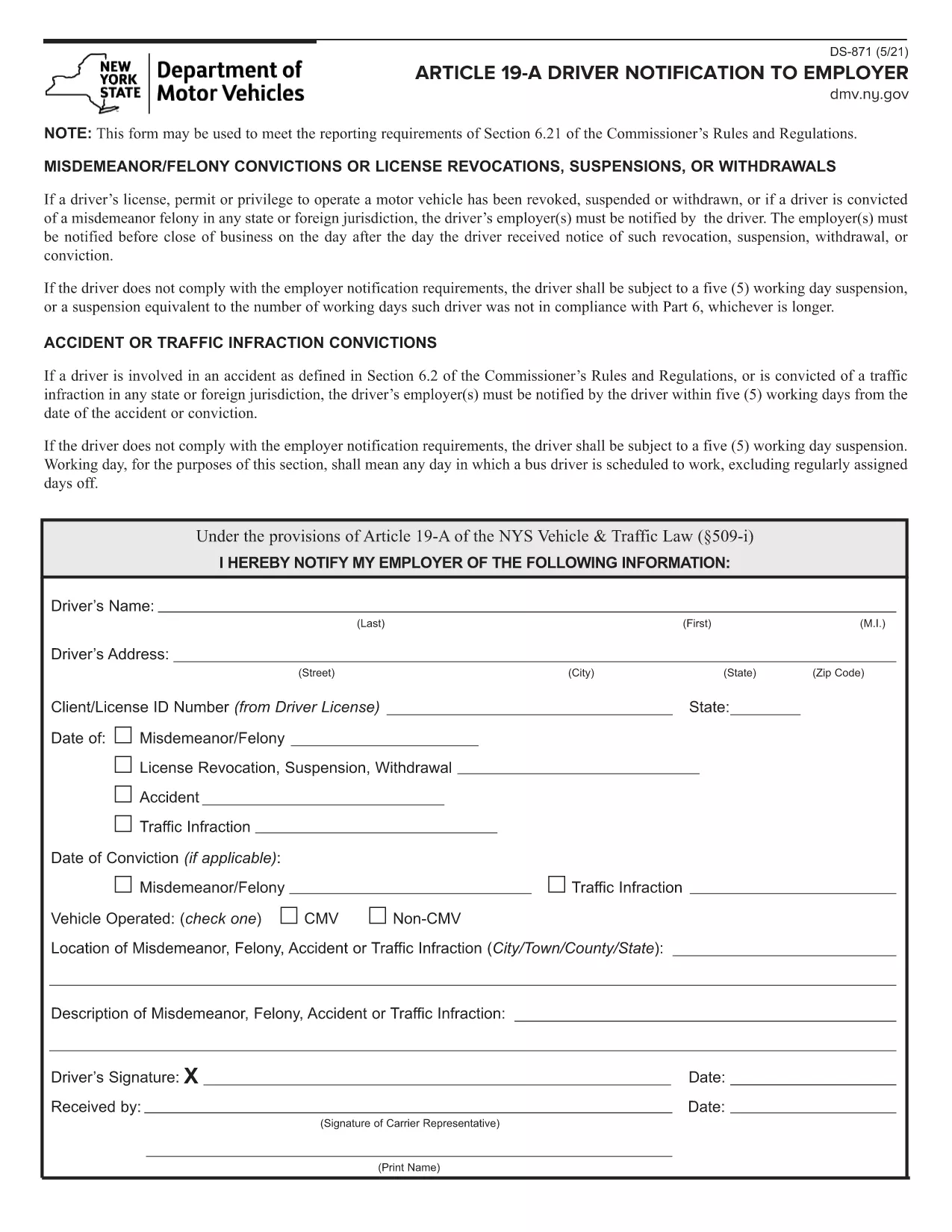
The DS-871 is the New York State Department of Motor Vehicles (DMV) form used by drivers to notify their employer of a suspension, revocation, or restriction under Article 19‑A. Employers need this documentation to stay compliant with state regulations.

This page offers a fillable PDF version of the DS-871, so you can complete the form directly in your browser without printing, scanning, or using a separate PDF editor. The Formize PDF Filler loads instantly, preserves your data, and lets you download a clean, signed copy ready for submission.

Below you’ll find a quick overview of the form, step‑by‑step instructions for filling it out online, common pitfalls to watch for, and guidance on where to send the finished document.

FAQ
  • What is the purpose of Form DS‑871?

    DS‑871 satisfies the New York DMV’s requirement that drivers notify their employer of any license suspension, revocation, or restriction under Article 19‑A.

  • Do I need a printer to use the fillable PDF?

    No. The form is fully editable online via the Formize PDF Filler. You only need to print a copy if your employer specifically requests a hard copy.

  • Can I save my progress and finish later?

    Yes. The Formize app lets you download a draft PDF that retains your entered data, so you can reopen it later and continue editing.

  • Is an electronic signature accepted?

    Most New York DMV employers accept an electronic signature created with the Formize signature tool. Check with your HR department if a wet‑ink signature is required.

  • Where should I send the completed DS‑871?

    Send the completed form to your employer’s HR or safety department. Keep a copy for your records in case the DMV requests proof of notification.

  • What if I make a mistake after submitting?

    Download a new copy of the fillable PDF, correct the error, and resend the updated version. The DMV does not require a specific form revision number.

  • Is there a filing fee for DS‑871?

    No. The DS‑871 is a free notification form; there is no charge to download or submit it.

  • Do I need to attach additional documents?

    Only attach supporting documents if your employer requests proof of the suspension (e.g., a copy of the DMV notice).

CUM SĂ

Cum să completați DS-871 gratuit, online, în 4 pași simpli:

  1. 1
    Open the Fillable Form
    Click the **Fill out this form** button on this page. The Formize PDF Filler app will load the DS‑871 PDF directly in your browser.
  2. 2
    Enter Your Information
    Type your name, license number, employer details, and the reason for the notification into the highlighted fields. All data is saved automatically as you type.
  3. 3
    Review and Sign
    Check each field for accuracy. Use the built‑in signature tool to add your electronic signature if required.
  4. 4
    Download or Email
    When you’re satisfied, click **Download PDF** to save a copy or **Email PDF** to send it straight to your employer.
Aplicația Formize PDF Filler
DESPRE

Formulare de solicitare a permisului de conducere

În majoritatea țărilor, este obligatoriu să ai permis de conducere înainte de a porni la drum. Obținerea permisului de conducere este o etapă importantă pentru oricine dorește să conducă o mașină.

DS-871 este unul dintre formularele de solicitare a permisului de conducere care sunt documente utilizate pentru a colecta informații de la persoanele care doresc să solicite un permis de conducere. De obicei, conține câmpuri pentru numele solicitantului, data nașterii, numărul de identificare, informațiile de contact, precum și istoricul și experiența permisului de conducere al acestuia.

CARACTERISTICI

Filler PDF

Cel mai simplu mod de a completa DS-871 online

  • Completați rapid DS-871
    Căutați o modalitate de a completa rapid DS-871 online? Cu ajutorul nostru online gratuit de completare a formularelor PDF, veți ști cum să editați și să completați acest document pdf în mai puțin de un minut.
  • Editor PDF online ușor de utilizat
    Sătul de tipărirea fișierelor PDF pentru a le putea edita, înainte de a le rescana și a le trimite înapoi? Editați documente PDF gratuit online. Utilizați editorul nostru online de pdf pentru a economisi timp și hârtie.
  • Instrumente grozave, toate platformele
    Vă întrebați cum să completați DS-871 pe un Mac sau poate cum să utilizați un fișier PDF gratuit? Instrumentele noastre PDF online funcționează pe toate platformele.
  • Stocare securizată a fișierelor
    Fișierele „DS-871” finalizate sunt stocate într-o bază de date securizată gestionată de Amazon Cloud hosting. Puteți șterge oricând fișierele din sistemul nostru. În orice caz, aceste fișiere sunt șterse automat după 24 de ore.
  • Chat cu DS-871
    Conversați cu „DS-871” pe Chatize, care este un asistent de citire PDF gratuit. Puneți întrebări și obțineți răspunsuri de la „DS-871”. Doar faceți clic pe butonul Conversați cu documentul de mai sus.

Ștergeți sesiunea de umplere

Ștergeți sesiunea de umplere selectată? În acest caz, progresul dumneavoastră în completarea formularului se va pierde.

Ștergeți sesiunea de editare

Ștergeți sesiunea de editare selectată? În acest caz, progresul dvs. în crearea și editarea formularului se va pierde.