Selecteaza limba

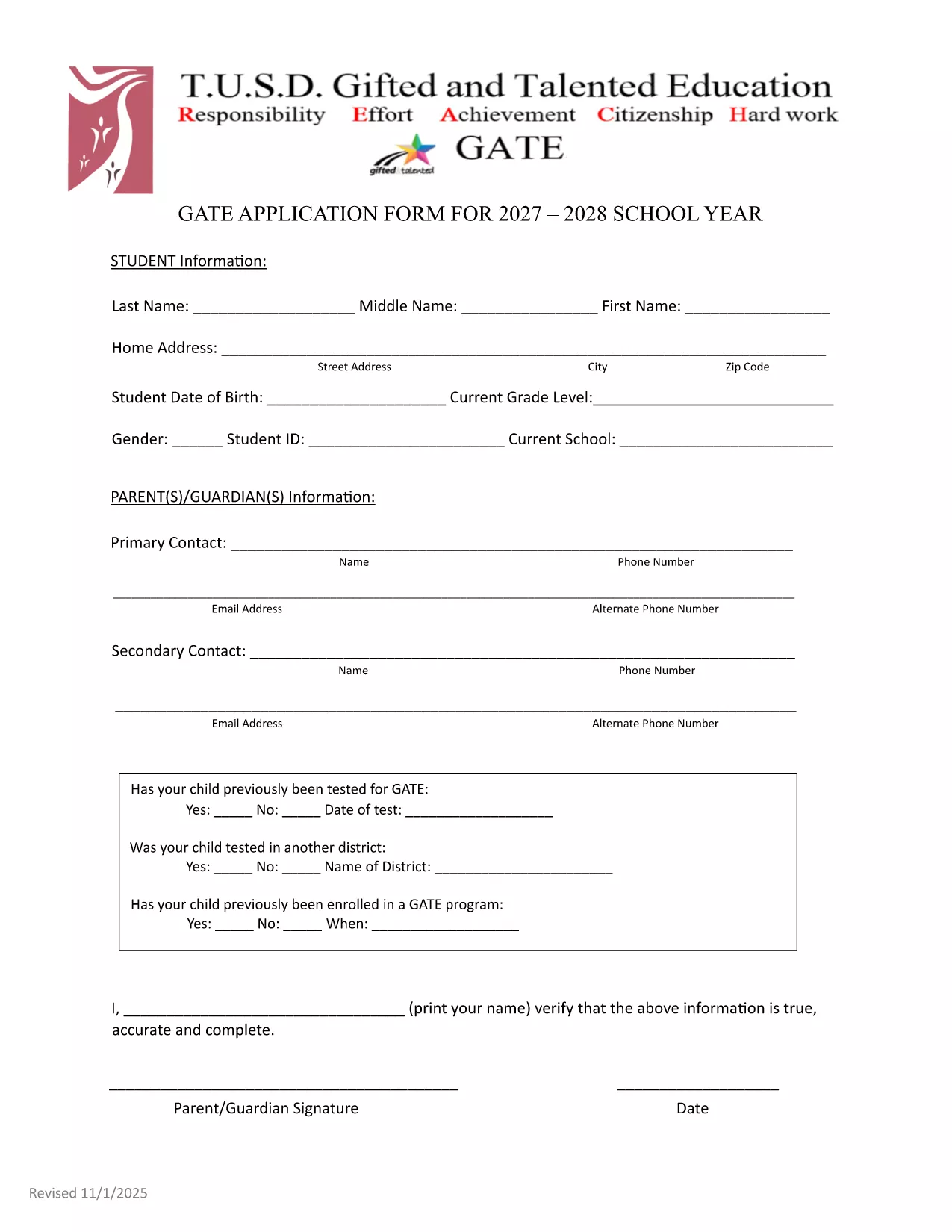
GATE 2027‑28 Application Form – Fillable PDF

  1. Limba Engleză
  2. Țară STATELE UNITE ALE AMERICII
  3. Departament Education
  4. Activitate School Admissions
GATE 2027‑28 Application Form – Fillable PDF

The GATE 2027‑28 Application Form is now available as a fully fillable PDF. Whether you’re a parent, guardian, or student, you can complete the form directly in your browser using the Formize PDF Filler – no extra software required.

Why Choose the Fillable GATE 2027 Form?

  • Instant online editing – start typing as soon as the page loads.
  • Built‑in validation to reduce errors.
  • Secure, cloud‑based processing ensures your data stays private.
  • Printable version available for hard‑copy submission if needed.

How to Complete the GATE Application Online

Follow the simple steps below to fill out the form quickly and accurately.

Common Mistakes to Avoid

  • Leaving the "Date of Test" field blank when a prior GATE test was taken.
  • Using unofficial abbreviations for school names.
  • Submitting incomplete contact information – double‑check phone numbers and email addresses.

Submission Guidelines & Deadlines

After completing the form, review all entries, sign electronically, and submit according to your district’s instructions. The deadline for the 2027‑28 cycle is May 15, 2027. Late submissions may not be considered.

Need help? Refer to the official PDF guide for detailed explanations of each section.

FAQ
  • Do I need Adobe Acrobat to fill out the GATE 2027 form?

    No. The Formize PDF Filler works in any modern browser, so you can complete the form without installing additional software.

  • Can I save my progress and finish later?

    Yes. Use the "Save Draft" button in the Formize app to store your work securely, then return with the same link to finish.

  • What if I make a mistake after submitting?

    Contact your district’s GATE coordinator immediately. They can provide a corrected form or allow you to resubmit a revised PDF.

  • Is the information I enter encrypted?

    All data transmitted through Formize is encrypted with SSL/TLS, keeping your personal details safe.

  • Do I need to print and mail the form after filling it online?

    Most districts accept the electronic submission directly. Check your local guidelines; a printed copy is only needed if explicitly requested.

  • What if my student was tested for GATE before 2027?

    Enter the previous test date in the "Date of Test" field and attach the original test report if required.

CUM SĂ

Cum să completați GATE application 2027 gratuit, online, în 4 pași simpli:

  1. 1
    Click the "Fill out this form" button
    On this page, press the highlighted button to launch the Formize PDF Filler app.
  2. 2
    Wait for the Formize PDF Filler to load
    The app loads in seconds; a progress bar will show when it’s ready.
  3. 3
    Enter your information
    Type directly into each field, use dropdowns where provided, and upload any required documents.
  4. 4
    Review, sign, and submit
    Double‑check all entries, add your electronic signature, then click Submit to send the completed application.
Aplicația Formize PDF Filler
DESPRE

șablon GATE application 2027

Cu setul tradițional de caracteristici pentru vizualizarea și completarea unui document PDF, combinat cu beneficiile unei aplicații web și a unui aspect receptiv, puteți completa GATE application 2027 în câteva minute.

CARACTERISTICI

Filler PDF

Cel mai simplu mod de a completa GATE application 2027 online

  • Completați rapid GATE application 2027
    Căutați o modalitate de a completa rapid GATE application 2027 online? Cu ajutorul nostru online gratuit de completare a formularelor PDF, veți ști cum să editați și să completați acest document pdf în mai puțin de un minut.
  • Editor PDF online ușor de utilizat
    Sătul de tipărirea fișierelor PDF pentru a le putea edita, înainte de a le rescana și a le trimite înapoi? Editați documente PDF gratuit online. Utilizați editorul nostru online de pdf pentru a economisi timp și hârtie.
  • Instrumente grozave, toate platformele
    Vă întrebați cum să completați GATE application 2027 pe un Mac sau poate cum să utilizați un fișier PDF gratuit? Instrumentele noastre PDF online funcționează pe toate platformele.
  • Stocare securizată a fișierelor
    Fișierele „GATE application 2027” finalizate sunt stocate într-o bază de date securizată gestionată de Amazon Cloud hosting. Puteți șterge oricând fișierele din sistemul nostru. În orice caz, aceste fișiere sunt șterse automat după 24 de ore.
  • Chat cu GATE application 2027
    Conversați cu „GATE application 2027” pe Chatize, care este un asistent de citire PDF gratuit. Puneți întrebări și obțineți răspunsuri de la „GATE application 2027”. Doar faceți clic pe butonul Conversați cu documentul de mai sus.

Ștergeți sesiunea de umplere

Ștergeți sesiunea de umplere selectată? În acest caz, progresul dumneavoastră în completarea formularului se va pierde.

Ștergeți sesiunea de editare

Ștergeți sesiunea de editare selectată? În acest caz, progresul dvs. în crearea și editarea formularului se va pierde.