
Selecteaza limba

Fillable Form 8453-C – California Corporate e‑File Authorization

  1. Țară STATELE UNITE ALE AMERICII
  2. Limba Engleză
  3. Activitate Impozite
  4. Departament FTB
Fillable Form 8453-C – California Corporate e‑File Authorization

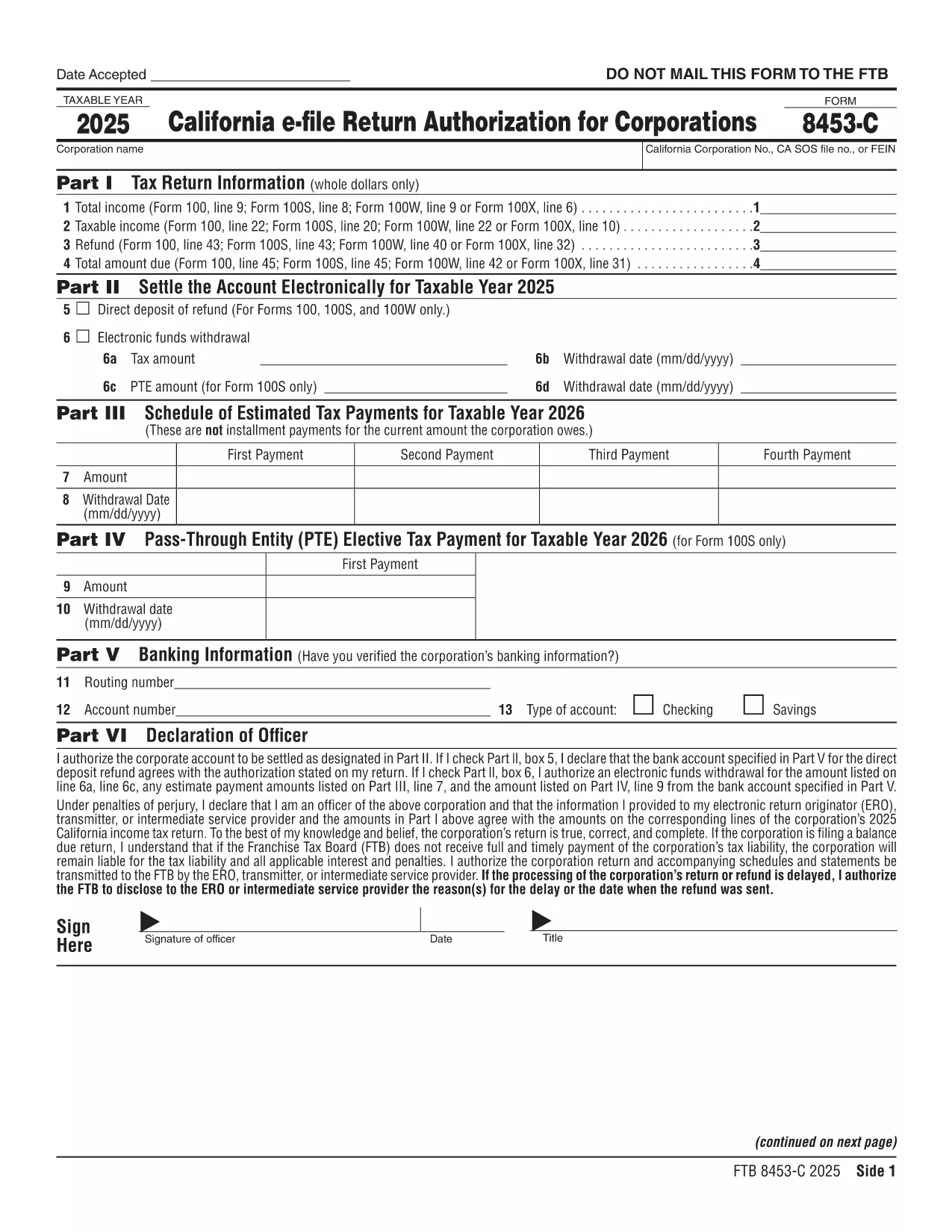
Form 8453‑C is the California Franchise Tax Board’s electronic filing authorization for corporations. It confirms that an authorized officer has reviewed and approved the e‑filed corporate tax return. Using a fillable PDF eliminates the need to print, sign, and mail a paper copy.

What Is Form 8453‑C?

This form is required for any corporation that files a California tax return electronically. It serves as the electronic signature and authorizes the state to accept the return. The form must be retained by the preparer for three years in case the FTB requests it.

How to Fill Out Form 8453‑C Online

Our Formize fillable PDF makes the process simple:

  • Click the "Fill out this form" button on this page.
  • Wait a few seconds while the Formize PDF Filler app loads.
  • Enter the corporation’s name, EIN, tax year, and other required details.
  • Provide the authorized officer’s signature using the built‑in e‑signature field.
  • Save the completed PDF directly to your device or cloud storage.

Common Mistakes to Avoid

  • Leaving the signature blank – the form is invalid without an electronic signature.
  • Mismatching dates – the date on the form must match the filing date in the CAELF screen.
  • Incorrect EIN or tax year – double‑check these numbers against the corporate return.

Where to Submit the Signed Form

Form 8453‑C is not mailed. The preparer retains the original PDF for three years and must make it available if the California Franchise Tax Board requests it. The electronic signature is accepted automatically when you file the return through approved tax‑software.

FAQs About Form 8453‑C

Answers to the most common questions are listed below. If you need more detail, consult the FTB publication 1345.

FAQ
  • Do I need to mail Form 8453‑C after I file electronically?

    No. The form is retained electronically by the preparer. It is only required to be available for audit purposes.

  • Can I use a handwritten signature on the PDF?

    Yes, you can upload an image of a handwritten signature or use the e‑signature field provided by the Formize filler.

  • How long must I keep the signed Form 8453‑C?

    The California Franchise Tax Board requires you to keep the original signed form for at least three years.

  • What if the officer’s name changes after signing?

    You must submit a new Form 8453‑C reflecting the current authorized officer’s name and signature.

  • Is Form 8453‑C required for all California corporate returns?

    Yes, any corporation filing a California tax return electronically must attach a completed Form 8453‑C.

  • Can I fill out Form 8453‑C on a mobile device?

    The Formize fillable PDF works on most modern smartphones and tablets. Use a browser that supports PDF editing.

CUM SĂ

Cum să completați Form 8453-C gratuit, online, în 5 pași simpli:

  1. 1
    Open the Fillable Form
    Click the "Fill out this form" button on the page. The Formize PDF Filler app will open in a new tab.
  2. 2
    Enter Required Information
    Complete all fields – corporation name, EIN, tax year, and officer details – exactly as they appear on the tax return.
  3. 3
    Add an Electronic Signature
    Use the built‑in signature box to draw or type the authorized officer’s signature. The date will auto‑populate.
  4. 4
    Save and Store
    Click "Save" to download the completed PDF. Keep the file for at least three years in case the FTB requests it.
  5. 5
    Submit Your Return
    File your corporate tax return through your e‑file software. The attached Form 8453‑C is automatically recognized.
Aplicația Formize PDF Filler
DESPRE

Formulare fiscale

Form 8453-C este unul dintre formularele fiscale care sunt documente utilizate pentru a raporta informații legate de taxe către autoritatea fiscală relevantă. Există diferite tipuri de formulare fiscale, inclusiv formulare fiscale federale, de stat și locale, care pot varia în funcție de circumstanțele și locația contribuabilului.

CARACTERISTICI

Filler PDF

Cel mai simplu mod de a completa Form 8453-C online

  • Completați rapid Form 8453-C
    Căutați o modalitate de a completa rapid Form 8453-C online? Cu ajutorul nostru online gratuit de completare a formularelor PDF, veți ști cum să editați și să completați acest document pdf în mai puțin de un minut.
  • Editor PDF online ușor de utilizat
    Sătul de tipărirea fișierelor PDF pentru a le putea edita, înainte de a le rescana și a le trimite înapoi? Editați documente PDF gratuit online. Utilizați editorul nostru online de pdf pentru a economisi timp și hârtie.
  • Instrumente grozave, toate platformele
    Vă întrebați cum să completați Form 8453-C pe un Mac sau poate cum să utilizați un fișier PDF gratuit? Instrumentele noastre PDF online funcționează pe toate platformele.
  • Stocare securizată a fișierelor
    Fișierele „Form 8453-C” finalizate sunt stocate într-o bază de date securizată gestionată de Amazon Cloud hosting. Puteți șterge oricând fișierele din sistemul nostru. În orice caz, aceste fișiere sunt șterse automat după 24 de ore.
  • Chat cu Form 8453-C
    Conversați cu „Form 8453-C” pe Chatize, care este un asistent de citire PDF gratuit. Puneți întrebări și obțineți răspunsuri de la „Form 8453-C”. Doar faceți clic pe butonul Conversați cu documentul de mai sus.

Ștergeți sesiunea de umplere

Ștergeți sesiunea de umplere selectată? În acest caz, progresul dumneavoastră în completarea formularului se va pierde.

Ștergeți sesiunea de editare

Ștergeți sesiunea de editare selectată? În acest caz, progresul dvs. în crearea și editarea formularului se va pierde.