
Selecteaza limba

Background Check Authorization Form (Fillable PDF)

  1. Limba Engleză
  2. Țară STATELE UNITE ALE AMERICII
  3. Departament Human Resources
  4. Activitate Employment Screening
Background Check Authorization Form (Fillable PDF)

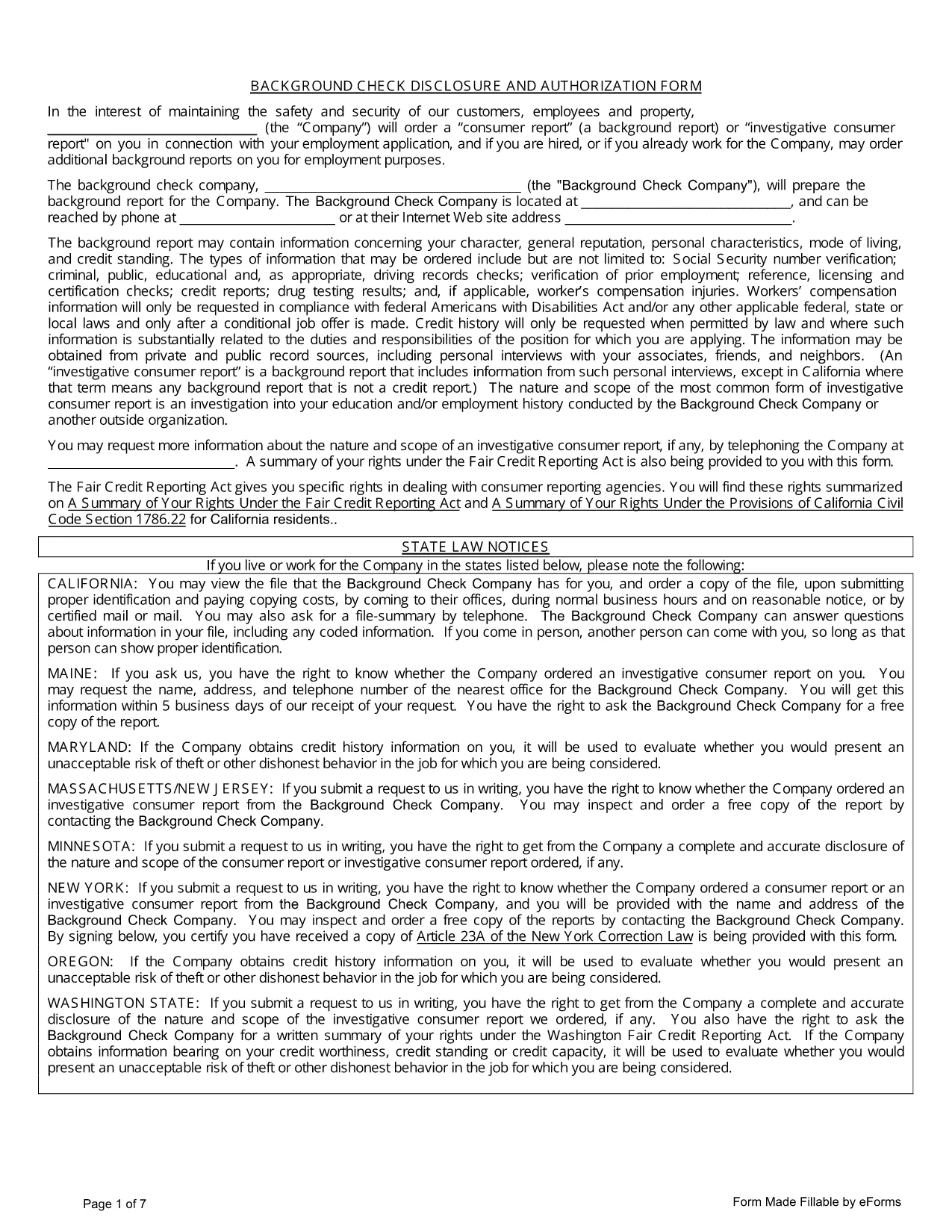
Employers need a signed authorization before they can request a consumer report or investigative consumer report. Our fillable Background Check Authorization Form lets you collect that consent quickly, securely, and in full compliance with federal and state law.

What Is a Background Check Authorization Form?

The form is a written consent that permits a company to obtain your background information—such as criminal history, employment verification, and credit data—once you are hired or during the hiring process.

Key Sections of the Form

  • Applicant Information: Name, address, Social Security Number, and contact details.
  • Scope of Authorization: Specifies whether the employer may request a consumer report, an investigative consumer report, or both.
  • Disclosure of Rights: Summarizes your rights under the Fair Credit Reporting Act (FCRA) and any applicable state notices.
  • Signature & Date: Your electronic signature confirms you understand and agree.

How to Fill the Form Online

Instead of downloading and editing the PDF in a separate editor, simply click the "Fill out this form" button on this page. The Formize PDF Filler will load automatically, allowing you to complete every field directly in your browser.

Common Mistakes to Avoid

  • Leaving required fields blank – the filler will highlight missing information.
  • Using an illegible signature – the digital signature tool creates a clear, legally‑valid signature.
  • Providing outdated contact details – ensure your phone and email are current.

Legal Rights Under the Fair Credit Reporting Act

When you sign this authorization, you retain the right to receive a copy of any report obtained, dispute inaccurate information, and be notified if the report influences an employment decision. The form includes a concise summary of these rights.

Ready to get started? Click the button below, fill out the form in seconds, and download a completed PDF for your records.

FAQ
  • Do I need to print the form to sign it?

    No. The Formize PDF Filler provides a secure electronic signature that is legally binding under the FCRA.

  • Is my personal data safe when I fill out the form online?

    Yes. All data is processed locally in your browser and transmitted over HTTPS. Formize does not store any personal information.

  • Can I edit the form after I download the completed PDF?

    The downloaded PDF is locked for editing to preserve the integrity of your signature. If you need changes, reopen the form in the filler and resubmit.

  • What if my employer requires additional state‑specific disclosures?

    The form includes a general FCRA summary. Employers can add state‑specific notices as an attachment if required.

  • How long is the authorization valid?

    Typically the authorization remains valid for the duration of the employment relationship, unless the employer states otherwise in the form.

  • What should I do if I receive a background report I disagree with?

    You have the right to dispute inaccurate information under the FCRA. Contact the reporting agency with your concerns and request a correction.

CUM SĂ

Cum să completați background check authorization form gratuit, online, în 4 pași simpli:

  1. 1
    Open the Form
    Click the "Fill out this form" button on the page. The Formize PDF Filler app will launch in your browser.
  2. 2
    Enter Your Information
    Complete each field—personal details, scope of authorization, and signature—using the on‑screen prompts.
  3. 3
    Review & Save
    Double‑check that all required fields are filled. The filler will alert you to any missing information.
  4. 4
    Download the Completed PDF
    When you’re satisfied, click "Save PDF" to download a signed copy for your records or to submit to the employer.
Aplicația Formize PDF Filler
DESPRE

șablon background check authorization form

Cu setul tradițional de caracteristici pentru vizualizarea și completarea unui document PDF, combinat cu beneficiile unei aplicații web și a unui aspect receptiv, puteți completa background check authorization form în câteva minute.

CARACTERISTICI

Filler PDF

Cel mai simplu mod de a completa background check authorization form online

  • Completați rapid background check authorization form
    Căutați o modalitate de a completa rapid background check authorization form online? Cu ajutorul nostru online gratuit de completare a formularelor PDF, veți ști cum să editați și să completați acest document pdf în mai puțin de un minut.
  • Editor PDF online ușor de utilizat
    Sătul de tipărirea fișierelor PDF pentru a le putea edita, înainte de a le rescana și a le trimite înapoi? Editați documente PDF gratuit online. Utilizați editorul nostru online de pdf pentru a economisi timp și hârtie.
  • Instrumente grozave, toate platformele
    Vă întrebați cum să completați background check authorization form pe un Mac sau poate cum să utilizați un fișier PDF gratuit? Instrumentele noastre PDF online funcționează pe toate platformele.
  • Stocare securizată a fișierelor
    Fișierele „background check authorization form” finalizate sunt stocate într-o bază de date securizată gestionată de Amazon Cloud hosting. Puteți șterge oricând fișierele din sistemul nostru. În orice caz, aceste fișiere sunt șterse automat după 24 de ore.
  • Chat cu background check authorization form
    Conversați cu „background check authorization form” pe Chatize, care este un asistent de citire PDF gratuit. Puneți întrebări și obțineți răspunsuri de la „background check authorization form”. Doar faceți clic pe butonul Conversați cu documentul de mai sus.

Ștergeți sesiunea de umplere

Ștergeți sesiunea de umplere selectată? În acest caz, progresul dumneavoastră în completarea formularului se va pierde.

Ștergeți sesiunea de editare

Ștergeți sesiunea de editare selectată? În acest caz, progresul dvs. în crearea și editarea formularului se va pierde.