
Selecteaza limba

VP 275 Fillable PDF – Nevada DMV Form

  1. Țară STATELE UNITE ALE AMERICII
  2. Limba Engleză
  3. Departament Nevada DMV
  4. Activitate Inmatricularea autoturismului
VP 275 Fillable PDF – Nevada DMV Form

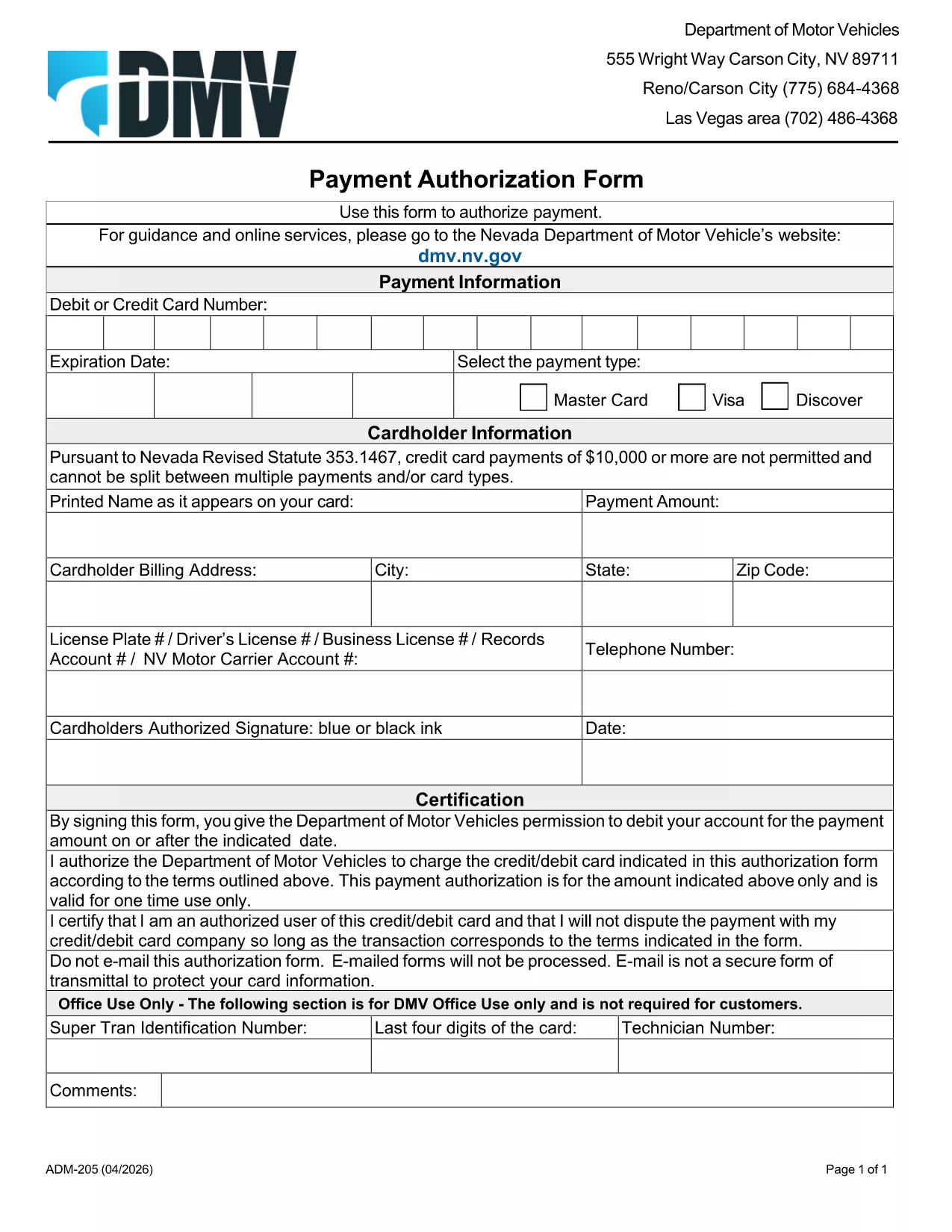
The VP 275 is the Nevada Department of Motor Vehicles (DMV) form used to authorize payment for vehicle‑related fees, such as registration renewals, title transfers, and specialty plates. This form is available as a fillable PDF, so you can complete it on any computer, tablet, or smartphone before you head to the DMV.

Formize.com hosts a secure, browser‑based PDF filler that lets you edit the VP 275 directly on our site – no extra software required. Simply click the "Fill out this form" button below, make your entries, and download the finished document ready for signature.

What Is the VP 275 Form?

VP 275 is the official Payment Authorization Form for the Nevada DMV. It captures:

  • Vehicle identification details (VIN, plate number)
  • Owner’s contact information
  • Amount to be charged to a credit or debit card
  • Authorization signature (added after printing)

Using the fillable PDF saves you time at the DMV counter and reduces the risk of errors.

How to Complete the VP 275 Online with Formize

Follow these simple steps to fill out the form instantly:

  1. Click the "Fill out this form" button on this page.
  2. Wait a few seconds while the Formize PDF Filler app loads.
  3. Enter the required information in each field – the interface highlights required fields.
  4. Click Save to store a copy in your browser or download the completed PDF.
  5. Print the form, sign it in person, and bring it to your nearest Nevada DMV office.

Common Mistakes to Avoid When Filling VP 275

  • Leaving required fields blank: The filler will warn you, but double‑check before saving.
  • Incorrect card information: Verify the card number, expiration date, and CVV to prevent payment rejections.
  • Using an outdated VIN: Ensure the VIN matches the vehicle you are registering.
  • Signing the PDF before printing: The DMV requires a handwritten signature on the physical copy.

Where to Submit the Completed VP 275

After printing and signing, you can:

  • Mail the form to your local DMV office (address listed on the form).
  • Bring it in person during your appointment.
  • Attach it to any online submission portal that accepts scanned PDFs.

Having a correctly completed VP 275 speeds up processing and helps you avoid extra visits.

FAQ
  • Is the VP 275 form available for free?

    Yes. The fillable PDF is provided at no cost. You only need an internet connection to use Formize’s online filler.

  • Can I submit the VP 275 electronically?

    The Nevada DMV still requires a physical signature, so you must print, sign, and mail or bring the form in person.

  • What if I make a mistake after saving?

    You can reopen the saved PDF in the Formize filler, correct the error, and re‑download the updated version.

  • Do I need Adobe Acrobat to fill out VP 275?

    No. Formize’s browser‑based filler works with any modern browser—no additional software is needed.

  • How long does the Formize filler take to load?

    Typically less than 5 seconds on a standard broadband connection.

  • Is my personal and payment information secure?

    Yes. Formize uses SSL encryption, and no data is stored on our servers after you download the completed PDF.

  • Can I use the VP 275 for a vehicle owned by a business?

    Absolutely. Just enter the business name and tax ID in the appropriate fields.

  • What should I do if the form won’t save?

    Refresh the page, ensure your browser allows pop‑ups, and try again. If the issue persists, try a different browser.

CUM SĂ

Cum să completați VP 275 form gratuit, online, în 4 pași simpli:

  1. 1
    Open the Fillable Form
    Click the "Fill out this form" button on this page. The Formize PDF Filler will open in a new browser tab.
  2. 2
    Enter Your Information
    Type directly into each highlighted field. Required fields are marked with an asterisk.
  3. 3
    Save and Download
    When all data is entered, click the Save button, then download the completed PDF to your device.
  4. 4
    Print and Sign
    Print the downloaded file, add your handwritten signature, and submit it to the Nevada DMV as instructed.
Aplicația Formize PDF Filler
DESPRE

Formulare de înmatriculare a vehiculelor

Dacă dețineți sau închiriați un autovehicul, o remorcă sau o barcă, trebuie să îndepliniți anumite obligații pentru a vă menține vehiculul înregistrat legal și în siguranță.

VP 275 form este unul dintre formularele de înmatriculare a vehiculelor care sunt documente care sunt utilizate pentru a înmatricula un autovehicul la autoritatea competentă de stat sau provincială. Aceste formulare sunt de obicei necesare atunci când o persoană cumpără un vehicul nou sau folosit sau când se mută într-un nou stat sau provincie cu un vehicul.

Cerințele exacte și formularele necesare pentru înmatricularea vehiculului pot varia în funcție de locație, dar, în general, procesul implică furnizarea de informații despre vehicul, proprietar și orice drepturi asupra vehiculului.

Odată ce formularele de înmatriculare și taxele sunt depuse, autoritatea de stat sau provincială va emite un certificat de înmatriculare sau plăcuță de înmatriculare proprietarului vehiculului. Această înmatriculare permite vehiculului să fie condus legal pe drumurile publice și autostrăzi.

CARACTERISTICI

Filler PDF

Cel mai simplu mod de a completa VP 275 form online

  • Completați rapid VP 275 form
    Căutați o modalitate de a completa rapid VP 275 form online? Cu ajutorul nostru online gratuit de completare a formularelor PDF, veți ști cum să editați și să completați acest document pdf în mai puțin de un minut.
  • Editor PDF online ușor de utilizat
    Sătul de tipărirea fișierelor PDF pentru a le putea edita, înainte de a le rescana și a le trimite înapoi? Editați documente PDF gratuit online. Utilizați editorul nostru online de pdf pentru a economisi timp și hârtie.
  • Instrumente grozave, toate platformele
    Vă întrebați cum să completați VP 275 form pe un Mac sau poate cum să utilizați un fișier PDF gratuit? Instrumentele noastre PDF online funcționează pe toate platformele.
  • Stocare securizată a fișierelor
    Fișierele „VP 275 form” finalizate sunt stocate într-o bază de date securizată gestionată de Amazon Cloud hosting. Puteți șterge oricând fișierele din sistemul nostru. În orice caz, aceste fișiere sunt șterse automat după 24 de ore.
  • Chat cu VP 275 form
    Conversați cu „VP 275 form” pe Chatize, care este un asistent de citire PDF gratuit. Puneți întrebări și obțineți răspunsuri de la „VP 275 form”. Doar faceți clic pe butonul Conversați cu documentul de mai sus.

Ștergeți sesiunea de umplere

Ștergeți sesiunea de umplere selectată? În acest caz, progresul dumneavoastră în completarea formularului se va pierde.

Ștergeți sesiunea de editare

Ștergeți sesiunea de editare selectată? În acest caz, progresul dvs. în crearea și editarea formularului se va pierde.