Selecteaza limba

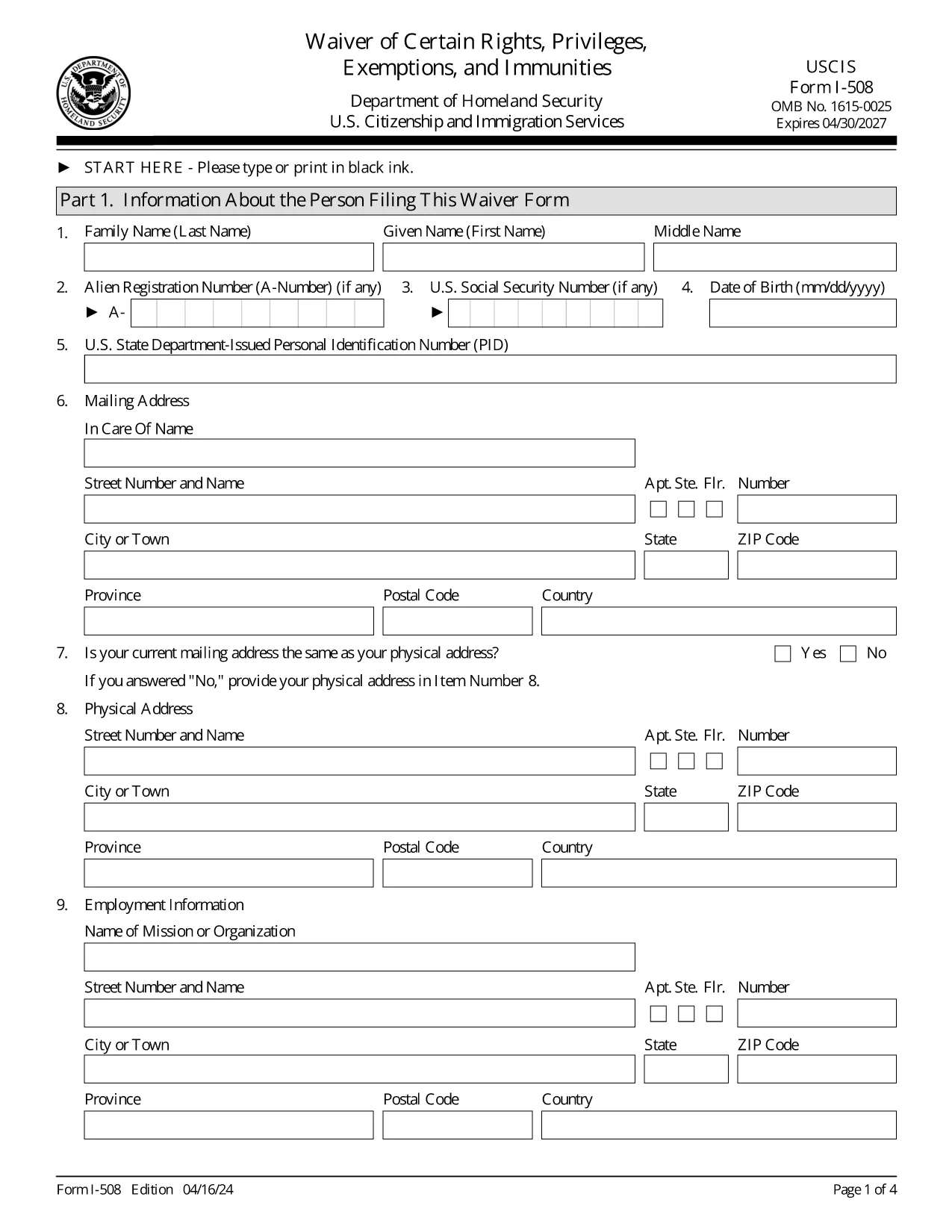
Form I-508 – Waiver of Rights, Privileges, Exemptions & Immunities

  1. Țară STATELE UNITE ALE AMERICII
  2. Limba Engleză
  3. Departament Serviciile de cetățenie și imigrare din SUA
Form I-508 – Waiver of Rights, Privileges, Exemptions & Immunities

The USCIS Form I-508 is a request to waive diplomatic rights, privileges, exemptions, and immunities for non‑U.S. citizens employed by foreign governments or international organizations. It is required when you hold an occupational status that would otherwise qualify you for A, G, or E nonimmigrant status.

What Is Form I-508?

This waiver allows you to retain your current immigration status (e.g., lawful permanent resident) while working for a foreign mission. It is mandated by Section 247(b) of the Immigration and Nationality Act (INA). If you do not submit a signed I‑508, USCIS may automatically convert your status to the appropriate diplomatic category.

How to Fill Out I-508 Using Formize

Instead of downloading, printing, and editing a PDF, simply click the “Fill out this form” button on our page. The Formize PDF Filler app loads the official USCIS document and lets you complete every field online.

Common Mistakes to Avoid

  • Leaving any required field blank – the form will not submit.
  • Using the wrong edition date – make sure the bottom of each page shows the 04/16/24 edition.
  • Forgetting to sign the certification section – an unsigned form is rejected.
  • Uploading a PDF from a different edition – only the official USCIS version works.

Where to File the Completed Waiver

File the completed I‑508 with the USCIS office handling your primary immigration application:

  • If you are filing with Form I‑131 (Travel Document), submit I‑508 to the same office.
  • If you are adjusting status (Form I‑485), file I‑508 with that office.

Need More Help?

Review USCIS filing tips, double‑check the edition date, and ensure every page is included. The Formize platform saves your progress, so you can review before final submission.

FAQ
  • Who must file Form I-508?

    Anyone who is a non‑U.S. citizen working for a foreign government mission or international organization and who would otherwise qualify for A, G, or E nonimmigrant status.

  • Can I submit I-508 electronically?

    USCIS currently requires a printed and signed PDF. Use Formize to fill the form, then print and sign before mailing.

  • What happens if I don’t file I-508?

    USCIS will automatically convert your status to the appropriate diplomatic category, which may affect your eligibility for adjustment of status.

  • Is there a filing fee for Form I-508?

    No separate fee is listed for I-508; any applicable fees are covered under the primary application (e.g., I‑131 or I‑485).

  • How do I know I have the correct edition of the form?

    The bottom of each page shows the edition date. The latest edition (04/16/24) is the one provided by USCIS and used by Formize.

  • Can I edit a saved Formize I-508 later?

    Yes. Your work is saved in your Formize account, allowing you to return, edit, and re‑download the form at any time before final submission.

CUM SĂ

Cum să completați I-508 gratuit, online, în 5 pași simpli:

  1. 1
    Open the Fillable Form
    Click the “Fill out this form” button on the page. The Formize PDF Filler app will load the official I-508 document.
  2. 2
    Complete Each Section
    Enter your personal information, employment details, and waiver statements. All fields are required; the app highlights any missing data.
  3. 3
    Review & Sign
    Use the built‑in review mode to verify every answer. Add your electronic signature in the certification box.
  4. 4
    Save or Download
    When you’re satisfied, click “Save” to store the filled form in your account or “Download” to get a PDF copy for filing.
  5. 5
    Submit to USCIS
    Print the final PDF (if required) and mail it to the USCIS office handling your case, following the filing instructions on the form.
Aplicația Formize PDF Filler
DESPRE

șablon I-508

Cu setul tradițional de caracteristici pentru vizualizarea și completarea unui document PDF, combinat cu beneficiile unei aplicații web și a unui aspect receptiv, puteți completa I-508 în câteva minute.

CARACTERISTICI

Filler PDF

Cel mai simplu mod de a completa I-508 online

  • Completați rapid I-508
    Căutați o modalitate de a completa rapid I-508 online? Cu ajutorul nostru online gratuit de completare a formularelor PDF, veți ști cum să editați și să completați acest document pdf în mai puțin de un minut.
  • Editor PDF online ușor de utilizat
    Sătul de tipărirea fișierelor PDF pentru a le putea edita, înainte de a le rescana și a le trimite înapoi? Editați documente PDF gratuit online. Utilizați editorul nostru online de pdf pentru a economisi timp și hârtie.
  • Instrumente grozave, toate platformele
    Vă întrebați cum să completați I-508 pe un Mac sau poate cum să utilizați un fișier PDF gratuit? Instrumentele noastre PDF online funcționează pe toate platformele.
  • Stocare securizată a fișierelor
    Fișierele „I-508” finalizate sunt stocate într-o bază de date securizată gestionată de Amazon Cloud hosting. Puteți șterge oricând fișierele din sistemul nostru. În orice caz, aceste fișiere sunt șterse automat după 24 de ore.
  • Chat cu I-508
    Conversați cu „I-508” pe Chatize, care este un asistent de citire PDF gratuit. Puneți întrebări și obțineți răspunsuri de la „I-508”. Doar faceți clic pe butonul Conversați cu documentul de mai sus.

Ștergeți sesiunea de umplere

Ștergeți sesiunea de umplere selectată? În acest caz, progresul dumneavoastră în completarea formularului se va pierde.

Ștergeți sesiunea de editare

Ștergeți sesiunea de editare selectată? În acest caz, progresul dvs. în crearea și editarea formularului se va pierde.