Selecteaza limba

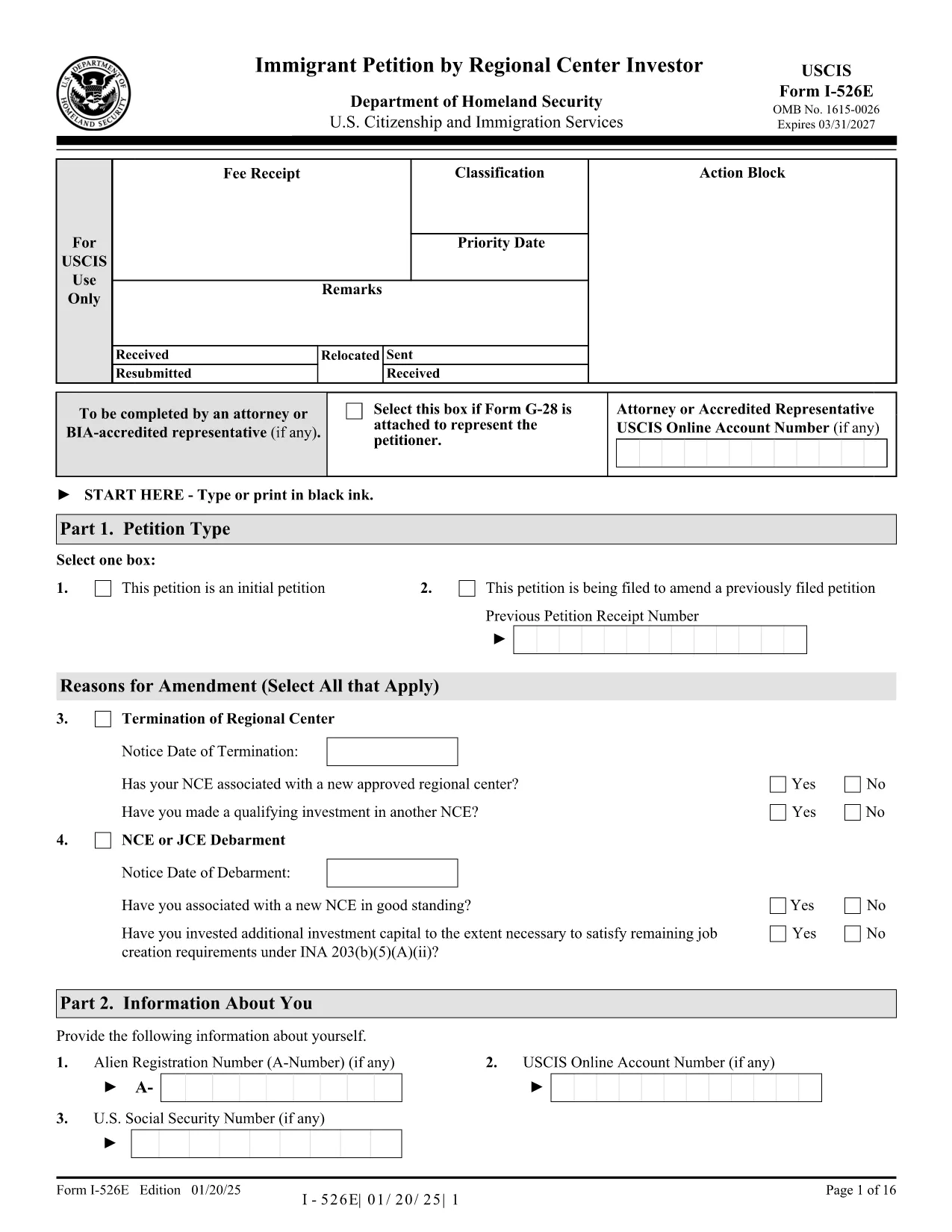
Form I-526E – Immigrant Petition by Regional Center Investor (Fillable PDF)

  1. Țară STATELE UNITE ALE AMERICII
  2. Limba Engleză
  3. Departament Serviciile de cetățenie și imigrare din SUA
Form I-526E – Immigrant Petition by Regional Center Investor (Fillable PDF)

The Form I-526E is the official USCIS petition used by investors who are participating in a Regional Center EB‑5 project. This fillable PDF lets you provide the required personal, investment, and project details so USCIS can evaluate your eligibility under INA 203(b)(5)(E).

What Is Form I-526E?

Form I-526E is distinct from the standalone I‑526 petition. It is specifically for:

  • Investors pooling capital with a USCIS‑approved Regional Center.
  • Petitioners reporting amendments when a Regional Center, enterprise, or job‑creating entity changes status.

Submitting the correct form helps prevent delays or rejections.

How to Fill the Form Online with Formize

Instead of downloading, printing, and scanning, use the Formize PDF Filler for a seamless experience:

  1. Click the "Fill out this form" button on this page.
  2. Wait a few seconds while the Formize PDF Filler app loads.
  3. Enter your information directly into the fillable fields.
  4. Save the completed PDF to your device or download a signed copy.

The filler automatically validates dates, numbers, and required fields, reducing the chance of errors.

Key Sections & Required Attachments

Pay special attention to these sections:

  • Part 1 – Information About the Investor: Full legal name, passport details, and address.
  • Part 2 – Investment Information: Amount invested, source of funds, and the Regional Center’s SEVIS ID.
  • Part 3 – Project Details: Name of the project, job‑creation estimates, and timeline.
  • Supporting Documents: Business plan, proof of lawful source of funds, and Regional Center approval letter.

Common Mistakes to Avoid

  • Leaving any required field blank – the form will be rejected.
  • Using an outdated PDF edition – always use the latest version (see download link).
  • Submitting a combined fee payment with other forms (USCIS now requires separate payments).
  • Signing the PDF with a scanned signature; use a digital signature tool or print‑sign‑scan.

Where to Submit Your Completed Petition

After completing the form, mail it to the appropriate USCIS lockbox address listed on the USCIS filing instructions. Include the separate filing fee and any required supplementary forms (e.g., G‑1450 for credit‑card payments).

Ready to start? Click the button below to open the fillable version of Form I-526E instantly.

FAQ
  • Who should use Form I-526E instead of Form I-526?

    Form I-526E is for investors who are pooling their capital with a USCIS‑approved Regional Center. Standalone investors use Form I-526.

  • Can I edit the PDF after I download it?

    Yes, but using the Formize PDF Filler is easier. It lets you edit, validate, and save the form without printing or scanning.

  • Do I need to sign the form digitally?

    USCIS accepts a digital signature if it meets their guidelines, but many applicants print, sign, and then scan the final document.

  • What happens if I submit an outdated version of Form I-526E?

    USCIS may reject the petition. Always use the latest PDF version – the link on this page points to the current edition.

  • Is there a filing fee for Form I-526E?

    Yes. The fee is listed on the USCIS Fee Schedule page and must be paid separately from any other forms.

  • Can I submit Form I-526E online?

    No, Form I-526E must be mailed as a paper petition. However, you can fill it out online with Formize before printing.

  • What supporting documents are required?

    Typical attachments include a business plan, proof of lawful source of funds, Regional Center approval notice, and any amendment notices if applicable.

  • How long does USCIS take to process a Form I-526E?

    Processing times vary; check the USCIS processing times page for the most current estimates.

CUM SĂ

Cum să completați Form I-526E gratuit, online, în 5 pași simpli:

  1. 1
    Open the Fillable Form
    Click the "Fill out this form" button on the page. The Formize PDF Filler will open in a new tab.
  2. 2
    Load the Form
    Wait a few seconds while the fillable PDF loads. All fields become editable automatically.
  3. 3
    Enter Your Information
    Type your answers directly into each section. The app validates dates, numbers, and required fields in real time.
  4. 4
    Save or Download
    When finished, click "Save" to store the completed file in your account or "Download" to get a signed PDF on your device.
  5. 5
    Print & Submit
    Print the completed form (if required) and mail it with the appropriate filing fee to the USCIS lockbox address.
Aplicația Formize PDF Filler
DESPRE

șablon Form I-526E

Cu setul tradițional de caracteristici pentru vizualizarea și completarea unui document PDF, combinat cu beneficiile unei aplicații web și a unui aspect receptiv, puteți completa Form I-526E în câteva minute.

CARACTERISTICI

Filler PDF

Cel mai simplu mod de a completa Form I-526E online

  • Completați rapid Form I-526E
    Căutați o modalitate de a completa rapid Form I-526E online? Cu ajutorul nostru online gratuit de completare a formularelor PDF, veți ști cum să editați și să completați acest document pdf în mai puțin de un minut.
  • Editor PDF online ușor de utilizat
    Sătul de tipărirea fișierelor PDF pentru a le putea edita, înainte de a le rescana și a le trimite înapoi? Editați documente PDF gratuit online. Utilizați editorul nostru online de pdf pentru a economisi timp și hârtie.
  • Instrumente grozave, toate platformele
    Vă întrebați cum să completați Form I-526E pe un Mac sau poate cum să utilizați un fișier PDF gratuit? Instrumentele noastre PDF online funcționează pe toate platformele.
  • Stocare securizată a fișierelor
    Fișierele „Form I-526E” finalizate sunt stocate într-o bază de date securizată gestionată de Amazon Cloud hosting. Puteți șterge oricând fișierele din sistemul nostru. În orice caz, aceste fișiere sunt șterse automat după 24 de ore.
  • Chat cu Form I-526E
    Conversați cu „Form I-526E” pe Chatize, care este un asistent de citire PDF gratuit. Puneți întrebări și obțineți răspunsuri de la „Form I-526E”. Doar faceți clic pe butonul Conversați cu documentul de mai sus.

Ștergeți sesiunea de umplere

Ștergeți sesiunea de umplere selectată? În acest caz, progresul dumneavoastră în completarea formularului se va pierde.

Ștergeți sesiunea de editare

Ștergeți sesiunea de editare selectată? În acest caz, progresul dvs. în crearea și editarea formularului se va pierde.