Selecteaza limba

Form I-914 Supplement A – Fillable PDF for T‑Visa Family Members

  1. Țară STATELE UNITE ALE AMERICII
  2. Limba Engleză
  3. Departament Serviciile de cetățenie și imigrare din SUA
Form I-914 Supplement A – Fillable PDF for T‑Visa Family Members

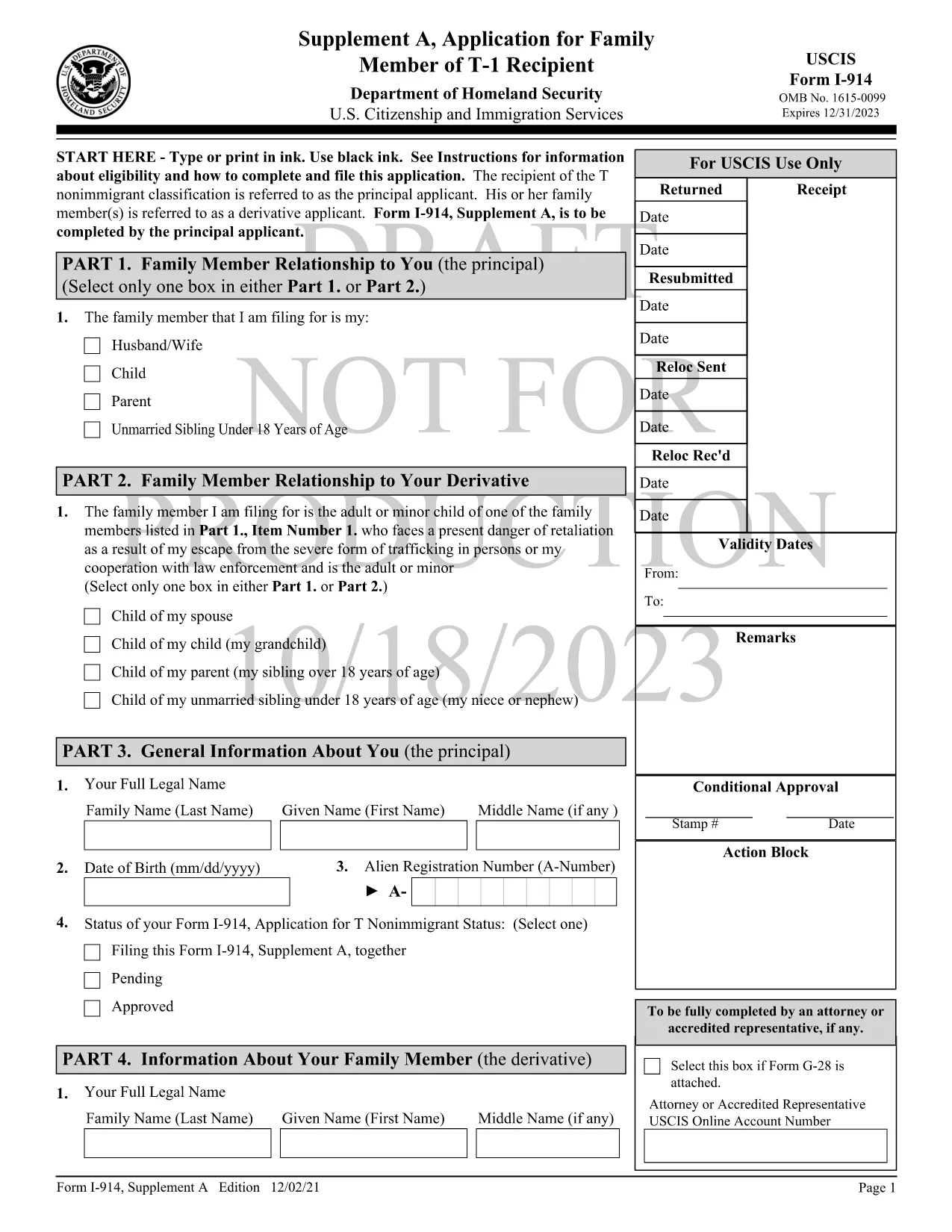
Form I-914 Supplement A is the official USCIS application used by qualifying family members of a principal T‑1 nonimmigrant to request derivative T‑visa status. This supplement accompanies the main I-914, Application for T Nonimmigrant Status and must be completed accurately to avoid delays.

What Is Form I-914 Supplement A?

The supplement collects detailed information about the relationship between the principal T‑visa holder and the derivative applicant, as well as proof of eligibility. It is a fillable PDF that can be completed online, printed, and mailed to the appropriate USCIS lockbox.

Key Eligibility Requirements

  • The principal applicant must already have an approved I-914 (T‑1) petition.
  • Derivatives include spouses, children, parents, and unmarried siblings under 18, provided they meet the definition of a “family member” under 8 CFR 274a.12(c).
  • The family member must be physically present in the United States, American Samoa, the Northern Mariana Islands, or at a port of entry.
  • Evidence of the qualifying relationship (marriage certificate, birth certificate, etc.) must be submitted with the form.

How to Complete the Fillable PDF with Formize

Instead of downloading the PDF and using a separate editor, follow these simple steps to fill it out directly on Formize:

  1. Click the "Fill out this form" button on this page.
  2. Wait a few seconds while the Formize PDF Filler app loads the I-914 Supplement A template.
  3. Enter your information in each field using black ink‑style typing. The app automatically saves your progress.
  4. Review the completed form for any missing or incorrect entries.
  5. When you’re satisfied, download the finished PDF or print it directly for mailing.

Common Mistakes to Avoid

  • Leaving fields blank: Every field marked with an asterisk (*) is required.
  • Using the wrong edition: Ensure the PDF you are filling matches the edition date shown on the bottom of each page (currently 01/20/25).
  • Mismatched signatures: The signature on Supplement A must be the derivative applicant’s, not the principal’s.
  • Incorrect document attachments: Attach only the documents listed in the instructions and label them clearly.

Where to Submit the Completed Form

After printing and signing, mail the form to the USCIS lockbox that corresponds to your residence. Refer to the USCIS I-914 filing locations page for the correct address.

Using Formize’s fillable version reduces the risk of errors, speeds up processing, and keeps your data secure.

FAQ
  • Who can file Form I-914 Supplement A?

    Spouses, children, parents, and unmarried siblings under 18 of a principal T‑1 applicant who meet USCIS eligibility criteria can file Supplement A.

  • Do I need to submit the main I-914 with Supplement A?

    Yes. Supplement A is filed together with the principal applicant’s approved I-914 petition and any required supporting evidence.

  • Can I submit the form electronically?

    USCIS currently requires a printed, signed copy for mailing. The fillable PDF helps you complete the form accurately before printing.

  • What happens if I make a mistake on the form?

    USCIS may issue a Request for Evidence (RFE) or reject the filing, causing delays. Use the Formize filler to reduce errors.

  • How long does USCIS take to process Supplement A?

    Processing times vary by service center but typically range from 2 to 6 months after receipt of a complete application.

  • Do I need to include a filing fee with Supplement A?

    Supplement A itself does not have a separate fee, but the principal I-914 filing fee applies. Check the USCIS fee schedule for the latest amounts.

  • Can I use a PDF editor instead of Formize?

    You can, but Formize’s fillable version ensures proper field alignment and reduces the chance of formatting errors that cause rejections.

CUM SĂ

Cum să completați I-914 Supplement A gratuit, online, în 5 pași simpli:

  1. 1
    Open the Fillable Form
    Click the "Fill out this form" button on the page to launch the Formize PDF Filler.
  2. 2
    Load the Template
    Wait a few seconds while the I-914 Supplement A template loads in the browser.
  3. 3
    Enter Your Information
    Type your answers into each field. The app saves your progress automatically.
  4. 4
    Review and Sign
    Check every required field for completeness, then add your electronic signature if allowed, or print to sign.
  5. 5
    Download or Print
    Download the completed PDF for your records or print it to mail to the USCIS lockbox.
Aplicația Formize PDF Filler
DESPRE

șablon I-914 Supplement A

Cu setul tradițional de caracteristici pentru vizualizarea și completarea unui document PDF, combinat cu beneficiile unei aplicații web și a unui aspect receptiv, puteți completa I-914 Supplement A în câteva minute.

CARACTERISTICI

Filler PDF

Cel mai simplu mod de a completa I-914 Supplement A online

  • Completați rapid I-914 Supplement A
    Căutați o modalitate de a completa rapid I-914 Supplement A online? Cu ajutorul nostru online gratuit de completare a formularelor PDF, veți ști cum să editați și să completați acest document pdf în mai puțin de un minut.
  • Editor PDF online ușor de utilizat
    Sătul de tipărirea fișierelor PDF pentru a le putea edita, înainte de a le rescana și a le trimite înapoi? Editați documente PDF gratuit online. Utilizați editorul nostru online de pdf pentru a economisi timp și hârtie.
  • Instrumente grozave, toate platformele
    Vă întrebați cum să completați I-914 Supplement A pe un Mac sau poate cum să utilizați un fișier PDF gratuit? Instrumentele noastre PDF online funcționează pe toate platformele.
  • Stocare securizată a fișierelor
    Fișierele „I-914 Supplement A” finalizate sunt stocate într-o bază de date securizată gestionată de Amazon Cloud hosting. Puteți șterge oricând fișierele din sistemul nostru. În orice caz, aceste fișiere sunt șterse automat după 24 de ore.
  • Chat cu I-914 Supplement A
    Conversați cu „I-914 Supplement A” pe Chatize, care este un asistent de citire PDF gratuit. Puneți întrebări și obțineți răspunsuri de la „I-914 Supplement A”. Doar faceți clic pe butonul Conversați cu documentul de mai sus.

Ștergeți sesiunea de umplere

Ștergeți sesiunea de umplere selectată? În acest caz, progresul dumneavoastră în completarea formularului se va pierde.

Ștergeți sesiunea de editare

Ștergeți sesiunea de editare selectată? În acest caz, progresul dvs. în crearea și editarea formularului se va pierde.