Selecteaza limba

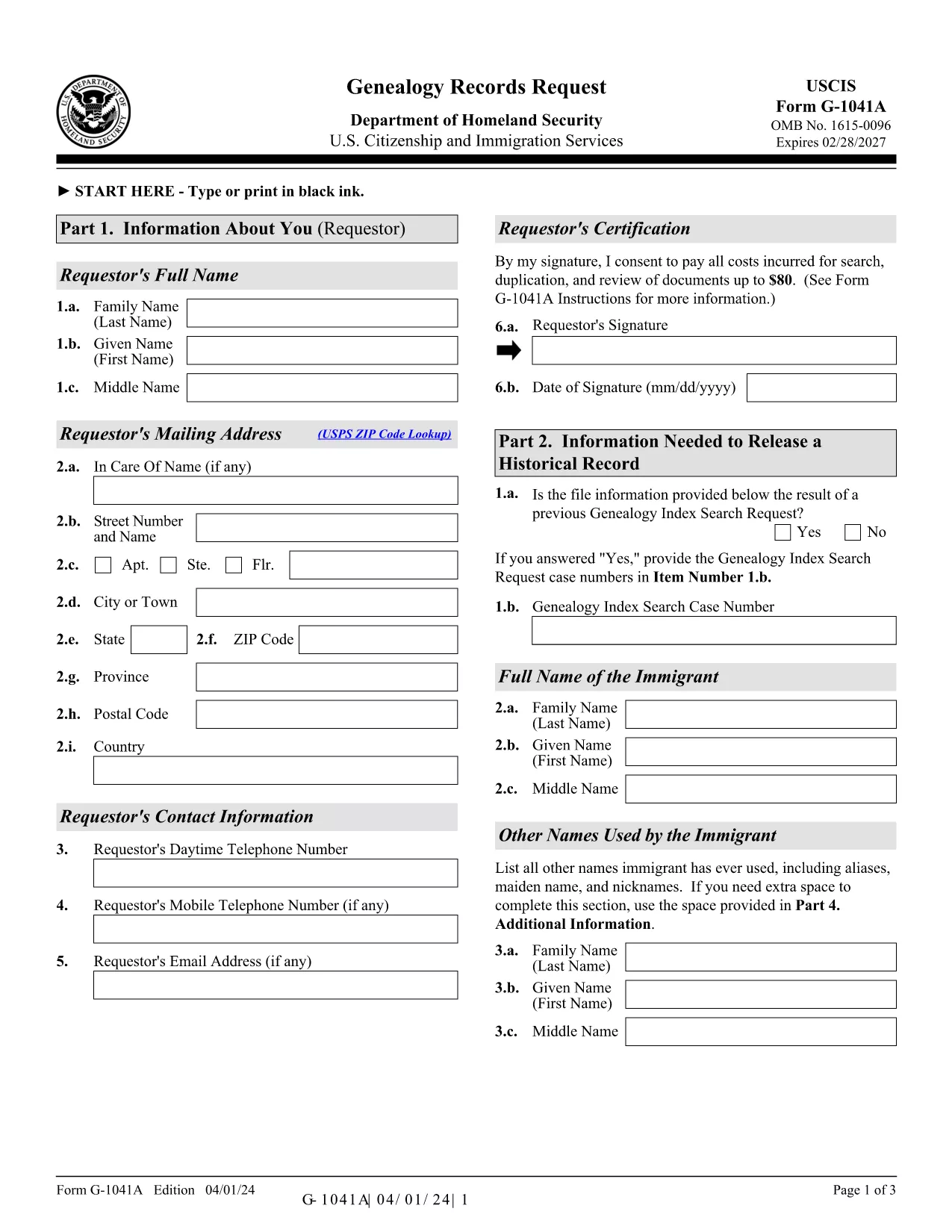
G-1041A – Genealogy Records Request (Fillable PDF)

  1. Țară STATELE UNITE ALE AMERICII
  2. Limba Engleză
  3. Activitate Immigration Records
  4. Departament USCIS
G-1041A – Genealogy Records Request (Fillable PDF)

The G-1041A is the official USCIS Genealogy Records Request form. It lets you obtain copies of historical immigration records for yourself or a relative. Instead of printing, scanning, and mailing a static PDF, you can fill the form directly on our site using the Formize PDF Filler – a secure, browser‑based editor that saves you time and eliminates formatting errors.

What Is the G-1041A Form?

G-1041A is used when you need full copies of an immigrant’s USCIS file, such as birth certificates, naturalization records, or travel documents. It is different from Form G-1041, which only requests an index search.

How to Complete the G-1041A with Formize

Follow the simple steps below to fill out the form online and download a completed PDF ready for mailing.

Common Mistakes & Tips for a Successful Submission

  • Use the latest edition – the form edition date is 04/01/24. Our filler always loads the current version.
  • Sign the form – the signature field is required; you can type your name and add a digital signature.
  • Provide English translations for any foreign‑language documents.
  • Do not send original documents unless specifically requested.

Where to Send Your Completed Request

After you download the filled PDF, mail it with the required fee to the USCIS Chicago Lockbox:

USCIS Attn: Genealogy Program
P.O. Box 805925
Chicago, IL 60680‑4188

For faster processing, you can also submit the request online through the USCIS Genealogy Program portal, but the fillable PDF remains the most reliable method for complex cases.

Need help? Review the official USCIS instructions or contact the USCIS Customer Service Center.

FAQ
  • What is the difference between G-1041 and G-1041A?

    Form G-1041 requests an index search of USCIS records, while G-1041A requests full copies of the records once the index is located.

  • Can I submit the G-1041A online instead of by mail?

    Yes, USCIS offers an online portal for genealogy requests, but the fillable PDF is required for many detailed or complex cases.

  • How much does the genealogy request cost?

    USCIS charges a fee for each copy of a document requested (up to $80 per document). Check the current fee schedule on the USCIS website.

  • Do I need to provide proof of death for the person I’m requesting?

    If the record holder is deceased and under 100 years old, you must include a death certificate or other acceptable proof of death.

  • What should I do if I receive a rejection notice?

    Review the notice for missing signatures, incorrect edition dates, or incomplete supporting documents. Correct the issue and resend the form.

  • Is the Formize filler secure for personal data?

    Yes. Formize uses SSL encryption and does not store your data on our servers after the PDF is generated.

CUM SĂ

Cum să completați G-1041A gratuit, online, în 5 pași simpli:

  1. 1
    Open the Fillable Form
    Click the “Fill out this form” button on the page. The Formize PDF Filler app loads directly in your browser.
  2. 2
    Enter Your Information
    Complete each field – name, date of birth, alien registration number, and the relationship to the record holder. Use the Tab key to move quickly.
  3. 3
    Add a Digital Signature
    Type your full name in the signature field or upload a scanned signature image. The app validates the signature format automatically.
  4. 4
    Review & Download
    Click “Review” to check for missing fields. When everything looks correct, press “Download Completed PDF” to save the file to your computer.
  5. 5
    Mail the Request
    Print the downloaded PDF, attach the required fee, and mail it to the USCIS Chicago Lockbox address provided above.
Aplicația Formize PDF Filler
DESPRE

șablon G-1041A

Cu setul tradițional de caracteristici pentru vizualizarea și completarea unui document PDF, combinat cu beneficiile unei aplicații web și a unui aspect receptiv, puteți completa G-1041A în câteva minute.

CARACTERISTICI

Filler PDF

Cel mai simplu mod de a completa G-1041A online

  • Completați rapid G-1041A
    Căutați o modalitate de a completa rapid G-1041A online? Cu ajutorul nostru online gratuit de completare a formularelor PDF, veți ști cum să editați și să completați acest document pdf în mai puțin de un minut.
  • Editor PDF online ușor de utilizat
    Sătul de tipărirea fișierelor PDF pentru a le putea edita, înainte de a le rescana și a le trimite înapoi? Editați documente PDF gratuit online. Utilizați editorul nostru online de pdf pentru a economisi timp și hârtie.
  • Instrumente grozave, toate platformele
    Vă întrebați cum să completați G-1041A pe un Mac sau poate cum să utilizați un fișier PDF gratuit? Instrumentele noastre PDF online funcționează pe toate platformele.
  • Stocare securizată a fișierelor
    Fișierele „G-1041A” finalizate sunt stocate într-o bază de date securizată gestionată de Amazon Cloud hosting. Puteți șterge oricând fișierele din sistemul nostru. În orice caz, aceste fișiere sunt șterse automat după 24 de ore.
  • Chat cu G-1041A
    Conversați cu „G-1041A” pe Chatize, care este un asistent de citire PDF gratuit. Puneți întrebări și obțineți răspunsuri de la „G-1041A”. Doar faceți clic pe butonul Conversați cu documentul de mai sus.

Ștergeți sesiunea de umplere

Ștergeți sesiunea de umplere selectată? În acest caz, progresul dumneavoastră în completarea formularului se va pierde.

Ștergeți sesiunea de editare

Ștergeți sesiunea de editare selectată? În acest caz, progresul dvs. în crearea și editarea formularului se va pierde.