
Selecteaza limba

Connecticut Cert-106 Vehicle Use Tax Refund Form (Fillable PDF)

  1. Limba Engleză
  2. Țară STATELE UNITE ALE AMERICII
  3. Activitate Inmatricularea autoturismului
  4. Stat Connecticut
Connecticut Cert-106 Vehicle Use Tax Refund Form (Fillable PDF)

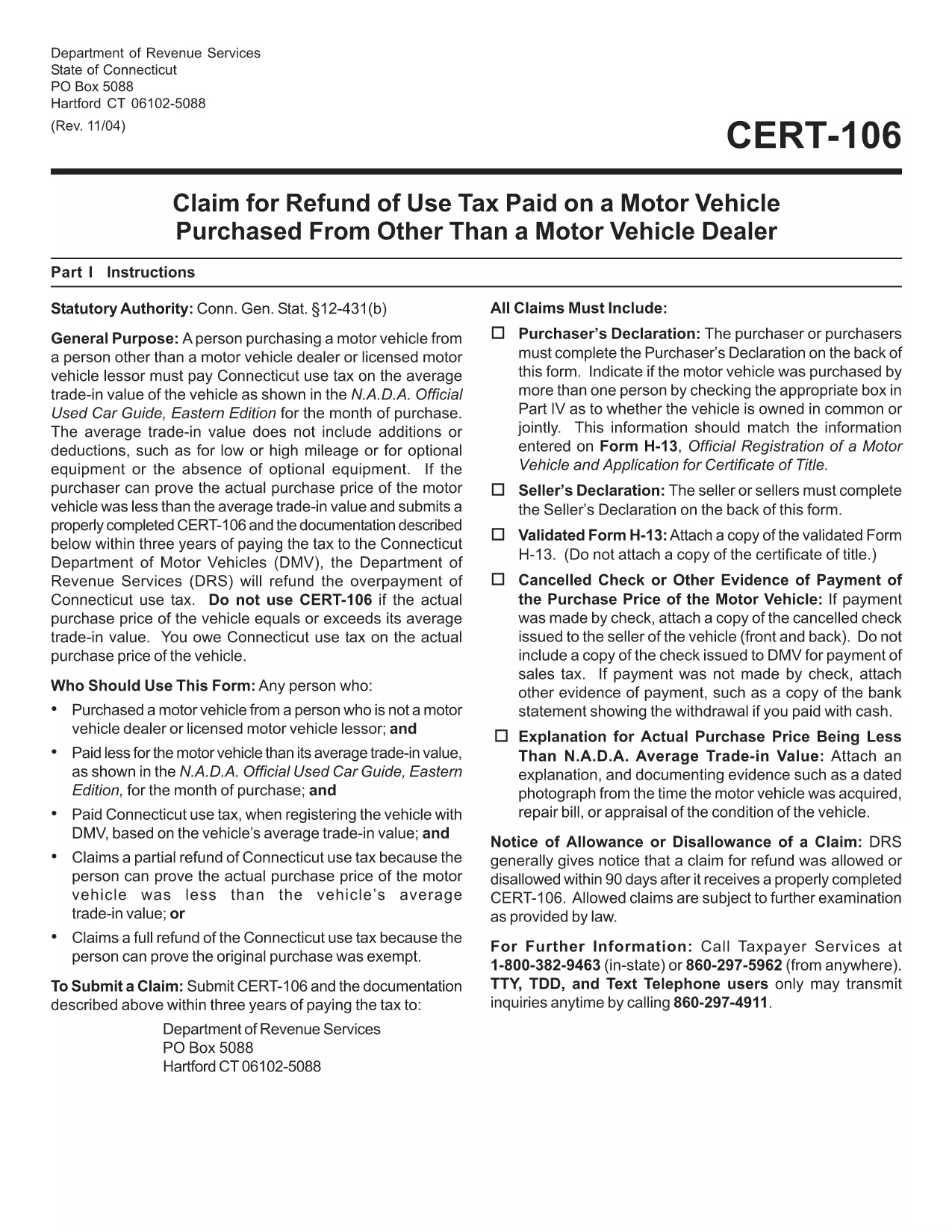
The Connecticut Cert-106 is the official claim form used to request a refund of use tax paid on a motor vehicle purchase. Whether you bought a car, truck, or motorcycle and believe you over‑paid tax, this fillable PDF lets you submit a proper request to the Connecticut Department of Revenue Services (DRS) quickly and accurately.

What is the Cert-106 Form?

Cert-106, officially titled “Claim for Refund of Use Tax Paid on Motor Vehicle Purchased,” collects essential details about the buyer, the vehicle, and the tax paid. The DRS reviews the information and, if eligible, issues a refund.

Who Needs to File Cert-106?

  • Individuals who purchased a vehicle and paid Connecticut use tax but qualify for a refund (e.g., out‑of‑state purchase, trade‑in adjustments).
  • Dealers or businesses that acted as the purchaser on behalf of a client.
  • Anyone who can provide proof of tax payment and supporting documentation within three years of the payment date.

How to Fill Out Cert-106 Online

Instead of printing, scanning, or manually typing, use Formize’s built‑in PDF filler:

  1. Click the "Fill out this form" button on this page.
  2. Wait a few seconds while the Formize PDF Filler app loads the Cert‑106 template.
  3. Enter your information directly into the fields (name, address, vehicle details, tax amount, etc.).
  4. Upload any required documents (receipt, proof of payment, vehicle title) using the attachment icons.
  5. Review the completed form, then click Save & Download or Submit according to your preferred filing method.

Common Mistakes to Avoid

  • Missing signatures: The purchaser’s declaration on the back of the form must be signed.
  • Incorrect dates: Use the exact date the tax was paid, not the purchase date.
  • Incomplete documentation: Attach the original receipt and any trade‑in paperwork; otherwise the claim will be rejected.
  • Submitting after three years: The DRS only accepts claims within three years of the tax payment.

Where to Submit Your Completed Form

After you’ve filled and saved the PDF, you can:

  • Mail it to Department of Revenue Services, PO Box 5088, Hartford, CT 06102‑5088.
  • Upload it through the Connecticut DRS online portal (if you have an account).
  • Deliver it in person to a local DRS office for immediate assistance.

Using Formize’s fillable PDF eliminates the hassle of printing, scanning, or re‑typing. Get your refund faster and keep a digital copy for your records.

FAQ
  • What is the purpose of Cert‑106?

    Cert‑106 is used to claim a refund of Connecticut use tax paid on a motor vehicle when the taxpayer qualifies for a refund.

  • Can I file Cert‑106 electronically?

    Yes. Fill the form online with Formize’s fillable PDF, save the completed document, and then upload or mail it to the Department of Revenue Services.

  • How long do I have to submit a Cert‑106 claim?

    Claims must be submitted within three years of the date the tax was paid.

  • What supporting documents are required?

    You need the original tax receipt, vehicle purchase agreement or title, and any trade‑in documentation that affects the tax amount.

  • Do I need a signature on the form?

    Yes. The purchaser’s declaration on the back of Cert‑106 must be signed for the claim to be valid.

  • Is there a filing fee for Cert‑106?

    No. There is no fee to submit a Cert‑106 claim, but you must provide accurate information to avoid processing delays.

  • Can a business use Cert‑106?

    Businesses that purchased a vehicle and paid use tax can also file Cert‑106 to request a refund.

  • What if my claim is denied?

    The DRS will send a written explanation. You can correct any errors and resubmit, or appeal the decision according to the DRS guidelines.

CUM SĂ

Cum să completați cert-106 gratuit, online, în 5 pași simpli:

  1. 1
    Open the Fillable Form
    Click the "Fill out this form" button on the page. The Formize PDF Filler app will open automatically.
  2. 2
    Enter Your Information
    Type directly into each field – name, address, vehicle details, tax amount, and any other required data.
  3. 3
    Attach Supporting Documents
    Use the attachment icons to upload receipts, proof of tax payment, and the vehicle title.
  4. 4
    Review & Save
    Double‑check every entry, then click "Save & Download" to keep a copy or "Submit" to send it to the DRS.
  5. 5
    Send Your Claim
    Mail the saved PDF to the DRS address, upload it via the online portal, or deliver it in person.
Aplicația Formize PDF Filler
DESPRE

Formulare de înmatriculare a vehiculelor

Dacă dețineți sau închiriați un autovehicul, o remorcă sau o barcă, trebuie să îndepliniți anumite obligații pentru a vă menține vehiculul înregistrat legal și în siguranță.

cert-106 este unul dintre formularele de înmatriculare a vehiculelor care sunt documente care sunt utilizate pentru a înmatricula un autovehicul la autoritatea competentă de stat sau provincială. Aceste formulare sunt de obicei necesare atunci când o persoană cumpără un vehicul nou sau folosit sau când se mută într-un nou stat sau provincie cu un vehicul.

Cerințele exacte și formularele necesare pentru înmatricularea vehiculului pot varia în funcție de locație, dar, în general, procesul implică furnizarea de informații despre vehicul, proprietar și orice drepturi asupra vehiculului.

Odată ce formularele de înmatriculare și taxele sunt depuse, autoritatea de stat sau provincială va emite un certificat de înmatriculare sau plăcuță de înmatriculare proprietarului vehiculului. Această înmatriculare permite vehiculului să fie condus legal pe drumurile publice și autostrăzi.

CARACTERISTICI

Filler PDF

Cel mai simplu mod de a completa cert-106 online

  • Completați rapid cert-106
    Căutați o modalitate de a completa rapid cert-106 online? Cu ajutorul nostru online gratuit de completare a formularelor PDF, veți ști cum să editați și să completați acest document pdf în mai puțin de un minut.
  • Editor PDF online ușor de utilizat
    Sătul de tipărirea fișierelor PDF pentru a le putea edita, înainte de a le rescana și a le trimite înapoi? Editați documente PDF gratuit online. Utilizați editorul nostru online de pdf pentru a economisi timp și hârtie.
  • Instrumente grozave, toate platformele
    Vă întrebați cum să completați cert-106 pe un Mac sau poate cum să utilizați un fișier PDF gratuit? Instrumentele noastre PDF online funcționează pe toate platformele.
  • Stocare securizată a fișierelor
    Fișierele „cert-106” finalizate sunt stocate într-o bază de date securizată gestionată de Amazon Cloud hosting. Puteți șterge oricând fișierele din sistemul nostru. În orice caz, aceste fișiere sunt șterse automat după 24 de ore.
  • Chat cu cert-106
    Conversați cu „cert-106” pe Chatize, care este un asistent de citire PDF gratuit. Puneți întrebări și obțineți răspunsuri de la „cert-106”. Doar faceți clic pe butonul Conversați cu documentul de mai sus.

Ștergeți sesiunea de umplere

Ștergeți sesiunea de umplere selectată? În acest caz, progresul dumneavoastră în completarea formularului se va pierde.

Ștergeți sesiunea de editare

Ștergeți sesiunea de editare selectată? În acest caz, progresul dvs. în crearea și editarea formularului se va pierde.