
Selecteaza limba

VP‑238 Moped‑Motorcycle Declaration – Fillable PDF

  1. Limba Engleză
  2. Țară STATELE UNITE ALE AMERICII
  3. Activitate Inmatricularea autoturismului
  4. Stat Nevada
VP‑238 Moped‑Motorcycle Declaration – Fillable PDF

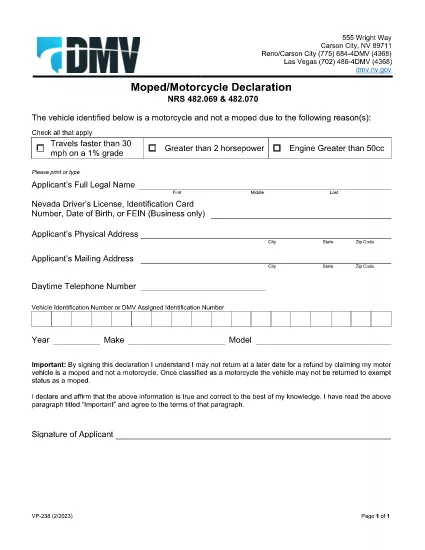
The Nevada Department of Motor Vehicles (DMV) requires the VP‑238 Moped‑Motorcycle Declaration when you convert a moped to a motorcycle or when you need to certify the vehicle’s classification. This form confirms that the vehicle meets Nevada’s definition of a motorcycle and that you understand the legal responsibilities.

What Is the VP‑238 Form?

VP‑238 is a one‑page declaration used for:

  • Changing a moped’s status to a motorcycle.
  • Providing a sworn statement that the vehicle complies with Nevada traffic laws.
  • Recording the applicant’s signature and the date of the declaration.

How to Complete the VP‑238 Online

Instead of printing, printing, and scanning, you can fill out the form directly in your browser with Formize’s PDF Filler. Follow these simple steps:

  1. Click the “Fill out this form” button on this page.
  2. Wait for the Formize PDF Filler app to load (a few seconds).
  3. Enter your personal information, vehicle details, and sign electronically.
  4. Review the entered data for accuracy.
  5. Click “Save & Download” to get a completed PDF you can print or submit electronically.

Common Mistakes to Avoid

  • Incorrect vehicle classification: Verify that the vehicle truly meets Nevada’s motorcycle criteria before selecting “Motorcycle.”
  • Missing signature: The form is not valid without a signed declaration.
  • Out‑of‑date information: Use the most recent vehicle identification number (VIN) and registration data.
  • Wrong form version: Always use the official VP‑238 PDF from the Nevada DMV (linked below).

Where to Submit the Completed Form

After filling out and printing the form, submit it to any Nevada DMV office or mail it to:

Nevada Department of Motor Vehicles
555 E. Washington St.
Carson City, NV 89701

Bring additional supporting documents such as the vehicle title, proof of insurance, and a valid ID.

Download the Official PDF

Click the button below to download the original, fillable VP‑238 PDF directly from the Nevada DMV.

Download VP‑238 PDF

FAQ
  • Do I need to print the VP‑238 after filling it online?

    Yes. The DMV requires a hard‑copy signature on the printed form, but you can fill out all fields electronically first.

  • Can I submit the VP‑238 electronically?

    Nevada DMV currently accepts only a printed, signed form. However, you can email a scanned copy for preliminary review before mailing the original.

  • What happens if I declare a moped as a motorcycle incorrectly?

    An incorrect classification can lead to fines, insurance issues, and the need to re‑file the form. Verify the vehicle meets Nevada’s motorcycle specifications before submitting.

  • Is there a fee for filing VP‑238?

    The VP‑238 itself has no filing fee, but changing the vehicle classification may trigger title or registration fees.

  • How long is the VP‑238 valid?

    The declaration is valid as long as the vehicle remains classified as a motorcycle. Any future status changes require a new VP‑238 submission.

  • What supporting documents should I bring?

    Bring the vehicle title, proof of insurance, a valid driver’s license, and any emission inspection certificates if applicable.

CUM SĂ

Cum să completați VP-238 gratuit, online, în 5 pași simpli:

  1. 1
    Open the Form
    Click the “Fill out this form” button on the page to launch Formize’s PDF Filler.
  2. 2
    Load the PDF
    The VP‑238 PDF loads automatically; wait a few seconds for the editor to appear.
  3. 3
    Enter Your Information
    Fill in all required fields: owner name, address, VIN, and vehicle classification.
  4. 4
    Add Your Signature
    Use the built‑in signature tool to sign electronically; this satisfies the DMV’s signature requirement.
  5. 5
    Save and Download
    Click “Save & Download” to get a completed PDF you can print or submit online.
Aplicația Formize PDF Filler
DESPRE

Formulare de înmatriculare a vehiculelor

Dacă dețineți sau închiriați un autovehicul, o remorcă sau o barcă, trebuie să îndepliniți anumite obligații pentru a vă menține vehiculul înregistrat legal și în siguranță.

VP-238 este unul dintre formularele de înmatriculare a vehiculelor care sunt documente care sunt utilizate pentru a înmatricula un autovehicul la autoritatea competentă de stat sau provincială. Aceste formulare sunt de obicei necesare atunci când o persoană cumpără un vehicul nou sau folosit sau când se mută într-un nou stat sau provincie cu un vehicul.

Cerințele exacte și formularele necesare pentru înmatricularea vehiculului pot varia în funcție de locație, dar, în general, procesul implică furnizarea de informații despre vehicul, proprietar și orice drepturi asupra vehiculului.

Odată ce formularele de înmatriculare și taxele sunt depuse, autoritatea de stat sau provincială va emite un certificat de înmatriculare sau plăcuță de înmatriculare proprietarului vehiculului. Această înmatriculare permite vehiculului să fie condus legal pe drumurile publice și autostrăzi.

CARACTERISTICI

Filler PDF

Cel mai simplu mod de a completa VP-238 online

  • Completați rapid VP-238
    Căutați o modalitate de a completa rapid VP-238 online? Cu ajutorul nostru online gratuit de completare a formularelor PDF, veți ști cum să editați și să completați acest document pdf în mai puțin de un minut.
  • Editor PDF online ușor de utilizat
    Sătul de tipărirea fișierelor PDF pentru a le putea edita, înainte de a le rescana și a le trimite înapoi? Editați documente PDF gratuit online. Utilizați editorul nostru online de pdf pentru a economisi timp și hârtie.
  • Instrumente grozave, toate platformele
    Vă întrebați cum să completați VP-238 pe un Mac sau poate cum să utilizați un fișier PDF gratuit? Instrumentele noastre PDF online funcționează pe toate platformele.
  • Stocare securizată a fișierelor
    Fișierele „VP-238” finalizate sunt stocate într-o bază de date securizată gestionată de Amazon Cloud hosting. Puteți șterge oricând fișierele din sistemul nostru. În orice caz, aceste fișiere sunt șterse automat după 24 de ore.
  • Chat cu VP-238
    Conversați cu „VP-238” pe Chatize, care este un asistent de citire PDF gratuit. Puneți întrebări și obțineți răspunsuri de la „VP-238”. Doar faceți clic pe butonul Conversați cu documentul de mai sus.

Ștergeți sesiunea de umplere

Ștergeți sesiunea de umplere selectată? În acest caz, progresul dumneavoastră în completarea formularului se va pierde.

Ștergeți sesiunea de editare

Ștergeți sesiunea de editare selectată? În acest caz, progresul dvs. în crearea și editarea formularului se va pierde.