
Selecteaza limba

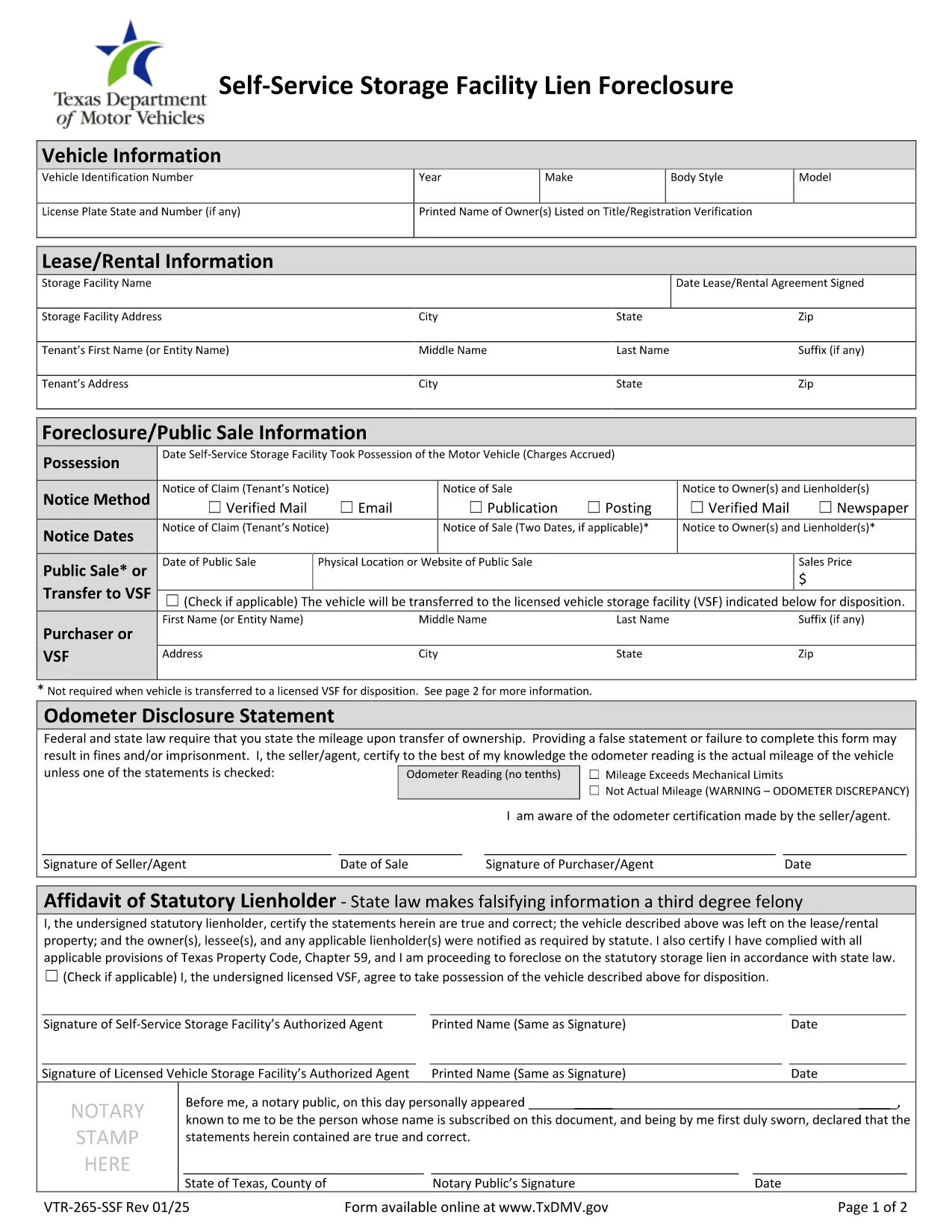
VTR-265-SSF Fillable PDF – Self‑Service Storage Facility Lien Foreclosure

  1. Limba Engleză
  2. Țară STATELE UNITE ALE AMERICII
  3. Activitate Inmatricularea autoturismului
  4. Stat Texas
VTR-265-SSF Fillable PDF – Self‑Service Storage Facility Lien Foreclosure

The VTR-265-SSF is the Texas Department of Motor Vehicles (TxDMV) form used to verify title and registration when a self‑service storage facility forecloses on a lien. Whether you’re a storage operator, a lien holder, or the vehicle owner, this form is required to transfer ownership after a lien foreclosure.

What Is Form VTR-265-SSF?

This form is officially titled Verification of Title and/or Registration – Self‑Service Storage Facility Lien Foreclosure. It collects:

  • Vehicle identification details (VIN, make, model, year)
  • Proof of lien foreclosure
  • Owner and lienholder signatures
  • Evidence that the title can be transferred

How to Complete the VTR-265-SSF Online

Instead of downloading, printing, and scanning, use Formize’s built‑in PDF filler:

  1. Click “Fill out this form” on the page.
  2. Wait a few seconds while the Formize PDF Filler app loads.
  3. Enter the required information in each fillable field. The app validates dates, VIN length, and required signatures.
  4. Review the completed form for accuracy.
  5. Save the filled PDF or submit it directly to the TxDMV portal if instructed.

Common Mistakes to Avoid

  • Incorrect VIN: Double‑check the 17‑character VIN; a single digit error will cause rejection.
  • Missing signatures: Both the lienholder and the vehicle owner must sign; electronic signatures are accepted in the Formize filler.
  • Wrong lien documentation: Attach the foreclosure notice and any court order before uploading.
  • Out‑of‑date form version: Use the PDF linked below – it is the current TxDMV version.

Where to Submit the Completed Form

After filling the form, you can:

  • Mail it to the Texas Department of Motor Vehicles, Vehicle Services Division.
  • Submit electronically through the TxDMV online portal if you have an account.
  • Deliver it in person to any TxDMV Regional Service Center.

Download the Official PDF

For reference or offline use, you can download the official VTR-265-SSF PDF directly from the Texas DMV website.

FAQ
  • Who needs to complete Form VTR-265-SSF?

    The form is required by storage facility owners, lienholders, and vehicle owners when a lien is foreclosed and title ownership must be transferred in Texas.

  • Can I submit the form electronically?

    Yes. After filling the form with Formize, you can upload the completed PDF to the TxDMV online portal or email it if the agency permits electronic submissions.

  • What documentation must accompany the form?

    Attach the foreclosure notice, any court order, and proof of notification (certified mail receipts). These documents verify the lien’s validity.

  • Is the PDF fillable on mobile devices?

    The Formize PDF Filler works on most modern smartphones and tablets, allowing you to complete the form on the go.

  • How long does the TxDMV take to process the form?

    Processing typically takes 7‑10 business days after receipt, provided all required fields and supporting documents are complete.

  • What if I make a mistake after submitting?

    Contact the TxDMV Vehicle Services Division to request a correction. You may need to submit a new VTR-265-SSF with the corrected information.

  • Is there a fee to file VTR-265-SSF?

    There is no filing fee for the VTR-265-SSF itself, but standard title transfer fees may apply when the new title is issued.

CUM SĂ

Cum să completați VTR-265-SSF gratuit, online, în 4 pași simpli:

  1. 1
    Open the Fillable Form
    Click the “Fill out this form” button on the page. The Formize PDF Filler will open in your browser.
  2. 2
    Enter Required Information
    Fill in each field – VIN, owner details, lienholder information, and attach the foreclosure notice. The filler checks for correct formats.
  3. 3
    Review and Sign
    Double‑check all entries, then add electronic signatures for the owner and lienholder using the built‑in signature tool.
  4. 4
    Save or Submit
    Save the completed PDF to your computer or submit it directly to the TxDMV portal as instructed.
Aplicația Formize PDF Filler
DESPRE

Formulare de înmatriculare a vehiculelor

Dacă dețineți sau închiriați un autovehicul, o remorcă sau o barcă, trebuie să îndepliniți anumite obligații pentru a vă menține vehiculul înregistrat legal și în siguranță.

VTR-265-SSF este unul dintre formularele de înmatriculare a vehiculelor care sunt documente care sunt utilizate pentru a înmatricula un autovehicul la autoritatea competentă de stat sau provincială. Aceste formulare sunt de obicei necesare atunci când o persoană cumpără un vehicul nou sau folosit sau când se mută într-un nou stat sau provincie cu un vehicul.

Cerințele exacte și formularele necesare pentru înmatricularea vehiculului pot varia în funcție de locație, dar, în general, procesul implică furnizarea de informații despre vehicul, proprietar și orice drepturi asupra vehiculului.

Odată ce formularele de înmatriculare și taxele sunt depuse, autoritatea de stat sau provincială va emite un certificat de înmatriculare sau plăcuță de înmatriculare proprietarului vehiculului. Această înmatriculare permite vehiculului să fie condus legal pe drumurile publice și autostrăzi.

CARACTERISTICI

Filler PDF

Cel mai simplu mod de a completa VTR-265-SSF online

  • Completați rapid VTR-265-SSF
    Căutați o modalitate de a completa rapid VTR-265-SSF online? Cu ajutorul nostru online gratuit de completare a formularelor PDF, veți ști cum să editați și să completați acest document pdf în mai puțin de un minut.
  • Editor PDF online ușor de utilizat
    Sătul de tipărirea fișierelor PDF pentru a le putea edita, înainte de a le rescana și a le trimite înapoi? Editați documente PDF gratuit online. Utilizați editorul nostru online de pdf pentru a economisi timp și hârtie.
  • Instrumente grozave, toate platformele
    Vă întrebați cum să completați VTR-265-SSF pe un Mac sau poate cum să utilizați un fișier PDF gratuit? Instrumentele noastre PDF online funcționează pe toate platformele.
  • Stocare securizată a fișierelor
    Fișierele „VTR-265-SSF” finalizate sunt stocate într-o bază de date securizată gestionată de Amazon Cloud hosting. Puteți șterge oricând fișierele din sistemul nostru. În orice caz, aceste fișiere sunt șterse automat după 24 de ore.
  • Chat cu VTR-265-SSF
    Conversați cu „VTR-265-SSF” pe Chatize, care este un asistent de citire PDF gratuit. Puneți întrebări și obțineți răspunsuri de la „VTR-265-SSF”. Doar faceți clic pe butonul Conversați cu documentul de mai sus.

Ștergeți sesiunea de umplere

Ștergeți sesiunea de umplere selectată? În acest caz, progresul dumneavoastră în completarea formularului se va pierde.

Ștergeți sesiunea de editare

Ștergeți sesiunea de editare selectată? În acest caz, progresul dvs. în crearea și editarea formularului se va pierde.