Выберите язык

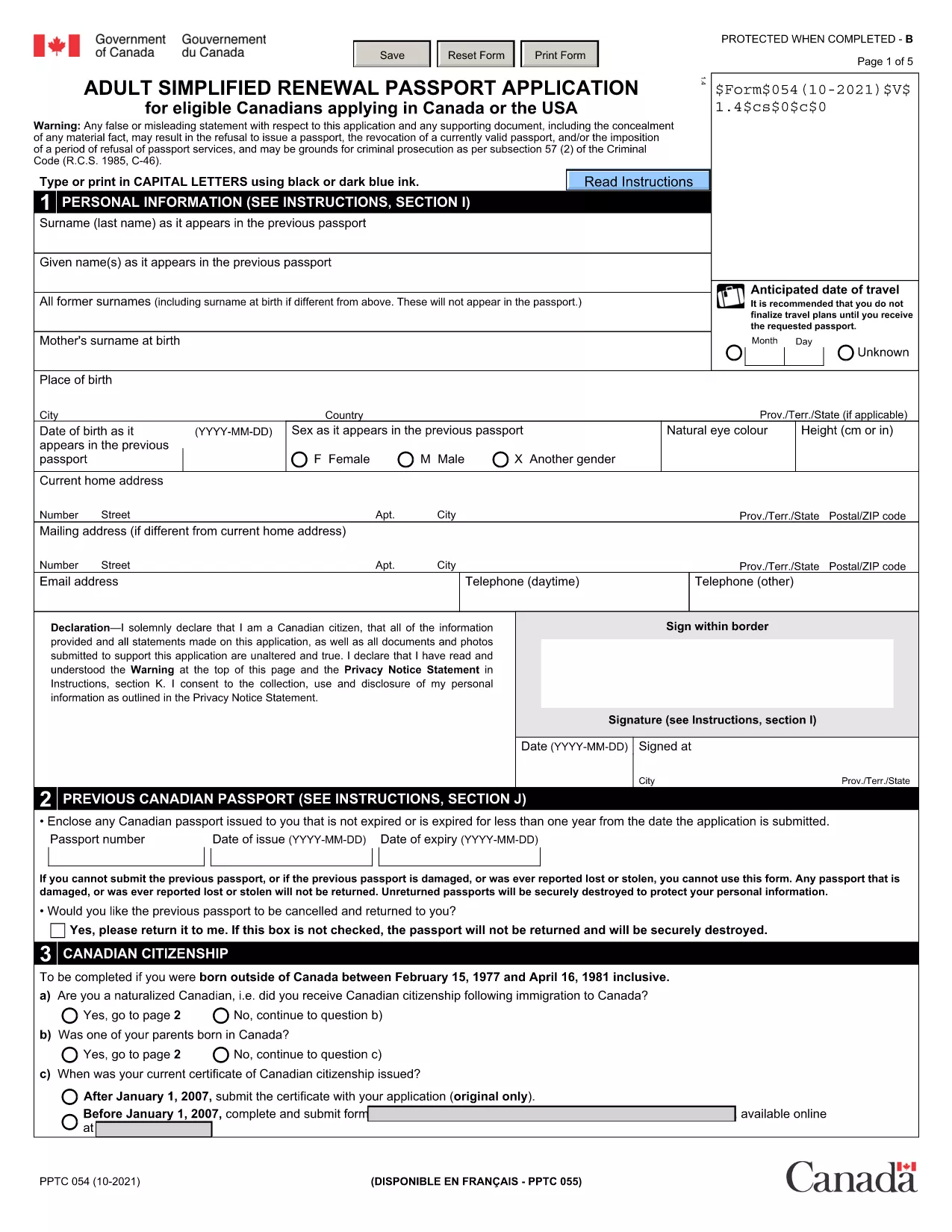
Passport Renewal Application Form – Fillable PDF

  1. Язык Английский
  2. Страна Канада
  3. Департамент Immigration, Refugees and Citizenship Canada
  4. Вид деятельности Passports
Passport Renewal Application Form – Fillable PDF

Renewing your passport doesn’t have to be a hassle. Our free, fillable PDF version of the Adult Simplified Renewal Passport Application lets you complete the entire form online, save your progress, and print a clean, error‑free document ready for submission.

Why Use Our Fillable PDF Form?

  • Instant access: No need to hunt for the official PDF on government sites.
  • Online editing: Fill fields directly in your browser – no extra software required.
  • Reduced errors: Automatic validation checks help you avoid common mistakes.
  • Secure download: The file is hosted on a trusted HTTPS server.

How to Complete the Passport Renewal Form in Minutes

Follow these simple steps to finish your renewal application:

  1. Click the "Fill out this form" button below.
  2. Wait a few seconds while the Formize PDF Filler app loads.
  3. Enter your personal details, passport information, and supporting data in the highlighted fields.
  4. Review each section – the filler will highlight any missing or incorrectly formatted entries.
  5. When you’re satisfied, click Save & Download to get a printable PDF.

Common Mistakes to Avoid When Renewing Your Passport

  • Leaving the "Previous Passport Number" blank even if you have it.
  • Using an outdated photo that doesn’t meet the 2‑inch, neutral‑expression requirements.
  • Forgetting to sign the form in the designated area.
  • Submitting an incomplete form – the filler will alert you, but double‑check before printing.

Where to Submit Your Completed Form

After printing, mail the completed application with your current passport, a new passport photo, and the required fee to the nearest Passport Canada office. If you need urgent service, visit a participating Service Canada location in person.

FAQs About Passport Renewal

Below are answers to the most common questions we receive from applicants.

ЧАСТО ЗАДАВАЕМЫЕ ВОПРОСЫ
  • Who can use the adult simplified renewal form?

    Canadian citizens aged 18 or older who already hold a valid passport and meet the standard renewal criteria.

  • Do I need to provide a new passport photo?

    Yes. The photo must be 2 × 2 inches, recent (taken within the last six months), and meet the standard Canadian passport photo specifications.

  • Can I submit the form electronically?

    No. The form must be printed, signed, and mailed or delivered in person with the required supporting documents.

  • How long does processing take?

    Standard processing is usually 10‑20 business days. Expedited services are available for an additional fee.

  • What if I make a mistake after printing?

    Correct any errors on the printed form by crossing out the mistake, initialing, and writing the correct information. If the error is extensive, download a fresh PDF and start over.

  • Is there a fee waiver for minors?

    Fees for minors under 16 are reduced, but a fee waiver is only available in specific hardship cases approved by Passport Canada.

  • Can I use this form to change my name?

    Yes, the same renewal form can be used for a name change if you provide legal proof (marriage certificate, legal name change document, etc.).

КАК ПОЛЬЗОВАТЬСЯ

Как бесплатно заполнить passport renewal form онлайн за 5 простых шагов:

  1. 1
    Click the Fill‑out Button
    Press the "Fill out this form" button on the page to launch the Formize PDF Filler.
  2. 2
    Wait for the Filler to Load
    A few seconds later the online editor appears, ready for you to start entering data.
  3. 3
    Complete All Required Fields
    Type your information into each highlighted field, following the on‑screen prompts.
  4. 4
    Validate and Save
    The filler checks for missing or incorrectly formatted entries. When everything is correct, click "Save & Download".
  5. 5
    Print and Submit
    Print the completed PDF, attach your current passport, photo, and fee, then mail or deliver it to the nearest Passport Canada office.
Приложение Formize PDF Filler
О ПРИЛОЖЕНИИ

Шаблон passport renewal form

С традиционный набор функций для просмотра и заполнения PDF-документа в сочетании с преимуществами веб-приложения и адаптивной верстки вы сможете заполнить passport renewal form за считанные минуты.

ФУНКЦИИ

Инструмент для запролнения PDF форм

Самый простой способ заполнить passport renewal form онлайн

  • Быстрое заполнение passport renewal form
    Ищете способ быстро заполнить passport renewal form онлайн? С нашим бесплатным онлайн-инструментом вы узнаете, как редактировать заполнить этот PDF-документ менее чем за минуту.
  • Простой в использовании онлайн-редактор PDF
    Надоело распечатывать PDF-файлы, чтобы их можно было отредактировать перед повторным сканированием и отправкой обратно? Редактируйте документы PDF бесплатно онлайн. Используйте наш онлайн-редактор PDF, чтобы сэкономить время и бумагу.
  • Отличные инструменты, все платформы
    Хотите знать, как заполнить passport renewal form на Mac или, может быть, как использовать бесплатный заполнитель PDF? Наши онлайн-инструменты PDF работают на всех платформах.
  • Безопасное хранение файлов
    Файлы заполненных "passport renewal form" хранятся в защищенной базе данных, управляемой облачным хостингом Amazon. Вы можете удалить свои файлы из нашей системы в любое время. В любом случае эти файлы автоматически удаляются через 24 часа.
  • Чат с passport renewal form
    Откройте чат с "passport renewal form" в Chatize — бесплатном помощнике для чтения PDF-файлов. Задавайте вопросы и получайте ответы от "passport renewal form". Просто нажмите кнопку Чат с документом выше.

Удалить данные о заполненной форме

Удалить данные о заполненной форме? В этом случае Ваш прогресс заполнения этой формы будет утерян.

Удалить сеанс редактирования

Удалить выбранный сеанс редактирования? В этом случае ваш прогресс в создании и редактировании формы будет утерян.