
Выберите язык

IRS Form 13369 – Fillable PDF for Mediation Rules Acknowledgment

  1. Страна США
  2. Язык Английский
  3. Вид деятельности Налоги
  4. Департамент Служба внутренних доходов
IRS Form 13369 – Fillable PDF for Mediation Rules Acknowledgment

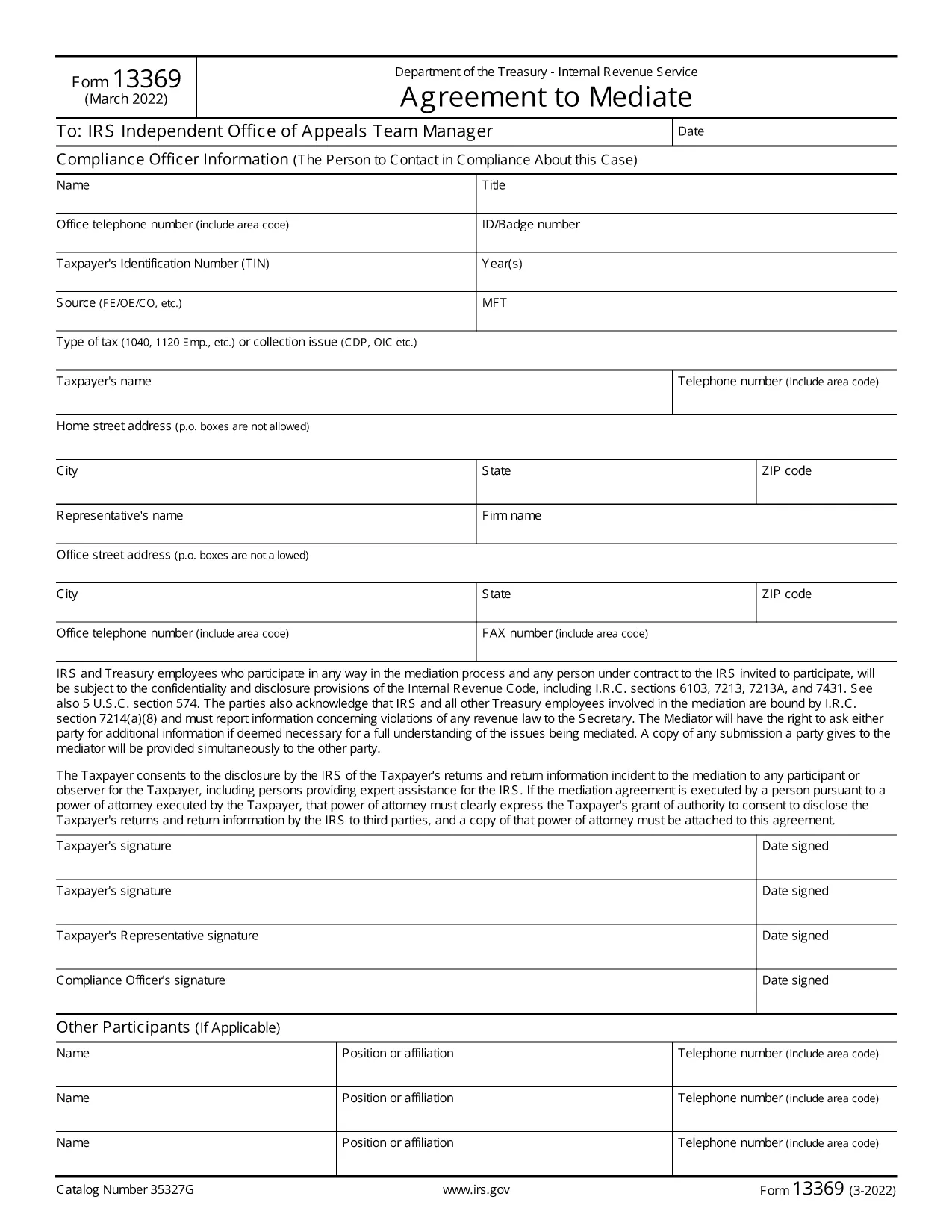
Form 13369 is the official Internal Revenue Service (IRS) document used to acknowledge that a taxpayer agrees to the mediation rules, authorizes disclosures, and consents to the conditions set by the IRS. Instead of printing, printing, and hand‑signing a paper copy, you can now complete this form directly in your browser with Formize’s secure fillable PDF.

What Is IRS Form 13369?

This form serves three main purposes:

  • Confirming your agreement to the IRS mediation process.
  • Providing a signature (or authorized representative’s signature) for the required disclosures.
  • Granting consent to all conditions stipulated in the mediation agreement.

How to Fill Out Form 13369 Online

Follow these simple steps to complete the form without leaving the page:

  1. Click the "Fill out this form" button below.
  2. Wait a few seconds while the Formize PDF Filler app loads.
  3. Enter your information in each fillable field – the interface highlights required fields.
  4. Use the Signature field to draw or type your signature.
  5. When finished, click Submit to download a completed copy or email it directly to the IRS.

Common Mistakes to Avoid

  • Leaving required fields blank – the filler will block submission until all required items are filled.
  • Using an illegible signature – the digital signature tool ensures a clear, printable signature.
  • Submitting the form to the wrong address – always double‑check the IRS mailing instructions on the final page.

Where to Submit the Completed Form

After you download the completed PDF, you can either:

  • Mail it to the address listed on the form’s instructions.
  • Upload it through the IRS online portal if you have an existing account.

Benefits of Using Formize’s Fillable PDF

Formize provides a fast, secure, and mobile‑friendly way to complete Form 13369. No software installation is required, and your data is encrypted during the entire process.

ЧАСТО ЗАДАВАЕМЫЕ ВОПРОСЫ
  • What is the purpose of IRS Form 13369?

    Form 13369 is used to acknowledge agreement to IRS mediation rules, authorize required disclosures, and give consent to the mediation conditions.

  • Can I fill out Form 13369 on a mobile device?

    Yes. Formize’s fillable PDF works on smartphones, tablets, and desktops, allowing you to complete the form anywhere.

  • Do I need to print the form after filling it online?

    No. You can download the completed PDF and either mail it to the IRS or upload it through the IRS portal.

  • Is my information secure when using Formize?

    All data entered in the Formize PDF Filler is encrypted in transit and stored only on your device after you download the completed form.

  • What should I do if I make a mistake after submitting?

    Download a fresh copy of the form, correct the error, and resubmit the updated PDF to the IRS.

  • Is there a fee to use the fillable PDF on Formize?

    No. Formize provides the fillable version of Form 13369 completely free of charge.

  • Where can I find the mailing address for the completed form?

    The mailing address is printed on the last page of Form 13369 under the "Submission Instructions" section.

  • Can a representative sign Form 13369 on my behalf?

    Yes, an authorized representative can sign, but they must include a power of attorney or other authorization documentation.

КАК ПОЛЬЗОВАТЬСЯ

Как бесплатно заполнить Form 13369 онлайн за 4 простых шагов:

  1. 1
    Open the Fillable Form
    Click the "Fill out this form" button on the page. The Formize PDF Filler will open in a new window.
  2. 2
    Enter Your Information
    Fill each highlighted field with the required data. Required fields are marked with an asterisk.
  3. 3
    Add Your Signature
    Use the digital signature tool to draw or type your signature. The signature will be saved in the PDF.
  4. 4
    Review and Submit
    Check all entries for accuracy, then click "Submit" to download the completed PDF or email it directly to the IRS.
Приложение Formize PDF Filler
О ПРИЛОЖЕНИИ

Налоговые формы

Form 13369 — это одна из налоговых форм, которые представляют собой документы, используемые для предоставления информации, связанной с налогами, в соответствующий налоговый орган. Существуют различные типы налоговых форм, в том числе федеральные, государственные и местные налоговые формы, которые могут различаться в зависимости от обстоятельств и местонахождения налогоплательщика.

ФУНКЦИИ

Инструмент для запролнения PDF форм

Самый простой способ заполнить Form 13369 онлайн

  • Быстрое заполнение Form 13369
    Ищете способ быстро заполнить Form 13369 онлайн? С нашим бесплатным онлайн-инструментом вы узнаете, как редактировать заполнить этот PDF-документ менее чем за минуту.
  • Простой в использовании онлайн-редактор PDF
    Надоело распечатывать PDF-файлы, чтобы их можно было отредактировать перед повторным сканированием и отправкой обратно? Редактируйте документы PDF бесплатно онлайн. Используйте наш онлайн-редактор PDF, чтобы сэкономить время и бумагу.
  • Отличные инструменты, все платформы
    Хотите знать, как заполнить Form 13369 на Mac или, может быть, как использовать бесплатный заполнитель PDF? Наши онлайн-инструменты PDF работают на всех платформах.
  • Безопасное хранение файлов
    Файлы заполненных "Form 13369" хранятся в защищенной базе данных, управляемой облачным хостингом Amazon. Вы можете удалить свои файлы из нашей системы в любое время. В любом случае эти файлы автоматически удаляются через 24 часа.
  • Чат с Form 13369
    Откройте чат с "Form 13369" в Chatize — бесплатном помощнике для чтения PDF-файлов. Задавайте вопросы и получайте ответы от "Form 13369". Просто нажмите кнопку Чат с документом выше.

Удалить данные о заполненной форме

Удалить данные о заполненной форме? В этом случае Ваш прогресс заполнения этой формы будет утерян.

Удалить сеанс редактирования

Удалить выбранный сеанс редактирования? В этом случае ваш прогресс в создании и редактировании формы будет утерян.