Выберите язык

IRS Form 6781 – Fillable PDF for Gains & Losses from Section 1256 Contracts

  1. Страна США
  2. Язык Английский
  3. Вид деятельности Налоги
  4. Департамент Служба внутренних доходов
IRS Form 6781 – Fillable PDF for Gains & Losses from Section 1256 Contracts

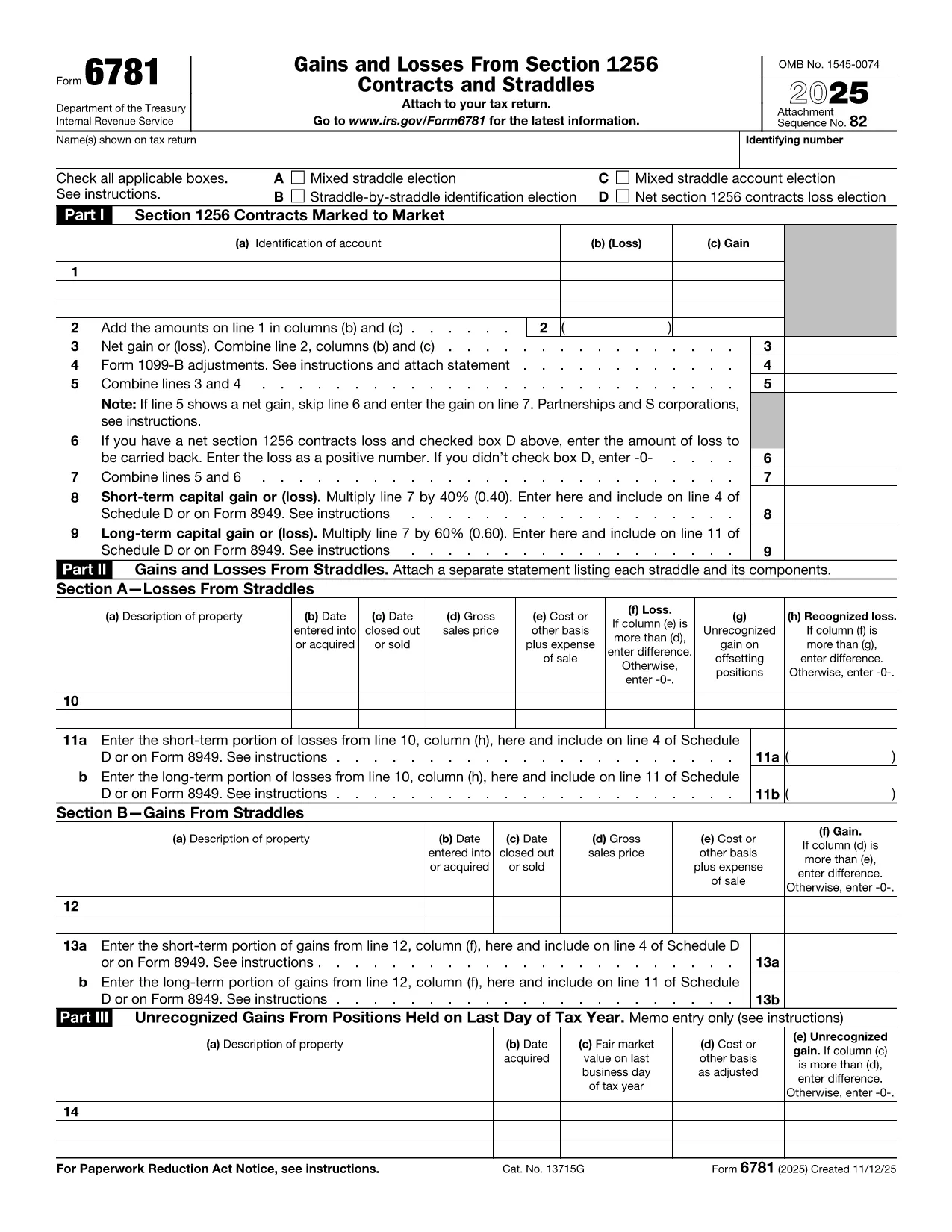
Form 6781, officially titled Gains and Losses From Section 1256 Contracts and Straddles, is required for traders, investors, and any taxpayer who holds regulated futures, options, foreign‑currency contracts, or other Section 1256 instruments. This one‑page form reports both short‑term and long‑term capital results, and it includes election boxes for mixed‑straddle and loss‑carryback options.

What Is IRS Form 6781?

The form captures three distinct sections:

  • Part I – Section 1256 Contracts Marked to Market
  • Part II – Gains and Losses from Straddles
  • Part III – Unrecognized Gains on Positions Held at Year‑End

Each part helps the IRS calculate the correct mix of short‑term (40%) and long‑term (60%) capital treatment, regardless of the actual holding period.

How to Fill Out the Form Using Formize

Instead of printing, scanning, or editing the PDF in a desktop editor, you can complete the form directly in your browser:

  1. Click "Fill out this form" on the page – the Formize PDF Filler loads instantly.
  2. Enter your name, Social Security or EIN, and the tax year.
  3. Select any applicable election boxes (Mixed Straddle, Straddle‑by‑Straddle, etc.).
  4. Enter contract identifiers, gains, and losses for each line item.
  5. Review the calculations, then click Save to download a completed PDF or Print to file with your return.

The online filler validates numeric fields and ensures required boxes are checked, reducing the chance of IRS rejections.

Common Mistakes to Avoid

  • Leaving election boxes unchecked when a mixed straddle exists.
  • Reporting the same contract in both Part I and Part II.
  • Mis‑calculating the 60/40 split of long‑term vs. short‑term gains.
  • Forgetting to attach a statement when you elect a net Section 1256 loss carryback.

When to File and Who Needs This Form

Form 6781 is attached to your individual, corporate, partnership, or trust tax return (Form 1040, 1120, 1065, or 1041). The filing deadline matches the underlying return – typically April 15 for individuals, with extensions available.

If you traded any Section 1256 contracts during the tax year, you must file Form 6781, even if the net result is a zero gain or loss.

Ready to get started? Click the button below to open the fillable version and complete it in seconds.

ЧАСТО ЗАДАВАЕМЫЕ ВОПРОСЫ
  • What types of contracts are reported on Form 6781?

    Section 1256 contracts include regulated futures, foreign‑currency contracts, non‑equity options, dealer equity options, and dealer securities futures contracts.

  • Do I need to file Form 6781 if I had no gain or loss?

    Yes. If you held any Section 1256 contracts during the year, you must file Form 6781 even if the net result is zero.

  • Can I e‑file Form 6781 with my return?

    Form 6781 is attached to the main tax return (Form 1040, 1120, etc.). When you e‑file the return, the completed PDF is included automatically.

  • What is the deadline for filing Form 6781?

    The deadline matches the filing deadline of the associated tax return – typically April 15 for individuals, with extensions available.

  • How does the 60/40 long‑term/short‑term split work?

    Regardless of how long you held the contract, 60% of the gain or loss is treated as long‑term capital, and 40% as short‑term capital.

  • Can I carry back a net Section 1256 loss?

    Yes, individuals may carry back a net Section 1256 loss up to three prior years, but corporations, partnerships, estates, and trusts are not eligible.

  • What common errors should I watch for?

    Common mistakes include forgetting to check required election boxes, double‑reporting contracts in both Part I and Part II, and mis‑calculating the 60/40 split.

  • Is there a printable version if I prefer paper?

    The fillable PDF can be downloaded, printed, and mailed, but using the online filler reduces errors and speeds up the process.

КАК ПОЛЬЗОВАТЬСЯ

Как бесплатно заполнить Form 6781 онлайн за 5 простых шагов:

  1. 1
    Open the Fillable Form
    Click the "Fill out this form" button on the page. The Formize PDF Filler will load instantly in your browser.
  2. 2
    Enter Taxpayer Information
    Provide your name, Social Security Number (or EIN), and the tax year at the top of the form.
  3. 3
    Select Election Boxes
    Check any applicable boxes for mixed straddle elections, straddle‑by‑straddle identification, or net loss carryback.
  4. 4
    Report Gains and Losses
    Enter each contract’s identification, mark‑to‑market gain or loss, and let the filler calculate the 60% long‑term / 40% short‑term split.
  5. 5
    Save or Print
    When all fields are complete, click "Save" to download the finished PDF or "Print" to attach it to your tax return.
Приложение Formize PDF Filler
О ПРИЛОЖЕНИИ

Налоговые формы

Form 6781 — это одна из налоговых форм, которые представляют собой документы, используемые для предоставления информации, связанной с налогами, в соответствующий налоговый орган. Существуют различные типы налоговых форм, в том числе федеральные, государственные и местные налоговые формы, которые могут различаться в зависимости от обстоятельств и местонахождения налогоплательщика.

ФУНКЦИИ

Инструмент для запролнения PDF форм

Самый простой способ заполнить Form 6781 онлайн

  • Быстрое заполнение Form 6781
    Ищете способ быстро заполнить Form 6781 онлайн? С нашим бесплатным онлайн-инструментом вы узнаете, как редактировать заполнить этот PDF-документ менее чем за минуту.
  • Простой в использовании онлайн-редактор PDF
    Надоело распечатывать PDF-файлы, чтобы их можно было отредактировать перед повторным сканированием и отправкой обратно? Редактируйте документы PDF бесплатно онлайн. Используйте наш онлайн-редактор PDF, чтобы сэкономить время и бумагу.
  • Отличные инструменты, все платформы
    Хотите знать, как заполнить Form 6781 на Mac или, может быть, как использовать бесплатный заполнитель PDF? Наши онлайн-инструменты PDF работают на всех платформах.
  • Безопасное хранение файлов
    Файлы заполненных "Form 6781" хранятся в защищенной базе данных, управляемой облачным хостингом Amazon. Вы можете удалить свои файлы из нашей системы в любое время. В любом случае эти файлы автоматически удаляются через 24 часа.
  • Чат с Form 6781
    Откройте чат с "Form 6781" в Chatize — бесплатном помощнике для чтения PDF-файлов. Задавайте вопросы и получайте ответы от "Form 6781". Просто нажмите кнопку Чат с документом выше.

Удалить данные о заполненной форме

Удалить данные о заполненной форме? В этом случае Ваш прогресс заполнения этой формы будет утерян.

Удалить сеанс редактирования

Удалить выбранный сеанс редактирования? В этом случае ваш прогресс в создании и редактировании формы будет утерян.