
Выберите язык

Fillable IRS Form 843 – Claim Refund or Request Abatement

  1. Страна США
  2. Язык Английский
  3. Вид деятельности Налоги
  4. Департамент Служба внутренних доходов
Fillable IRS Form 843 – Claim Refund or Request Abatement

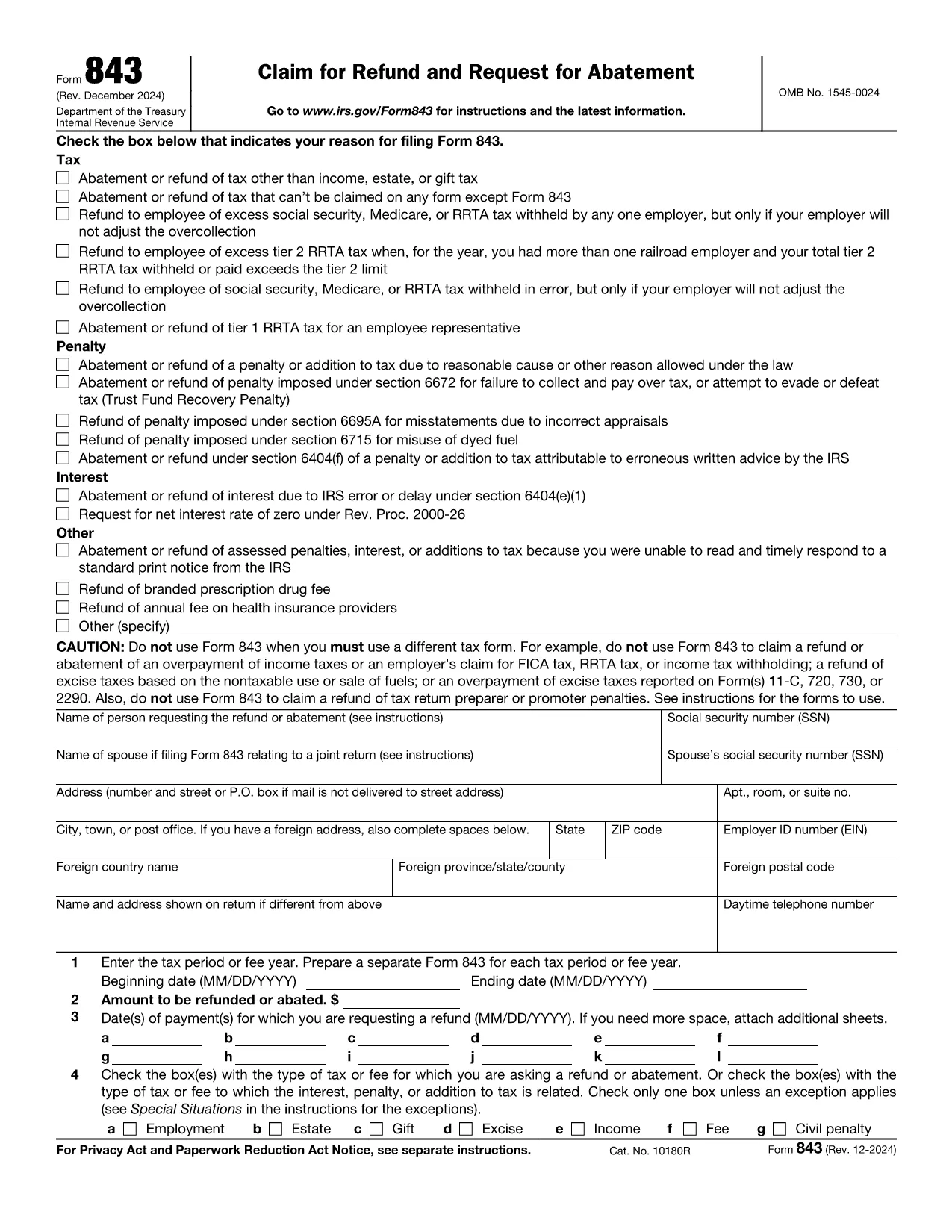
Form 843 (Claim for Refund and Request for Abatement) lets taxpayers ask the Internal Revenue Service for a refund of taxes, penalties, interest, or fees that were paid in error. Whether you’re seeking a refund on an employment tax, an excise tax, or a penalty, this two‑page form is the official way to make the request.

What Is IRS Form 843?

Form 843 is a multipurpose tax document used for:

  • Refunding overpaid taxes (e.g., employment, estate, gift, excise).
  • Requesting abatement of penalties or interest.
  • Claiming refunds for specific fees such as the branded prescription drug fee.

When Should You Use Form 843?

You should file Form 843 when you have a legitimate reason to believe the IRS collected more than it was entitled to, or when an error caused an improper penalty or interest assessment. Typical scenarios include:

  • Incorrect calculation of employment taxes.
  • Excess Tier 2 RRTA tax.
  • Interest charged due to IRS processing delays.
  • Fee refunds for prescription drug fees.

How to Complete Form 843 Online with Formize

Formize makes the process painless. Follow these simple steps:

  1. Click the "Fill out this form" button on this page.
  2. The Formize PDF Filler app loads in your browser – no download needed.
  3. Enter your taxpayer information, tax period, amount, and reason for the claim.
  4. Attach any supporting documents (e.g., W‑2s, Form 8947) using the attachment field.
  5. Review, sign electronically, and submit directly to the IRS or download the completed PDF for mailing.

Common Mistakes to Avoid

  • Leaving lines blank: Every applicable line must be completed, even if the answer is “0”.
  • Incorrect tax type selection: Choose the exact tax or fee from the list on Line 4.
  • Missing signatures: Both the taxpayer and, if applicable, the authorized representative must sign.
  • Insufficient documentation: Attach copies of the original tax return or related forms to support your claim.

Where to Submit Your Completed Form

After filling out Form 843, you have two options:

  • Mail: Send the signed PDF to the address listed in the form’s instructions for your tax type.
  • Electronic submission: Use the IRS’s secure e‑file portal if you have a valid e‑file account.

Using Formize’s online filler ensures the PDF is correctly formatted for both mailing and electronic submission.

Инструкции

ЧАСТО ЗАДАВАЕМЫЕ ВОПРОСЫ
  • What tax types can I claim on Form 843?

    Form 843 covers employment tax, estate tax, gift tax, excise tax, fee refunds, and certain interest or penalty abatements. It does not apply to regular income tax refunds.

  • Do I need a certified tax professional to fill out Form 843?

    No. The form is straightforward, and with Formize’s fillable PDF you can complete it yourself. However, consult a tax professional if your situation is complex.

  • How long does the IRS take to process a Form 843 request?

    Processing time varies, but most refunds or abatements are issued within 60–90 days after the IRS receives a complete and accurate submission.

  • Can I file Form 843 electronically?

    Yes. After completing the form with Formize, you can upload the PDF to the IRS e‑file portal if you have an active e‑file account.

  • What supporting documents should I include?

    Attach copies of the original tax return, payment receipts, related forms (e.g., W‑2, Form 8947), and any IRS notices that explain the penalty or interest.

  • Is there a filing fee for Form 843?

    No. There is no fee to file Form 843; however, you may incur postage costs if mailing a paper copy.

  • Can I request a refund for a penalty that was assessed in error?

    Yes. If you can demonstrate that the penalty was incorrectly assessed, you can use Form 843 to request an abatement.

КАК ПОЛЬЗОВАТЬСЯ

Как бесплатно заполнить Form 843 онлайн за 5 простых шагов:

  1. 1
    Open the Fillable Form
    Click the "Fill out this form" button on this page. The Formize PDF Filler app will load directly in your browser.
  2. 2
    Enter Your Information
    Complete each section of Form 843 – taxpayer details, tax period, amount, and reason for the claim – using the on‑screen fields.
  3. 3
    Attach Supporting Documents
    Use the attachment option to upload copies of W‑2s, prior tax returns, or any other documents that support your refund or abatement request.
  4. 4
    Review and Sign
    Double‑check all entries, then apply your electronic signature in the signature field.
  5. 5
    Submit or Download
    Choose to submit the completed form directly to the IRS through the portal, or download the PDF to mail it yourself.
Приложение Formize PDF Filler
О ПРИЛОЖЕНИИ

Федеральные налоговые формы

Form 843 — это одна из федеральных налоговых форм, которые представляют собой документы, используемые для отчетности и подачи федеральных подоходных налогов в Налоговое управление США (IRS). Эти формы используются отдельными лицами, предприятиями и организациями для сообщения о своих доходах, вычетах и ​​другой соответствующей информации, необходимой для расчета их федеральных налоговых обязательств.

Наиболее часто используемой формой федерального налога является Форма 1040, которая используется отдельными налогоплательщиками для отчетности по подоходному налогу с населения. Другие часто используемые формы включают Форма 1065 для партнерских отношений, Форма 1120 для корпораций и Форма 990 для организаций, освобожденных от налогов.

Федеральные налоговые формы обычно требуют от налогоплательщиков сообщать о различных источниках дохода, таких как заработная плата, оклады и чаевые, а также о доходах от инвестиций, сдачи в аренду недвижимости и других источников. Формы также позволяют налогоплательщикам требовать вычетов и кредитов на различные расходы, такие как благотворительные взносы, проценты по ипотеке и расходы на здравоохранение.

Важно точно и вовремя подавать федеральные налоговые формы, поскольку невыполнение этого требования может привести к штрафам и начислению процентов со стороны IRS.

ФУНКЦИИ

Инструмент для запролнения PDF форм

Самый простой способ заполнить Form 843 онлайн

  • Быстрое заполнение Form 843
    Ищете способ быстро заполнить Form 843 онлайн? С нашим бесплатным онлайн-инструментом вы узнаете, как редактировать заполнить этот PDF-документ менее чем за минуту.
  • Простой в использовании онлайн-редактор PDF
    Надоело распечатывать PDF-файлы, чтобы их можно было отредактировать перед повторным сканированием и отправкой обратно? Редактируйте документы PDF бесплатно онлайн. Используйте наш онлайн-редактор PDF, чтобы сэкономить время и бумагу.
  • Отличные инструменты, все платформы
    Хотите знать, как заполнить Form 843 на Mac или, может быть, как использовать бесплатный заполнитель PDF? Наши онлайн-инструменты PDF работают на всех платформах.
  • Безопасное хранение файлов
    Файлы заполненных "Form 843" хранятся в защищенной базе данных, управляемой облачным хостингом Amazon. Вы можете удалить свои файлы из нашей системы в любое время. В любом случае эти файлы автоматически удаляются через 24 часа.
  • Чат с Form 843
    Откройте чат с "Form 843" в Chatize — бесплатном помощнике для чтения PDF-файлов. Задавайте вопросы и получайте ответы от "Form 843". Просто нажмите кнопку Чат с документом выше.

Удалить данные о заполненной форме

Удалить данные о заполненной форме? В этом случае Ваш прогресс заполнения этой формы будет утерян.

Удалить сеанс редактирования

Удалить выбранный сеанс редактирования? В этом случае ваш прогресс в создании и редактировании формы будет утерян.