
Выберите язык

Schedule M (Form 8858) – Fillable PDF

  1. Страна США
  2. Язык Английский
  3. Вид деятельности Налоги
  4. Департамент Служба внутренних доходов
Schedule M (Form 8858) – Fillable PDF

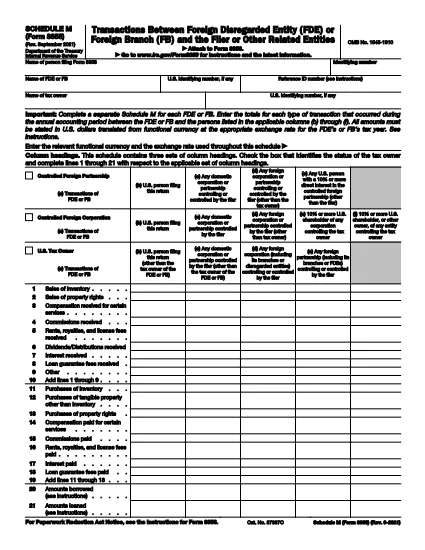
Schedule M (Form 8858) is the IRS attachment used to report transactions between a foreign disregarded entity (FDE) or foreign branch (FB) and the U.S. taxpayer who files Form 8858. Whether you’re reporting sales, purchases, loans, or capital contributions, Schedule M captures the details needed for proper tax compliance.

What Is Schedule M (Form 8858)?

Schedule M provides three distinct sets of column headings to cover different transaction types and entities. It requires you to report amounts in the functional currency of the foreign entity and then convert them to U.S. dollars using the appropriate exchange rate.

How to Complete Schedule M Online

Instead of downloading a static PDF and editing it in a separate program, simply click the "Fill out this form" button on this page. The Formize PDF Filler will load the fillable version of Schedule M, letting you enter data directly in your browser.

  • Step 1: Click the button and wait for the Formize PDF Filler to open.
  • Step 2: Select the appropriate entity type (FDE or FB) and the column that matches the transaction partner.
  • Step 3: Enter the transaction amount in the foreign currency, then input the exchange rate.
  • Step 4: Review the automatically calculated U.S. dollar total.
  • Step 5: Save the completed form and attach it to your Form 8858 filing.

Common Mistakes & Tips

Avoid these pitfalls to ensure a smooth filing:

  • Do not mix up the columns for "Related persons" and "Unrelated persons." Each column has a specific definition in the instructions.
  • Always use the exchange rate that applies to the transaction date, not an average rate, unless the instructions specifically allow it.
  • Complete a separate Schedule M for each FDE or FB you own. Consolidating multiple entities on one schedule will cause a rejection.
  • Double‑check that the functional currency is correctly identified; an incorrect currency can lead to mis‑reported amounts.

Download the Fillable PDF

When you’re ready to keep a copy for your records, you can download the official IRS fillable PDF directly from the link below.

ЧАСТО ЗАДАВАЕМЫЕ ВОПРОСЫ
  • Do I need a separate Schedule M for each foreign entity?

    Yes. The IRS requires a distinct Schedule M for every foreign disregarded entity or foreign branch you own.

  • Can I use an average exchange rate for all transactions?

    Only if the instructions specifically allow it. Generally, you must use the rate that applies to the date of each transaction.

  • What is the difference between columns (b) and (c) on Schedule M?

    Column (b) reports transactions with the filer or related persons, while column (c) captures transactions with unrelated persons.

  • Is the PDF on Formize.com the official IRS version?

    Yes. The PDF linked below is the official IRS Schedule M (Form 8858) PDF, made fillable through Formize’s online editor.

  • What happens if I file Schedule M with errors?

    The IRS may reject your Form 8858 filing, causing delays and possible penalties. Double‑check all amounts, exchange rates, and entity classifications.

  • Do I need to attach supporting documents for each transaction?

    You do not attach supporting documents to Schedule M itself, but retain all records in case the IRS requests them during an audit.

КАК ПОЛЬЗОВАТЬСЯ

Как бесплатно заполнить Form 8858 Schedule M онлайн за 5 простых шагов:

  1. 1
    Open the Fillable Form
    Click the "Fill out this form" button on the page. The Formize PDF Filler will load the Schedule M PDF directly in your browser.
  2. 2
    Enter Entity Information
    Select whether you are reporting a Foreign Disregarded Entity (FDE) or a Foreign Branch (FB) and fill in the identifying details.
  3. 3
    Record Transaction Details
    Enter each transaction amount in the foreign currency, choose the correct column (b‑f), and provide the applicable exchange rate.
  4. 4
    Review Calculations
    The filler automatically converts foreign amounts to U.S. dollars. Verify the totals before proceeding.
  5. 5
    Save and Attach
    Save the completed Schedule M as a PDF and attach it to your Form 8858 filing with the IRS.
Приложение Formize PDF Filler
О ПРИЛОЖЕНИИ

Налоговые формы

Form 8858 Schedule M — это одна из налоговых форм, которые представляют собой документы, используемые для предоставления информации, связанной с налогами, в соответствующий налоговый орган. Существуют различные типы налоговых форм, в том числе федеральные, государственные и местные налоговые формы, которые могут различаться в зависимости от обстоятельств и местонахождения налогоплательщика.

ФУНКЦИИ

Инструмент для запролнения PDF форм

Самый простой способ заполнить Form 8858 Schedule M онлайн

  • Быстрое заполнение Form 8858 Schedule M
    Ищете способ быстро заполнить Form 8858 Schedule M онлайн? С нашим бесплатным онлайн-инструментом вы узнаете, как редактировать заполнить этот PDF-документ менее чем за минуту.
  • Простой в использовании онлайн-редактор PDF
    Надоело распечатывать PDF-файлы, чтобы их можно было отредактировать перед повторным сканированием и отправкой обратно? Редактируйте документы PDF бесплатно онлайн. Используйте наш онлайн-редактор PDF, чтобы сэкономить время и бумагу.
  • Отличные инструменты, все платформы
    Хотите знать, как заполнить Form 8858 Schedule M на Mac или, может быть, как использовать бесплатный заполнитель PDF? Наши онлайн-инструменты PDF работают на всех платформах.
  • Безопасное хранение файлов
    Файлы заполненных "Form 8858 Schedule M" хранятся в защищенной базе данных, управляемой облачным хостингом Amazon. Вы можете удалить свои файлы из нашей системы в любое время. В любом случае эти файлы автоматически удаляются через 24 часа.
  • Чат с Form 8858 Schedule M
    Откройте чат с "Form 8858 Schedule M" в Chatize — бесплатном помощнике для чтения PDF-файлов. Задавайте вопросы и получайте ответы от "Form 8858 Schedule M". Просто нажмите кнопку Чат с документом выше.

Удалить данные о заполненной форме

Удалить данные о заполненной форме? В этом случае Ваш прогресс заполнения этой формы будет утерян.

Удалить сеанс редактирования

Удалить выбранный сеанс редактирования? В этом случае ваш прогресс в создании и редактировании формы будет утерян.