
Выберите язык

IRS Form 8959 – Fillable PDF for Additional Medicare Tax

  1. Страна США
  2. Язык Английский
  3. Вид деятельности Налоги
  4. Департамент Служба внутренних доходов
IRS Form 8959 – Fillable PDF for Additional Medicare Tax

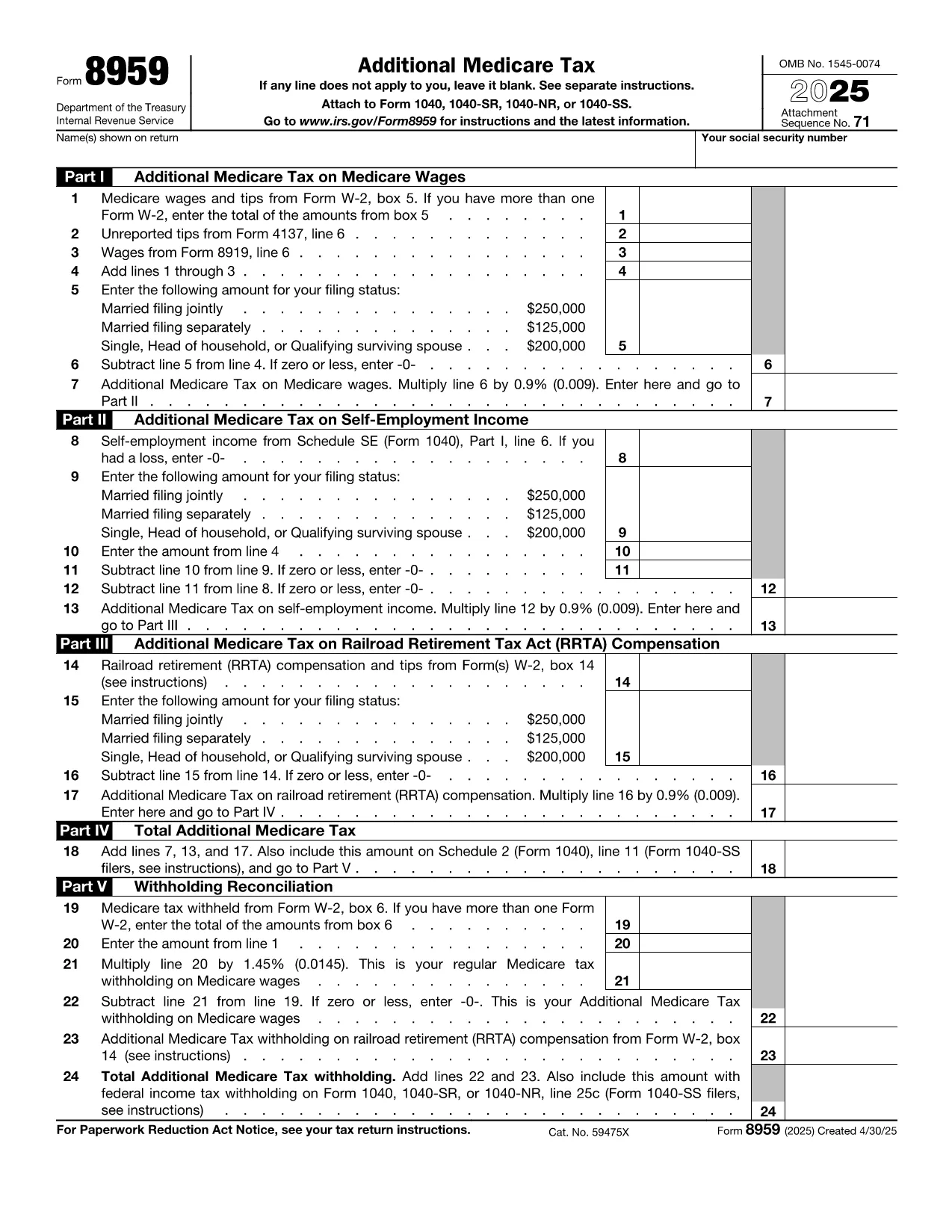
Form 8959, Additional Medicare Tax, is required when your earned income, compensation, or self‑employment income exceeds the thresholds set by the IRS. Whether you are filing as an individual or on behalf of a small business, our Fill out this form button launches the Formize PDF Filler – a secure, browser‑based editor that lets you complete the form without downloading any software.

What Is Form 8959?

Form 8959 calculates the extra 0.9% Medicare tax that applies to high‑income earners. The tax is applied to wages, compensation, and self‑employment income above $200,000 (single) or $250,000 (married filing jointly). The form is attached to your annual Form 1040 filing.

How to Complete Form 8959 Online

  1. Click the Fill out this form button on this page.
  2. Wait a few seconds while the Formize PDF Filler app loads the fillable version of Form 8959.
  3. Enter your personal information, wages, and any adjustments directly into the fields.
  4. Review the calculated tax amount that appears automatically.
  5. When you’re satisfied, click Save & Download to get a completed PDF you can attach to your tax return.

Common Mistakes to Avoid

  • Using the wrong filing threshold: Remember the $200K/$250K limits differ by filing status.
  • Leaving fields blank: The filler will highlight required fields in red.
  • Double‑counting Medicare tax: If your employer already withheld the additional tax, report it on line 5, not line 4.
  • Submitting an outdated version: Always use the 2024 PDF linked below to ensure you have the latest layout.

Where to Submit the Form

Attach the completed Form 8959 to your Form 1040 when filing electronically or include it with your paper return. If you use a tax professional, provide them the saved PDF.

Need extra help? The IRS Instructions for Form 1040 contain a detailed section on Form 8959.

Инструкции

ЧАСТО ЗАДАВАЕМЫЕ ВОПРОСЫ
  • Do I need to file Form 8959 if I’m below the income threshold?

    No. The Additional Medicare Tax only applies if your wages, compensation, or self‑employment income exceed $200,000 (single) or $250,000 (married filing jointly). If you’re below these limits, you can skip Form 8959.

  • Can I edit a downloaded PDF with my own software?

    While you could use a PDF editor, our fillable version lets you complete the form directly in the browser, ensuring the calculations are correct and the layout matches the IRS specifications.

  • Is the Formize PDF Filler secure?

    Yes. All data is processed locally in your browser and never stored on our servers. Once you download the completed PDF, you have a copy on your device.

  • What if I make a mistake after saving?

    Simply reopen the saved PDF in the Formize PDF Filler, correct the fields, and re‑download the updated version.

  • Do I need to attach Form 8959 when filing electronically?

    When e‑filing, the software will automatically attach the completed Form 8959 if you import the PDF. If you file manually, print the PDF and attach it to your Form 1040.

  • Where can I find the official IRS instructions for Form 8959?

    The official instructions are available on the IRS website at https://www.irs.gov/instructions/i8959.

КАК ПОЛЬЗОВАТЬСЯ

Как бесплатно заполнить Form 8959 онлайн за 4 простых шагов:

  1. 1
    Open the Fillable Form
    Click the "Fill out this form" button on this page. The Formize PDF Filler app will open in a new browser tab.
  2. 2
    Load the Form
    Wait a few seconds while the fillable version of Form 8959 loads. All fields become editable automatically.
  3. 3
    Enter Your Data
    Type your personal details, wages, and any adjustments into the highlighted fields. The calculator updates the tax amount in real time.
  4. 4
    Save and Download
    When the information is correct, click "Save & Download" to obtain a completed PDF that you can attach to your 1040 filing.
Приложение Formize PDF Filler
О ПРИЛОЖЕНИИ

Налоговые формы

Form 8959 — это одна из налоговых форм, которые представляют собой документы, используемые для предоставления информации, связанной с налогами, в соответствующий налоговый орган. Существуют различные типы налоговых форм, в том числе федеральные, государственные и местные налоговые формы, которые могут различаться в зависимости от обстоятельств и местонахождения налогоплательщика.

ФУНКЦИИ

Инструмент для запролнения PDF форм

Самый простой способ заполнить Form 8959 онлайн

  • Быстрое заполнение Form 8959
    Ищете способ быстро заполнить Form 8959 онлайн? С нашим бесплатным онлайн-инструментом вы узнаете, как редактировать заполнить этот PDF-документ менее чем за минуту.
  • Простой в использовании онлайн-редактор PDF
    Надоело распечатывать PDF-файлы, чтобы их можно было отредактировать перед повторным сканированием и отправкой обратно? Редактируйте документы PDF бесплатно онлайн. Используйте наш онлайн-редактор PDF, чтобы сэкономить время и бумагу.
  • Отличные инструменты, все платформы
    Хотите знать, как заполнить Form 8959 на Mac или, может быть, как использовать бесплатный заполнитель PDF? Наши онлайн-инструменты PDF работают на всех платформах.
  • Безопасное хранение файлов
    Файлы заполненных "Form 8959" хранятся в защищенной базе данных, управляемой облачным хостингом Amazon. Вы можете удалить свои файлы из нашей системы в любое время. В любом случае эти файлы автоматически удаляются через 24 часа.
  • Чат с Form 8959
    Откройте чат с "Form 8959" в Chatize — бесплатном помощнике для чтения PDF-файлов. Задавайте вопросы и получайте ответы от "Form 8959". Просто нажмите кнопку Чат с документом выше.

Удалить данные о заполненной форме

Удалить данные о заполненной форме? В этом случае Ваш прогресс заполнения этой формы будет утерян.

Удалить сеанс редактирования

Удалить выбранный сеанс редактирования? В этом случае ваш прогресс в создании и редактировании формы будет утерян.