

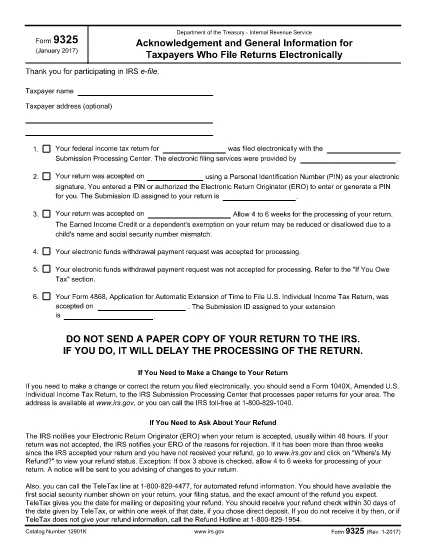

Формы Налогового управления США (IRS)
Form 9325 — это одна из официальных налоговых форм, используемых в США для отчетности о доходах, заявлений о вычетах и зачетах, расчета налоговых обязательств и выполнения других налоговых обязательств. IRS — это федеральное агентство, ответственное за администрирование и обеспечение соблюдения законов о внутренних доходах в Соединенных Штатах.
Вот несколько примеров форм Налоговой службы:
Форма 1040: это основная форма декларации по индивидуальному подоходному налогу, используемая большинством налогоплательщиков. Он используется для отчетности о различных типах доходов, заявлений о вычетах и кредитах, расчета налоговых обязательств и определения того, должен ли налогоплательщик дополнительный налог или имеет ли право на возмещение.
Форма 1099. Существуют различные варианты формы 1099, например 1099-MISC, 1099-INT, 1099-DIV и т. д. Эти формы используются для отчета о доходах, полученных физическими или юридическими лицами из различных источников, помимо трудоустройства, таких как самозанятость. доход, процентный доход, дивидендный доход и доход от аренды.
Форма W-2: эта форма используется работодателями для отчетности о заработной плате, выплачиваемой сотрудникам, и налогах. удержаны из их заработной платы. Сотрудники используют информацию из формы W-2 для заполнения своих индивидуальных налоговых деклараций.
Форма 941. Работодатели используют эту форму для отчетности о налогах на трудоустройство, включая удержанный федеральный подоходный налог, налог на социальное обеспечение и налог на медицинскую помощь, для своих сотрудников.
Форма 1065: эта форма используется партнерствами для отчетности о своих доходах, отчислениях и налоговых обязательствах. Сами товарищества не платят подоходный налог; вместо этого партнеры сообщают о своей доле дохода партнерства в своих индивидуальных налоговых декларациях.
Форма 1120: это форма декларации по корпоративному подоходному налогу, используемая корпорациями C для отчетности о своих доходах. вычеты и налоговые обязательства.
Форма 990. Эта форма используется освобожденными от налогов организациями, такими как некоммерческие и благотворительные организации, для сообщать о своей финансовой информации, деятельности и соблюдении налогового законодательства.
Форма 8862: эта форма используется налогоплательщиками, которые ранее требовали налогового кредита на заработанный доход (EITC). но это было запрещено, и теперь я хочу потребовать это снова.
Это всего лишь несколько примеров многочисленных форм IRS, которые существуют для выполнения различных налоговых обязательств. Конкретные формы, необходимые для физического или юридического лица, зависят от их уникальных обстоятельств, источников дохода и вычетов. Рекомендуется посетить официальный сайт Налоговой службы (www.irs.gov) или обратиться за профессиональной налоговой консультацией, чтобы получить точную и актуальную информацию о конкретной налоговой службе. формы, соответствующие вашей налоговой ситуации.