
Выберите язык

Form 990 Schedule F – Fillable PDF Online

  1. Страна США
  2. Язык Английский
  3. Вид деятельности Налоги
  4. Департамент Служба внутренних доходов
Form 990 Schedule F – Fillable PDF Online

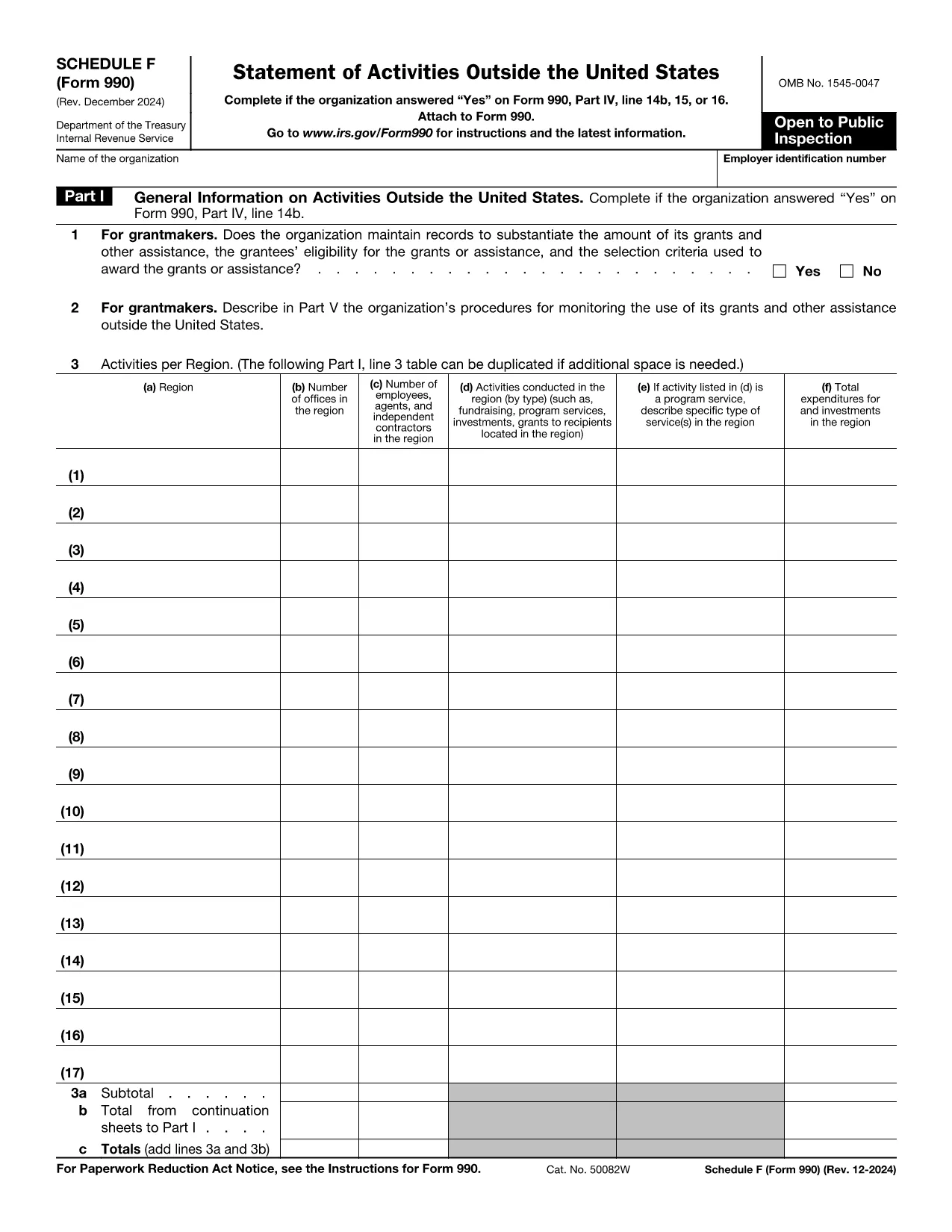
The IRS Form 990 Schedule F (Grant and Other Assistance to Organizations Outside the United States) is required for tax‑exempt organizations that reported a “Yes” on Form 990, Part IV, line 15. This schedule captures details of any grant, contribution, or assistance of $5,000 or more provided to foreign entities.

What Is Schedule F and Who Must File?

Schedule F is part of the annual Form 990 return. Non‑profit organizations that make significant foreign grants must complete this schedule. If your organization answered “Yes” to the foreign assistance question, you need to disclose each recipient, the amount, and the purpose of the assistance.

Key Sections of Schedule F Explained

  • Part I – General Information: Identify the foreign recipient and the type of assistance.
  • Part II – Grants and Other Assistance: List each grant over $5,000, including dates, amounts, and program descriptions.
  • Part III – Summary: Totals for each category and a certification statement.

How to Fill Out Schedule F Using Formize

Instead of downloading the PDF and editing it in a separate program, simply click the “Fill out this form” button on this page. The Formize PDF Filler app will load the official IRS Schedule F PDF, and you can complete every field directly in your browser.

Common Mistakes & Tips for Accurate Filing

  • Do not omit any foreign recipient that received $5,000 or more.
  • Provide clear, concise program descriptions – vague language can trigger IRS follow‑up.
  • Ensure totals in Part III match the sum of the individual entries in Part II.
  • Sign and date the certification; an unsigned schedule is considered incomplete.

Once you have finished, you can download the completed PDF, save a copy for your records, and attach it to your Form 990 filing.

Инструкции

ЧАСТО ЗАДАВАЕМЫЕ ВОПРОСЫ
  • Do I need to file Schedule F if the grant is under $5,000?

    No. Schedule F is required only for foreign grants of $5,000 or more. Smaller amounts can be reported in the narrative section of Form 990.

  • Can I file Schedule F electronically?

    Yes. After completing the fillable PDF with Formize, you can upload the saved PDF as part of your electronic Form 990 submission.

  • What if I made a grant to an overseas subsidiary of a U.S. organization?

    If the recipient is a foreign entity and the assistance exceeds $5,000, it must be reported on Schedule F regardless of ownership structure.

  • Is a digital signature accepted on Schedule F?

    The IRS accepts electronic signatures on the PDF as long as the signature field is completed using a recognized PDF signing tool, such as the one built into Formize.

  • Where can I find the official instructions for Schedule F?

    The official IRS instructions are included in the PDF linked below. They provide detailed guidance on each line item and reporting requirements.

  • What common errors should I avoid?

    Common errors include omitting eligible foreign recipients, miscalculating totals, and forgetting to sign the certification. Use the checklist in the instructions to avoid these pitfalls.

  • Can I edit the PDF after I’ve downloaded it?

    Yes, but using Formize ensures the fields remain fillable and the document stays compliant with IRS formatting standards.

КАК ПОЛЬЗОВАТЬСЯ

Как бесплатно заполнить Form 990 Schedule F онлайн за 5 простых шагов:

  1. 1
    Click the Fill Out Button
    Press the “Fill out this form” button on the page. Formize will open the official Schedule F PDF in a secure online editor.
  2. 2
    Wait for the Formize PDF Filler to Load
    The app loads the fillable fields automatically. This usually takes a few seconds.
  3. 3
    Complete Each Section
    Enter the required information for each grant, assistance, or foreign recipient. Use the on‑screen prompts for date formats and dollar amounts.
  4. 4
    Review and Save
    Double‑check totals and signatures, then click “Save” to store a copy in your browser or download the completed PDF.
  5. 5
    Attach to Your Form 990
    Include the finished Schedule F PDF with your annual Form 990 filing, either electronically or on paper.
Приложение Formize PDF Filler
О ПРИЛОЖЕНИИ

Налоговые формы

Form 990 Schedule F — это одна из налоговых форм, которые представляют собой документы, используемые для предоставления информации, связанной с налогами, в соответствующий налоговый орган. Существуют различные типы налоговых форм, в том числе федеральные, государственные и местные налоговые формы, которые могут различаться в зависимости от обстоятельств и местонахождения налогоплательщика.

ФУНКЦИИ

Инструмент для запролнения PDF форм

Самый простой способ заполнить Form 990 Schedule F онлайн

  • Быстрое заполнение Form 990 Schedule F
    Ищете способ быстро заполнить Form 990 Schedule F онлайн? С нашим бесплатным онлайн-инструментом вы узнаете, как редактировать заполнить этот PDF-документ менее чем за минуту.
  • Простой в использовании онлайн-редактор PDF
    Надоело распечатывать PDF-файлы, чтобы их можно было отредактировать перед повторным сканированием и отправкой обратно? Редактируйте документы PDF бесплатно онлайн. Используйте наш онлайн-редактор PDF, чтобы сэкономить время и бумагу.
  • Отличные инструменты, все платформы
    Хотите знать, как заполнить Form 990 Schedule F на Mac или, может быть, как использовать бесплатный заполнитель PDF? Наши онлайн-инструменты PDF работают на всех платформах.
  • Безопасное хранение файлов
    Файлы заполненных "Form 990 Schedule F" хранятся в защищенной базе данных, управляемой облачным хостингом Amazon. Вы можете удалить свои файлы из нашей системы в любое время. В любом случае эти файлы автоматически удаляются через 24 часа.
  • Чат с Form 990 Schedule F
    Откройте чат с "Form 990 Schedule F" в Chatize — бесплатном помощнике для чтения PDF-файлов. Задавайте вопросы и получайте ответы от "Form 990 Schedule F". Просто нажмите кнопку Чат с документом выше.

Удалить данные о заполненной форме

Удалить данные о заполненной форме? В этом случае Ваш прогресс заполнения этой формы будет утерян.

Удалить сеанс редактирования

Удалить выбранный сеанс редактирования? В этом случае ваш прогресс в создании и редактировании формы будет утерян.