
Выберите язык

Fillable Form W‑7 – Application for IRS ITIN

  1. Страна США
  2. Язык Английский
  3. Вид деятельности Налоги
  4. Департамент Служба внутренних доходов
Fillable Form W‑7 – Application for IRS ITIN

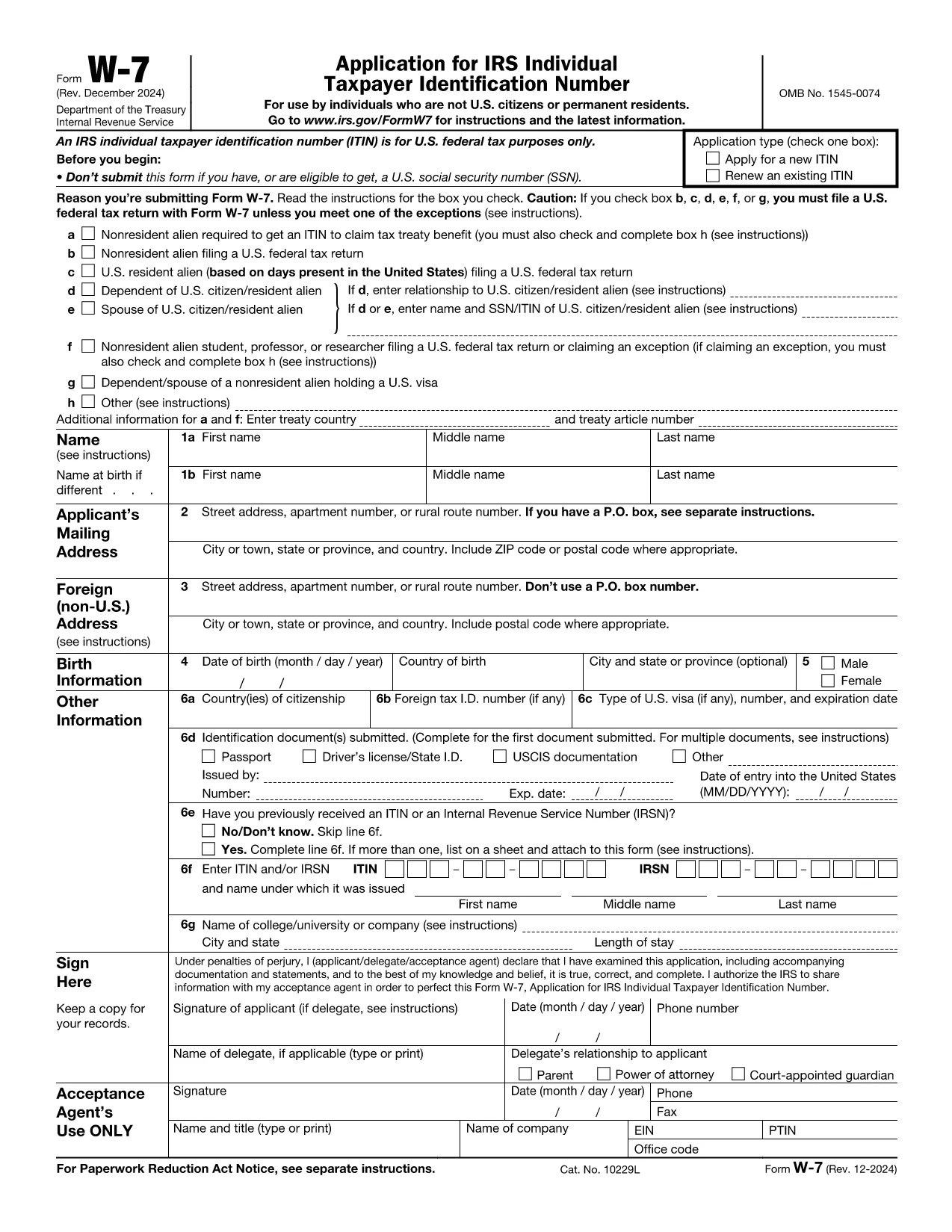
Form W‑7 is the IRS application used to obtain an Individual Taxpayer Identification Number (ITIN) for individuals who are not eligible for a Social Security Number. With Formize you can fill out the official IRS PDF online, save time, and avoid printing errors.

What is Form W‑7?

The Form W‑7 (Application for IRS Individual Taxpayer Identification Number) allows non‑resident aliens, foreign students, dependents, and spouses of U.S. taxpayers to comply with U.S. tax reporting requirements.

Key Requirements & Documents

  • Valid passport (or other accepted ID)
  • Proof of foreign status (visa, birth certificate, etc.)
  • A federal income tax return, unless you qualify for an exception
  • Completed Form W‑7 attached to your return

How to Complete the Form Online

Instead of downloading the PDF, simply click the Fill out this form button on this page. The Formize PDF Filler loads instantly, letting you type directly into each field.

Common Mistakes to Avoid

  • Leaving the “SSN” box checked when you do not have a Social Security Number.
  • Submitting an incomplete list of supporting documents.
  • Using an outdated version of the form (always use the latest PDF from the IRS).
  • Failing to sign and date the form.

Where to Submit Your Application

After you finish the online form, download the completed PDF and mail it with your supporting documents to:

IRS ITIN Operations
P.O. Box 149342
Austin, TX 78714‑9342
United States

You may also use an IRS‑approved Certified Acceptance Agent.

Инструкции

  • Форма W-7 Инструкции - Инструкции по форме W-7, Заявление на индивидуальный идентификационный номер налогоплательщика IRS (Использование с августовским пересмотром формы W-7 2019 года)
ЧАСТО ЗАДАВАЕМЫЕ ВОПРОСЫ
  • Who needs to file Form W‑7?

    Anyone who is not eligible for a Social Security Number but must file a U.S. federal tax return, claim a tax treaty benefit, or be listed as a dependent/spouse on a U.S. return.

  • Can I submit Form W‑7 electronically?

    The IRS currently accepts only mailed paper submissions, but you can complete the form online with Formize and then print or email the final PDF for mailing.

  • What identification documents are accepted?

    A valid passport is the most common document. Other accepted IDs include national ID cards, foreign driver’s licenses, or a combination of birth certificate and government photo ID.

  • Do I need to attach a tax return with Form W‑7?

    Yes, in most cases you must attach the federal tax return you are filing. Exceptions exist for treaty benefits and certain students; see the form instructions for details.

  • How long does it take to receive an ITIN?

    The IRS typically processes ITIN applications within 7 weeks. If you are applying from a foreign address, allow up to 9 weeks.

  • Is there a fee to file Form W‑7?

    There is no filing fee for the form itself, but you may incur costs for certified copies of documents or for using a Certified Acceptance Agent.

КАК ПОЛЬЗОВАТЬСЯ

Как бесплатно заполнить Form W‑7 онлайн за 5 простых шагов:

  1. 1
    Click the Fill out this form button
    On the Formize page, press the blue “Fill out this form” button to launch the PDF filler.
  2. 2
    Wait for the Formize PDF Filler to load
    The web app loads the official IRS Form W‑7 in a secure viewer. No software download is required.
  3. 3
    Enter your information
    Type directly into each field, using the instructions provided on the form. Use the tab key to move quickly between fields.
  4. 4
    Review and sign
    Double‑check every entry, then add your electronic signature using the built‑in signature tool.
  5. 5
    Save or email the completed form
    When you’re done, click “Download PDF” or “Email to me” and attach the file to your ITIN submission package.
Приложение Formize PDF Filler
О ПРИЛОЖЕНИИ

Налоговые формы

Form W‑7 — это одна из налоговых форм, которые представляют собой документы, используемые для предоставления информации, связанной с налогами, в соответствующий налоговый орган. Существуют различные типы налоговых форм, в том числе федеральные, государственные и местные налоговые формы, которые могут различаться в зависимости от обстоятельств и местонахождения налогоплательщика.

ФУНКЦИИ

Инструмент для запролнения PDF форм

Самый простой способ заполнить Form W‑7 онлайн

  • Быстрое заполнение Form W‑7
    Ищете способ быстро заполнить Form W‑7 онлайн? С нашим бесплатным онлайн-инструментом вы узнаете, как редактировать заполнить этот PDF-документ менее чем за минуту.
  • Простой в использовании онлайн-редактор PDF
    Надоело распечатывать PDF-файлы, чтобы их можно было отредактировать перед повторным сканированием и отправкой обратно? Редактируйте документы PDF бесплатно онлайн. Используйте наш онлайн-редактор PDF, чтобы сэкономить время и бумагу.
  • Отличные инструменты, все платформы
    Хотите знать, как заполнить Form W‑7 на Mac или, может быть, как использовать бесплатный заполнитель PDF? Наши онлайн-инструменты PDF работают на всех платформах.
  • Безопасное хранение файлов
    Файлы заполненных "Form W‑7" хранятся в защищенной базе данных, управляемой облачным хостингом Amazon. Вы можете удалить свои файлы из нашей системы в любое время. В любом случае эти файлы автоматически удаляются через 24 часа.
  • Чат с Form W‑7
    Откройте чат с "Form W‑7" в Chatize — бесплатном помощнике для чтения PDF-файлов. Задавайте вопросы и получайте ответы от "Form W‑7". Просто нажмите кнопку Чат с документом выше.

Удалить данные о заполненной форме

Удалить данные о заполненной форме? В этом случае Ваш прогресс заполнения этой формы будет утерян.

Удалить сеанс редактирования

Удалить выбранный сеанс редактирования? В этом случае ваш прогресс в создании и редактировании формы будет утерян.