Выберите язык

2026 Application Form CSE (APP‑CSE) – Fillable PDF

  1. Язык Английский
  2. Страна Philippines
  3. Департамент Department of Budget and Management
  4. Вид деятельности Procurement
Заполнить эту форму
2026 Application Form CSE (APP‑CSE) – Fillable PDF

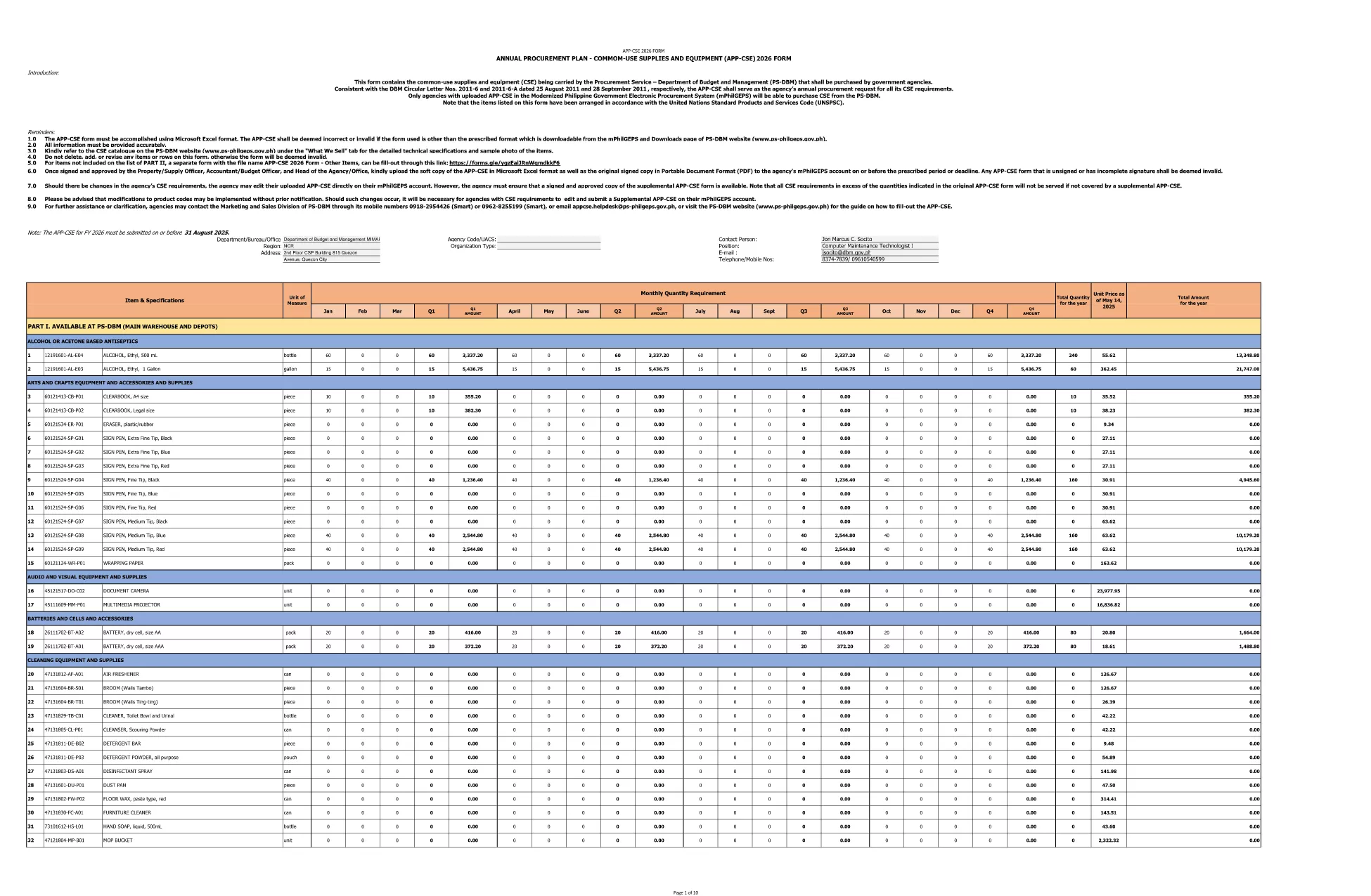
The Application Form CSE 2026 (APP‑CSE) is the official Annual Procurement Plan for Common‑use Supplies and Equipment required by government agencies in the Philippines. This form captures the list of items, quantities, and budget allocations that will be procured for the fiscal year 2026.

What is the APP‑CSE 2026?

APP‑CSE stands for Annual Procurement Plan – Common‑use Supplies and Equipment. It is issued by the Procurement Service of the Department of Budget and Management (PS‑DBM) and must be submitted by each agency to secure funding and approval for their 2026 procurement activities.

Why Use the Fillable PDF Version?

  • Instant editing: No need for separate PDF editors – the Formize filler loads in your browser.
  • Auto‑save: Your entries are saved automatically while you work.
  • Error reduction: Built‑in validation highlights missing or incorrect fields.
  • Fast download: Export the completed form as a standard PDF ready for submission.

How to Complete the Form Online

Follow the simple steps below to fill out the APP‑CSE 2026 without leaving the page.

Common Mistakes to Avoid

  • Leaving required fields blank – the filler will flag these before you can export.
  • Using the wrong unit of measure – double‑check the specification sheet attached to your agency’s procurement schedule.
  • Submitting an outdated version – always use the 2026 PDF linked on this page.

Where to Submit the Completed Form

After you download the filled PDF, email it to procurement@psdbm.gov.ph or upload it through the official PS‑DBM e‑procurement portal as instructed by your agency’s procurement office.

ЧАСТО ЗАДАВАЕМЫЕ ВОПРОСЫ
  • Is the APP‑CSE 2026 form really fillable online?

    Yes. By clicking the "Fill out this form" button, the Formize PDF Filler loads in your browser, allowing you to complete the form without any extra software.

  • Do I need Adobe Acrobat to edit the PDF?

    No. The online filler works in all modern browsers, so you can edit, save, and download the form without Adobe Acrobat.

  • Can I save my progress and return later?

    The filler auto‑saves locally in your browser. If you close the tab, reopen it and click "Fill out this form" again, you can continue where you left off.

  • What file format do I receive after completing the form?

    You receive a standard, non‑editable PDF that complies with the official DBM submission requirements.

  • Is there a cost to use the Formize filler?

    No. The online filler is free for all users accessing this page.

  • What should I do if I encounter a validation error?

    The filler will highlight the problematic field and provide a brief tip. Correct the entry and the warning will disappear.

  • Can I print the filled form before submitting?

    Absolutely. After downloading, you can open the PDF in any viewer and print it if a hard copy is required.

  • Where can I find the official instructions for APP‑CSE 2026?

    The official guidelines are included in the PDF itself and on the DBM website. The fillable version mirrors the original layout.

  • Is this the latest 2026 version of the form?

    Yes. The linked PDF is the current 2026 APP‑CSE document released by DBM.

  • Who should I contact if I need help with the form?

    Contact your agency’s procurement officer or the PS‑DBM help desk for assistance.

КАК ПОЛЬЗОВАТЬСЯ

Как бесплатно заполнить APP CSE 2026 онлайн за 5 простых шагов:

  1. 1
    Open the Fillable Form
    Click the "Fill out this form" button on the page. The Formize PDF Filler app will load directly in your browser.
  2. 2
    Enter Your Information
    Start typing into each field. Required fields are marked with an asterisk and will be highlighted if left empty.
  3. 3
    Validate Your Entries
    When you finish a section, the filler automatically checks for errors such as missing numbers or invalid dates.
  4. 4
    Save and Download
    Click the "Download PDF" button to save the completed form to your computer. The file is ready for submission.
  5. 5
    Submit the Form
    Send the downloaded PDF to your agency’s procurement office or upload it to the PS‑DBM e‑procurement portal as instructed.
Приложение Formize PDF Filler
О ПРИЛОЖЕНИИ

Шаблон APP CSE 2026

С традиционный набор функций для просмотра и заполнения PDF-документа в сочетании с преимуществами веб-приложения и адаптивной верстки вы сможете заполнить APP CSE 2026 за считанные минуты.

ФУНКЦИИ

Инструмент для запролнения PDF форм

Самый простой способ заполнить APP CSE 2026 онлайн

  • Быстрое заполнение APP CSE 2026
    Ищете способ быстро заполнить APP CSE 2026 онлайн? С нашим бесплатным онлайн-инструментом вы узнаете, как редактировать заполнить этот PDF-документ менее чем за минуту.
  • Простой в использовании онлайн-редактор PDF
    Надоело распечатывать PDF-файлы, чтобы их можно было отредактировать перед повторным сканированием и отправкой обратно? Редактируйте документы PDF бесплатно онлайн. Используйте наш онлайн-редактор PDF, чтобы сэкономить время и бумагу.
  • Отличные инструменты, все платформы
    Хотите знать, как заполнить APP CSE 2026 на Mac или, может быть, как использовать бесплатный заполнитель PDF? Наши онлайн-инструменты PDF работают на всех платформах.
  • Безопасное хранение файлов
    Файлы заполненных "APP CSE 2026" хранятся в защищенной базе данных, управляемой облачным хостингом Amazon. Вы можете удалить свои файлы из нашей системы в любое время. В любом случае эти файлы автоматически удаляются через 24 часа.
  • Чат с APP CSE 2026
    Откройте чат с "APP CSE 2026" в Chatize — бесплатном помощнике для чтения PDF-файлов. Задавайте вопросы и получайте ответы от "APP CSE 2026". Просто нажмите кнопку Чат с документом выше.

Удалить данные о заполненной форме

Удалить данные о заполненной форме? В этом случае Ваш прогресс заполнения этой формы будет утерян.

Удалить сеанс редактирования

Удалить выбранный сеанс редактирования? В этом случае ваш прогресс в создании и редактировании формы будет утерян.