
Выберите язык

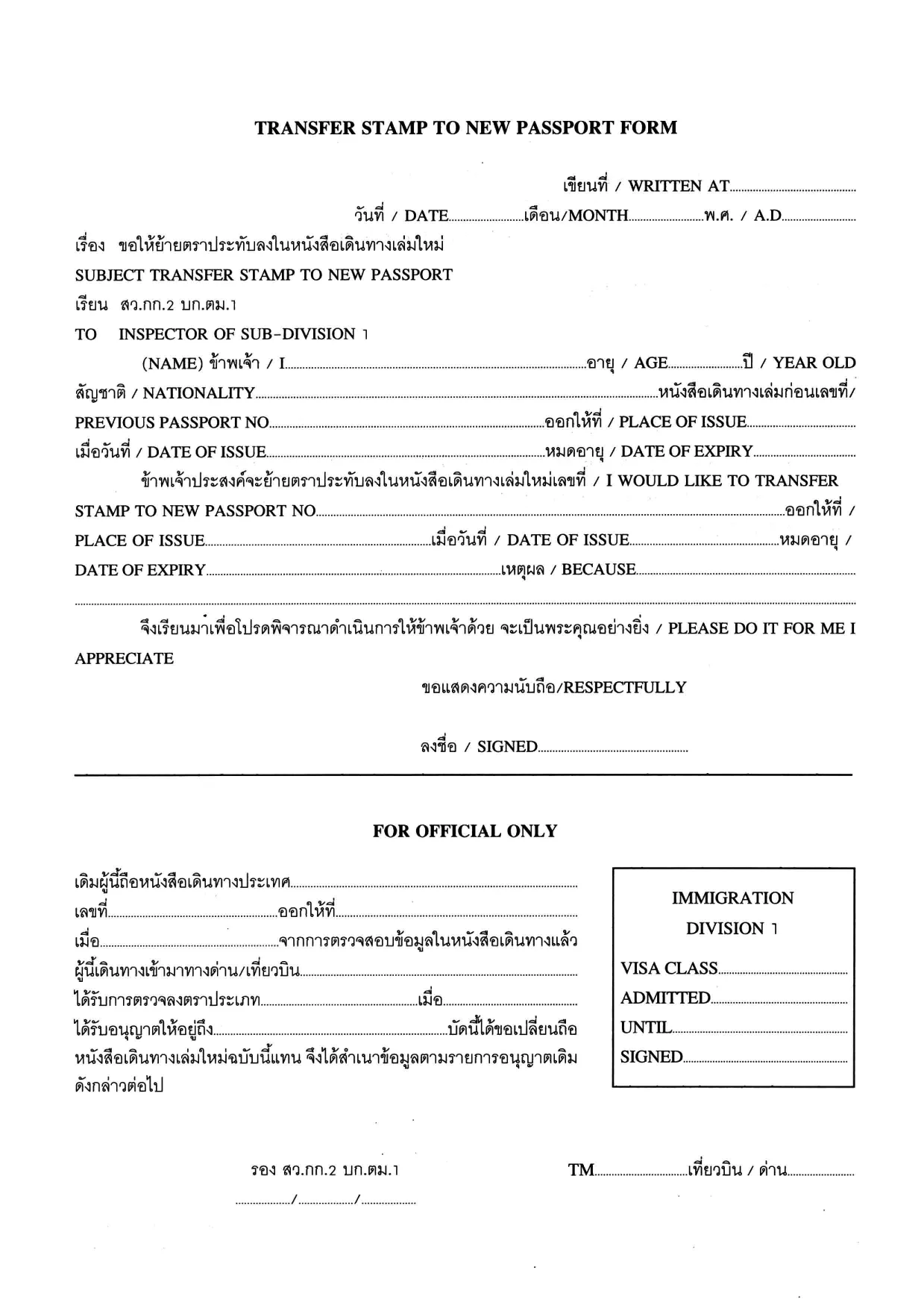
Transfer Stamp to New Passport Form (Fillable PDF)

  1. Язык Английский Тайский
  2. Страна Таиланд
  3. Вид деятельности Визы
Transfer Stamp to New Passport Form (Fillable PDF)

When you receive a new passport, you must transfer any valid visa or entry stamp from your old passport to the new one. The Transfer Stamp to New Passport Form is the official document used by many embassies and consulates to record this transfer.

Our fillable PDF lets you complete the form quickly, without printing, scanning, or hand‑writing. Simply click the button below, let the Formize PDF Filler load, and start typing. The form saves your progress automatically, so you can return later if needed.

Why You Need This Form

Without a transferred stamp, your existing visa may be considered invalid, which can lead to denied entry, delays at the border, or the need to re‑apply for a new visa. The transfer form ensures that immigration authorities recognize the continuity of your visa status.

How to Fill the Transfer Stamp Form Online

Follow the step‑by‑step guide in the How To section below. The online Formize filler mirrors the original PDF layout, so you’ll know exactly where each piece of information belongs.

Required Documents and Common Mistakes

  • Old passport – copy of the page with the original stamp.
  • New passport – copy of the biographic page.
  • Embassy or consular letter (if required).

Common errors include misspelling names, entering an incorrect passport number, or forgetting to sign the form. Double‑check each field before saving.

Download & Start Filling Instantly

Click the button below to open the fillable PDF in the Formize PDF Filler app. No additional software is needed – everything runs securely in your browser.

Fill out this form

ЧАСТО ЗАДАВАЕМЫЕ ВОПРОСЫ
  • Who must use the Transfer Stamp to New Passport Form?

    Anyone who has a valid visa or entry stamp in an old passport that is being replaced with a new passport must complete this form to keep the visa active.

  • Can I fill out the form on a mobile device?

    Yes. The Formize PDF Filler works on all modern browsers, including smartphones and tablets.

  • Do I need to print the form after filling it online?

    Most embassies accept a digitally signed PDF, but check the specific instructions of the consulate you are dealing with.

  • What documents should I attach with the completed form?

    Attach a clear copy of the page containing the original stamp from the old passport, a copy of the biographic page of the new passport, and any embassy letter if required.

  • Is the information I enter secure?

    Formize runs over HTTPS, encrypting all data between your browser and our servers. The PDF is stored only on your device unless you choose to upload it.

  • Can I edit the form after I have downloaded it?

    Yes, you can reopen the saved PDF in Formize to make additional changes before final submission.

  • What should I do if I make a mistake?

    Simply correct the field in the filler and re‑save. If you have already submitted the form, contact the embassy for guidance on re‑issuing the document.

  • Is there a fee for using the Transfer Stamp form?

    The form itself is free to download. Any processing or visa transfer fees are set by the embassy or consulate.

КАК ПОЛЬЗОВАТЬСЯ

Как бесплатно заполнить transfer stamp new passport онлайн за 5 простых шагов:

  1. 1
    Click the Fill‑out Button
    Press the “Fill out this form” button on the page. The Formize PDF Filler will open in a new browser tab.
  2. 2
    Wait for the Formizer to Load
    The fillable PDF loads automatically. A loading indicator shows when the app is ready.
  3. 3
    Enter Your Information
    Type directly into each field – name, passport numbers, visa details, and dates. Use the tab key to move quickly between fields.
  4. 4
    Save Your Progress
    The filler saves your entries in real time. You can close the tab and return later without losing data.
  5. 5
    Download or Submit
    When finished, click “Download PDF” to save the completed form, or follow your embassy’s instructions to submit it electronically.
Приложение Formize PDF Filler
О ПРИЛОЖЕНИИ

Визовые формы

transfer stamp new passport – это одна из визовых форм, которые представляют собой документы, используемые для подачи заявления на получение визы для въезда в другую страну. Виза – это документ, который позволяет иностранному гражданину въезжать, находиться, а иногда и работать в иностранном государстве в течение определенного периода времени. Точные формы и требования для получения визы зависят от страны и типа визы.

В визовых формах обычно требуется личная информация, такая как имя, дата рождения и паспортные данные, а также информация о цели и продолжительности поездки, предполагаемом пункте назначения, а также о том, было ли заявителю ранее отказано в визе или депортирован из страны. Для форм также могут потребоваться подтверждающие документы, такие как паспорт, фотографии и подтверждение финансовой поддержки.

В Соединенных Штатах наиболее распространенными формами виз являются формы DS-160 и DS-260. Форма DS-160 используется для подачи заявления на получение неиммиграционной визы, а форма DS-260 используется для подачи заявления на получение иммиграционной визы. Эти формы требуют подробной информации о личной жизни и истории поездок заявителя, а также подтверждающей документации, такой как паспорт, маршрут поездки и финансовые отчеты.

В других странах могут быть другие формы и требования к визе, но основной процесс обычно включает в себя заполнение заявления на получение визы, предоставление сопроводительной документации и посещение собеседования с сотрудником консульства в посольстве или консульстве США. Важно отметить, что процесс подачи заявления на получение визы может быть сложным и длительным, поэтому лицам, желающим получить визу, рекомендуется проконсультироваться с иммиграционным адвокатом или другим квалифицированным специалистом, чтобы убедиться, что все необходимые формы и требования выполнены.

ФУНКЦИИ

Инструмент для запролнения PDF форм

Самый простой способ заполнить transfer stamp new passport онлайн

  • Быстрое заполнение transfer stamp new passport
    Ищете способ быстро заполнить transfer stamp new passport онлайн? С нашим бесплатным онлайн-инструментом вы узнаете, как редактировать заполнить этот PDF-документ менее чем за минуту.
  • Простой в использовании онлайн-редактор PDF
    Надоело распечатывать PDF-файлы, чтобы их можно было отредактировать перед повторным сканированием и отправкой обратно? Редактируйте документы PDF бесплатно онлайн. Используйте наш онлайн-редактор PDF, чтобы сэкономить время и бумагу.
  • Отличные инструменты, все платформы
    Хотите знать, как заполнить transfer stamp new passport на Mac или, может быть, как использовать бесплатный заполнитель PDF? Наши онлайн-инструменты PDF работают на всех платформах.
  • Безопасное хранение файлов
    Файлы заполненных "transfer stamp new passport" хранятся в защищенной базе данных, управляемой облачным хостингом Amazon. Вы можете удалить свои файлы из нашей системы в любое время. В любом случае эти файлы автоматически удаляются через 24 часа.
  • Чат с transfer stamp new passport
    Откройте чат с "transfer stamp new passport" в Chatize — бесплатном помощнике для чтения PDF-файлов. Задавайте вопросы и получайте ответы от "transfer stamp new passport". Просто нажмите кнопку Чат с документом выше.

Удалить данные о заполненной форме

Удалить данные о заполненной форме? В этом случае Ваш прогресс заполнения этой формы будет утерян.

Удалить сеанс редактирования

Удалить выбранный сеанс редактирования? В этом случае ваш прогресс в создании и редактировании формы будет утерян.