
Выберите язык

MV-58A Fillable PDF Form – New York DMV

  1. Язык Английский
  2. Страна США
  3. Вид деятельности Регистрация ТС
  4. Департамент Department of Motor Vehicles
MV-58A Fillable PDF Form – New York DMV

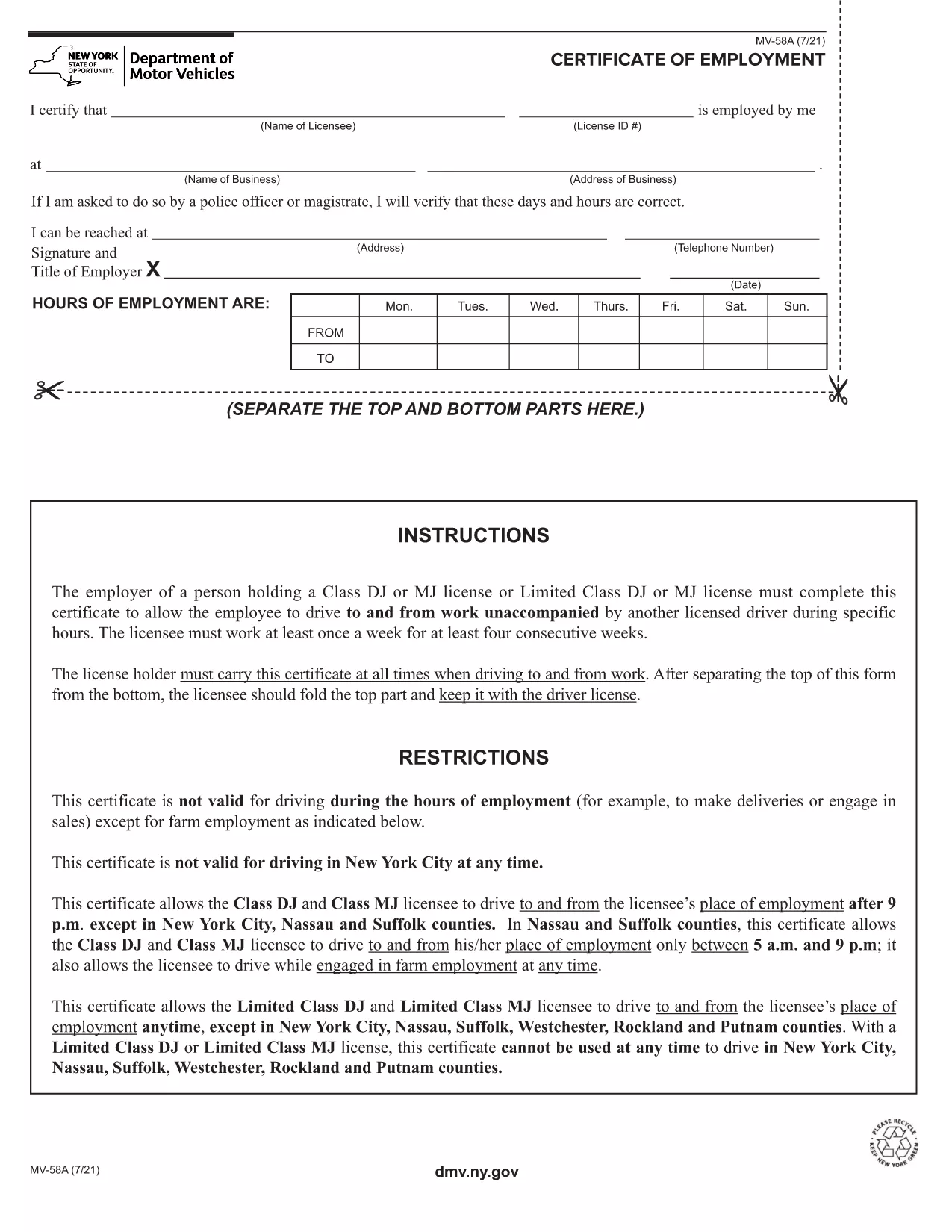
The MV-58A is the New York State Department of Motor Vehicles (DMV) form used for specific vehicle‑related transactions. Whether you need to correct registration details, request a duplicate, or handle a special circumstance, the MV-58A is the official document required by the NY DMV.

Formize.com offers a fillable PDF version of the MV-58A that lets you complete the form instantly in your browser—no extra software needed. Simply click the “Fill out this form” button, let the Formize PDF Filler load, and start entering your information.

Below you’ll find everything you need to know about the MV-58A, step‑by‑step instructions for filling it out online, common pitfalls to watch out for, and where to send the finished form.

What Is the MV-58A Form?

The MV-58A is typically used for:

  • Updating vehicle ownership information.
  • Correcting errors on a title or registration.
  • Submitting special requests that are not covered by standard DMV forms.

It is a mandatory paper‑based form for the NY DMV, but with Formize’s fillable PDF you can complete it digitally and print a clean copy for submission.

How to Complete the MV-58A Online

Follow our quick guide to finish the form without ever opening a separate PDF editor:

  1. Click the “Fill out this form” button on the page.
  2. Wait a few seconds while the Formize PDF Filler app loads the MV-58A.
  3. Enter your information in the highlighted fields. The app automatically saves your progress.
  4. Review each section for accuracy; the filler highlights any required fields you missed.
  5. When you’re done, click “Download PDF” to save a printable copy or “Print” to send it directly to your printer.

Common Mistakes to Avoid

  • Leaving required fields blank: The filler will flag empty required boxes, but double‑check before downloading.
  • Using the wrong date format: NY DMV expects MM/DD/YYYY.
  • Signing the wrong copy: The MV-58A has multiple copies; sign only the copy you will submit.
  • Incorrect vehicle identification number (VIN): Verify the VIN matches the title exactly.

Where to Submit the Completed Form

After printing, mail or deliver the signed MV-58A to your local NY DMV office. Include any supporting documents referenced on the form. For faster processing, consider using certified mail with a tracking number.

Need a reminder? Bookmark this page and return anytime you need the MV-58A fillable PDF again.

ЧАСТО ЗАДАВАЕМЫЕ ВОПРОСЫ
  • What is the purpose of the MV-58A form?

    The MV-58A is used for special vehicle registration requests, corrections, or ownership updates that are not covered by standard DMV forms.

  • Can I fill out MV-58A on a phone or tablet?

    Yes. The Formize fillable PDF works on any modern browser, including mobile devices, though a larger screen makes data entry easier.

  • Do I need to print the form after filling it online?

    The NY DMV requires a signed paper copy, so you must print the completed form, sign it, and submit it by mail or in person.

  • How long does it take for the DMV to process the MV-58A?

    Processing times vary, but most requests are handled within 10‑14 business days after the DMV receives the complete form.

  • Is there a fee for submitting MV-58A?

    A processing fee may apply depending on the specific request. Check the form instructions or the NY DMV fee schedule for details.

  • What should I do if I make a mistake after printing?

    If you notice an error, correct it on a new copy of the form. Do not use correction fluid; instead, start a fresh fillable PDF and print again.

  • Can I submit the MV-58A electronically?

    The NY DMV currently requires a handwritten signature on a printed copy, so electronic submission alone is not accepted.

  • Where can I find a local NY DMV office?

    Visit the official NY DMV website and use the office locator tool to find the nearest location.

КАК ПОЛЬЗОВАТЬСЯ

Как бесплатно заполнить MV-58A онлайн за 5 простых шагов:

  1. 1
    Open the Fillable Form
    Click the “Fill out this form” button on the page. The Formize PDF Filler will open in a new tab.
  2. 2
    Enter Your Information
    Type directly into each highlighted field. The app saves your entries automatically.
  3. 3
    Validate and Review
    Check for any highlighted missing fields or format warnings, then review all entered data.
  4. 4
    Download or Print
    When satisfied, click “Download PDF” to save a copy or “Print” to produce a hard‑copy for mailing.
  5. 5
    Submit to the NY DMV
    Mail or deliver the signed form to your local New York DMV office along with any required attachments.
Приложение Formize PDF Filler
О ПРИЛОЖЕНИИ

Формы регистрации транспортных средств

Если вы владеете или арендуете автомобиль, прицеп или лодку, вы должны выполнять определенные обязательства, чтобы ваше транспортное средство было юридически зарегистрировано и безопасно.

MV-58A — это одна из регистрационных форм транспортных средств, которые представляют собой документы, используемые для регистрации транспортного средства в соответствующем государственном или провинциальном органе власти. Эти формы обычно требуются, когда человек покупает новый или подержанный автомобиль или когда он переезжает в новый штат или провинцию на автомобиле.

Точные требования и формы, необходимые для регистрации транспортного средства, могут различаться в зависимости от местоположения, но, как правило, процесс включает предоставление информации о транспортном средстве, владельце и любых правах на транспортное средство.

После подачи регистрационных форм и сборов власти штата или провинции выдают свидетельство о регистрации или номерной знак владельцу транспортного средства. Эта регистрация позволяет легально эксплуатировать транспортное средство на дорогах общего пользования и автомагистралях.

ФУНКЦИИ

Инструмент для запролнения PDF форм

Самый простой способ заполнить MV-58A онлайн

  • Быстрое заполнение MV-58A
    Ищете способ быстро заполнить MV-58A онлайн? С нашим бесплатным онлайн-инструментом вы узнаете, как редактировать заполнить этот PDF-документ менее чем за минуту.
  • Простой в использовании онлайн-редактор PDF
    Надоело распечатывать PDF-файлы, чтобы их можно было отредактировать перед повторным сканированием и отправкой обратно? Редактируйте документы PDF бесплатно онлайн. Используйте наш онлайн-редактор PDF, чтобы сэкономить время и бумагу.
  • Отличные инструменты, все платформы
    Хотите знать, как заполнить MV-58A на Mac или, может быть, как использовать бесплатный заполнитель PDF? Наши онлайн-инструменты PDF работают на всех платформах.
  • Безопасное хранение файлов
    Файлы заполненных "MV-58A" хранятся в защищенной базе данных, управляемой облачным хостингом Amazon. Вы можете удалить свои файлы из нашей системы в любое время. В любом случае эти файлы автоматически удаляются через 24 часа.
  • Чат с MV-58A
    Откройте чат с "MV-58A" в Chatize — бесплатном помощнике для чтения PDF-файлов. Задавайте вопросы и получайте ответы от "MV-58A". Просто нажмите кнопку Чат с документом выше.

Удалить данные о заполненной форме

Удалить данные о заполненной форме? В этом случае Ваш прогресс заполнения этой формы будет утерян.

Удалить сеанс редактирования

Удалить выбранный сеанс редактирования? В этом случае ваш прогресс в создании и редактировании формы будет утерян.