
Выберите язык

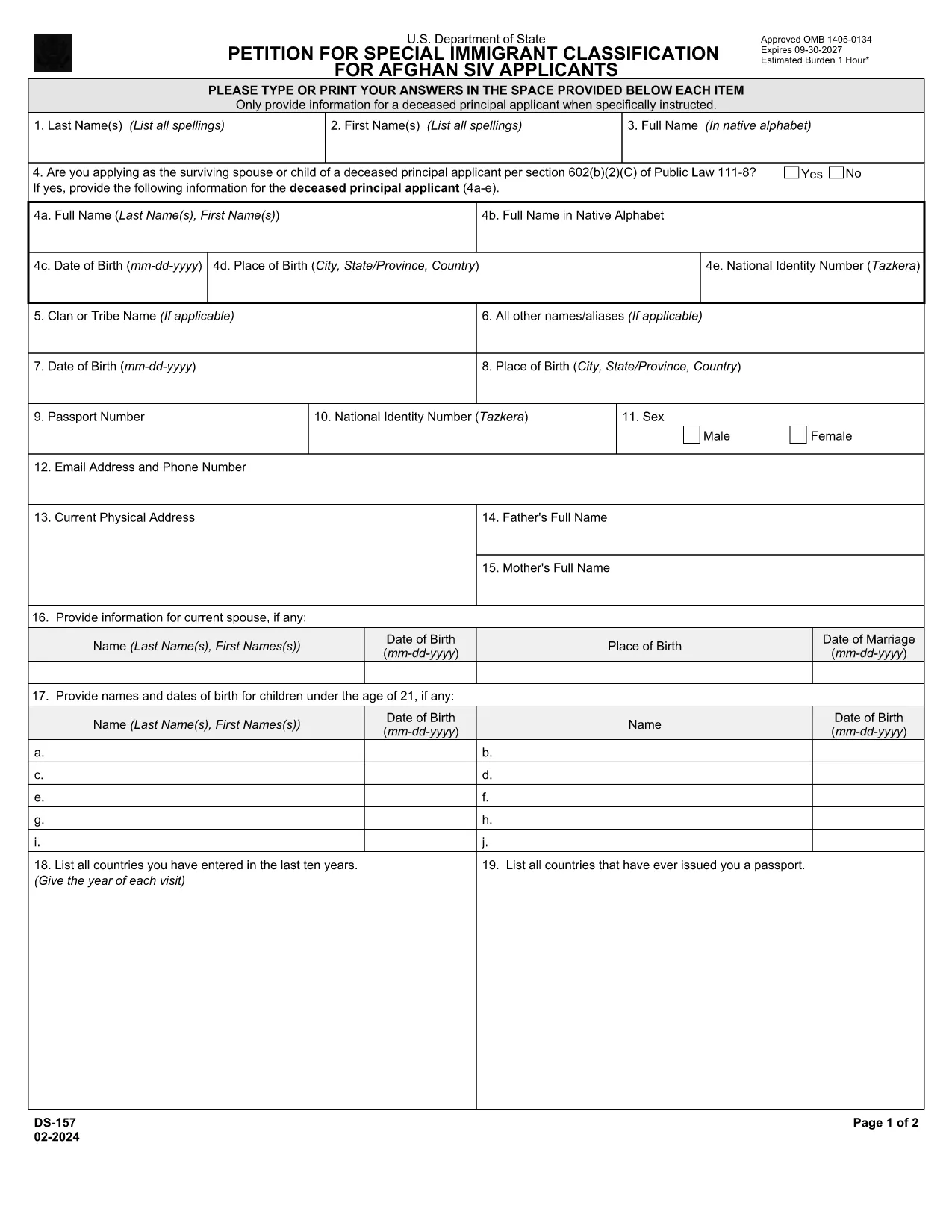
DS-157 Supplemental Nonimmigrant Visa Application – Fillable PDF

  1. Язык Английский
  2. Страна США
  3. Департамент Госдепартамент
  4. Вид деятельности Визы
DS-157 Supplemental Nonimmigrant Visa Application – Fillable PDF

The DS-157 (Supplemental Nonimmigrant Visa Application) is required for certain male visa applicants, especially Afghan Special Immigrant Visa (SIV) candidates. It collects detailed personal, employment, and travel information that supports the main DS-160 application.

What is the DS-157 Form?

Issued by the U.S. Department of State, the DS-157 is a supplemental questionnaire that must be submitted with your visa packet. It is a fillable PDF that can be completed electronically, printed, signed, and attached to your visa interview documents.

How to Fill the DS-157 Online with Formize

Formize provides a secure, browser‑based PDF filler so you never need to download, print, or scan the form. Follow these steps:

  • Click the **"Fill out this form"** button on this page.
  • Wait a few seconds while the Formize PDF Filler app loads.
  • Enter your information in the highlighted fields. Use the tab key or click to move between sections.
  • When finished, click **"Save & Download"** to get a copy you can print or email.
  • Sign the form with your finger (touchscreen) or type your signature, then download the completed PDF.

Common Mistakes to Avoid

  • Leaving fields blank – every question must be answered, even if the answer is “None” or “N/A”.
  • Incorrect dates – double‑check birth dates, travel dates, and employment periods.
  • Illegible signatures – use the built‑in e‑signature tool for a clear, legal signature.
  • Mismatched information – ensure details match those on your DS‑160 and supporting documents.

Where to Submit the Completed Form

Print the filled DS-157, sign it in ink if you printed a hard copy, and attach it to your visa interview packet. Submit the package to the U.S. Embassy or Consulate handling your case. Some posts now accept the PDF electronically; verify the specific instructions on your appointment notice.

Download the Official PDF

For reference or offline use, you can download the official, government‑issued PDF directly from the Department of State:

Download DS-157 PDF

Using Formize’s online filler saves you time, reduces errors, and eliminates the need for a scanner.

ЧАСТО ЗАДАВАЕМЫЕ ВОПРОСЫ
  • Who must complete the DS-157 form?

    All male non‑immigrant visa applicants between ages 16‑45, including Afghan SIV applicants, must submit a DS-157 in addition to the DS‑160.

  • Is the DS-157 form available in languages other than English?

    The official form is only provided in English. If you need translation assistance, you must provide an accurate English version for the U.S. Embassy.

  • Can I submit the DS-157 electronically?

    Some U.S. posts accept an electronic PDF, but most still require a printed, signed copy. Check the instructions on your appointment notice.

  • Do I need a notarized signature on the DS-157?

    No notarization is required. A regular signature (ink or e‑signature) is sufficient as long as it matches the signature on your other visa documents.

  • What happens if I make a mistake on the DS-157?

    Correct the error by crossing out the mistake neatly, writing the correct information, and initialing the change. If the mistake is extensive, download a fresh copy and refill the form.

  • How long is the DS-157 valid?

    The DS-157 is tied to a specific visa application. If your application is withdrawn or denied, you must obtain a new form for any future applications.

КАК ПОЛЬЗОВАТЬСЯ

Как бесплатно заполнить ds-157 онлайн за 4 простых шагов:

  1. 1
    Open the Formize filler
    Click the "Fill out this form" button on the page. The Formize PDF Filler will open in a new tab.
  2. 2
    Enter your information
    Type directly into each highlighted field. Use the tab key or click to move to the next question.
  3. 3
    Add your signature
    Use the built‑in e‑signature tool to sign with your finger or mouse. The signature is legally binding.
  4. 4
    Save and download
    When all fields are complete, click "Save & Download" to get a copy of the filled PDF. Print it if a hard copy is required.
Приложение Formize PDF Filler
О ПРИЛОЖЕНИИ

Визовые формы

ds-157 – это одна из визовых форм, которые представляют собой документы, используемые для подачи заявления на получение визы для въезда в другую страну. Виза – это документ, который позволяет иностранному гражданину въезжать, находиться, а иногда и работать в иностранном государстве в течение определенного периода времени. Точные формы и требования для получения визы зависят от страны и типа визы.

В визовых формах обычно требуется личная информация, такая как имя, дата рождения и паспортные данные, а также информация о цели и продолжительности поездки, предполагаемом пункте назначения, а также о том, было ли заявителю ранее отказано в визе или депортирован из страны. Для форм также могут потребоваться подтверждающие документы, такие как паспорт, фотографии и подтверждение финансовой поддержки.

В Соединенных Штатах наиболее распространенными формами виз являются формы DS-160 и DS-260. Форма DS-160 используется для подачи заявления на получение неиммиграционной визы, а форма DS-260 используется для подачи заявления на получение иммиграционной визы. Эти формы требуют подробной информации о личной жизни и истории поездок заявителя, а также подтверждающей документации, такой как паспорт, маршрут поездки и финансовые отчеты.

В других странах могут быть другие формы и требования к визе, но основной процесс обычно включает в себя заполнение заявления на получение визы, предоставление сопроводительной документации и посещение собеседования с сотрудником консульства в посольстве или консульстве США. Важно отметить, что процесс подачи заявления на получение визы может быть сложным и длительным, поэтому лицам, желающим получить визу, рекомендуется проконсультироваться с иммиграционным адвокатом или другим квалифицированным специалистом, чтобы убедиться, что все необходимые формы и требования выполнены.

ФУНКЦИИ

Инструмент для запролнения PDF форм

Самый простой способ заполнить ds-157 онлайн

  • Быстрое заполнение ds-157
    Ищете способ быстро заполнить ds-157 онлайн? С нашим бесплатным онлайн-инструментом вы узнаете, как редактировать заполнить этот PDF-документ менее чем за минуту.
  • Простой в использовании онлайн-редактор PDF
    Надоело распечатывать PDF-файлы, чтобы их можно было отредактировать перед повторным сканированием и отправкой обратно? Редактируйте документы PDF бесплатно онлайн. Используйте наш онлайн-редактор PDF, чтобы сэкономить время и бумагу.
  • Отличные инструменты, все платформы
    Хотите знать, как заполнить ds-157 на Mac или, может быть, как использовать бесплатный заполнитель PDF? Наши онлайн-инструменты PDF работают на всех платформах.
  • Безопасное хранение файлов
    Файлы заполненных "ds-157" хранятся в защищенной базе данных, управляемой облачным хостингом Amazon. Вы можете удалить свои файлы из нашей системы в любое время. В любом случае эти файлы автоматически удаляются через 24 часа.
  • Чат с ds-157
    Откройте чат с "ds-157" в Chatize — бесплатном помощнике для чтения PDF-файлов. Задавайте вопросы и получайте ответы от "ds-157". Просто нажмите кнопку Чат с документом выше.

Удалить данные о заполненной форме

Удалить данные о заполненной форме? В этом случае Ваш прогресс заполнения этой формы будет утерян.

Удалить сеанс редактирования

Удалить выбранный сеанс редактирования? В этом случае ваш прогресс в создании и редактировании формы будет утерян.