
Выберите язык

MVR-3 Fillable PDF – North Carolina DMV Vehicle Form

  1. Язык Английский
  2. Страна США
  3. Вид деятельности Регистрация ТС
  4. Департамент Департамент транспорта
  5. Штат/Регион Северная Каролина
MVR-3 Fillable PDF – North Carolina DMV Vehicle Form

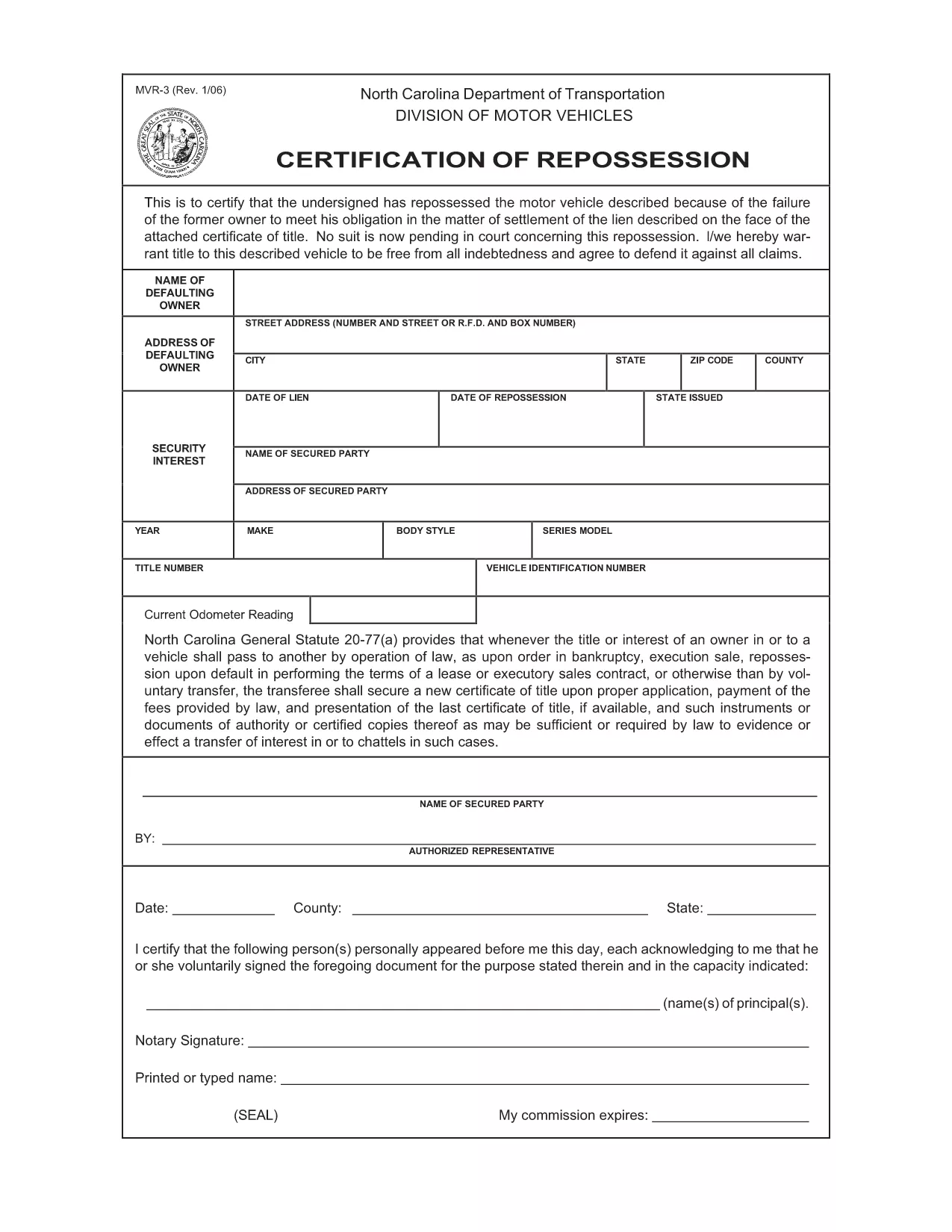
The MVR-3 is the official North Carolina Department of Transportation (NCDOT) vehicle registration application. Whether you’re registering a new vehicle, updating ownership information, or correcting a title, the MVR-3 is the required paperwork.

What Is the MVR-3 Form?

The MVR-3 collects essential vehicle details such as VIN, make, model, year, and current odometer reading. It also captures owner information, lienholder data, and any special exemptions.

Key Sections of the MVR-3

  • Section A – Owner Information: Name, address, driver’s license number.
  • Section B – Vehicle Details: VIN, year, make, model, body style.
  • Section C – Lienholder Data (if applicable): Name and address of the lienholder.
  • Section D – Certification & Signature: Owner’s signature and date.

How to Complete the Form Online

Instead of printing, downloading, and hand‑filling the PDF, use Formize’s built‑in filler:

  1. Click the "Fill out this form" button on this page.
  2. Wait a few seconds while the Formize PDF Filler loads the MVR-3.
  3. Enter your information directly into each field. The filler validates required entries in real time.
  4. Review the completed form for accuracy.
  5. Save a copy to your device or print it for submission at your local NCDOT office.

Common Mistakes & Tips

  • Incorrect VIN: Double‑check the 17‑character VIN; a single digit error can delay processing.
  • Missing Signature: The form is invalid without the owner’s signature and date.
  • Odometer Disclosure: Provide the exact current mileage; tampering can result in penalties.
  • Out‑of‑date Address: Ensure the mailing address matches the one on file with the DMV.

Download & Save Your Completed Form

After filling out the MVR-3 with Formize, you can download a PDF copy for your records or print it for immediate submission. Keep a saved copy in case the DMV requests additional information.

ЧАСТО ЗАДАВАЕМЫЕ ВОПРОСЫ
  • What is the purpose of the MVR-3 form?

    The MVR-3 is used to register a vehicle, transfer ownership, or correct title information with the North Carolina DMV.

  • Can I submit the MVR-3 electronically?

    North Carolina currently requires a printed and signed copy for most transactions, but you can fill it out online and print it yourself.

  • Do I need a notary for the MVR-3?

    No notary is required unless a lienholder specifically requests notarization on the lien section.

  • How long does it take for the DMV to process the MVR-3?

    Processing typically takes 7‑10 business days after the form is submitted, provided all information is correct.

  • What should I do if I make a mistake on the form?

    Cross out the error with a single line, initial it, and write the correct information. Alternatively, start a new form to avoid confusion.

  • Is there a fee associated with filing the MVR-3?

    Yes, filing fees vary depending on the transaction type (e.g., title transfer, registration renewal). Check the NCDOT fee schedule for current rates.

  • Where can I get help if I have questions about the MVR-3?

    Contact your local NCDOT office or visit the official NCDOT website for FAQs and contact information.

КАК ПОЛЬЗОВАТЬСЯ

Как бесплатно заполнить MVR-3 онлайн за 5 простых шагов:

  1. 1
    Open the Fillable Form
    Click the "Fill out this form" button on the page to launch the Formize PDF Filler.
  2. 2
    Wait for the Filler to Load
    A short loading screen appears while the MVR-3 PDF is prepared for editing.
  3. 3
    Enter Your Information
    Type directly into each highlighted field. Required fields are marked with an asterisk.
  4. 4
    Review and Validate
    Check every section for completeness. The filler will alert you to any missing or invalid entries.
  5. 5
    Save or Print
    Download the completed PDF to your device or print it for submission at your local NCDOT office.
Приложение Formize PDF Filler
О ПРИЛОЖЕНИИ

Формы регистрации транспортных средств

Если вы владеете или арендуете автомобиль, прицеп или лодку, вы должны выполнять определенные обязательства, чтобы ваше транспортное средство было юридически зарегистрировано и безопасно.

MVR-3 — это одна из регистрационных форм транспортных средств, которые представляют собой документы, используемые для регистрации транспортного средства в соответствующем государственном или провинциальном органе власти. Эти формы обычно требуются, когда человек покупает новый или подержанный автомобиль или когда он переезжает в новый штат или провинцию на автомобиле.

Точные требования и формы, необходимые для регистрации транспортного средства, могут различаться в зависимости от местоположения, но, как правило, процесс включает предоставление информации о транспортном средстве, владельце и любых правах на транспортное средство.

После подачи регистрационных форм и сборов власти штата или провинции выдают свидетельство о регистрации или номерной знак владельцу транспортного средства. Эта регистрация позволяет легально эксплуатировать транспортное средство на дорогах общего пользования и автомагистралях.

ФУНКЦИИ

Инструмент для запролнения PDF форм

Самый простой способ заполнить MVR-3 онлайн

  • Быстрое заполнение MVR-3
    Ищете способ быстро заполнить MVR-3 онлайн? С нашим бесплатным онлайн-инструментом вы узнаете, как редактировать заполнить этот PDF-документ менее чем за минуту.
  • Простой в использовании онлайн-редактор PDF
    Надоело распечатывать PDF-файлы, чтобы их можно было отредактировать перед повторным сканированием и отправкой обратно? Редактируйте документы PDF бесплатно онлайн. Используйте наш онлайн-редактор PDF, чтобы сэкономить время и бумагу.
  • Отличные инструменты, все платформы
    Хотите знать, как заполнить MVR-3 на Mac или, может быть, как использовать бесплатный заполнитель PDF? Наши онлайн-инструменты PDF работают на всех платформах.
  • Безопасное хранение файлов
    Файлы заполненных "MVR-3" хранятся в защищенной базе данных, управляемой облачным хостингом Amazon. Вы можете удалить свои файлы из нашей системы в любое время. В любом случае эти файлы автоматически удаляются через 24 часа.
  • Чат с MVR-3
    Откройте чат с "MVR-3" в Chatize — бесплатном помощнике для чтения PDF-файлов. Задавайте вопросы и получайте ответы от "MVR-3". Просто нажмите кнопку Чат с документом выше.

Удалить данные о заполненной форме

Удалить данные о заполненной форме? В этом случае Ваш прогресс заполнения этой формы будет утерян.

Удалить сеанс редактирования

Удалить выбранный сеанс редактирования? В этом случае ваш прогресс в создании и редактировании формы будет утерян.